UnitedHealthcare’s 2026 provider administrative guide gives participating providers a limited license to show its logo, and only alongside the logos of other carriers they’re contracted with. Every other use of its marks requires advance written consent.
HealthCare.gov’s glossary adds the other half of the rule for insurance pages: preauthorization isn’t a promise that a plan will cover the cost.
Between those two lines sits most of what a treatment center’s insurance pages need to get right.
Families want to know whether the facility takes their insurance and what they’ll pay. Search engines and AI assistants want a clear, current statement they can repeat. And payers, LegitScript, and state law all limit how a facility can describe the relationship.
This piece covers what an insurance page has to answer, accurate network language, hub and carrier page structure, what AI systems can read, paid carrier pages, and keeping it all current. It’s how our landing page team for treatment centers builds insurance pages, and it builds on the complete guide to landing pages.
Key Takeaways
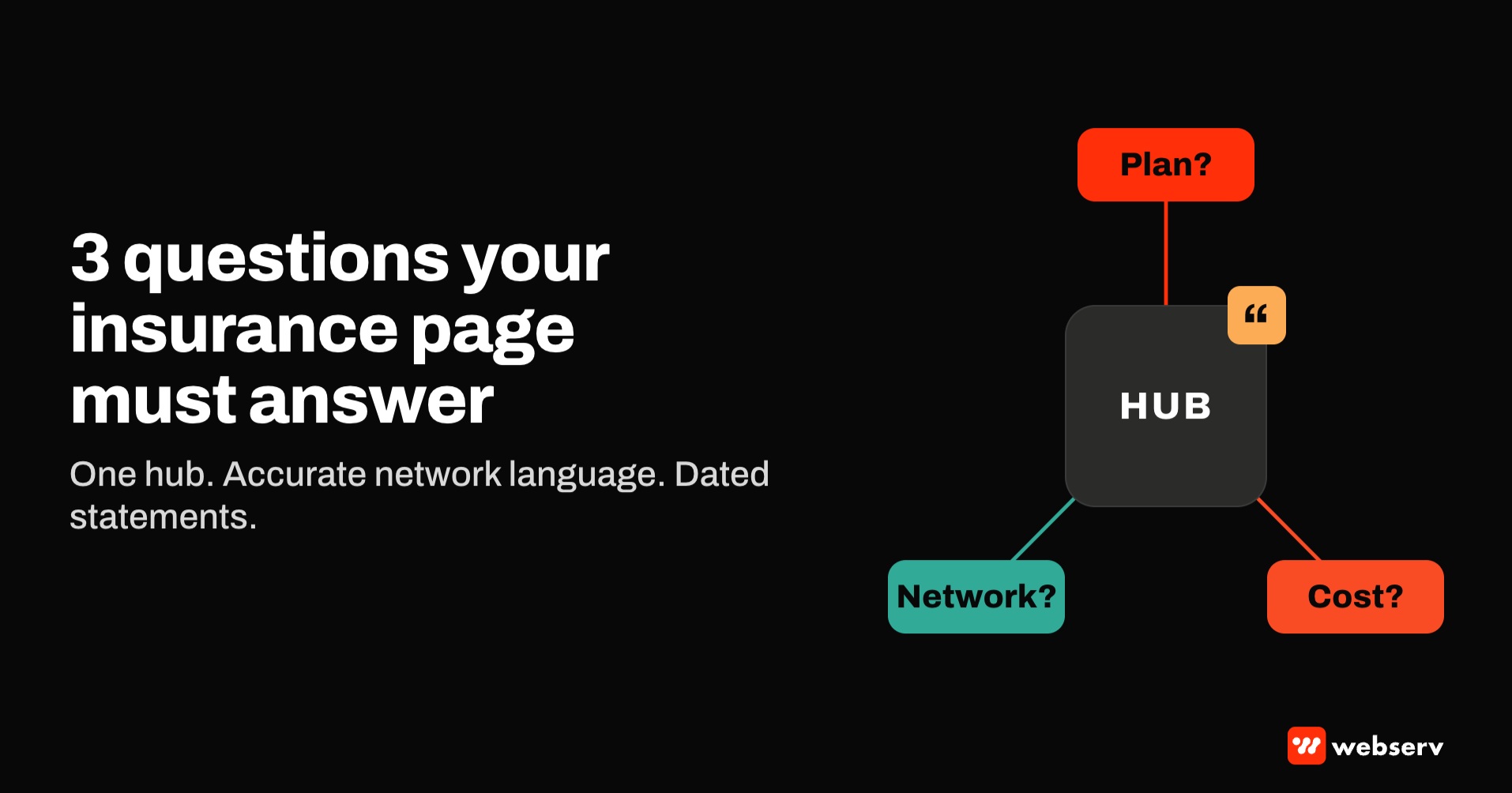
- Insurance pages answer three questions: does this facility work with my plan, what’s my network status, and how do I find out what I’ll pay.
- “In-network” means a contract. Federal rules define a participating provider by its contractual relationship with the plan, so out-of-network facilities shouldn’t imply otherwise.
- Payer logos come with conditions. UnitedHealthcare licenses its logo only to contracted providers, shown alongside their other contracted carriers.
- Build one verify-insurance hub, and add carrier pages only where there’s something carrier-specific to say. Near-identical pages per carrier risk Google’s doorway and scaled content policies.
- Write network statements as dated, self-contained sentences that AI systems can quote, and keep them consistent across the site.
- Recheck network status whenever contracts change, and confirm with LegitScript before putting carrier names in ad text.
What an insurance page has to answer
Families arriving at an insurance page usually have one of three questions:
- Does this facility work with my plan? A yes or no, by carrier and ideally by plan type.
- Is it in network? In-network and out-of-network coverage can differ substantially, and families often ask.
- What will I actually pay? The page can’t answer that for an individual, but it can explain how to find out and how long it takes.
DEFINITION
Verify-insurance hub. A single page that lists the carriers a facility works with, states the network status for each, explains how insurance verification works and what it can and can’t confirm, and gives families a clear way to start. Carrier pages and paid landing pages link back to it as the source of truth.
The hub should also be honest about what verification is. HealthCare.gov’s glossary says preauthorization isn’t a promise that a plan will cover the cost, and a benefits check works the same way. Our guide to verification of benefits vs pre-authorization covers the difference.
Language that keeps network claims accurate
The words on an insurance page carry legal and practical weight.
“In-network” means a contract. Federal rules at 45 CFR 149.30 define a participating provider as one with a contractual relationship with the plan, and HealthCare.gov defines a network as the providers a plan has contracted with. Use “in network with” only where that contract exists.
Be specific about out-of-network. “We work with Aetna” or “We accept many Aetna plans” can be accurate for an out-of-network facility, but families may read it as in-network. Say it directly: “We’re out of network with Aetna. Many Aetna plans include out-of-network benefits; we’ll check yours.”
DO
- “We’re in network with Cigna for residential and IOP (as of October 2026).”
- “We’re out of network with Aetna; we’ll check your out-of-network benefits.”
DON’T
- “We accept all major insurance” over a grid of carrier logos.
- “Your insurance covers rehab.”
- “Free verification” worded so it reads like free treatment.
Single case agreements are narrow. The same federal definitions note that a single case agreement creates a contractual relationship limited to the parties to that agreement. It doesn’t make a facility in network for everyone on that plan. For how they work before admission, see our guide to single case agreements.
Be careful with “free.” The FTC’s guide on free offers says they must be made with extreme care to avoid misleading consumers. “Free insurance verification” is fine if there’s no catch; it shouldn’t imply free treatment.
LegitScript’s certification standards require advertising and practices to be accurate, transparent, and not misleading. Florida’s section 397.55 and California’s Health and Safety Code section 11831.9 bar false or misleading statements about a provider’s services, which reasonably includes network status.
COMMON MISTAKE
A wall of carrier logos. An insurance page shows a grid of every major carrier’s logo, including carriers the facility has no contract with. Families read the logos as “in network.”
It’s also a licensing problem. UnitedHealthcare’s 2026 administrative guide licenses its logo only to contracted providers, and Blue Cross of Idaho’s provider policy requires prior approval for materials using the Blue Cross Blue Shield names or logos. Use text names, check each payer’s terms, and show logos only where the contract allows.
How to structure the hub and carrier pages
One hub per facility or group. List each carrier, the network status, and the levels of care it applies to, by facility if the group has several. Add a short explanation of verification, a form, a phone number, and what happens after someone submits.
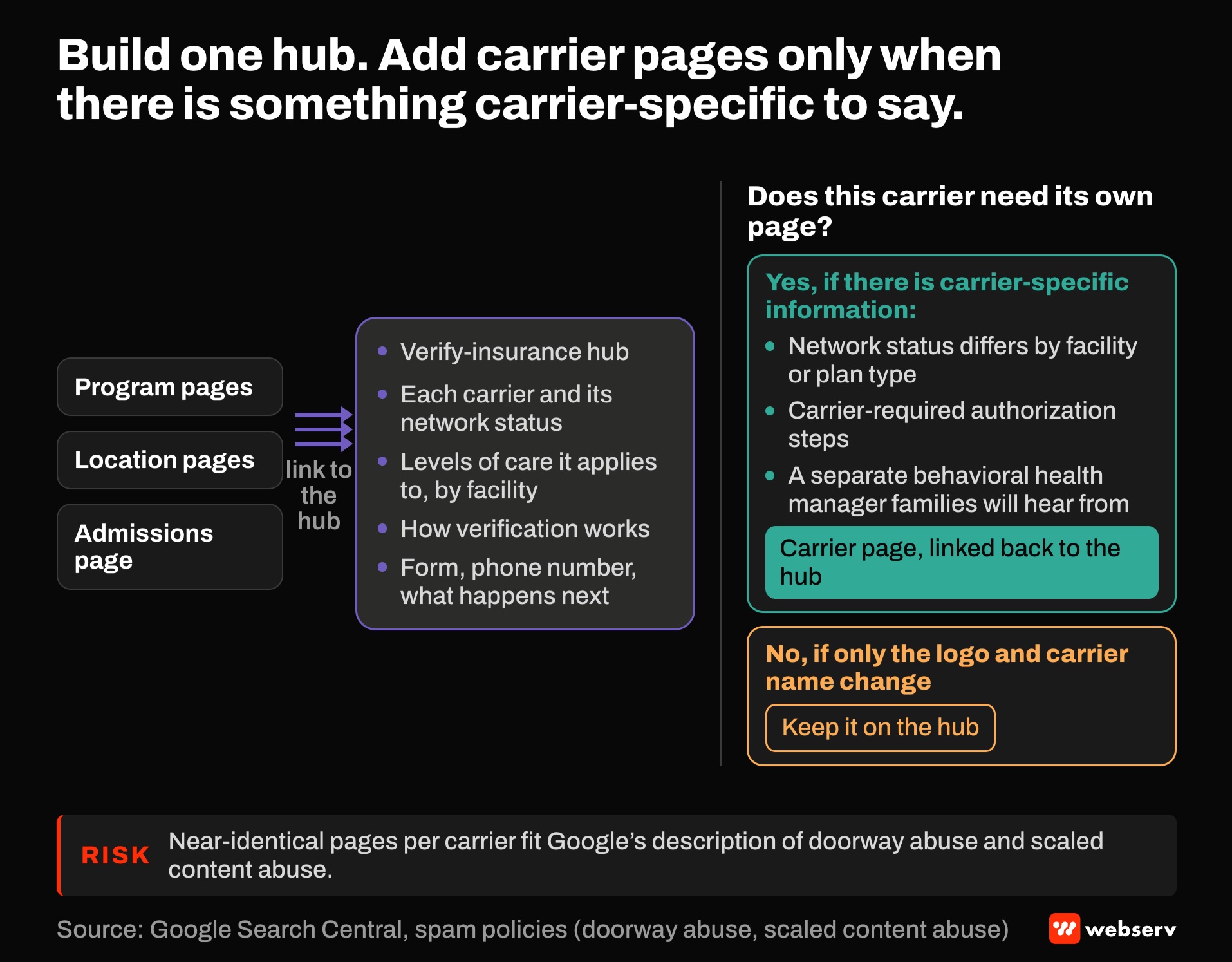
Carrier pages only where they add something. A page for a carrier makes sense when there’s carrier-specific information: network status that differs by facility or plan type, authorization steps that carrier requires, or a separate behavioral health manager families will hear from.
Google’s spam policies describe doorway abuse as substantially similar pages built to rank for similar queries, and scaled content abuse as many pages generated primarily to manipulate rankings. Ten carrier pages that differ only by the logo and the carrier’s name fit that description.
Link the hub to the rest of the site. Program pages, location pages, and the admissions page should point to the hub. Our AI information page guide covers a single reference page for core facts that should also link to it. For building those spoke pages, see our guides to modality pages and location pages.
What AI systems can read
AI assistants and search features answer insurance questions by quoting pages they can understand. That favors a particular style.
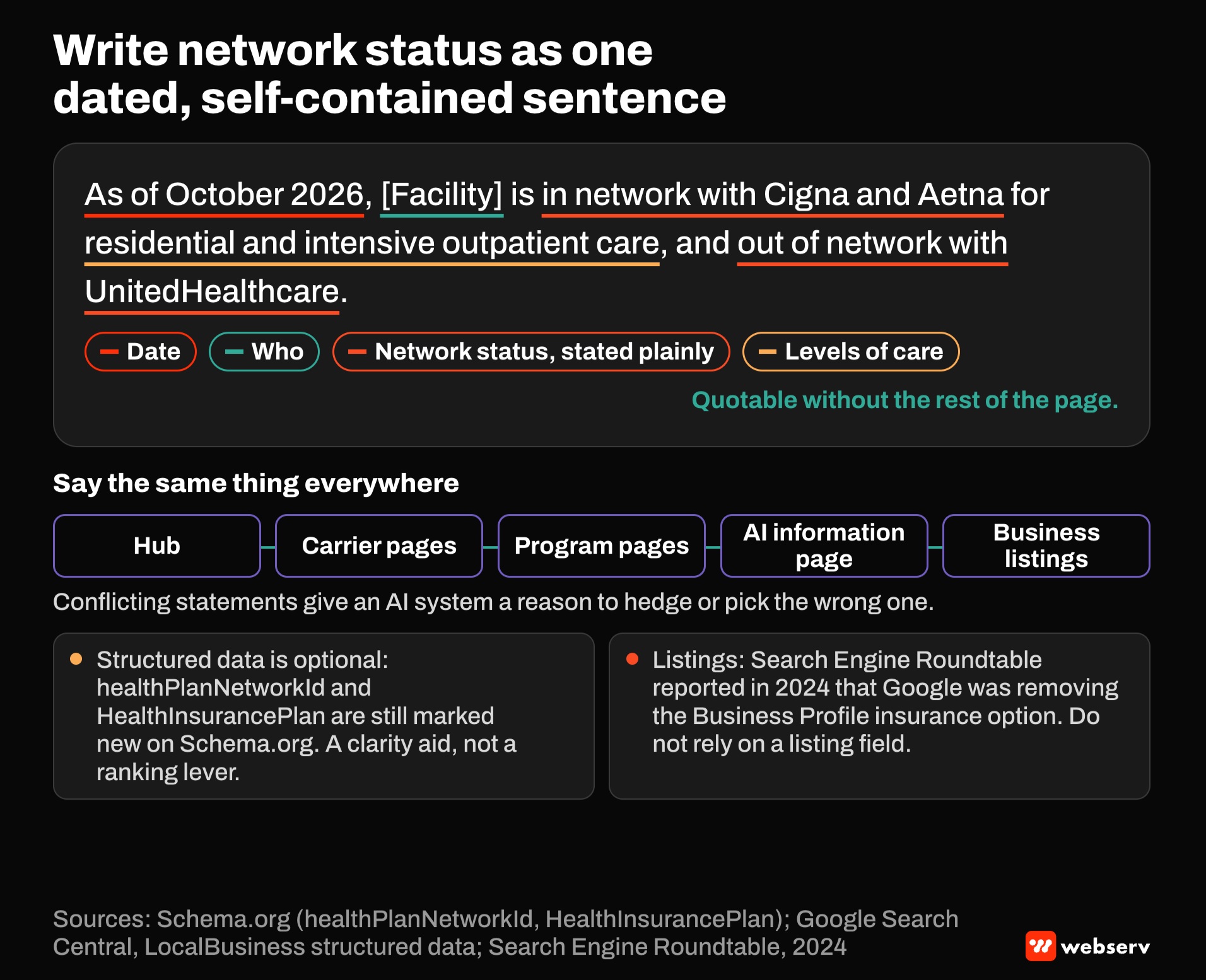
Write self-contained, dated statements. “As of October 2026, [Facility] is in network with Cigna and Aetna for residential and intensive outpatient care, and out of network with UnitedHealthcare.” A sentence like that can be quoted accurately without the rest of the page.
Keep it consistent everywhere. The hub, carrier pages, program pages, AI information page, and any business listings should say the same thing. Conflicting statements give an AI system a reason to hedge or pick the wrong one.
Structured data is optional. Schema.org has properties for this, including healthPlanNetworkId and the HealthInsurancePlan type, both still marked as new. Google’s LocalBusiness documentation doesn’t mention them, so treat them as a clarity aid, not a ranking lever.
Check listings separately. Google once let health providers show insurance networks on Business Profiles, as its 2021 announcement describes, but Search Engine Roundtable reported in 2024 that Google was removing the option. Don’t rely on a listing field to carry the message.
Paid carrier landing pages
Carrier-specific searches, such as “rehab that takes Cigna,” can be strong paid traffic. The landing page has to match the claim the ad makes.
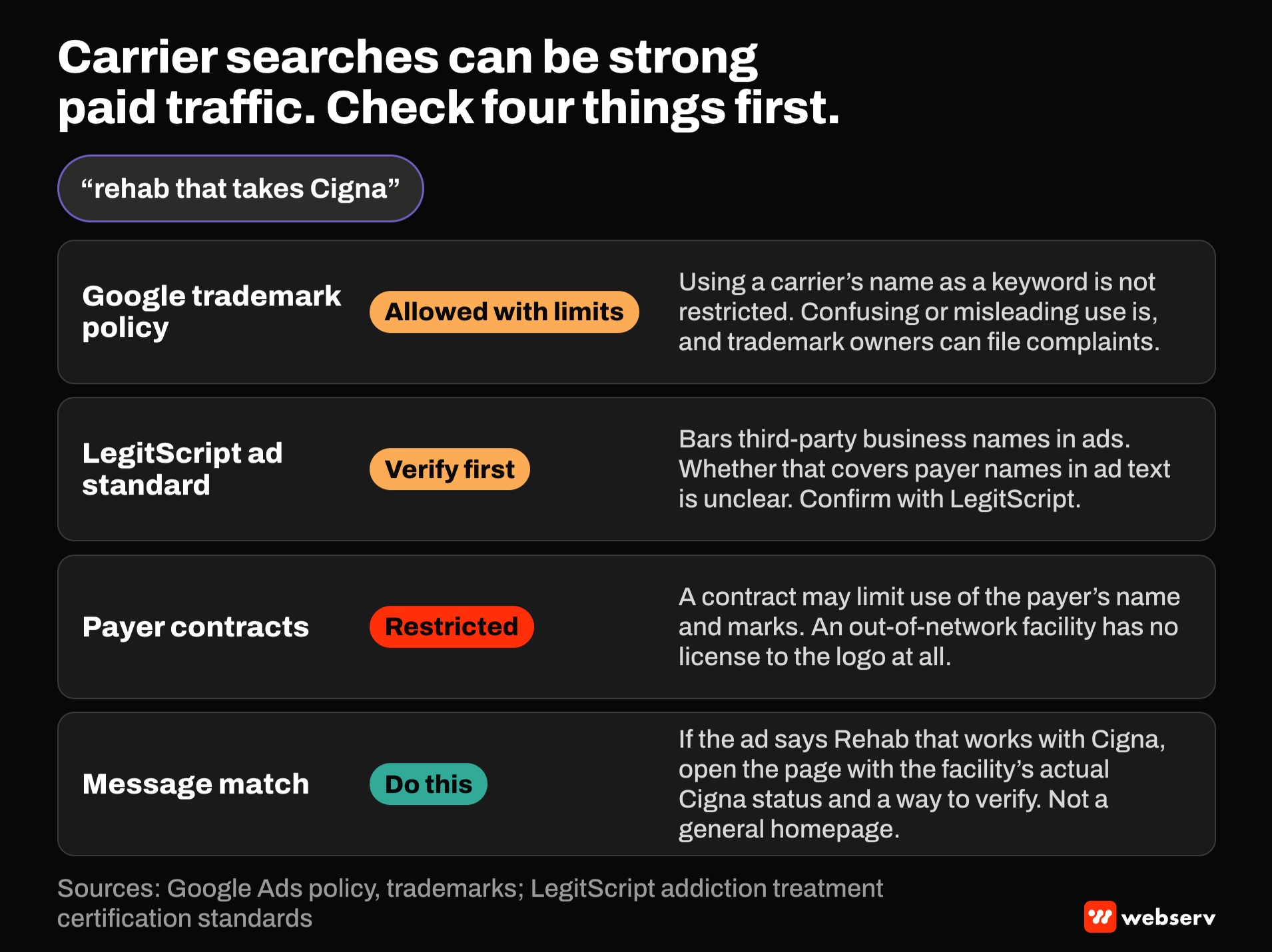
Trademark rules. Google’s trademark policy allows advertisers to use others’ trademarks in some situations, reviews complaints from trademark owners, and restricts confusing or misleading use. Using a carrier’s name as a keyword isn’t restricted.
LegitScript’s ad standard. LegitScript bars using third-party business names in advertisements. Whether that covers payer names in ad text is unclear, so confirm with LegitScript before running carrier names in ads.
Payer contracts. A contracted facility’s agreement may restrict how it uses the payer’s name and marks in marketing. An out-of-network facility has no license to the logo at all.
Message match. If the ad says “Rehab that works with Cigna,” the page should open with the facility’s actual Cigna status and a way to verify, not a general homepage. Our Google Ads playbook covers ad group structure for carrier terms.
Keep insurance pages current
Network status changes when contracts are signed, renewed, or ended, and an outdated insurance page creates a direct problem for families.
Plans have their own obligations here. Under the No Surprises Act, plans must verify provider directory information at least every 90 days, and CMS’s overview of provider requirements says providers must submit directory updates when there are material changes. A facility’s own pages should be held to at least the same standard.
OPERATOR INSIGHT
Make contract changes trigger a page update. Whoever manages payer contracts, often billing or the revenue cycle team, should notify marketing the day a status changes, with the effective date.
Route every insurance form submission into the verification workflow with its source tagged, so admissions can see which carrier pages produce verified, admitted patients. Our pre-admission eligibility verification playbook covers the workflow on the other side of the form.
A build checklist
Six steps, in order.
Confirm network status
Confirm network status for every carrier, by facility and level of care, with billing.
Write the hub
Write the hub with dated network statements, an explanation of verification, and a form.
Add carrier pages
Add carrier pages only where there’s carrier-specific information.
Remove unlicensed logos
Remove unlicensed logos and check each payer’s terms for name and logo use.
Align every page and listing
Align every page and listing to the same statements.
Set the update trigger
Set the update trigger so contract changes reach the website the day they happen.
Where this fits
Insurance pages connect marketing to admissions. For page layouts, see our landing page design guide, and for the verification process itself, our guide to verification of benefits for treatment centers.
For how insurance pages fit the rest of your marketing, see the complete guide to behavioral health marketing. If you want a second look at your insurance pages, book an intro meeting.
Frequently Asked Questions
Can an out-of-network treatment center say it accepts a carrier’s insurance?
It can describe the relationship accurately, but should avoid implying it’s in network. Federal rules define a participating provider by its contractual relationship with the plan.
A clear statement, such as “We’re out of network with Aetna; many Aetna plans include out-of-network benefits,” gives families the real picture.
State and LegitScript rules bar misleading statements about services, which reasonably includes network status.
Can we use insurance company logos on our website?
Only where the payer allows it. UnitedHealthcare’s 2026 provider guide licenses its logo only to contracted providers, shown alongside their other contracted carriers, and requires written consent for other uses.
Blue Cross of Idaho requires prior approval for materials using the Blue Cross Blue Shield names or logos.
Use text names unless your contract permits logos, and check each payer’s terms.
Should we build a separate page for every insurance carrier?
Only where there’s carrier-specific information to share, such as different network status by facility, authorization steps, or a separate behavioral health manager.
Google’s spam policies describe substantially similar pages built for similar queries as doorway abuse.
A strong hub with a few useful carrier pages is better than many near-identical ones.
Does insurance verification guarantee coverage?
No. HealthCare.gov’s glossary says preauthorization isn’t a promise that a plan will cover the cost, and a benefits check confirms plan terms, not payment.
Say so on the insurance page, and explain what verification does confirm.
Our guide to verification of benefits vs pre-authorization covers the difference.
How do we make insurance information easy for AI assistants to repeat accurately?
Write dated, self-contained statements of network status by carrier and level of care, and keep them identical across the hub, program pages, and AI information page.
Conflicting statements make it harder for AI systems to answer correctly.
Structured data properties exist for health plan networks, but Google doesn’t document using them, so treat them as optional.
Keaton Nalle is the Director of Paid Admissions at Webserv, a digital marketing agency for treatment centers.