When a family taps the call button on a Google ad, the call goes straight from the search results to the facility. There’s no website visit, so a call tracking script on the site never sees it. CallRail’s documentation says calls from Google Business Profile listings don’t get Google click IDs at all.
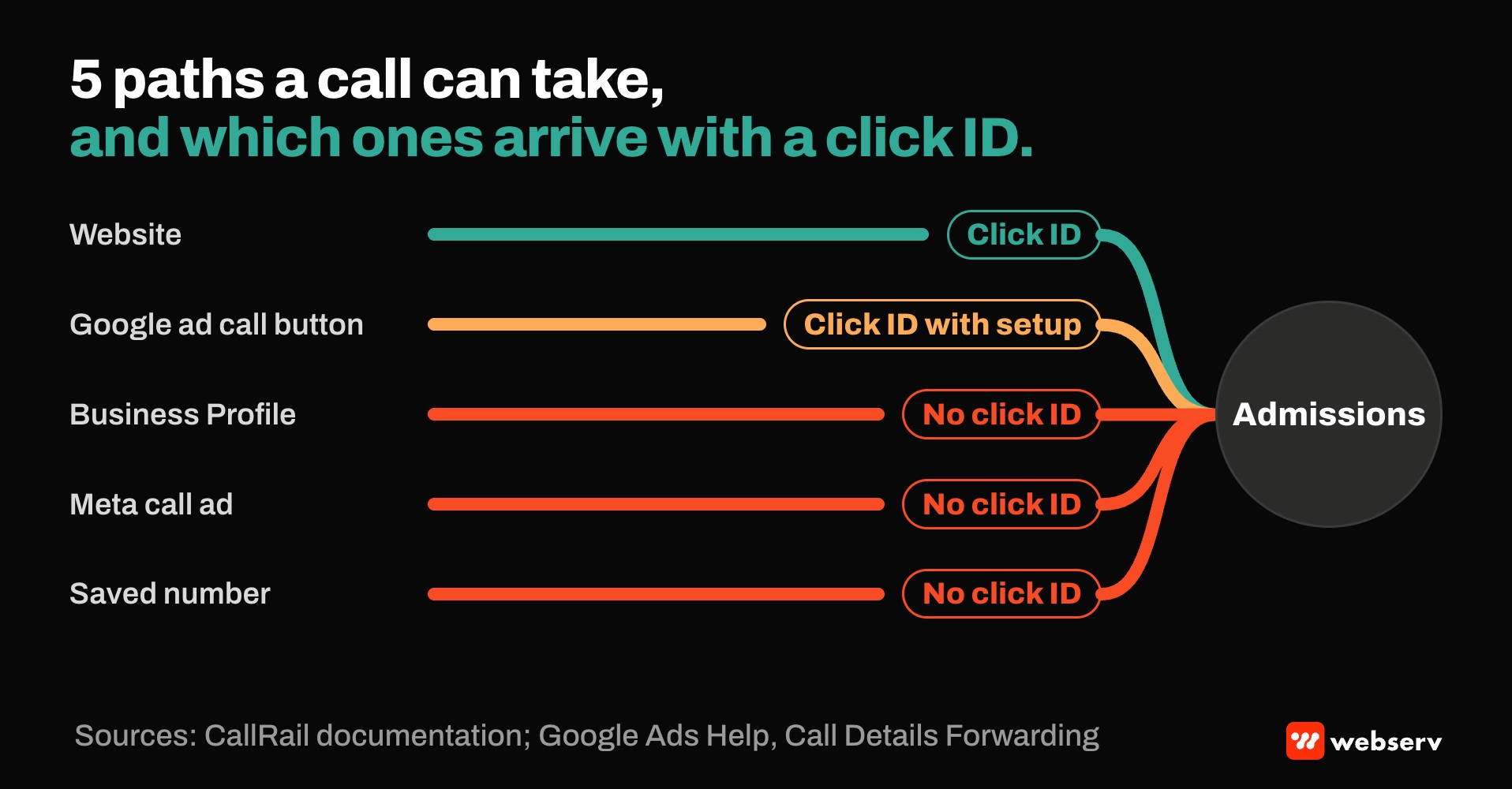
Those two details explain a lot of the gap between “calls” and “calls we can attribute.” Treatment center admissions run on the phone, and every place a call can start has its own tracking rules: the website, the ad itself, the Business Profile, Meta’s call button, and the number someone saved weeks ago.
Matching calls to ad sources at scale means knowing which of those paths your setup actually covers, sizing number pools so attribution holds when traffic grows, and choosing which convenience features are worth the attribution they cost.
This piece covers the paths a call can take, how each one gets tracked, where attribution breaks, how to size number pools, and the HIPAA questions that come with sending call data to ad platforms. It builds on our call tracking guide for behavioral health and is part of our admission ops and attribution work.
Key Takeaways
- Calls start in at least five places: the website, Google ad call buttons, the Google Business Profile, Meta call ads, and saved or remembered numbers. Each needs its own tracking approach.
- A website call tracking script captures Google’s click ID for site visitors. Calls placed straight from an ad’s call button skip the website and need a separate setup.
- Google’s Call Details Forwarding, supported by CallRail and CTM, can pass a click ID for mobile calls from ads lasting more than 15 seconds.
- CallRail recommends one tracking number per concurrent visitor, with a minimum of four per pool. CTM’s guidance is one number per 20 daily visitors per source, or automatic sizing in its newer pools.
- Google’s call conversion import uses the caller’s phone number and call start time. For treatment centers, sending caller numbers to an ad platform is a question for counsel, and click-ID-based paths are the safer default.
- Google removed Business Profile call history in July 2024, so Business Profile calls need a tracking number to be measured.
The paths a call can take
There are five common paths, and each one sets the tracking options.
DEFINITION
Call path. The route a caller takes from first seeing the facility to dialing: from a website visit, directly from an ad, from a Business Profile listing, from a social ad’s call button, or from a number they saved. Each path determines what tracking data, if any, travels with the call.
From the website. The visitor clicks an ad, lands on the site, and calls the number shown. A dynamic number insertion script swaps in a tracking number tied to that visit.
CallRail’s documentation says that with visitor tracking, it captures the Google Click ID for each visitor, which is what lets the call be matched to the ad.
From a Google ad’s call button. Call assets let people tap to call straight from the ad. Google tracks these through call reporting, which uses Google forwarding numbers; Google says turning call reporting off prevents Google Ads from tracking the calls.
From the Business Profile. CallRail’s documentation says no click ID is issued for calls from Business Profile listings, and Google ended Business Profile call history on July 31, 2024. A tracking number on the profile is the way to count these calls.
From a Meta call ad. Meta reports calls placed from its call ads, and notes the metrics are partly modeled rather than a straight count.
From a saved number. A family who copied the number days ago and calls later carries no tracking data. Only the intake question, how did you hear about us, recovers the source.
| Path | What tracks it | Carries a click ID? |
|---|---|---|
| Website | Dynamic number insertion pool | Yes, through visitor tracking |
| Google ad call button | Dedicated call asset number with Call Details Forwarding | Yes, for mobile calls over 15 seconds with Call Details Forwarding |
| Business Profile | Tracking number on the profile | No |
| Meta call ad | Offline tracking number; Meta’s calls placed metric is partly modeled | No |
| Saved number | The intake question: how did you hear about us? | No |
Where attribution breaks
Call buttons skip the website. A call from a Google ad’s call button never loads the site, so the website script can’t attribute it. Using a separate call tracking number in the call asset tells you the call came from Google Ads, but by itself it doesn’t carry the click ID.
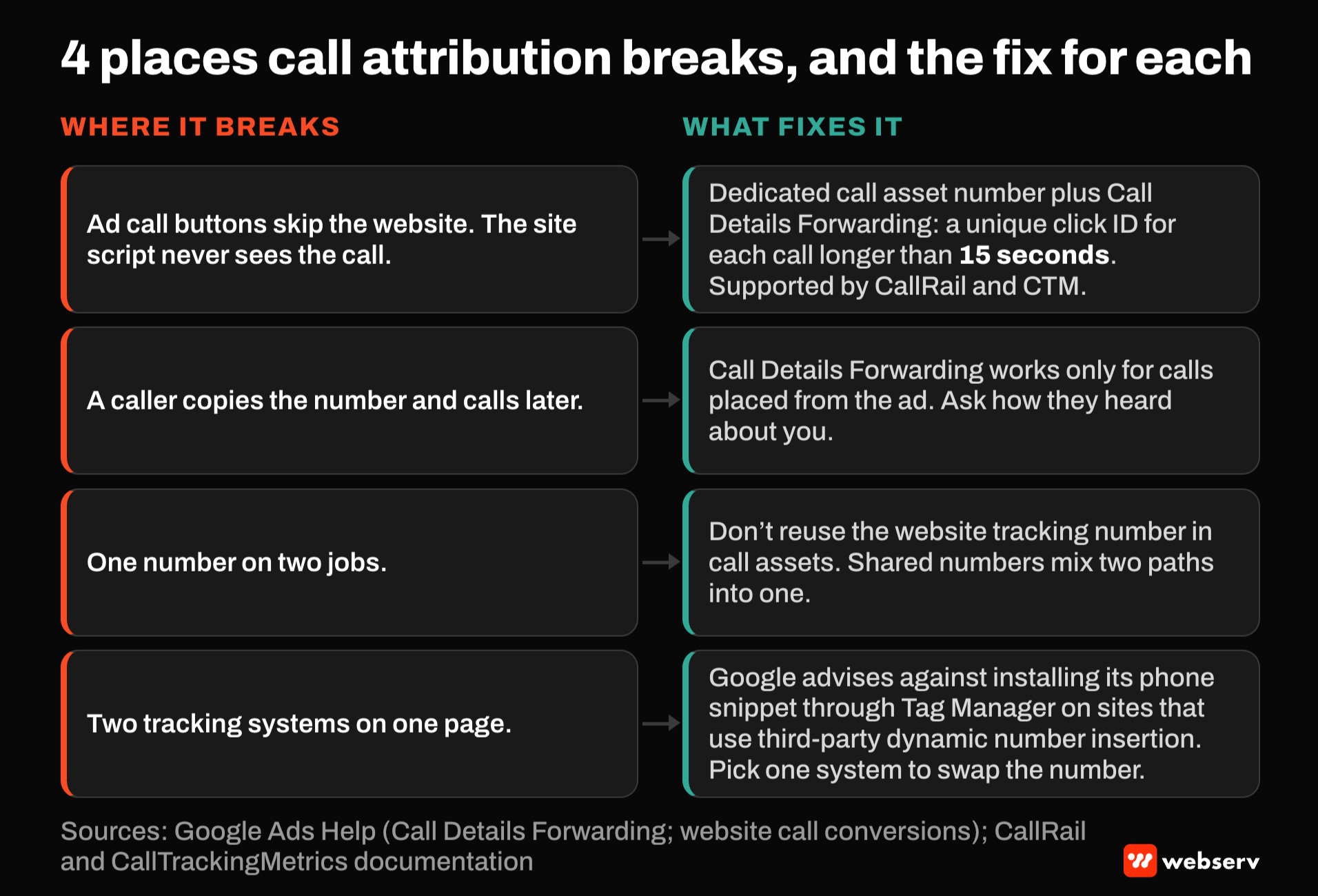
Call Details Forwarding fills part of that gap. Google’s Call Details Forwarding gives a unique click ID for each call lasting longer than 15 seconds and lists both CallRail and CTM as supported providers.
CallRail’s documentation notes it works only for calls placed from the ad, so a caller who copies the number and calls later still has no click ID.
One number on two jobs. CTM’s documentation says not to use the same tracking number in call assets that you use on your website. Shared numbers mix two paths into one.
Two tracking systems on one page. Google’s website call conversions use a phone snippet that replaces the site’s number with a Google forwarding number, and Google advises against installing it through Tag Manager on sites that use third-party dynamic number insertion.
Running Google’s swap and a call tracking script on the same page means two systems competing to replace one number.
COMMON MISTAKE
Two “phone call” conversions in Google Ads. A treatment center keeps Google’s default “Calls from ads” conversion and adds the call tracking platform’s “Phone call” conversion, both as primary goals. CallRail notes its calls report to its own conversion action, not under “Calls from ads”.
Decide which system owns each path, and make only one conversion action primary for each. Otherwise bidding optimizes toward counts that may include the same call twice.
Sizing number pools
Dynamic number insertion only works if there are enough numbers in the pool for every visitor to get their own while the visit is active. Too few, and calls get attributed to the wrong session.
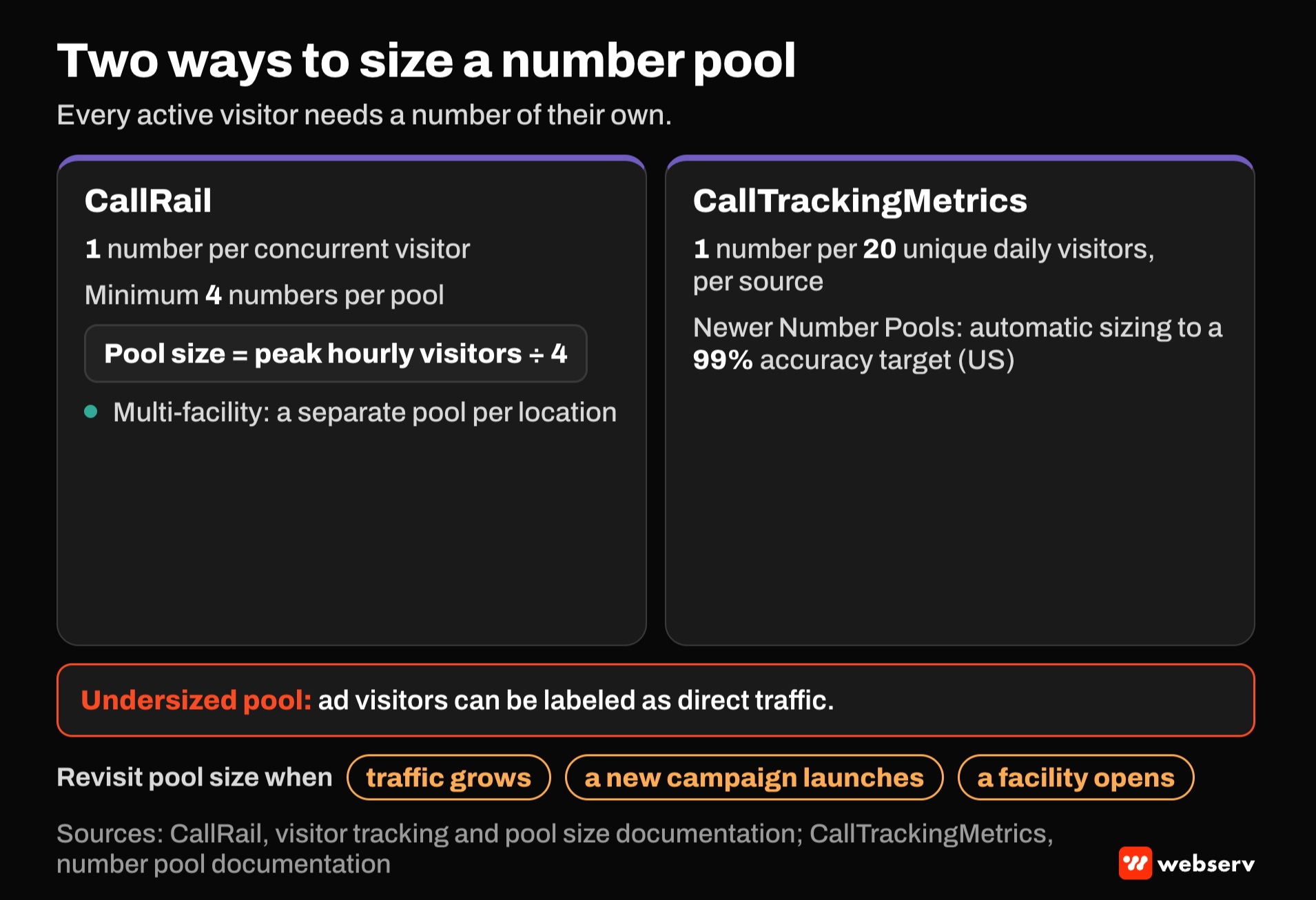
The two major vendors size pools differently:
- CallRail recommends one number per concurrent visitor with a minimum of four, and calculates pool size as peak hourly visitors divided by four. It warns that an undersized pool can label ad visitors as direct traffic.
- CTM’s guidance has been one number for every 20 unique daily visitors from each source. Its newer Number Pools feature sizes the pool automatically to a 99% accuracy target, in the US.
For multi-facility groups, CallRail’s documentation describes a separate pool per location. Revisit pool size when traffic grows, when a new campaign launches, or when a facility opens. For the pages those pools sit on, see our guide to location-specific landing pages.
Choosing convenience features deliberately
Some features make it easier for families to call and harder to know where the call came from. That’s a trade-off to make on purpose.
Call buttons in ads. They remove a step for families. With Call Details Forwarding and a dedicated number, much of the attribution can be kept. Without them, calls arrive with only a campaign-level source.
Business Profile calls. They can be a meaningful share of local calls, and they arrive without click IDs.
Use a tracking number on the profile so they’re at least counted by source. CallRail describes showing a tracking number while keeping the main number as an additional number; Google’s profile guidelines allow additional numbers and require the number to be under the business’s direct control.
Chat. A chat widget can be part of the same tracked session. CallRail’s chat documentation says its Google Ads integration captures the click ID for chats. Check whatever chat tool you use for the same capability, and for a BAA if chats can include health information.
The HIPAA questions in call data
Call attribution moves data about people contacting a treatment center. That needs the same care as any other tracking.
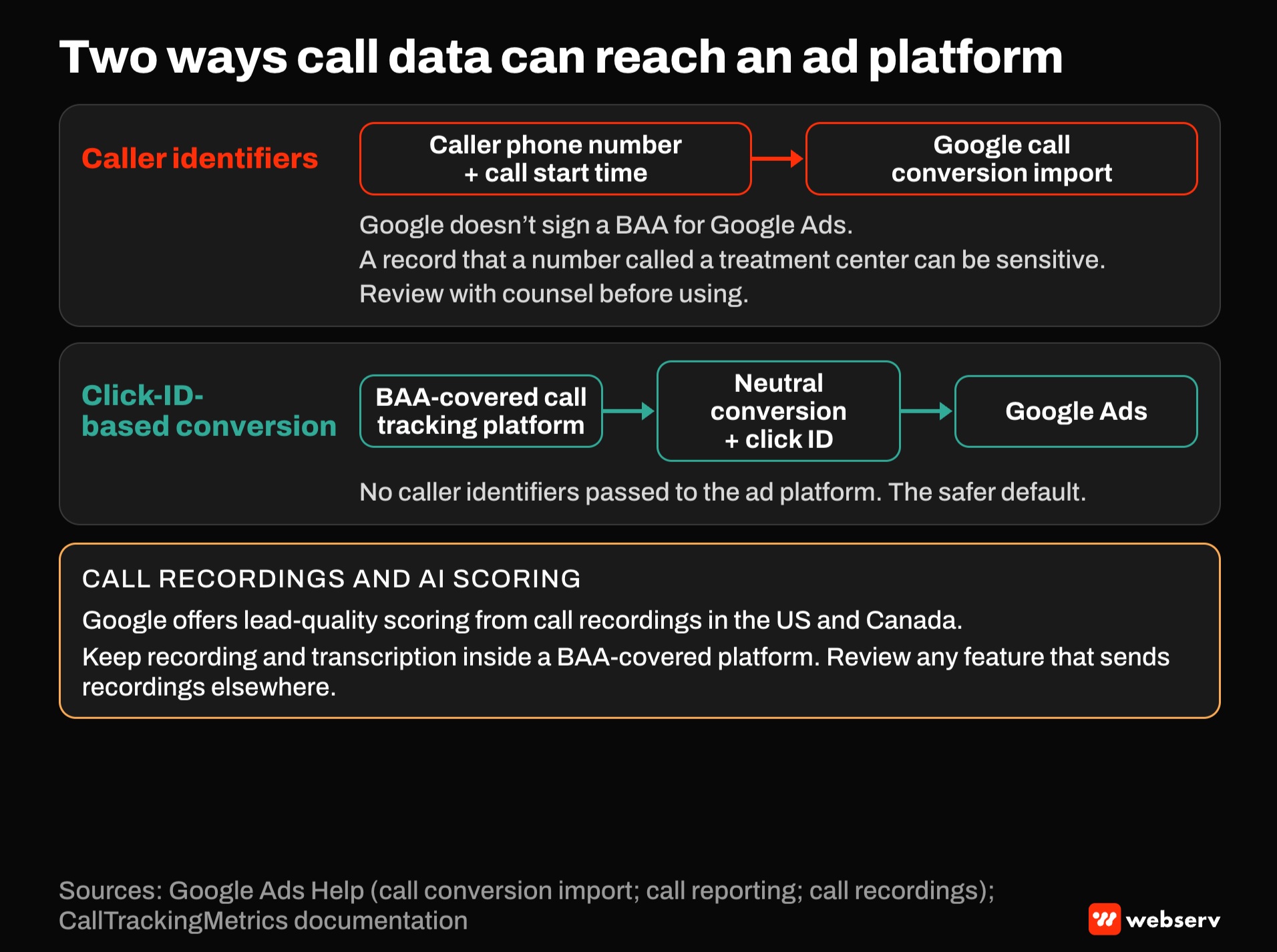
Caller phone numbers to ad platforms. Google’s call conversion import uses the caller’s phone number and call start time, and Google’s call reporting captures caller phone numbers.
Google doesn’t sign a BAA for Google Ads. A record that a phone number called an addiction treatment center can be sensitive, so review these features with counsel before using them.
Click-ID-based paths. Sending a neutral conversion tied to a click ID, from a call tracking platform covered by a BAA, avoids passing caller identifiers to the ad platform. CTM notes that Google only accepts conversions with a click ID for its imports. Our HIPAA-safe conversion tracking guide covers event design.
Call recordings and AI scoring. Google now offers lead-quality scoring based on call recordings in the US and Canada. Admissions calls often include health information. Keep recording and transcription inside a BAA-covered call tracking platform, and review any feature that sends recordings elsewhere.
OPERATOR INSIGHT
Map every call path to a tracking method and an owner, on one page. For each path, note whether it carries a click ID, a source only, or nothing, and which conversion action in Google Ads it feeds.
The map makes the gaps visible: calls with no source, paths counted twice, and paths sending more data than they should. Review it whenever a campaign type, number, or vendor changes.
A setup checklist
Six steps, in order.
List every path
List every path callers use: website, ad call buttons, Business Profile, Meta call ads, offline sources.
Assign tracking per path
Assign tracking per path: website pool, dedicated call asset number with Call Details Forwarding, Business Profile tracking number, offline number for Meta call buttons.
Size each pool
Size each pool using your vendor’s guidance, and review after traffic changes.
Pick one primary conversion per path
Pick one primary conversion per path in Google Ads.
Keep identifiers out of ad platforms
Keep identifiers out of ad platforms unless counsel has approved, and use click-ID-based conversions from a BAA-covered platform.
Ask how they heard about you
Ask how they heard about you on every call, and record it in the CRM.
Where this fits
Call attribution feeds the rest of the measurement stack. For implementation detail, see our CTM implementation playbook, CallRail setup guide, and CallRail vs CTM comparison. For a side-by-side of options, see our list of top attribution tools for treatment centers. Our piece on the attribution gap between ad platforms and the CRM covers where those numbers diverge.
For the full model, see the complete guide to attribution, and for budget decisions, our guide on lowering cost per admit without cutting ad budget. For turning more landing page visits into calls in the first place, see our complete guide to conversion rate optimization for rehab marketing.
For how measurement fits the rest of your marketing, see the complete guide to behavioral health marketing. If you want a second look at your call tracking setup, book an intro meeting.
Frequently Asked Questions
Why don’t calls from Google ad call buttons show up in our call tracking?
Calls from an ad’s call button go straight from the search results to your number, without a website visit, so your website tracking script never sees them.
Use a dedicated tracking number in the call asset to count them by source.
Call Details Forwarding, supported by CallRail and CTM, can pass a click ID for mobile calls from ads lasting more than 15 seconds.
How many tracking numbers does a treatment center need?
It depends on traffic and vendor. CallRail recommends one number per concurrent visitor, with a minimum of four, calculated as peak hourly visitors divided by four.
CTM’s guidance is one number for every 20 unique daily visitors per source, or automatic sizing in its newer pools.
Multi-facility groups should use a separate pool per location.
Can we track calls from our Google Business Profile?
Yes, with a tracking number on the profile. Google ended Business Profile call history in July 2024, and CallRail notes these calls don’t get Google click IDs.
Google’s guidelines allow additional numbers and require the number to be under your direct control.
Keep the main number listed as an additional number for consistency.
Is it safe to import call conversions into Google Ads?
Google’s call conversion import uses the caller’s phone number and call start time, and Google doesn’t sign a BAA for Google Ads.
For treatment centers, sending caller numbers to an ad platform should be reviewed with counsel.
Click-ID-based conversions sent from a BAA-covered call tracking platform avoid passing caller identifiers.
Should we keep Google’s “Calls from ads” conversion if we use CallRail or CTM?
Decide which system owns each call path, and make only one conversion action primary for it.
CallRail notes its calls report to its own conversion action, separate from Google’s “Calls from ads.”
Two primary call conversions can lead bidding to optimize on counts that include the same call twice.
Keaton Nalle is the Director of Paid Admissions at Webserv, a digital marketing agency for treatment centers.