Google’s web performance guidance says plainly that if a page includes a large number of tracking scripts for advertising, loading them asynchronously won’t prevent them from slowing the page down.
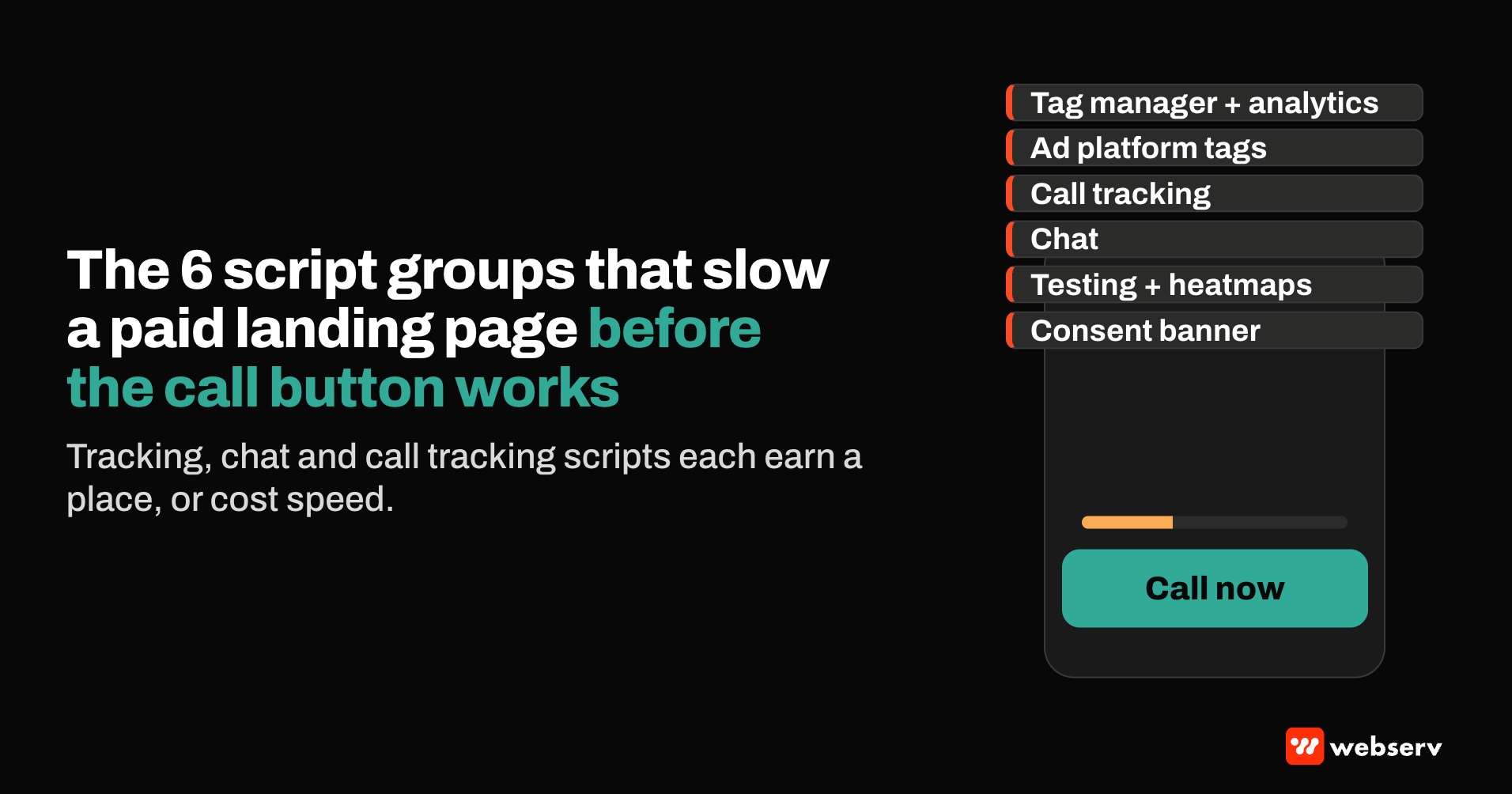
That describes most treatment center paid landing pages. A typical page carries a tag manager, an analytics tag, the Google Ads and Meta tags, a call tracking script that swaps the phone number, a chat widget, sometimes a benefits verification widget, a heatmap tool, and a consent banner.
Each was added for a good reason. Together they can slow the page a family lands on from an ad.
The HTTP Archive’s 2025 Web Almanac found that more than nine in ten web pages include at least one third party. The question for a treatment center isn’t whether the page has third-party scripts. It’s which ones are earning their place, and what they cost in speed.
This piece covers the scripts a paid landing page usually carries, how they slow it down, how to measure the cost, and the fixes in order.
For Core Web Vitals basics and benchmarks, see our Core Web Vitals guide for treatment centers. This is part of the work inside our landing page practice for treatment centers.
Key Takeaways
- Tracking, chat, and call tracking scripts are the most common source of avoidable weight on treatment center paid landing pages. Google says loading tracking scripts asynchronously doesn’t stop them from slowing the page.
- Third-party scripts hurt speed in two ways: they compete for bandwidth while the main content loads, and they tie up the browser’s main thread, which delays response to taps.
- Google Ads counts landing page experience as one of the three Quality Score components, and its guidance on improving it names loading speed and mobile friendliness.
- Field data from real visitors is the measure that matters. Lab tools like Lighthouse are for diagnosis, and Lighthouse can’t measure Interaction to Next Paint.
- Fix in order: remove scripts that don’t earn their place, load the rest after the main content, use a lightweight placeholder for chat, and move tags server-side through a BAA-covered layer.
- Server-side tagging is both a speed fix and a privacy fix. Google says it reduces the JavaScript that has to load in the browser.
The scripts a paid landing page usually carries
On a treatment center paid landing page, those scripts usually fall into a few groups:
- Tag management and analytics. A tag manager container plus analytics. The Web Almanac notes that tag managers tend to load many other scripts and start many tasks.
- Ad platform tags. The Google Ads tag and the Meta pixel, often both on every page.
- Call tracking. A script that replaces the phone number on the page with a tracked number for each visitor or source.
- Chat and contact. The Web Almanac groups chat and contact tools as customer success scripts and notes they’re generally heavier in weight.
- Testing and behavior tools. A/B testing scripts, heatmaps, and session recording.
- Consent and compliance. Cookie consent banners and their own scripts.
Third parties also load their own third parties. The 2025 Web Almanac found the median depth of that inclusion chain is three. A single tag can pull in scripts nobody on the marketing team chose directly.
DEFINITION
Martech speed tax. The load time and responsiveness a page loses to the third-party scripts added for measurement, communication, and testing, separate from the page’s own content and code.
How third-party scripts slow a page
Google’s Core Web Vitals set the targets: Largest Contentful Paint within 2.5 seconds, Interaction to Next Paint under 200 milliseconds, and Cumulative Layout Shift under 0.1, measured at the 75th percentile of visits.
Core Web Vitals “good” thresholds, at the 75th percentile of visits
2.5s
Largest Contentful Paint (loading)
200ms
Interaction to Next Paint (responsiveness)
0.1
Cumulative Layout Shift (visual stability)
Source: Google Search Central, Core Web Vitals.
Third-party scripts work against all three:
- Loading speed (LCP). Google’s documentation on unused JavaScript notes that even asynchronous scripts compete for bandwidth with other resources. On a phone, that can delay the headline, hero image, or call button.
- Responsiveness (INP). Script parsing and execution can delay user interaction, according to web.dev’s third-party JavaScript guidance. A parent who taps the call button and waits for it to respond is feeling this.
- Layout stability (CLS). Widgets and banners that appear after the page has rendered can push content down as they load.
Google’s overview of third-party JavaScript also warns that a failing third-party request can block rendering until it times out. A page’s speed then depends partly on vendors the treatment center doesn’t control.
Where the cost shows up for paid campaigns
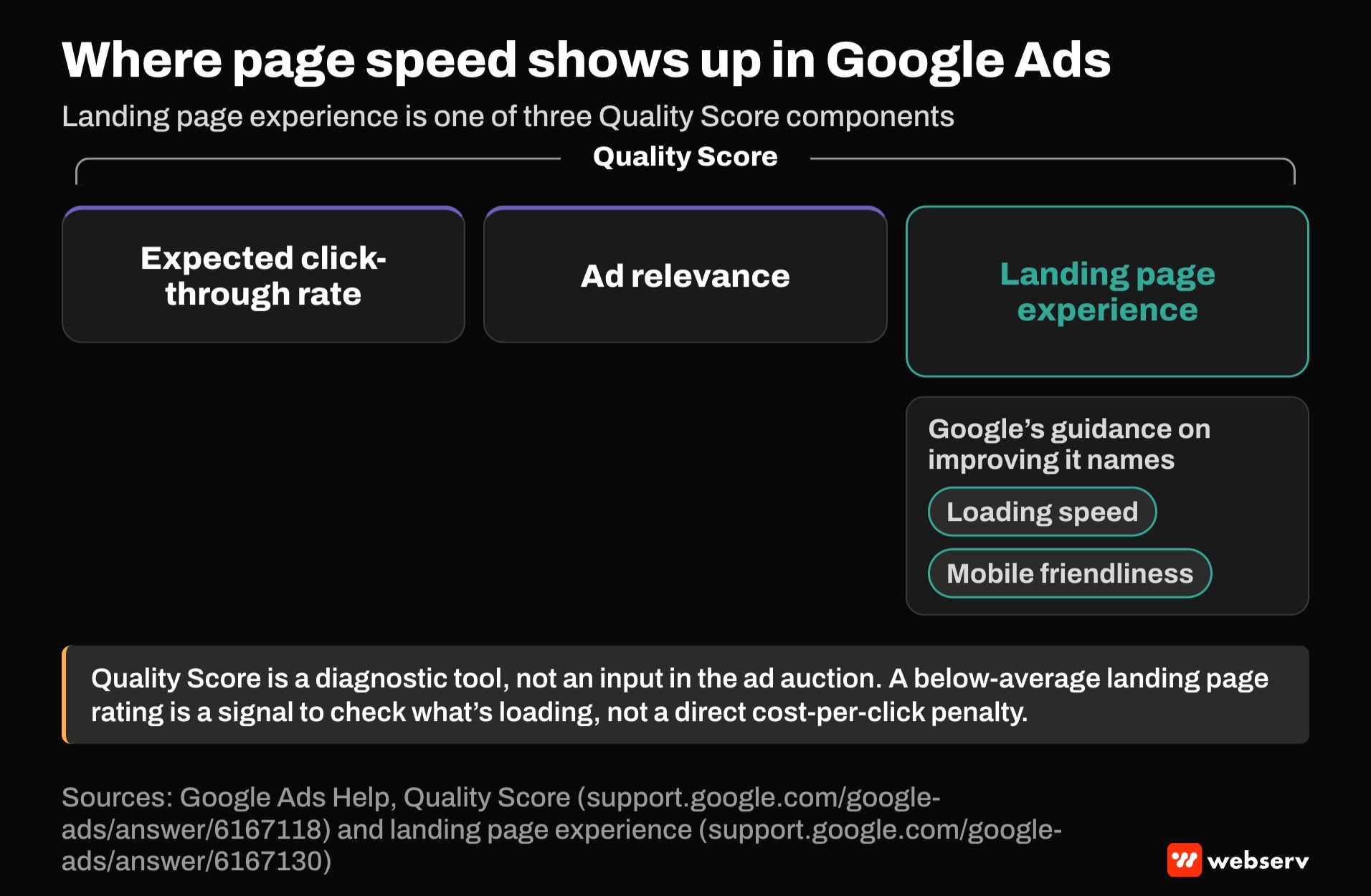
Google Ads lists landing page experience as one of three Quality Score components, alongside expected click-through rate and ad relevance. Its guidance on improving landing page experience names loading speed and mobile friendliness.
Google also says Quality Score is a diagnostic tool, not an input in the ad auction. So a slow page isn’t a direct penalty on cost per click. Treat a below-average landing page experience rating as a signal to check what’s loading on the page.
The larger cost is on the family’s side. When a parent arrives from an ad on a phone, in a hurry and sometimes in a crisis, every second spent waiting for scripts to load is a second before the phone number, the insurance question, or the call button is usable.
COMMON MISTAKE
Chasing a perfect lab score. Teams run a Lighthouse test, see a low score, and start optimizing toward 100. Lab tests simulate one device on one network. Google’s PageSpeed Insights documentation says lab data is useful for debugging but may not capture real-world bottlenecks.
Use field data from real visitors to decide whether there’s a problem, and lab tools to find the cause.
How to measure the speed tax
Five steps, in order.
Check field data first
Check field data first. In PageSpeed Insights, look at the Core Web Vitals assessment for the landing page URL. It reflects real Chrome users over the previous 28 days, if the page has enough traffic.
Run a lab test for the causes
Run a lab test for the causes. Lighthouse 13’s third parties insight flags third-party code that affects load performance. It always passes, so read it as a diagnostic, not a grade.
Watch Total Blocking Time
Watch Total Blocking Time. Lighthouse can’t measure INP because no one is tapping the page. Google says Total Blocking Time under 200 milliseconds on average mobile hardware is the lab target that tends to correlate with good INP.
Inventory every tag
Inventory every tag. List each script on the page, what it does, who asked for it, and when it was last used for a decision. Google’s guidance notes you probably don’t need two tag managers or two analytics platforms.
Test a stripped version
Test a stripped version. Compare the page with and without the nonessential scripts. The difference is the speed tax.
The fixes, in order
Remove what doesn’t earn its place. Heatmaps from a test that ended, a second analytics tool, a retired chat vendor, an old testing script. Google’s guidance is direct: if a script doesn’t add clear value, remove it.
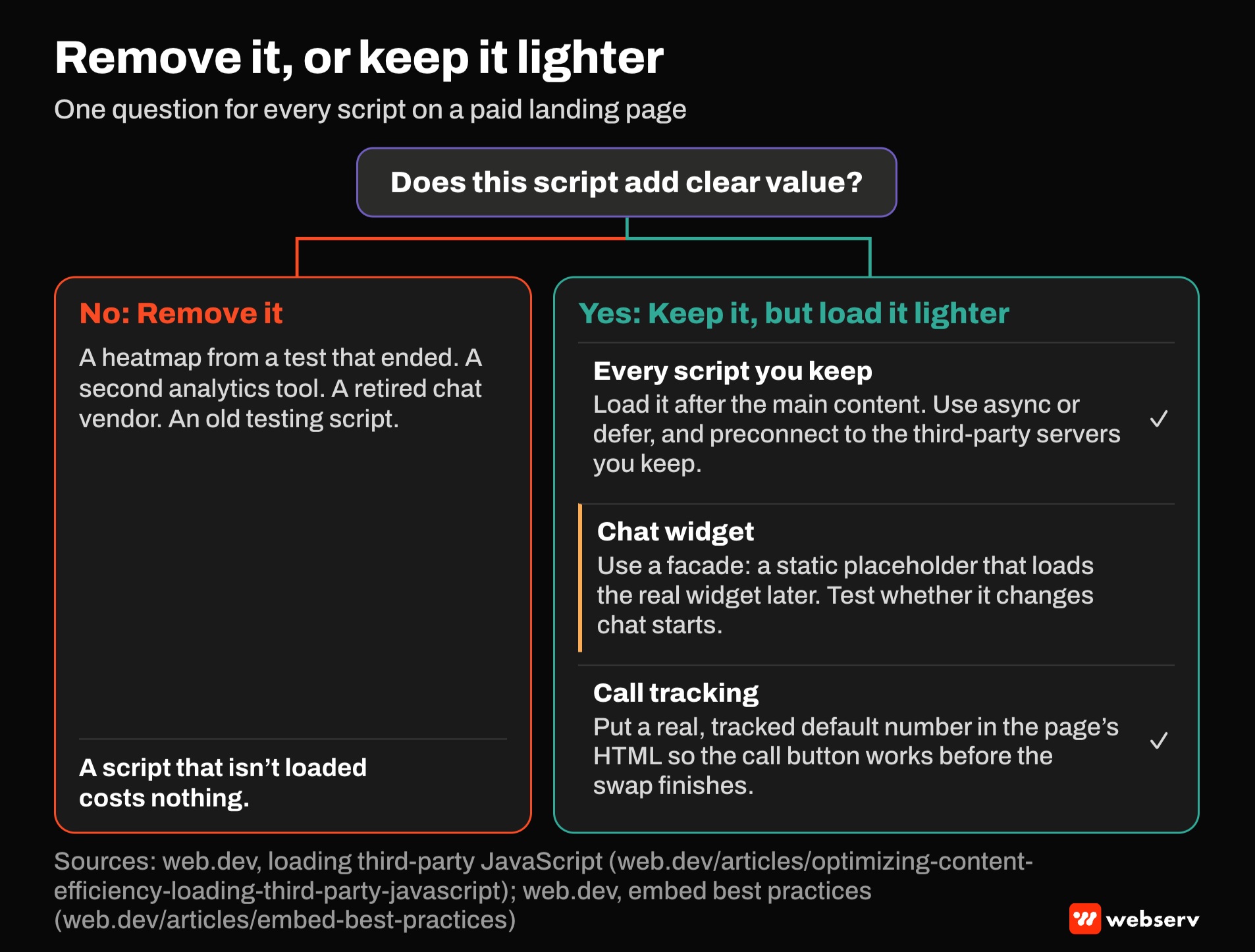
Load the rest after the main content. Google recommends adding asynchronous scripts after the page’s critical content loads, using async or defer attributes, and preconnecting to the third-party servers you keep.
Use a placeholder for chat. Google describes a facade as a static element that looks like the embed but loads the real thing later, and lists chat widgets as a use case. The trade-off is a short delay before chat works, so test whether it changes chat starts.
Keep a working phone number in the page itself. Put a real, tracked default number in the page’s HTML so the call button works before the call tracking script finishes swapping it. Our call tracking attribution guide covers number pools and fallbacks.
Move tags server-side. Google’s server-side tagging documentation says the amount of JavaScript that needs to load in the browser is greatly reduced, and that it can improve site performance.
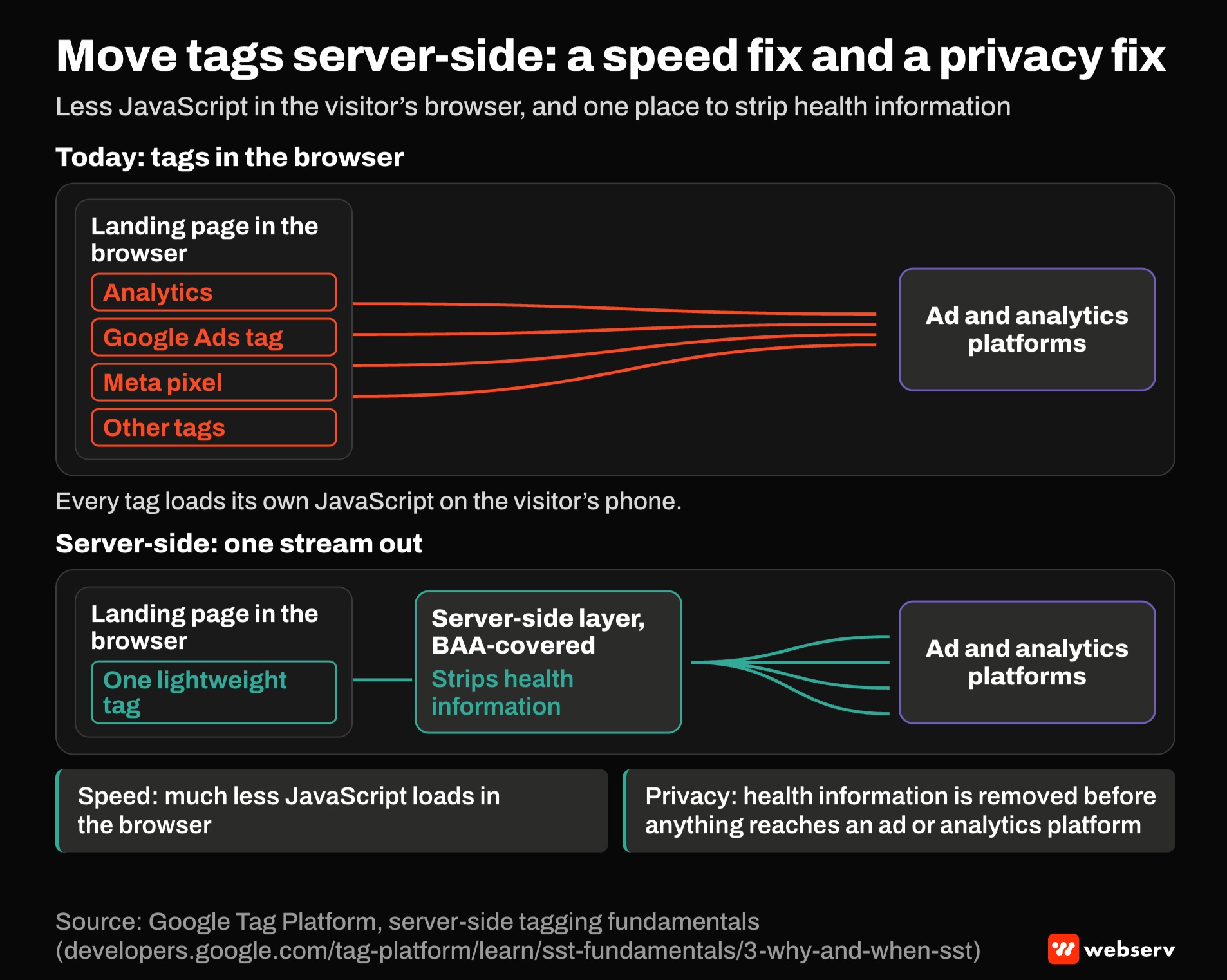
For treatment centers, the server-side layer is also where health information gets stripped before anything reaches an ad or analytics platform. Run it through a BAA-covered layer. Our HIPAA-safe conversion tracking guide covers the event design. For sending admits back to Google Ads, see our guide to offline conversion import.
OPERATOR INSIGHT
Treat every script as a line item with an owner and a reason. Review the list each quarter, and remove anything nobody can tie to a decision made in the last 90 days.
The scripts that survive are the ones worth their weight. The ones that don’t were costing speed without paying for it.
Where this fits
Speed is one layer of landing page performance. For page structure, see our treatment center landing page design guide, the complete guide to landing pages for treatment center marketing, and the 10-point landing page checklist.
For conversion work, see our complete guide to conversion rate optimization for rehab marketing and our guide to landing page optimization for addiction treatment. For the Meta side of server-side tracking, see our Meta Conversions API guide for treatment centers.
For how paid media fits the rest of your marketing, see the complete guide to behavioral health marketing. If you want a second look at what’s loading on your landing pages, book an intro meeting.
Frequently Asked Questions
Do tracking scripts really slow down a landing page if they load asynchronously?
Yes. Google’s guidance says that when a page includes many tracking scripts for advertising, loading them asynchronously won’t prevent them from slowing the page.
Asynchronous loading keeps scripts from blocking the page from rendering, but they still compete for bandwidth and the browser’s main thread.
Loading them after the main content, or moving them server-side, reduces that cost.
Does page speed affect Google Ads costs?
Indirectly. Google Ads lists landing page experience as a Quality Score component and names loading speed and mobile friendliness in its guidance on improving it.
Google also says Quality Score is a diagnostic, not an auction input, so speed isn’t a direct cost penalty.
The clearer cost is in conversion: a family waiting on a slow page is a family not calling yet.
Should we remove our chat widget to speed up the page?
Not necessarily. Google lists chat widgets as a use case for facades, which show a lightweight placeholder and load the real widget later.
The trade-off is a short delay before chat is usable.
Test the facade against the current setup and compare chat starts and calls, not just speed scores.
Does call tracking slow down a landing page?
It adds a script that has to load and swap the phone number, so it carries some cost like any third-party script.
The bigger risk is a call button that doesn’t work until the swap finishes. Keep a real, tracked default number in the page’s HTML.
Measure the script’s impact in a lab test and keep it if attribution depends on it.
What’s the most effective single fix?
Removing scripts that no longer earn their place, since a script that isn’t loaded costs nothing.
After that, server-side tagging reduces browser-side JavaScript and, for treatment centers, gives a place to strip health information before it reaches ad platforms.
Run it through a BAA-covered layer, and confirm the setup with counsel.
Keaton Nalle is the Director of Paid Admissions at Webserv, a digital marketing agency for treatment centers.