I have watched the same admissions call run two different ways in the same week at the same facility with the same coordinator. In week one, she runs the call without rate intelligence in the workflow. VOB comes back covered. She confirms the admit.
The patient shows up on Monday. Three months later the billing team sees the actual payment: $675 per day on a program the operator quoted internally at $900. The margin on that admit is negative and nobody knew until the check landed.
In week two, the same coordinator runs the same type of call. VOB still comes back covered.
But there is a rate intelligence field on her screen this time, showing expected reimbursement of $675 per day based on 34 similar claims in the pool, with a low-confidence trust score attached. Her CRM flags the call for admissions manager review before the admit gets scheduled.
The manager makes the call: admit at the OON rate with an adjusted internal cost model, or route the patient to a different level of care that reimburses more predictably. The decision changes. The math on the admit works.
The difference between those two calls is not the coordinator. It is not the script she reads. It is the data available to the workflow behind the script. Adding rate intelligence to the admissions call is not a change in what the coordinator says.
It is a change in what the coordinator sees and what triggers the next step.
This piece walks the specific workflow changes required to integrate rate data into your admissions call script without breaking the call flow, breaching HIPAA, or leaving the coordinator carrying decisions that should escalate. It builds on the definitional reframe in VOB vs. Expected Reimbursement.
Under HIPAA, rate data displayed to a coordinator during a live call cannot be disclosed to the caller without breaking the confidentiality rules that govern PHI-adjacent financial information. HIPAA Journal’s de-identification reference is what most treatment centers use as their internal-tool guidance — the short version is: the coordinator sees the dollar, but the caller never hears it. Every script pattern in this piece assumes that boundary.
Key Takeaways
- Rate intelligence does not change what the coordinator says on the call. It changes what the coordinator sees on the screen and what triggers escalation to the admissions manager before an admit gets scheduled.
- The rate data field lives in the CRM workflow at the same step where VOB status lives, not in the intake script the coordinator reads. Coordinators reference rate data internally, not with the patient or family on the call.
- HIPAA and family-audience boundaries limit what the coordinator can discuss about payer rates during the call. The coordinator’s job is to escalate rate flags, not negotiate coverage or reveal reimbursement variance to the family.
- Escalation triggers should be defined upstream: low-confidence rate, expected reimbursement below program cost floor, or cross-domain canonical mismatch on the payer identifier. Coordinators do not decide whether to admit at low rates. Managers do.
- The 30-day rollout playbook is CRM configuration first (rate field placement, escalation triggers), then coordinator training, then script sync so the coordinator’s language on the call matches what the manager will confirm downstream.
Where rate intelligence enters the call script
Almost every treatment center admissions team I have worked with makes the same mistake when they try to integrate rate data into the call workflow. They add a script line where the coordinator asks about coverage, gets the answer, then asks a follow-up about “expected reimbursement.” That is exactly wrong.
The coordinator’s job on the call is to confirm the patient can be admitted and to build enough rapport that the patient or family member trusts the facility with their care.
The coordinator’s job is not to negotiate coverage, discuss payer rates, or make an admissions decision that hinges on reimbursement math.
Every second the coordinator spends talking about rate data on the call is a second the family is not talking about the actual reason they called, which is that someone they love needs treatment.
Rate intelligence enters the workflow behind the script, not inside the script. The coordinator sees rate data on her CRM screen after she runs the VOB check.
She uses it to decide whether to schedule the admit immediately, route the call to a different level of care, or escalate to the admissions manager for a rate review. The patient or family member never hears the words “expected reimbursement” from the coordinator on the call.
That distinction is what most facilities get wrong on their first attempt at integrating rate data. The tool is on the coordinator’s screen. The conversation stays where it was before the tool arrived.
Answer the call
Standard opener, active listening on why the family is calling, initial qualification. First 60 seconds unchanged from your existing script.
Run VOB
Coordinator triggers eligibility check in CRM. VOB comes back in under a minute.
Read the screen
VOB status + rate intelligence + trust score populate on same screen. Both internal-only. Neither read aloud on the call.
Apply triggers
Cost floor / trust score / flagged payer. CRM enforces the triggers automatically; coordinator does not have to remember them.
Escalate or schedule
If any trigger fires, CRM routes to admissions manager queue. Manager reviews in real time; coordinator holds the family warm.
The call flow with rate data integrated
Here is the specific sequence I run at Webserv-integrated facilities.
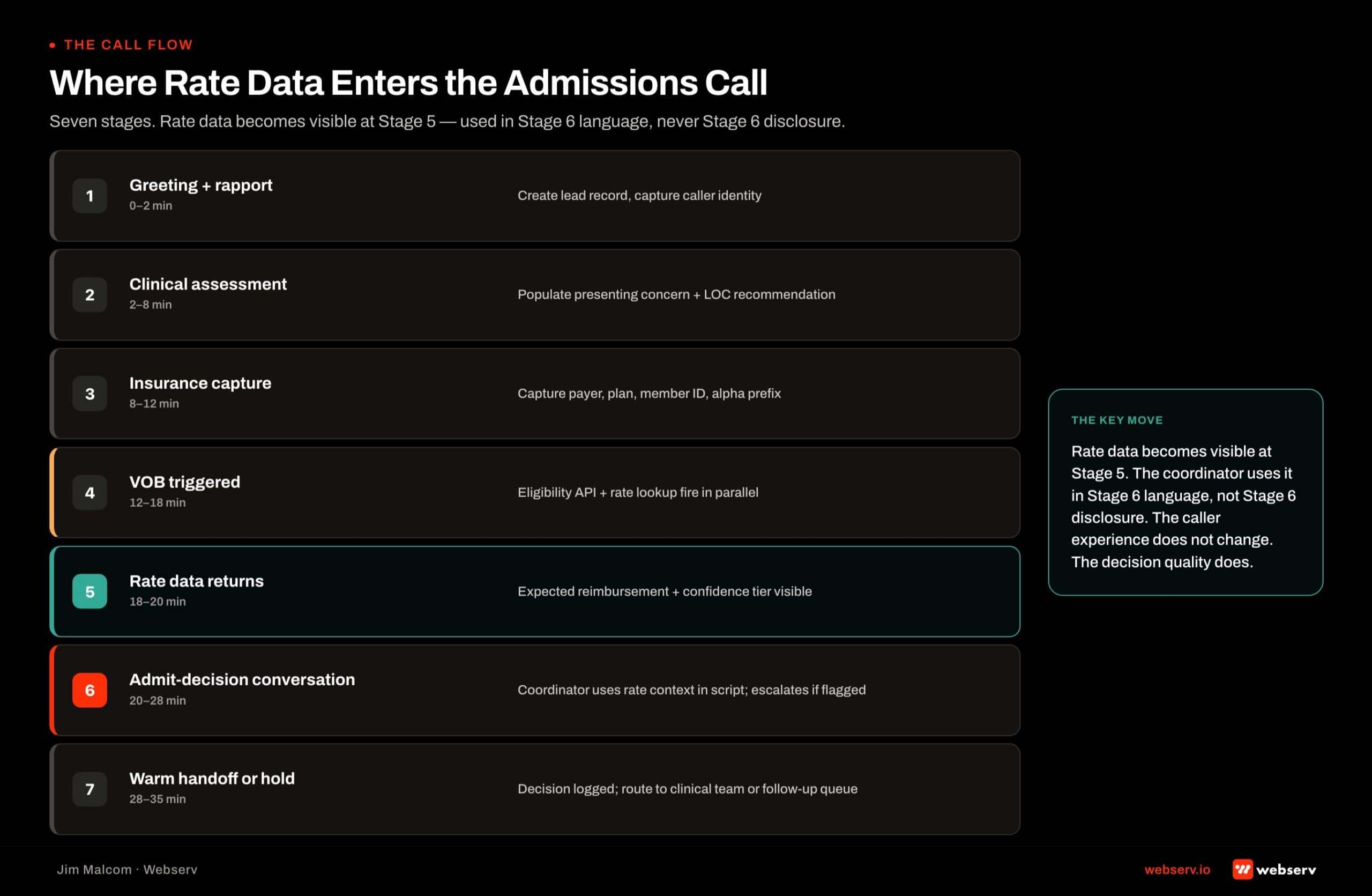
Step one, the coordinator answers the inbound call. Standard opener, active listening on why the family is calling, initial qualification questions. The first 60 seconds of the admissions call piece walks the opening in more depth.
Step two, once the patient’s insurance information is collected, the coordinator triggers the VOB check through her CRM. VOB comes back in under a minute on most modern eligibility tools.
Step three, at the same moment the VOB status returns, the rate intelligence field populates. The coordinator now sees two data points on her screen: the coverage confirmation and the expected reimbursement per day with a trust score attached. Both fields are internal-only. Neither gets read aloud on the call.
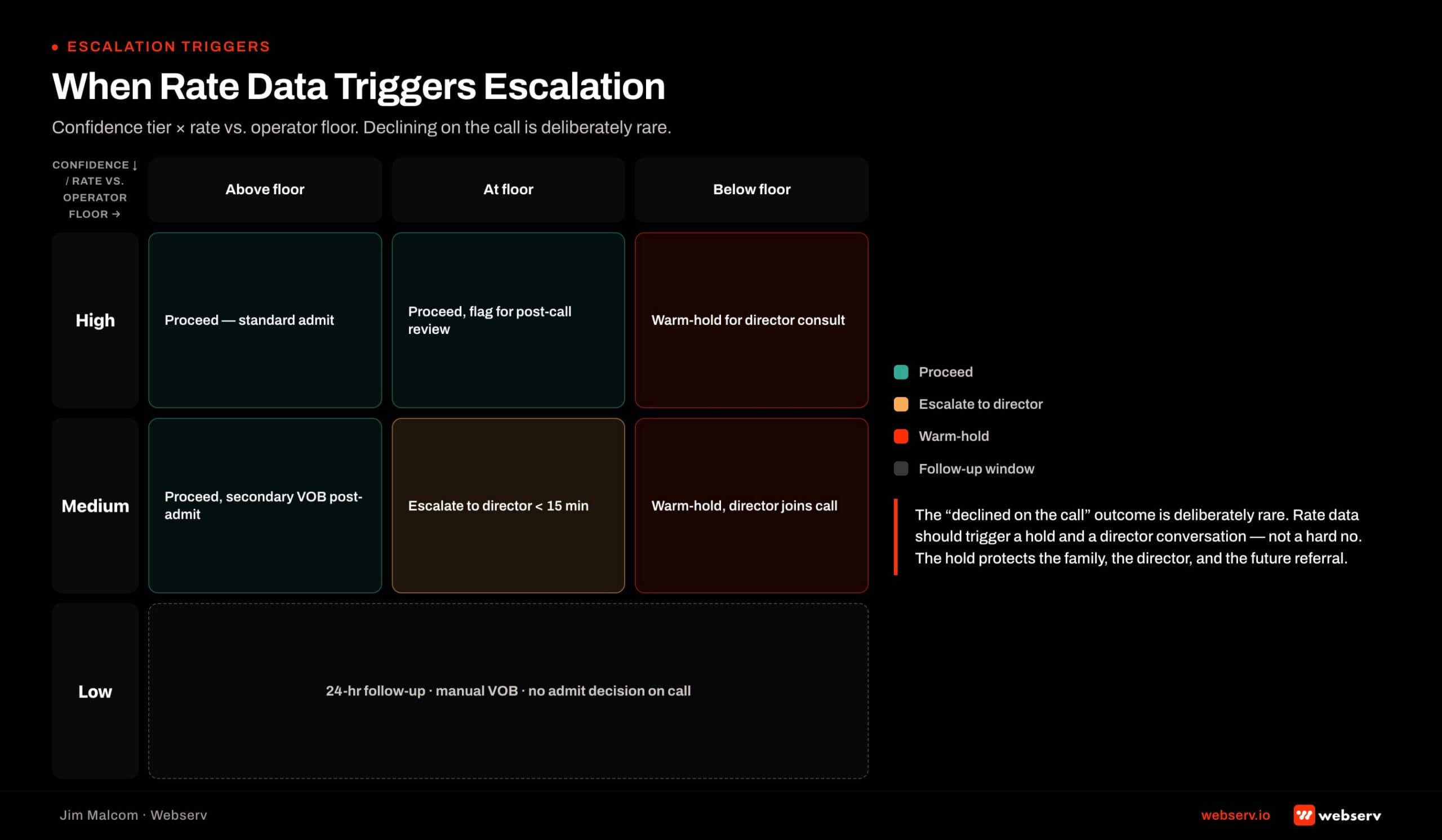
Step four, the coordinator applies the escalation triggers. If the expected reimbursement is above the facility’s program cost floor with a high or medium confidence trust score, the coordinator proceeds to schedule the admit.
If the expected reimbursement is below the cost floor, or the trust score is low, or the payer identifier resolves to a home plan the facility has flagged for review, the CRM auto-routes the call to the admissions manager queue.
Step five, in the escalation cases, the coordinator holds the call warm with the family while the manager reviews the rate data in real time.
The manager either approves the admit, redirects to a different level of care, or authorizes a specific script line for the coordinator to run with the family (usually offering a follow-up call within 24 hours).
None of that changes the family’s experience on the call in a way that erodes trust. What it changes is what happens after the coordinator hangs up.
Admits that should not be admits at their expected rate get caught before they become census misses on the collections report 90 days later. Webserv’s eligibility and reimbursement capability is where this workflow gets configured for treatment center clients.
What the coordinator says versus what the coordinator sees
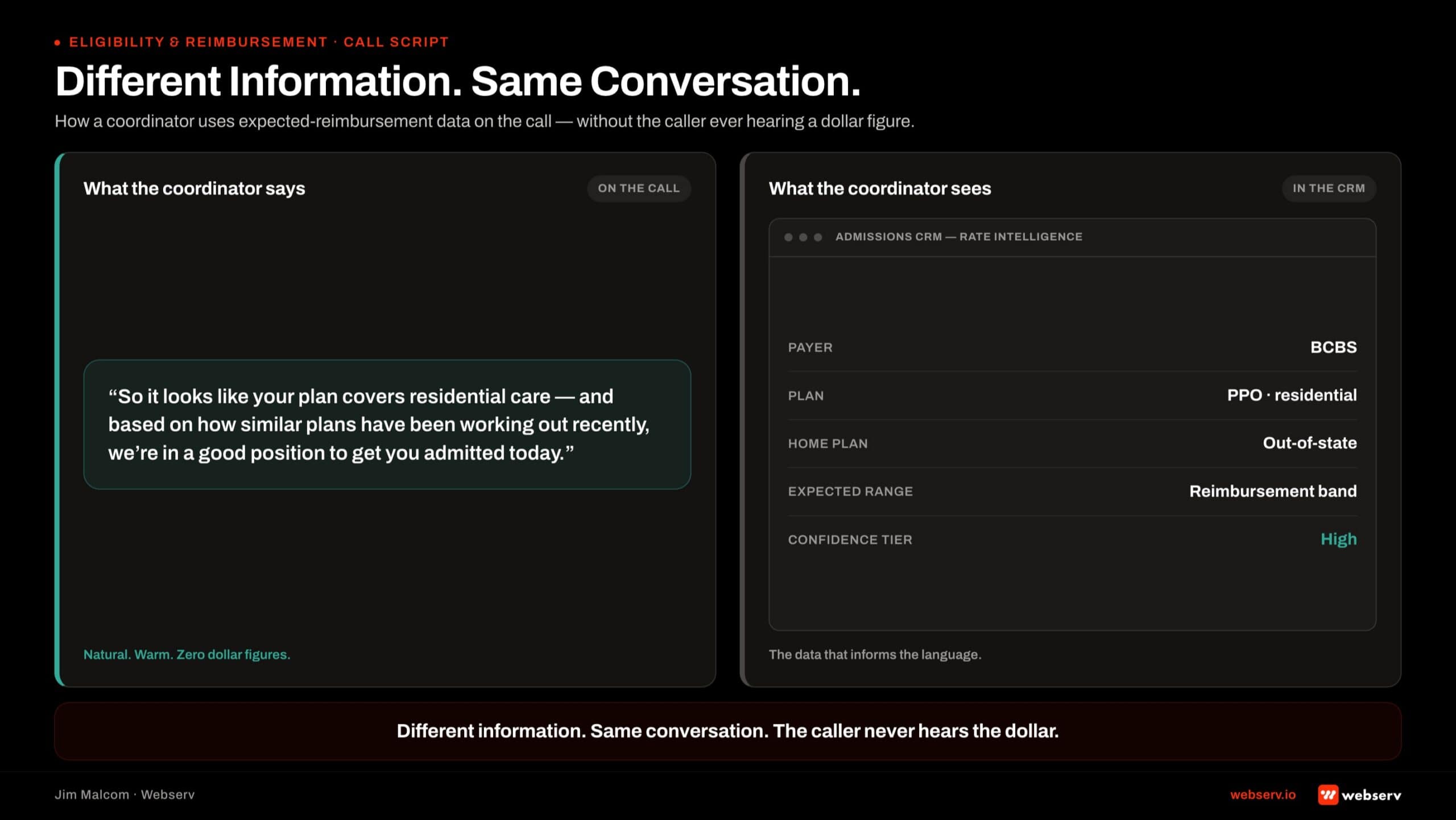
The single most important design principle in this workflow is that the coordinator’s script and the coordinator’s screen are two different things.
What the coordinator says on the call: standard admissions script, coverage confirmation (“your plan does cover treatment at our facility”), the next-step language for scheduling or follow-up. The rate data never appears in the family-facing language.
What the coordinator sees on the screen: VOB status, expected reimbursement with trust score, payer identifier resolution (including BCBS alpha prefix and home plan when applicable), and any escalation flags the CRM has attached. This is internal-only data that governs what happens after the call.
The reason this separation matters is HIPAA and family-audience trust. A family in the first hour of researching addiction treatment is not equipped to interpret “your payer reimburses at the low end of our expected range.” That sentence, spoken by a coordinator, produces confusion, distrust, and often a hang-up.
The rate data is for the admissions team to act on, not for the family to hear.
This is where the Hostage Dynamic on admissions teams piece connects. Coordinators who feel personally accountable for rate outcomes start scripting rate concerns into the call to justify their own admissions decisions.
The solution is not more coordinator empowerment on rate data. It is cleaner escalation and clearer manager accountability so the coordinator does not carry a decision that structurally belongs upstream.
When rate data triggers escalation
The three escalation triggers I define at every facility rollout are the following.
Trigger one: expected reimbursement below program cost floor. Every facility should have a per-day cost floor per level of care that represents the minimum reimbursement at which the admit produces positive contribution margin.
When the expected reimbursement returns below that floor, the admit escalates. Cost floor lives in the CRM configuration, not in coordinator memory.
Trigger two: low-confidence trust score with any rate near the cost floor. If the trust score is low (few claims in the pool, older data, or thin coverage of the specific alpha prefix), the coordinator should not make an admit decision based on the estimate alone.
The admissions manager reviews the situation and either authorizes the admit at operational risk or holds pending payer confirmation through the RCM team.
Trigger three: payer identifier flagged for review. Some facilities maintain a running list of specific payers, alpha prefixes, or home plans that have caused denials, extended payment delays, or reimbursement disputes.
When the rate intelligence lookup surfaces one of those identifiers, the coordinator routes to the manager regardless of the expected reimbursement number.
The point of formalizing these three triggers in the CRM is that the coordinator does not have to remember them. The system enforces them. That is the difference between a workflow that survives coordinator turnover and one that lives in one senior coordinator’s head.
HIPAA and family-audience boundaries on rate discussions
There is one more layer to get right, and it is the compliance layer.
HIPAA does not directly govern verbal discussions between a coordinator and a family member about the family member’s coverage.
Those conversations are within the scope of what the coordinator is authorized to have. What HIPAA does govern is the storage, sharing, and downstream use of the specific patient’s coverage and rate data.
Where facilities routinely trip up is on the storage-and-sharing side. Rate intelligence data lives in the CRM against the specific patient record. That data is protected health information the moment it is linked to the patient identifier.
The coordinator has authorization to see it. Referral partners do not. Marketing teams do not. Third-party consultants without a Business Associate Agreement do not.
The 42 CFR Part 2 layer sits on top of HIPAA for substance use disorder patient records specifically. Rate data linked to a SUD patient identifier carries the higher confidentiality standard.
The CRM metrics KPI spine piece walks the access-control mechanics that keep this data on the right side of both regulations.
For the family-audience side, the rule is simple: coordinators do not discuss payer rate variance with families on the call. The information exists for internal decision support.
If a family asks about reimbursement rates directly, the coordinator’s script line is to route the question to the billing team, who has a different conversation designed for that discussion after admit.
How rate data changes the hard-no and soft-no conversations
Two specific conversation shapes get substantially better when rate intelligence is in the workflow.
The hard-no conversation is when the facility cannot accept the patient at the expected rate. Before rate intelligence, this conversation happened after the admit, sometimes weeks later, when the collections report showed the reimbursement gap.
The family was already emotionally invested. The facility was already operationally invested. Backing out of the admit at that stage produced bad outcomes for everyone.
With rate intelligence in the workflow, the hard-no gets identified before the admit is scheduled. The admissions manager, not the coordinator, delivers the message. The specific script line I use: “We’re not the right fit for your loved one’s specific coverage right now.
Here are two facilities I trust that work with your plan more effectively.” That is a substantially better conversation than a mid-treatment discharge because the reimbursement math did not work.
The soft-no conversation is when the facility could accept the patient but at operational risk given the expected rate. Before rate intelligence, this conversation did not exist. The admit went forward and the operator absorbed the risk without knowing they were absorbing it.
With rate intelligence, the manager can make an informed call: admit with an adjusted operational plan, admit at reduced program services, or route to a different level of care with better reimbursement structure. The out-of-network reimbursement math piece covers the specific math the manager runs in that decision.
Integration with the CRM workflow
The specific CRM configuration changes required to make this work are surprisingly minimal.
First, add a rate intelligence data field on the patient record, populated by the eligibility check at the same moment the VOB status field populates. Second, add a trust score field alongside it.
Third, configure escalation triggers as automated CRM workflow rules that route to the admissions manager queue when any trigger condition fires. Fourth, add a manager review status field so the coordinator can see whether the escalation has been resolved before proceeding with the admit.
Most modern behavioral health CRMs (HubSpot, Salesforce, Dazos) support this configuration natively through custom fields and workflow automation. The specific configuration walkthrough for each is covered in the platform-specific pieces on HubSpot for treatment center admissions and its Salesforce sibling.
The one non-negotiable configuration is that the rate intelligence field must render on the same screen where the coordinator sees VOB status. Coordinators are running warm calls under time pressure. If the rate data lives two clicks away, it will not get looked at consistently.
COMMON MISTAKE
Scripting rate data into the family-facing conversation. The tool is on the coordinator’s screen; the conversation stays where it was before the tool arrived. Families in the first hour of researching addiction treatment cannot interpret “your payer reimburses at the low end of our expected range.” That sentence, spoken by a coordinator, produces confusion, distrust, and a hang-up.
Common mistakes when adding rate data to the call
Four failure modes recur across facilities that try to add rate intelligence without a structured rollout.
Mistake one: scripting rate data into the family-facing conversation. Covered above. The rate data is internal. It never enters the coordinator’s script.
Mistake two: giving the coordinator authority to make the admit decision on borderline rates. The coordinator’s job is to trigger the escalation, not to make the call. Facilities that skip this step end up with individual coordinators making inconsistent admits decisions and no ability to trace the reasoning downstream.
Mistake three: over-escalating. Every low-confidence trust score should not go to the manager. Every rate near the cost floor should not stop the admit.
The escalation triggers should be tight enough that they catch the real problems without turning the admissions floor into a queue of held admits waiting on manager review.
Mistake four: undertraining the coordinator on what the rate data means. Coordinators do not need to understand the technical mechanics of alpha prefix resolution or trust score calculation.
They do need to understand what the numbers mean at the workflow level and when to escalate. A 30-minute training pass, refreshed quarterly, is what this looks like.
The 30-day rollout playbook
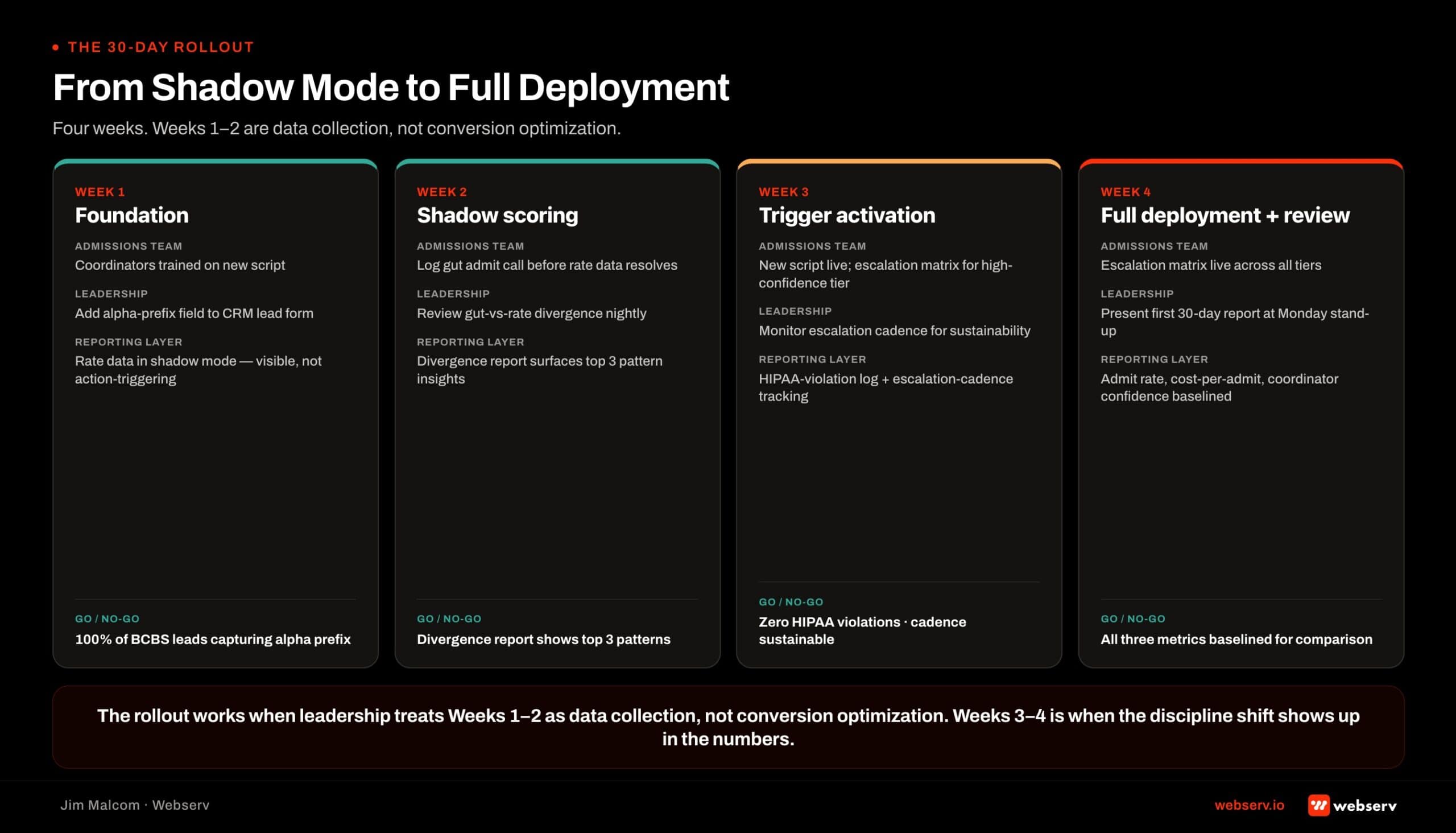
Adding rate intelligence to an admissions team’s workflow at a single-facility treatment center runs 30 days end to end.
Week 1: CRM configuration. Add the rate intelligence and trust score fields to the patient record. Configure the three escalation triggers as workflow rules. Set the manager review queue. Verify the rate data field renders on the same screen as VOB status.
Week 2: script and process alignment. Document the specific script lines the coordinator uses when an escalation is triggered (“I want to loop in our admissions manager for a moment on your case.
Can you hold for 90 seconds?”). Document what the manager does when the escalation lands (review, approve, redirect, or authorize a follow-up script). Document what happens in the CRM when the manager resolves the escalation.
Week 3: coordinator training. 30-minute training session for the admissions team. Cover what the rate data field shows, what the trust score means, and what triggers escalation. Practice with dummy call scenarios. Confirm every coordinator can articulate the escalation trigger criteria back to the manager.
Week 4: soft launch and calibration. Run the workflow live for a week with the manager reviewing every escalation to calibrate the triggers.
Adjust the cost floor, the trust score threshold, or the payer flag list based on what surfaces. By the end of week 4, the workflow should be running with only the escalations that actually require manager review.
The Admissions Process UG covers the broader admissions workflow this rate intelligence layer sits inside. What this piece adds is the specific integration mechanic for the rate data.
Frequently Asked Questions
For the fuller admissions technology stack, see behavioral health marketing guide and Dazos implementation guide.
When on the call does the coordinator use the rate intelligence data?
The coordinator sees the rate data on her screen at the same moment the VOB status returns, typically 30 to 90 seconds after she enters the patient’s insurance information into the CRM. She never says anything about the rate to the family on the call.
The rate data determines whether she proceeds to schedule the admit, routes to a different level of care, or escalates to the admissions manager. The family experience does not change based on what the rate data shows.
The coordinator’s role is to trigger the escalation when the rate data flags a threshold. The decision on whether to admit at a below-floor rate always sits with the manager, not the coordinator.
Can coordinators discuss expected reimbursement with families during the call?
No. Rate intelligence data is internal decision support. It never enters the family-facing conversation. Families asking about coverage should get a coverage-level answer (“your plan does cover treatment”).
Families asking about reimbursement rates specifically should be routed to the billing team for a separate conversation after admit. Coordinators discussing rate variance with families during intake produces confusion and trust erosion without any operational benefit.
The separation between the coordinator’s script and the coordinator’s screen is what keeps the workflow HIPAA-safe and family-audience appropriate simultaneously.
How does the coordinator know when to escalate to the admissions manager?
Three triggers, all configured in the CRM so the coordinator does not have to remember them. Expected reimbursement below the program cost floor escalates automatically. Low-confidence trust score on a rate near the cost floor escalates. Payer identifier flagged on the facility’s review list escalates.
The coordinator sees the escalation flag on her screen and follows the documented script line to hold the family while the manager reviews. The system enforces the triggers rather than relying on coordinator judgment call by call.
This is the difference between a workflow that survives coordinator turnover and one that lives in one senior coordinator’s head. Formalize the triggers in the CRM. Do not rely on memory.
Does adding rate intelligence require replacing our current VOB tool?
No. Rate intelligence runs alongside VOB, not instead of it. Coverage confirmation is still necessary for the admissions workflow, and VOB tools do that job well. What rate intelligence adds is the second data source, sourced from adjudicated claims, that VOB tools structurally cannot see.
Some tools return both data sets in the same call, which reduces the number of tools in the admissions ops stack. Others run alongside a separate VOB tool. Either configuration works as long as both data sources are in the workflow before the admit decision is made.
The wrong configuration is running only coverage confirmation and treating the collections surprise 90 days later as a payer problem instead of a data problem.
How long before an admissions team gets comfortable with the new workflow?
Four weeks for the full team to internalize the workflow. Two weeks for calibration on the escalation triggers so the manager review queue is running at a reasonable volume rather than catching every borderline case.
Six to eight weeks before the operational benefit (fewer negative-margin admits, cleaner census planning, better manager awareness of reimbursement risk) shows up in the monthly report. The 30-day rollout playbook above covers the setup mechanics.
The operational payback takes another 30 to 60 days to compound into visible reporting improvement. Facilities that pull the plug at week 6 because the numbers have not moved yet are pulling the plug before the payback window opens.
Jim Malcom is Vice President of Admissions at Webserv, a behavioral health marketing agency and admissions ops platform working with residential, outpatient, and telehealth treatment providers. He leads the admissions floor and works directly with treatment center operators on admissions ops discipline, CRM configuration, and marketing-to-admissions alignment. If you want to walk your current call script against a rate-intelligence workflow, start with a Visibility Gap conversation.
HFMA’s 2025 revenue cycle analysis describes AI agents that “flow results back into operational systems and trigger next best actions” as the direction the entire admissions financial stack is moving — from once-per-day batch VOBs to real-time, decision-supporting rate intelligence at the point of the call. The 30-day rollout above is one operator-level path into that pattern, sized for a single-facility or three-facility operator, not an enterprise RCM transformation.