A Tennessee mental-health outpatient came to Webserv with Dazos already installed and a PPC close rate stuck at 17 percent. The operator’s assumption was that the platform was broken. The platform was not the problem. The configuration was.
Nothing about Dazos had been mapped to how the admissions team actually worked. Fields existed. Nobody used them. Automations were never deployed. Reporting was gut, not data.
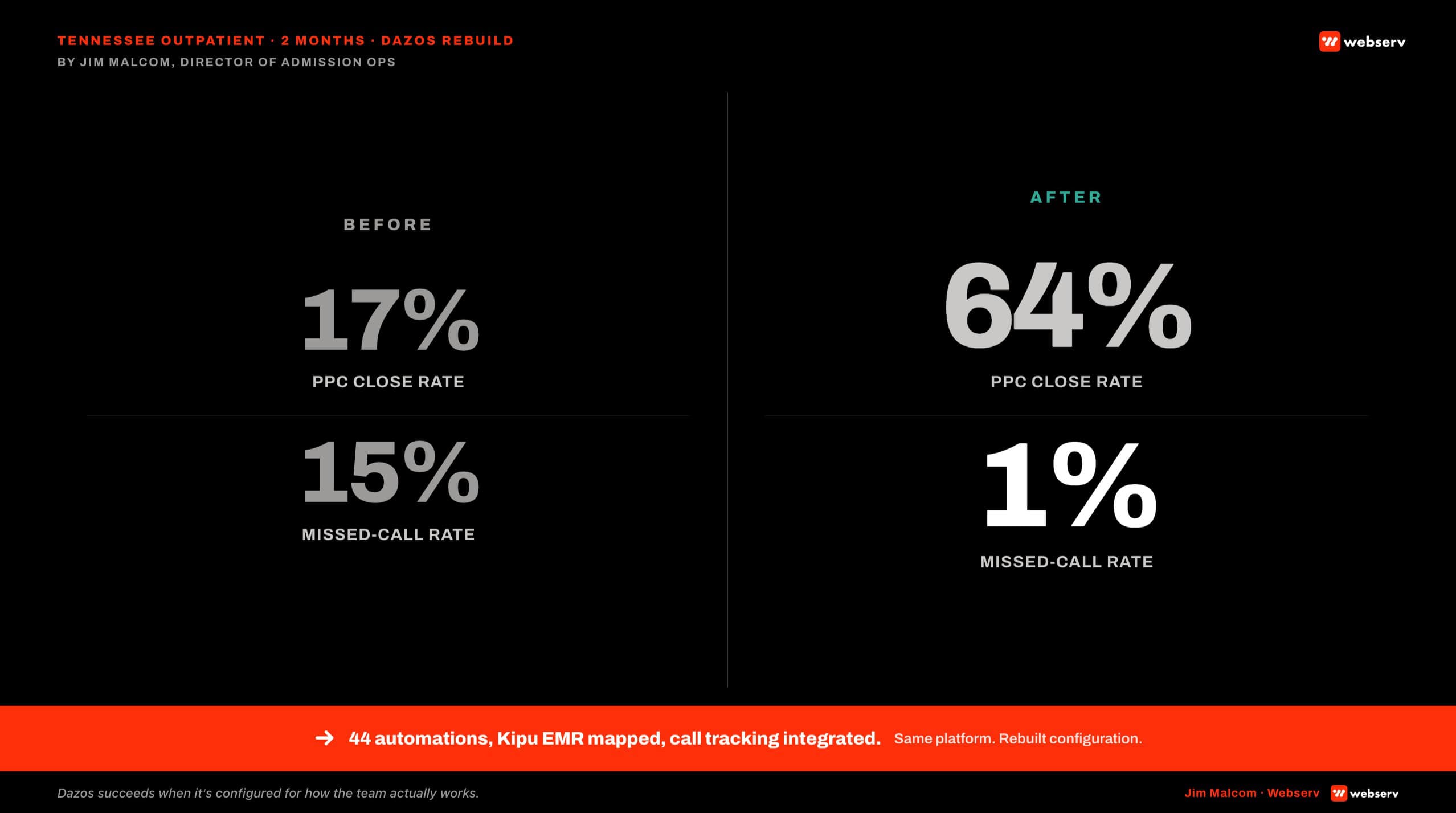
Two months after Webserv’s admission ops team rebuilt the CRM from the ground up, the same team, the same platform, and the same marketing spend produced a 64 percent PPC close rate and dropped missed calls from 15 percent to 1 percent.
The marketing did not change. The admissions engine did.
Disclosure: Webserv is a Dazos implementation partner. That relationship is why we have deployed the platform inside enough behavioral health facilities to see the pattern this article describes, and why we are upfront about the cases where a different CRM is the right pick.
The partnership does not change how we evaluate a facility’s needs. Webserv does not receive commissions on Dazos license sales.
Key Takeaways
- A Tennessee behavioral health outpatient came to Webserv with Dazos already installed and a PPC close rate stuck at 17 percent. Two months of rebuild (same platform, same team, same marketing spend) moved that rate to 64 percent and dropped missed calls from 15 percent to 1 percent.
- Dazos is a behavioral-health-native CRM. That is a starting point, not a solution. Installing the platform is table stakes. Configuring it around a facility’s actual admissions workflow is the work that moves the numbers.
- The Tennessee rebuild deployed 44 automations across intake, VOB, and referral workflows, integrated CallRail for call tracking, and bidirectionally mapped Kipu EMR for patient sync. Every one of those was a configuration choice, not a platform feature.
- Dazos wins at small-to-mid facilities and 2-8 location portfolios where admissions is the operational bottleneck. It is not always the right pick for enterprise portfolios of 20+ facilities with dedicated Salesforce admins and heavy custom development budgets. Salesforce Health Cloud or a customized HubSpot can be defensible in those environments.
- Three failure modes account for most underperforming Dazos deployments: mistaking install for configuration, no automation deployment, and no reporting layer. All three show up on facilities that thought Dazos was the fix and skipped the configuration work.
- A Webserv Dazos implementation runs the 6-week Admission Ops sprint: onboard and audit, lead tracking, CRM pipeline, VOB workflow, training and launch. One-time setup is $7,500 to $15,000. Retainer runs $3,500 to $15,000 per month depending on portfolio size.
- Webserv is a Dazos implementation partner. We disclose that openly. The partnership is why we see the pattern this piece describes and why we are direct about the cases where Dazos is not the right CRM.
What Dazos Is Built For
DAZOS SHIPS WITH THE BEHAVIORAL HEALTH OBJECT MODEL OUT OF THE BOX
VOB with structured fields for expected reimbursement, prior-auth flags, and payer product type. Alpha prefix routing on member IDs. Level of care and referral partner attribution. Coordinator scorecards visible to the coordinator, not just the manager. Dazos IQ as the built-in analytics and reporting layer. A generic CRM has to be built to that specification. Dazos starts there.
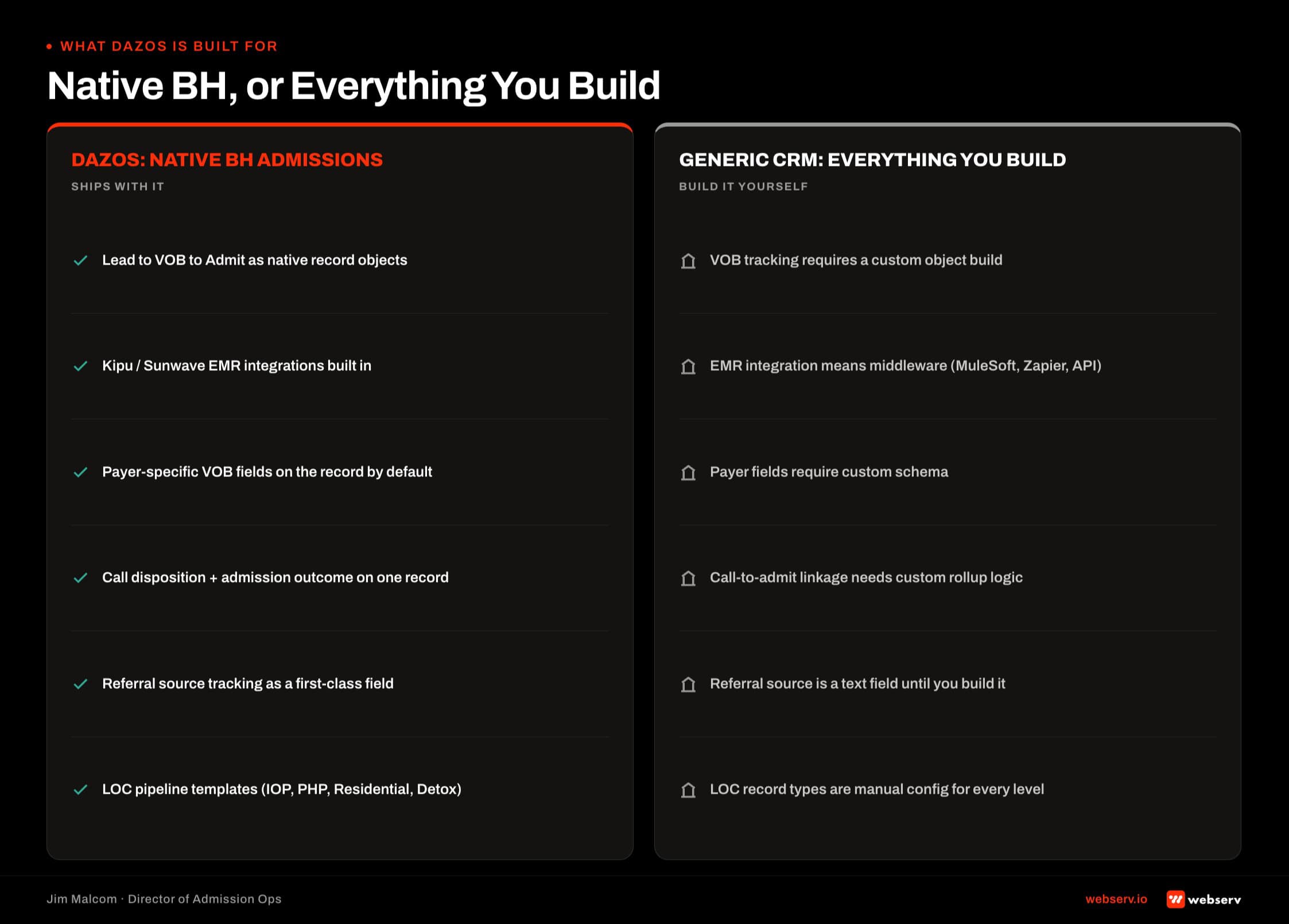
Dazos is a behavioral-health-native CRM. The field structure, VOB workflow, coordinator ergonomics, and admissions logic shipped with the platform already know what an alpha prefix, a level of care, a payer product type, and a coordinator scorecard are.
Generic CRMs like Salesforce and HubSpot can absolutely run a behavioral health facility. The difference is that every one of those objects has to be built as a custom object with a custom workflow, which is typically a four-to-six-month build before the platform produces value.
Behavioral health admissions volumes are concentrated at facilities with structured intake and referral workflows. Facilities without formalized admissions operations show materially lower conversion rates from referral to admit (SAMHSA, National Survey on Drug Use and Health).
Admissions infrastructure, not marketing spend, is what determines the conversion result at a treatment center. Dazos is admissions infrastructure by default.
When Dazos Wins vs When It Doesn’t
Dazos wins at small-to-mid single-brand facilities and 2-8 location portfolios where admissions is the operational bottleneck and the team wants a behavioral-health-native workflow without a 6-month Salesforce build.
Dazos is not always the right pick for enterprise portfolios of 20+ facilities with dedicated Salesforce admins, heavy custom development budgets, and existing enterprise data lakes. In those environments, Salesforce Health Cloud or a heavily-customized HubSpot instance can be the defensible pick.
Disclosure: Webserv is a Dazos partner. We have deployed Dazos across dozens of behavioral health facilities, which is why we have seen where the platform wins and where it doesn’t.
In the enterprise-portfolio scenarios above, we have recommended Salesforce Health Cloud or a heavily-customized HubSpot instead of Dazos. We will say so directly in the diagnostic phase of any engagement.
The honest cut is that most treatment centers are not enterprise portfolios. They are single-brand or small-portfolio operators where the four-to-six-month generic-CRM build is time and budget they do not have. Dazos exists to remove that build. That is the operational fit.
The Tennessee Implementation: 44 Automations That Rebuilt the Engine
The anchor case. A Tennessee mental-health outpatient came to Webserv running Dazos already, PPC close rate 17 percent, missed calls 15 percent, admissions team frustrated. The platform was in place. Nothing was mapped to how the team actually worked.
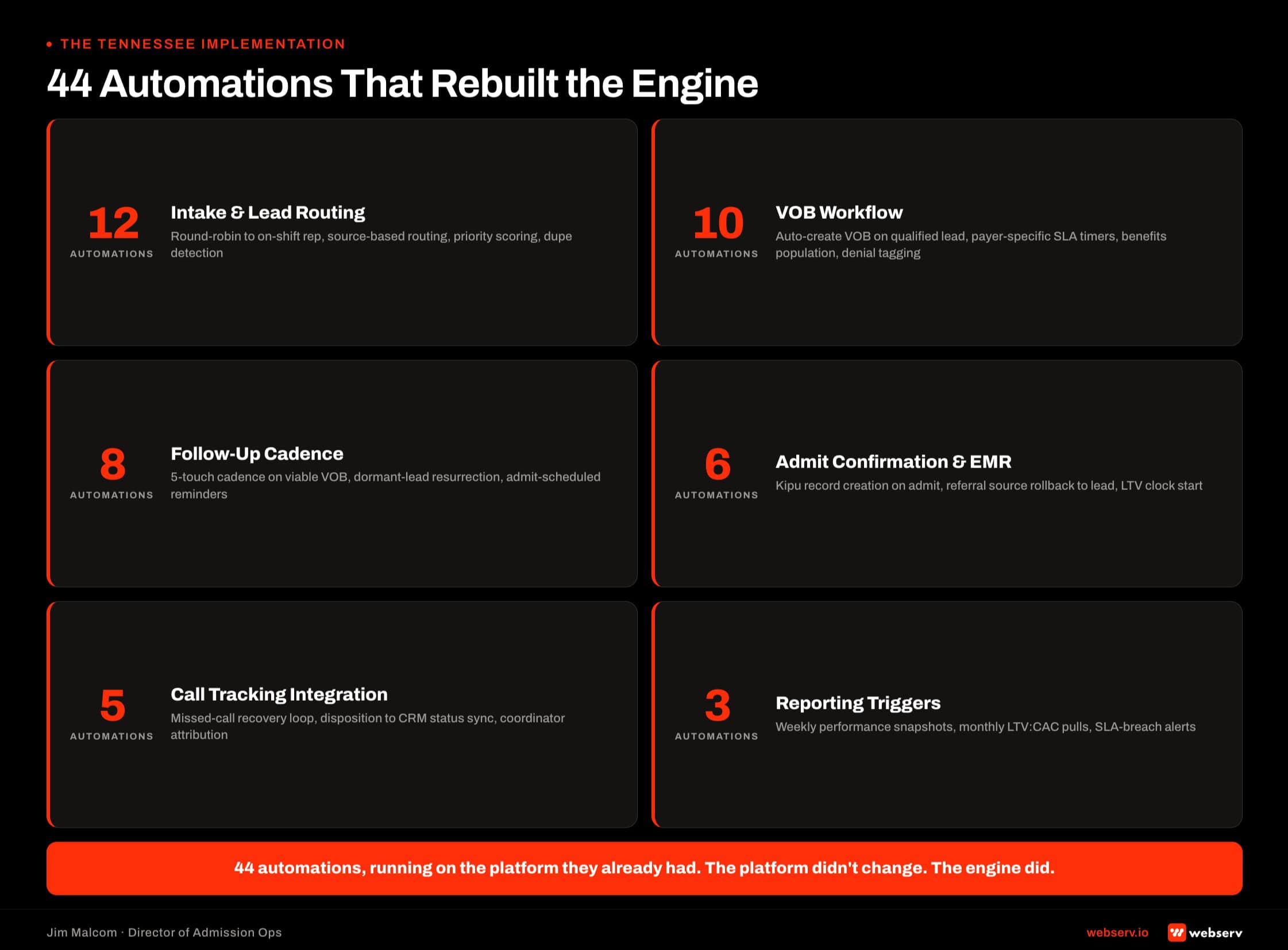
Webserv rebuilt the CRM from the ground up. Four workstreams inside a six-week sprint.
- Call Tracking Integration. CallRail routed and logged every inbound call, with campaign source metadata attached to the Dazos lead record on creation. Missed-call SMS follow-up triggered inside 60 seconds. Missed call rate moved from 15 percent to 1 percent inside the first month.
- Kipu EMR Bidirectional Mapping. Patient-level sync so admissions never re-entered discharge status and clinical never re-entered admit source. Both systems held one truth about the patient. The handoff between admissions and clinical stopped being manual data entry.
- 44 Workflow Automations. Intake auto-assignment by shift. VOB task creation on status change. Referral partner tag routing. Prior-auth flag surfacing at admission decision time. Coordinator scorecard population from live call data. Every automation removed a manual step the coordinators had been doing on top of the platform.
- Dazos IQ Reporting Layer. Custom dashboards for admissions director, coordinator lead, and CEO. Leadership decisions moved from gut to data the CRM already held. The KPI spine every admissions CRM should carry finally lived where the admissions team could see it.
The results. PPC close rate 17 percent to 64 percent in two months. Missed call rate 15 percent to 1 percent. Same coordinators. Same marketing spend. Same clinical program. Same Dazos license.
The marketing didn’t change. The admissions engine did.
Configuration Choices That Actually Move Admissions
The Tennessee case is one instance of a pattern. Six configuration choices consistently move admissions when Dazos is deployed correctly, and consistently fail to move admissions when the choices go unmade.
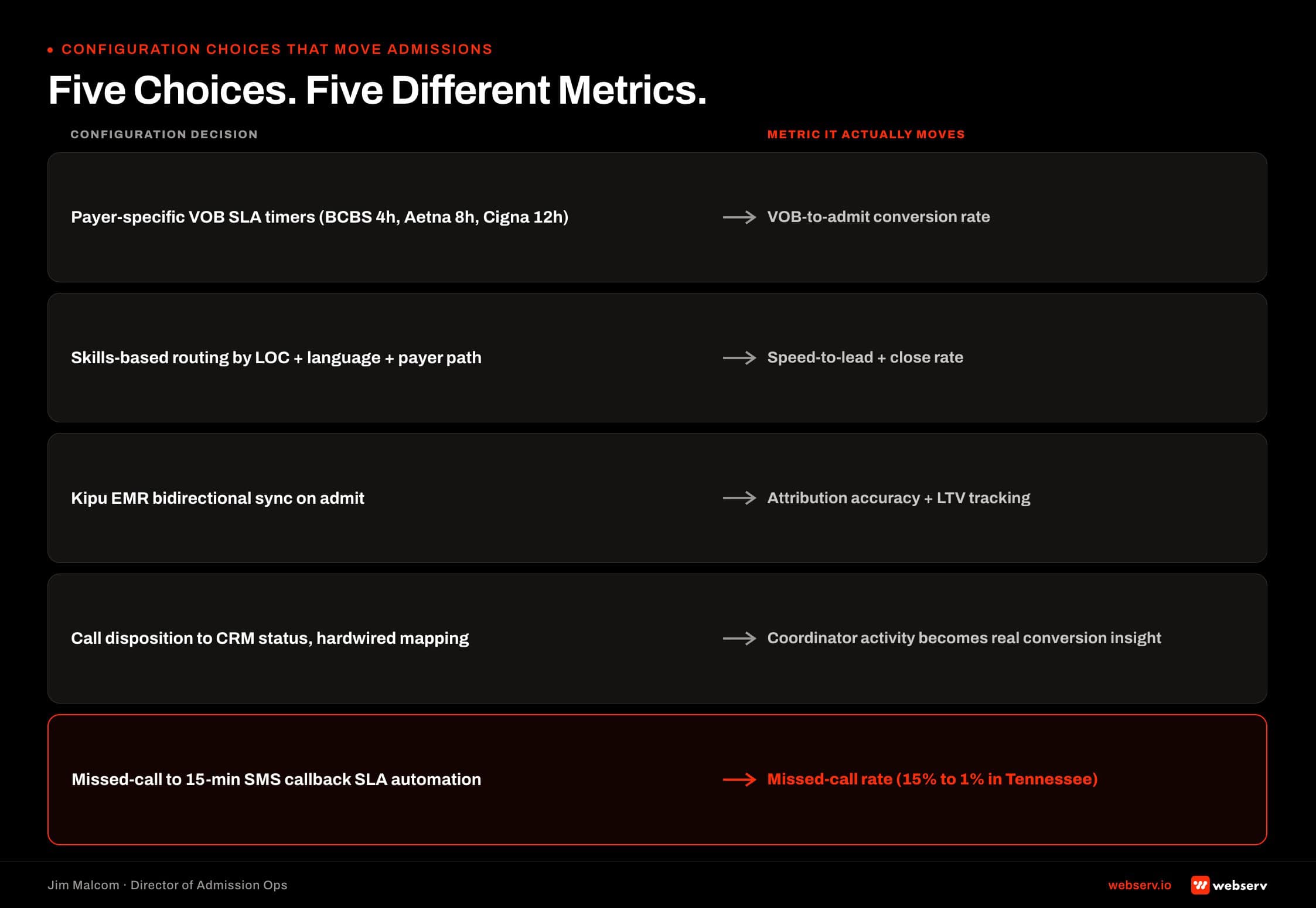
Pipeline stages that match the actual admissions journey, not the vendor’s default template. Every facility has its own definition of what “hot,” “warm,” and “committed” mean. The template does not.
VOB object with structured fields for expected reimbursement, prior-auth flags, and payer product type. This is where the KPI spine every admissions CRM should carry starts producing coordinator-visible data.
Source attribution wired into call tracking and form capture, so every lead carries its source through admit. If admits by source is not accurate, marketing spend is guessing.
Coordinator scorecards visible to the coordinator, not just the manager. Scorecards used only for review become a compliance exercise. Scorecards the coordinator sees daily become a coaching tool.
Prior-auth and medical-necessity flags surfaced at admission decision time, not billing time. This is the flag that keeps admissions from accepting cases the payer will down-code 60 days later.
Missed-call escalation with SMS follow-up inside 60 seconds. This is the single largest and cheapest lift most facilities have available. The Tennessee move from 15 percent to 1 percent lived here. It also connects to the broader admissions process framework.
Evaluating Dazos Against a Generic CRM
DAZOS VS GENERIC CRM SCORECARD
Behavioral health field customization: Dazos out-of-the-box, generic requires custom object build. VOB workflow: Dazos native object, generic requires custom object plus workflow build. Dashboard flexibility: Dazos IQ ships tight-to-purpose, Salesforce Reports and HubSpot Reports are more flexible but require an admin. Coordinator ergonomics: Dazos single-pane admissions workflow, generic multi-tab enterprise UI. Time-to-value: Dazos 6-8 weeks configured, generic CRM 4-6 months of custom build. Total cost of ownership over three years: Dazos platform plus implementation, generic CRM license plus admin FTE plus implementation partner.
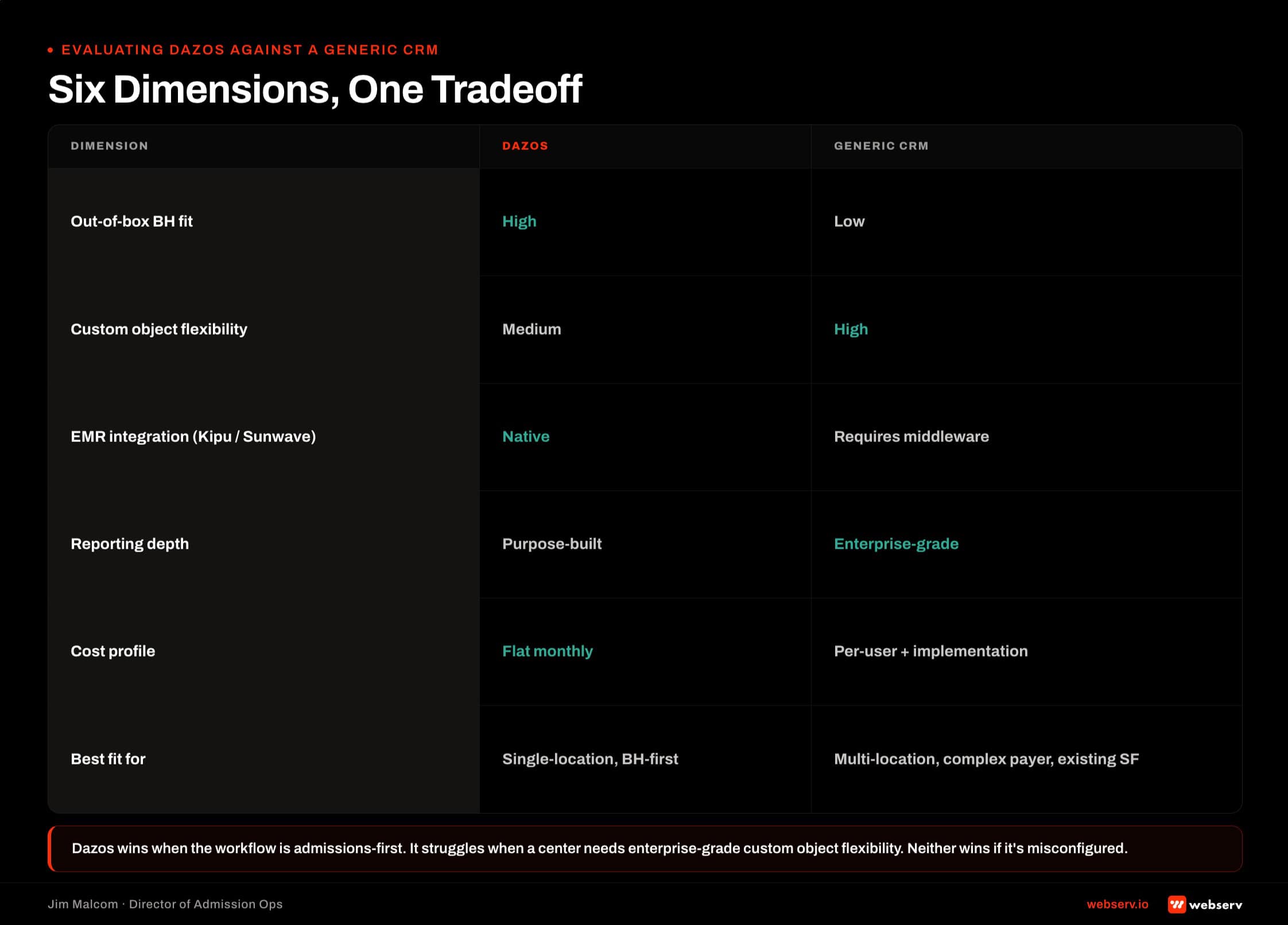
Facilities running a real evaluation should compare against the CRM shortlist for behavioral health with those six dimensions in mind.
The answer is almost always Dazos for small-to-mid operators and portfolios in the 2-8 location range. The answer is sometimes Salesforce Health Cloud for enterprise portfolios that already carry Salesforce infrastructure.
The tradeoff is not about which platform is better. It is about which platform fits the operational profile of the facility running the evaluation.
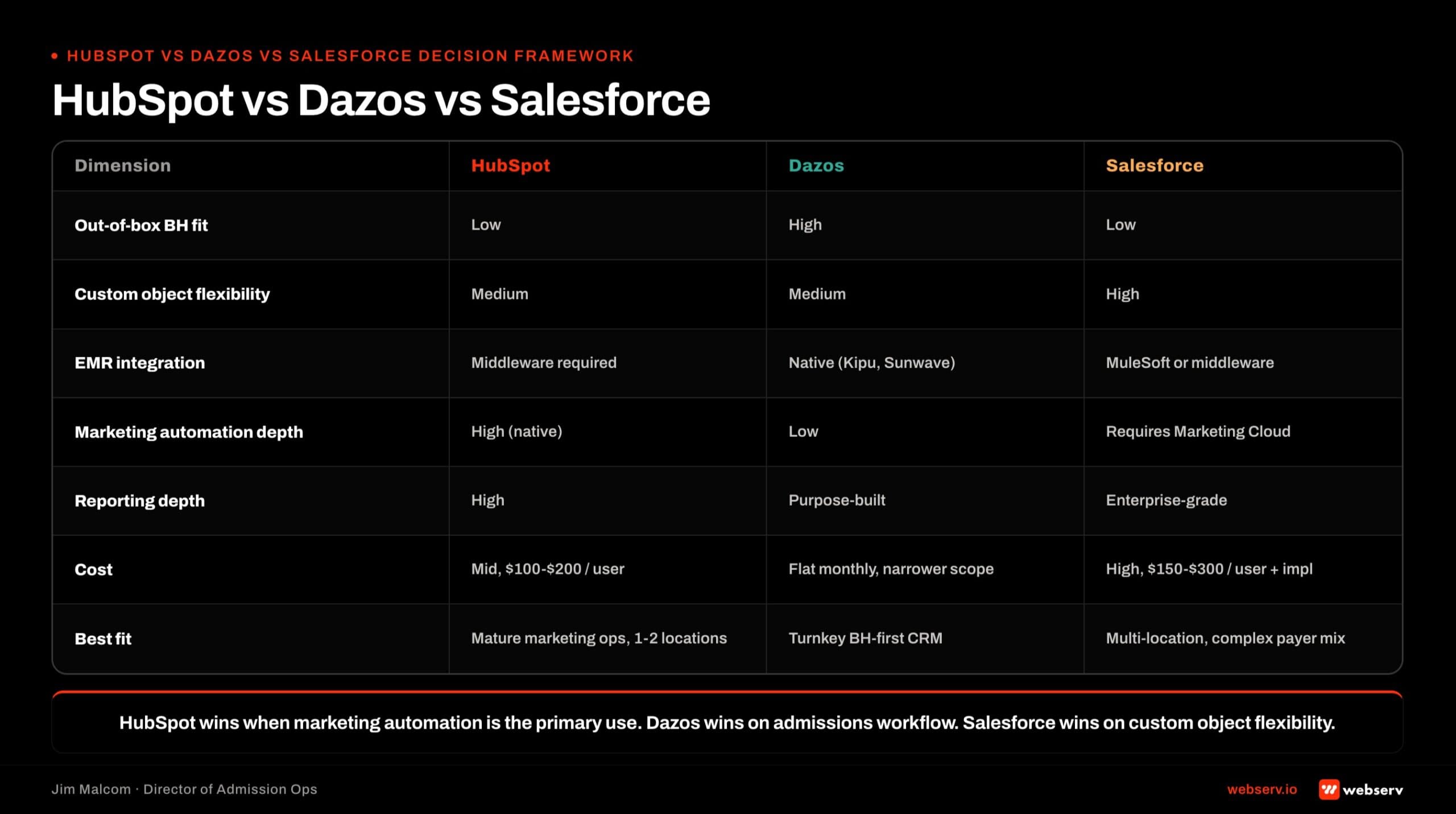
HubSpot vs Dazos vs Salesforce Decision Framework
Feature-by-feature comparison based on published product documentation as of 2026-07.
Time to launch. HubSpot as marketing automation: 2-3 weeks configured. HubSpot as full admissions system of record: 8-12 weeks. Dazos: 2-4 weeks turnkey. Salesforce: 6-12 weeks with consultant.
Native behavioral health object model. HubSpot: no (requires Enterprise tier custom object build). Dazos: yes (out-of-box). Salesforce: no (requires custom object build).
Marketing automation depth. HubSpot: deep (built as marketing automation first). Dazos: light. Salesforce: moderate (via Marketing Cloud, sold separately).
Coordinator workflow ergonomics. HubSpot: designed for B2B sales, not admissions call floor. Dazos: purpose-built for admissions. Salesforce: general-purpose (customizable but heavy).
BH EMR connectors. HubSpot: middleware required. Dazos: native. Salesforce: middleware required.
Annual cost (mid-size facility). HubSpot Marketing Hub Professional plus Sales Hub Professional: $20K-$40K. HubSpot Enterprise: $40K-$80K. Dazos: $20K-$40K. Salesforce: $30K-$80K or more.
Best for. HubSpot: marketing automation upstream of an admissions CRM, or admissions system of record for small facilities under 15 admits per month. Dazos: single-mission behavioral health admissions system of record. Salesforce: enterprise portfolios with existing Salesforce footprint and complex payer mix.
The clean architecture for most mid-size facilities. HubSpot for marketing automation and pre-lead nurture. Either Dazos as the behavioral-health-native admissions CRM or Salesforce as the enterprise-portfolio admissions system of record. The two integrate cleanly on lead handoff via native or middleware connectors.
COMMON MISTAKE
Configuring HubSpot as a general B2B CRM and expecting it to work for admissions. HubSpot ships with defaults tuned for SaaS-style pipelines, not for admissions workflows. The custom object model, deal stages, and workflow automation all need behavioral-health-specific configuration before HubSpot produces the reporting an admissions team can actually use.
Common Dazos Implementation Failures
Three failure modes account for most underperforming Dazos deployments. All three show up on facilities that assumed the platform itself would move the numbers and skipped the workflow build underneath.
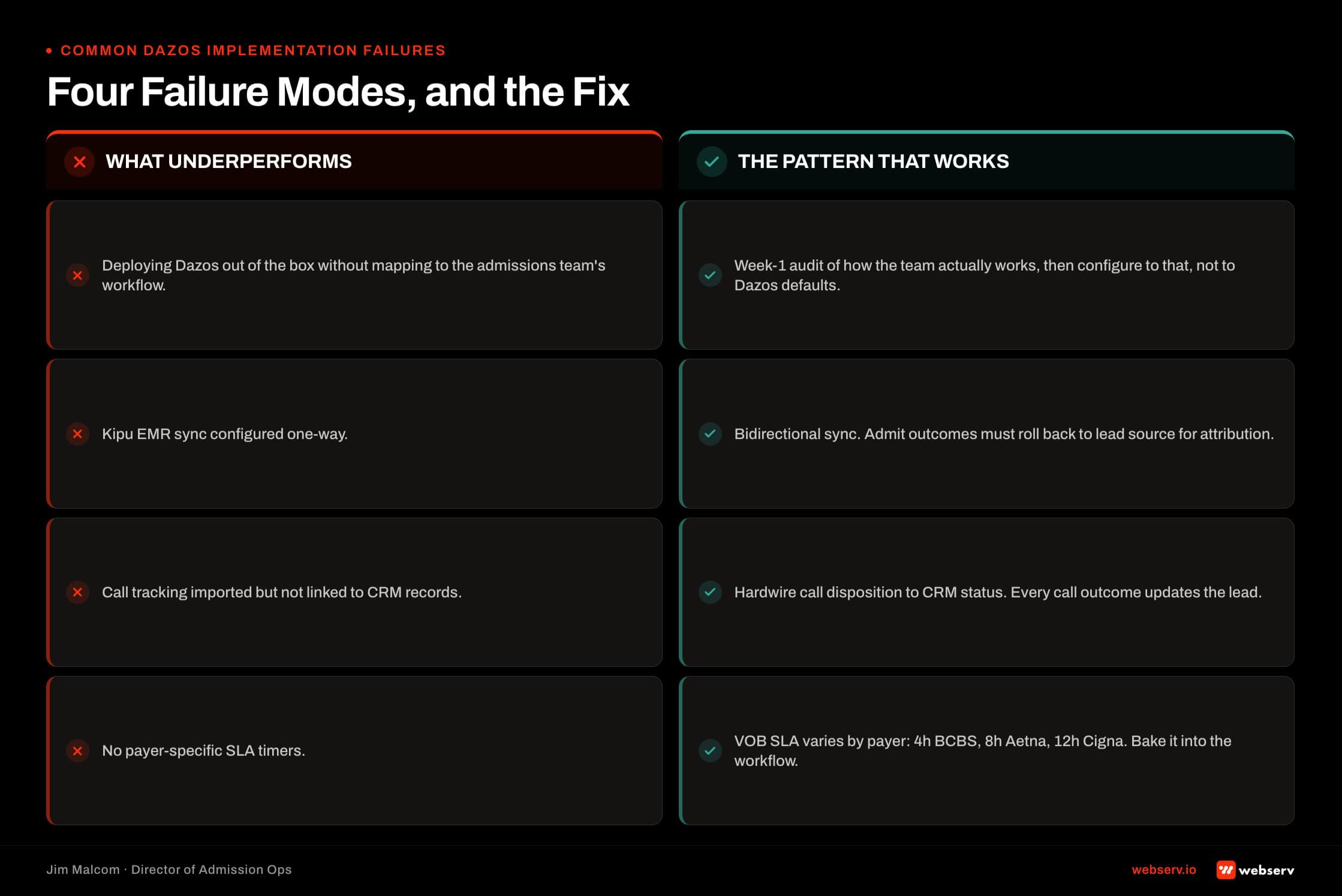
Mistaking install for configuration. Dazos was deployed, but nothing was mapped to the facility’s actual admissions workflow. Fields exist. Nobody is using them. The CRM becomes a contact database with a behavioral health skin.
Healthcare CRM implementations that include workflow configuration and automation deployment produce measurable admissions improvements. Install-only deployments produce minimal ROI (HFMA, Revenue Cycle Management).
No automation deployment. Coordinators are still doing manual task creation, manual follow-up, manual VOB status updates. The platform is a filing cabinet with a login.
This is the coordinator hostage dynamic that stalls admissions CRMs: the coordinators are doing work the CRM should be doing, and no reporting layer surfaces the gap.
No reporting layer. Dazos IQ was never turned on or was turned on with default dashboards nobody looks at. Leadership makes decisions on gut, not on data the CRM already holds. Turning Dazos IQ on is not the same as making it useful.
Integrating Dazos With Call Tracking, EMR, and Billing
Integration mechanics at operator depth. The three surfaces every treatment center has to wire.
Call tracking. CallRail is the default integration, but Twilio or vanity DID stacks also work. The pattern is the same: every call routes and logs into Dazos with source metadata attached to the lead record, so admits by source is accurate through the funnel.
EMR. Kipu is dominant in outpatient behavioral health, with Sunwave and a handful of others in play. The integration goal is bidirectional patient sync, so admissions doesn’t re-enter discharge status and clinical doesn’t re-enter admit source.
Both systems hold one truth about the patient. The admissions hub and its integration surface is where that handoff design happens.
Billing. External billing systems or in-house RCM. The admit-to-billing handoff carries structured payer and product-type metadata so RCM inherits the reimbursement expectation the VOB captured. Anything less and reimbursement expectation gets rebuilt inside billing from scratch.
What a Webserv Engagement Looks Like
The Webserv Dazos implementation runs a 6-week Admission Ops sprint.
Week 1, Onboard and Audit. Kickoff, intake assessment, gap map, roadmap.
Week 2, Lead Tracking. Call tracking configuration and source mapping into Dazos.
Week 3, CRM Pipeline. Pipeline stages, automations, early reporting.
Week 4, VOB Workflow. VOB object built out with prior-auth flags and status tracking.
Weeks 5-6, Training and Launch. Playbooks, QA feedback loops, live coordinator training.
Pricing: one-time setup $7,500 to $15,000 depending on center size, CRM complexity, and integration scope. Ongoing retainer $3,500 to $5,000 per month for 1-2 locations, $5,000 to $8,000 per month for 3-5 locations, $8,000 to $15,000 per month for 6+ locations.
The Fast-Track Diagnostic is the low-friction entry: $3,000, credited 100 percent toward month one if the facility moves forward. Three-day audit of the current CRM configuration, call tracking posture, and reporting layer. Delivers a gap map, prioritized punch list, and a clear stay-or-reconfigure recommendation.
For the fuller admissions technology stack, see behavioral health marketing guide and HubSpot for treatment center admissions.
Salesforce for Admissions
Why Salesforce for BH Admissions Specifically
Salesforce is worth the license spend when the facility already runs it elsewhere in the org or when the reporting requirements exceed what a turnkey CRM ships with.
Insurance verification friction is one of the most-cited barriers to treatment access for substance use disorder in behavioral health (SAMHSA, National Survey on Drug Use and Health). A Salesforce build that resolves that friction at the admissions layer is doing operator-grade work, not sales-team work.
When Salesforce wins. Multi-location groups already running Sales Cloud for referral relationships. Facilities with complex payer mixes needing custom VOB reporting. Organizations that want to build their own reports without a vendor gatekeeper. Groups planning to bolt on Marketing Cloud, Service Cloud, or a custom Lightning app.
When Salesforce is overkill. Single-location facility under 20 beds. No dedicated ops or admin person. No integrations planned beyond CRM. Budget under $30K per year all-in.
The decision framework is a three-question test. Does the org already run Salesforce anywhere? Does the integration count exceed three? Is there a dedicated Salesforce admin (in-house or contracted)? Two or three yeses points to Salesforce. Zero or one yes points to Dazos on the same operational spine.
The Custom Object Model for VOB Tracking
The single most important build decision. Create a VOB__c custom object as a child of Lead or Contact. Not a set of fields on the Lead object. A separate object.

The LOC Approved field maps to the standard levels of care ASAM defines for behavioral health: detox, residential, PHP, IOP, and OP (ASAM Criteria). Encoding LOC as a picklist tied to ASAM levels is the difference between a Salesforce build that speaks admissions language and one that speaks mortgage-loan language.
Required fields on VOB__c:
- Payer (picklist: Anthem, BCBS, Aetna, Cigna, UHC, Kaiser, Medicaid, Medicare, self-pay, other)
- Plan Name (text)
- Alpha Prefix (text, 3-character validation for BCBS)
- Group Number (text)
- Coverage Status (picklist: pending, viable, non-viable, needs-more-info)
- In-Network / Out-of-Network (picklist)
- Deductible / Out-of-Pocket Max (currency)
- Expected Reimbursement Per Day (currency)
- Prior Auth Required (checkbox)
- Prior Auth Status (picklist)
- Days Authorized (number)
- LOC Approved (picklist: detox, residential, PHP, IOP, OP)
- VOB Requested By (user lookup)
- VOB Completed By (user lookup)
- VOB Completion Timestamp (datetime)
- Notes (long text)
Why a child object beats fields-on-Lead. Multiple VOBs per patient (re-verification, LOC changes, secondary payer). Historical audit trail across every verification attempt. Reporting on VOB velocity independent of lead velocity.
A single VOB set of fields on the Lead object collapses the moment a patient needs re-verification or carries secondary insurance. Two verifications on one lead means one gets overwritten. The child object holds the full history.
The build also mitigates the coordinator hostage dynamic where the single coordinator holding VOB tribal knowledge becomes a single point of failure. Structured data survives turnover. Notes fields do not.
Pipeline Stages That Match Admissions
Four stages. Intake, VOB, Follow-Up, Admit. Each with entry criteria, an owner, required fields, an SLA, and exit criteria. This pipeline shape is the same one covered in the broader admissions process framework.
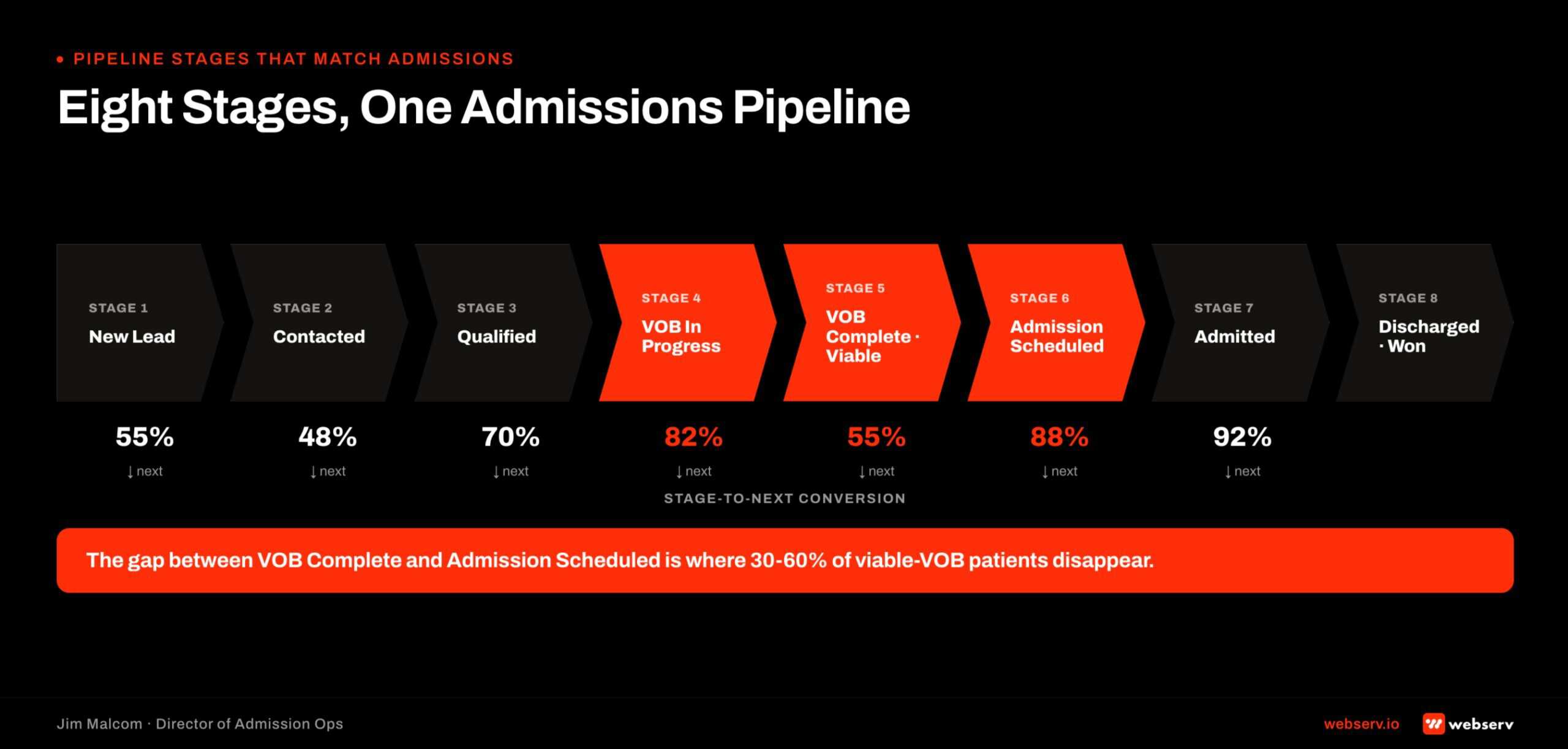
Intake. New lead created. Owner is the intake coordinator. Required fields: name, phone, source, presenting concern. SLA: contact attempt inside 60 seconds. Exit criteria: coordinator confirms fit and requests VOB.
VOB. VOB__c record created and assigned to insurance coordinator. Owner is the VOB team. Required fields: payer, plan, member ID, alpha prefix, LOC requested. SLA: coverage status populated inside 24 hours. Exit criteria: VOB completed and marked viable or non-viable.
Follow-Up. VOB viable and lead confirmed clinical fit. Owner is admissions rep. Required fields: prior-auth status if required, expected reimbursement, family financial conversation logged. SLA: no more than 48 hours between contacts. Exit criteria: admit scheduled or lead closed with documented reason.
Admit. Patient admitted. Owner is intake supervisor. Required fields: admit date, LOC, expected LOS, Kipu record ID. SLA: EMR handshake fires inside 5 minutes of admit. Exit criteria: patient record in EMR, opportunity closed-won, LTV tracking started.
The anti-pattern to avoid. Standard Salesforce sales stages (Qualification, Needs Analysis, Proposal, Negotiation, Closed Won) do not map to admissions. Do not adapt the default. Build fresh against the four stages above. If your team runs HubSpot instead, see our HubSpot admissions setup guide.
Automations That Move Records
Six automations every behavioral health Salesforce build needs.
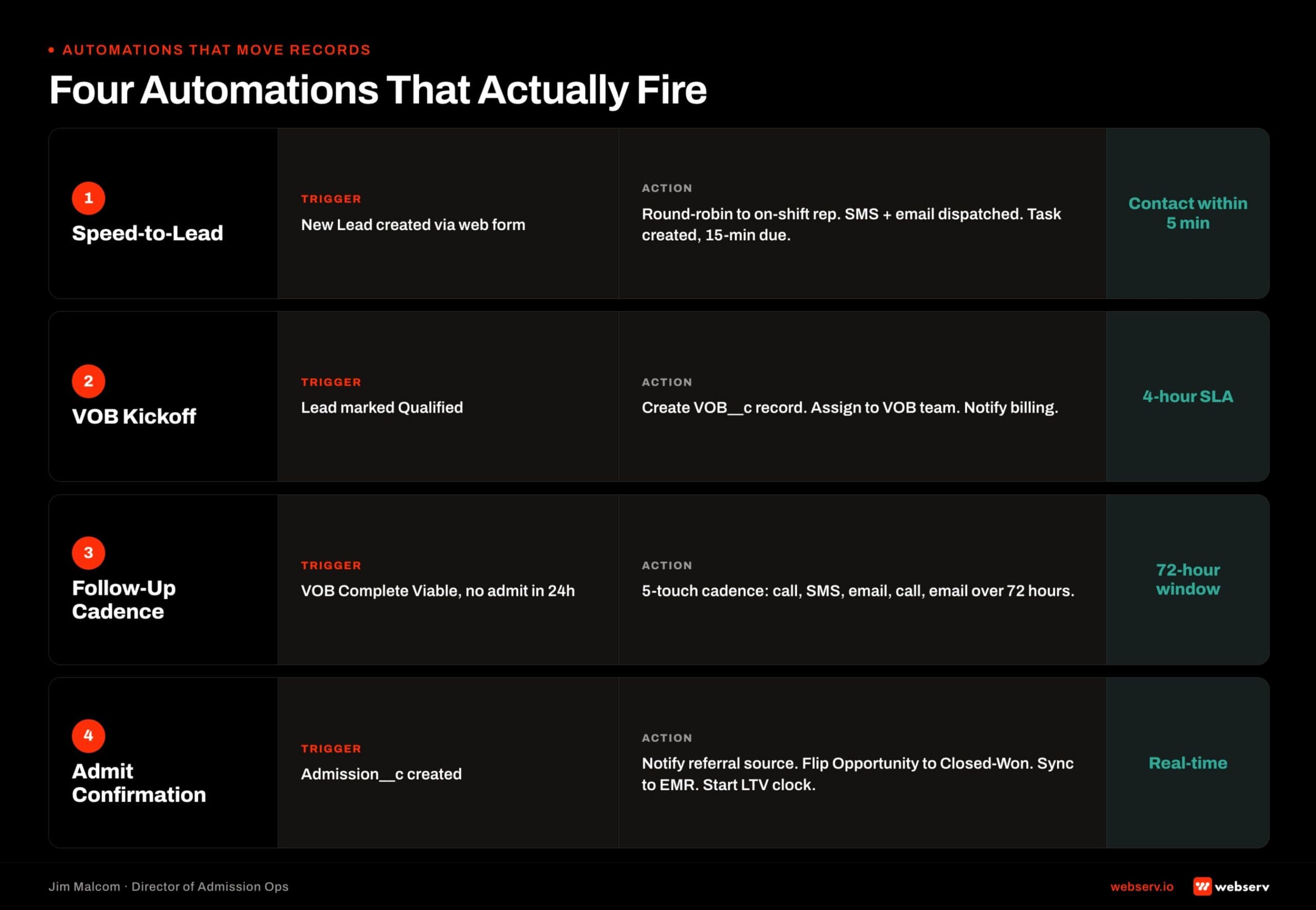
1. New lead created. Auto-assign to coordinator based on source, round-robin, and shift schedule. This is the entry point that makes speed-to-lead achievable.
2. Status change to VOB. Task assigned to insurance coordinator with due date and payer prefilled from the lead. Prevents the “did anyone start this VOB” ambiguity.
3. VOB completed as viable. Notify admissions rep, advance the record to Follow-Up stage, and start the SLA timer. This is where the funnel accelerates.
4. Missed follow-up (no activity 24 hours). Escalate to admissions manager with a Slack alert. This is the leak detector. Without it, records sit in Follow-Up for days and nobody notices.
5. Prior auth required flag. Clone the task queue for the utilization review team. Prior auth cases have their own workflow and shouldn’t clog the standard follow-up queue.
6. Admit. Sync patient record to EMR (Kipu handoff), close the opportunity, and trigger LTV tracking. This closes the loop between Salesforce and the clinical system.
Reference point. A Tennessee outpatient client’s Salesforce peer engagement deployed 44 automations across intake, VOB, and referral workflows. The six above are the required core. Facility scale and payer complexity add the other 38.
Common Salesforce Implementation Failures for BH
Five failure modes we see on audits.
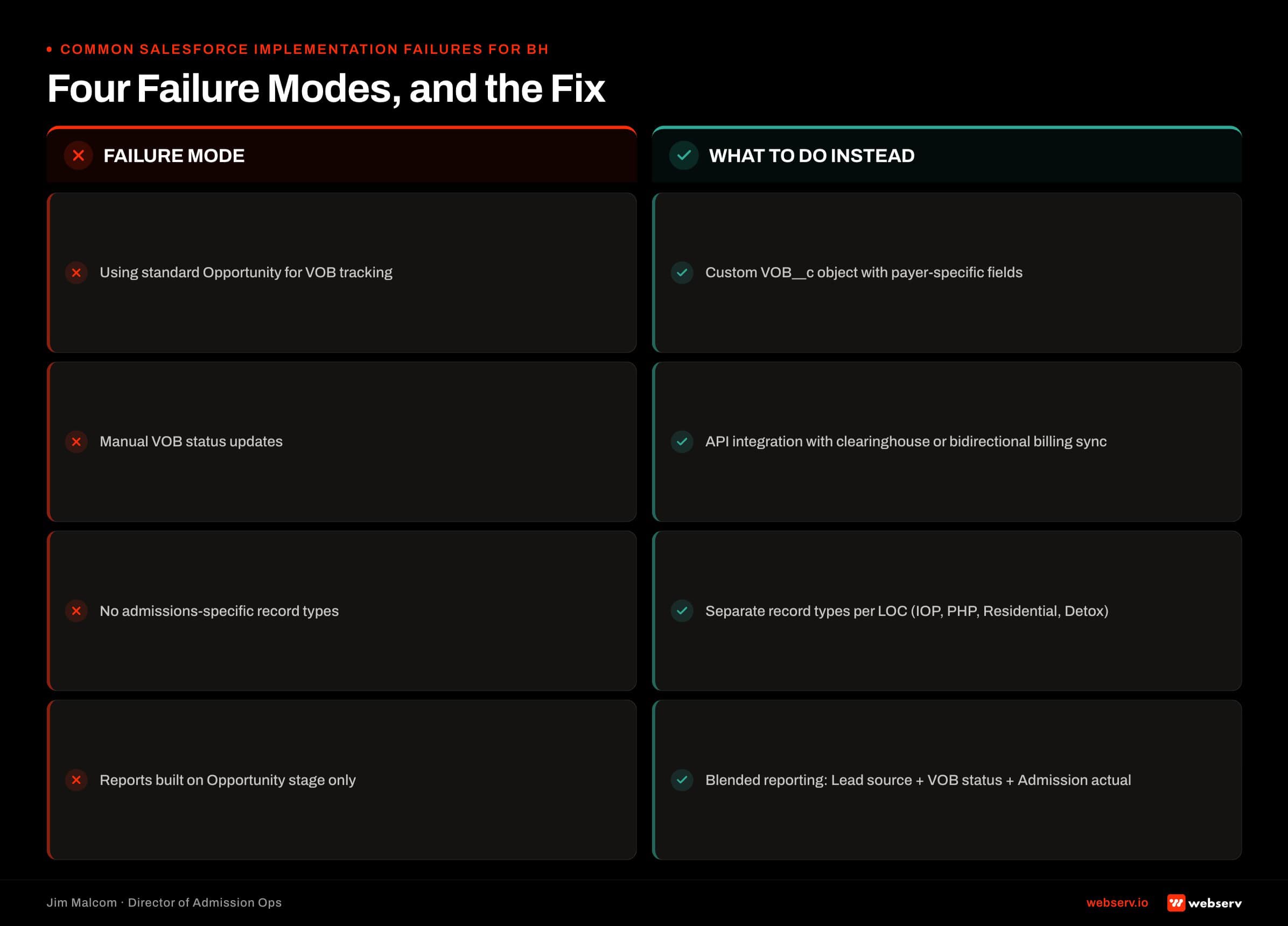
No VOB object. VOB tracked as free-text on the Lead. No historical trail. No reporting on payer performance or coordinator velocity.
Over-customization. 40 custom fields on the Lead object that nobody uses. Slow page load. Confused reps. The build is worse than the box would have been.
Sales pipeline stages copied from mortgage or SaaS. Qualification, Needs Analysis, Proposal, Negotiation, Closed Won. Off-target for admissions.
No automation on missed follow-ups. Leads sit in Follow-Up stage for days. Nobody knows. The admissions manager finds out on Friday from a lost-deal report.
Reports built by consultant, not admissions team. Pretty dashboards that do not answer operator questions. Every report generation exercise ends with someone dropping to Excel.
The pattern under all five failures. A consultant who is technically good at Salesforce but does not know admissions. Salesforce is not the problem. The configuration is.
HubSpot for Admissions
Why HubSpot for BH Admissions Specifically
HubSpot has real strengths and real limitations for behavioral health admissions. The honest cut depends on what role the platform plays in the stack.
When HubSpot wins. Facilities using HubSpot as marketing automation upstream of admissions. Facilities with heavy email nurture workflows for family or referral partner communication.
Facilities that already run HubSpot Marketing Hub for other service lines and want a single marketing automation tool. Small facilities under 15 admits per month where a lightweight HubSpot Starter or Pro tier is enough for a lead database.
When HubSpot is overkill or misfit. Facilities that need a purpose-built admissions system of record with VOB tracking, alpha prefix routing, LOC segmentation, and coordinator ergonomics designed for the admissions call floor.
Facilities running 30+ admits per month where the reporting layer needs BH-specific dimensions HubSpot does not ship with. Facilities where the EMR integration is load-bearing and Kipu, Sunwave, or BestNotes needs a native connector.
The three-question test. Does the facility need a purpose-built admissions system of record? Are the reporting dimensions behavioral-health-specific (VOB by payer, alpha prefix by payer, LOC-by-source close rate)? Is the EMR integration the constraint?
Two or three yeses point at Dazos or Salesforce downstream of HubSpot rather than HubSpot as the system of record. How to evaluate a behavioral health CRM at the platform level is the framework operators can walk each option against.
DEFINITION
HubSpot custom objects are the mechanism that lets an admissions team model VOB status, level of care, payer identifier, and referral partner as first-class data on the deal record. Without custom objects, VOB tracking lives in ad-hoc contact properties and reporting collapses.
The Custom Object Model for VOB Tracking in HubSpot
HubSpot supports custom objects on Enterprise tier. A VOB custom object built inside HubSpot has the same shape as the equivalent VOB__c object in Salesforce: a child of the Contact record, with structured fields for payer, alpha prefix, coverage status, prior-auth flags, and LOC.
The LOC picklist should map to ASAM’s standard levels of care so the reporting stays clinically coherent regardless of platform (ASAM Criteria).
Insurance verification friction is a documented barrier to treatment access, which is why admissions CRM configuration is operational work with clinical stakes (SAMHSA, National Survey of Substance Abuse Treatment Services).
Required fields on a HubSpot VOB custom object:
- Payer (dropdown: Anthem, BCBS, Aetna, Cigna, UHC, Kaiser, Medicaid, Medicare, self-pay, other)
- Plan Name (single-line text)
- Alpha Prefix (single-line text, 3-character validation for BCBS)
- Group Number (single-line text)
- Coverage Status (dropdown: pending, viable, non-viable, needs-more-info)
- In-Network / Out-of-Network (dropdown)
- Deductible / Out-of-Pocket Max (number)
- Expected Reimbursement Per Day (number)
- Prior Auth Required (single checkbox)
- Prior Auth Status (dropdown)
- Days Authorized (number)
- LOC Approved (dropdown: detox, residential, PHP, IOP, OP)
- VOB Requested By (HubSpot user)
- VOB Completed By (HubSpot user)
- VOB Completion Timestamp (date and time)
- Notes (multi-line text)
The build note. Custom objects on HubSpot are Enterprise tier only. Facilities on Marketing Hub Professional or Sales Hub Professional cannot build custom objects.
If a Professional-tier facility wants VOB tracking, the options are upgrading to Enterprise, tracking VOB as fields on the Contact (which collapses the moment a patient needs re-verification), or moving admissions off HubSpot and keeping it as marketing automation upstream.
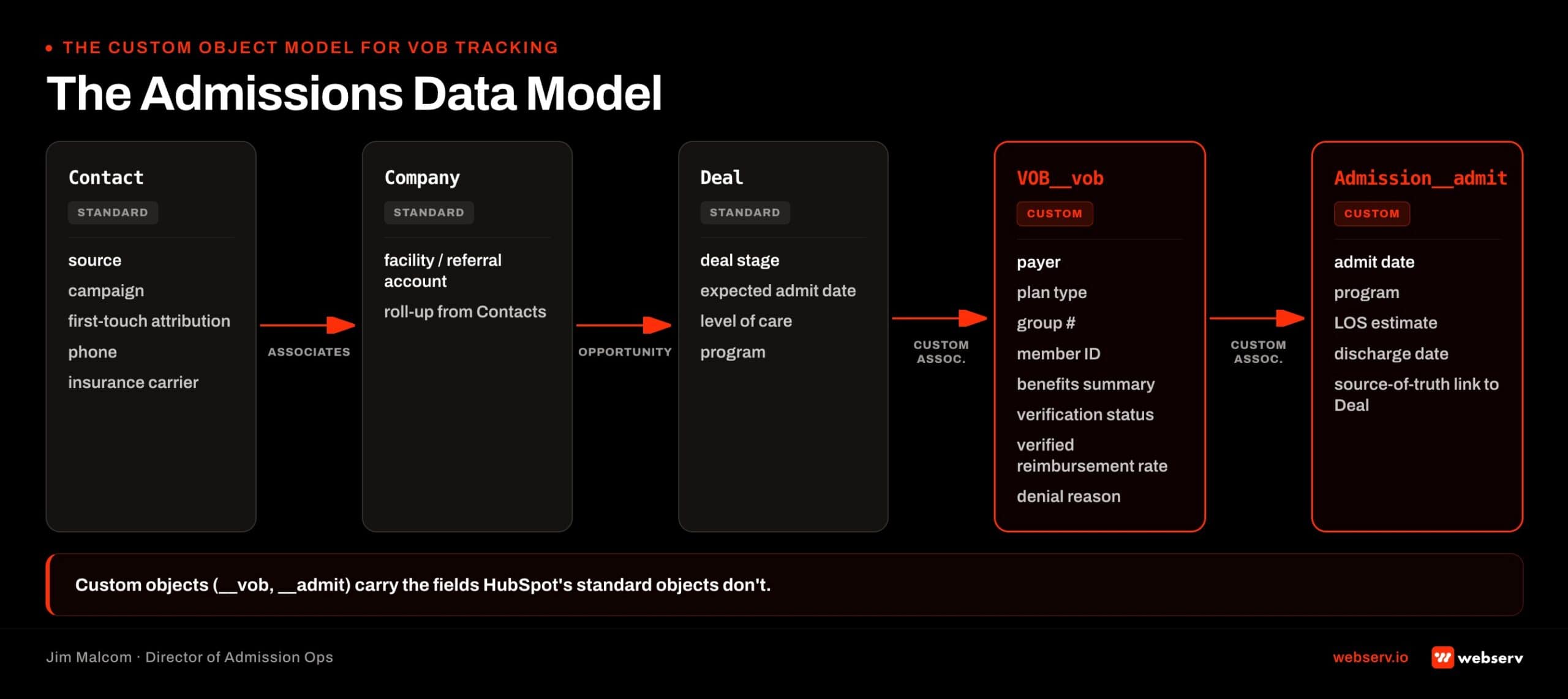
Deal Stages That Match Admissions
HubSpot’s Deal pipeline is the layer where admissions stages get built. The naming is different from Salesforce’s Opportunity stages, but the structure is the same.
Intake stage. New Deal created against a Contact. Owner is the intake coordinator. Required properties: name, phone, source, presenting concern. SLA: contact attempt inside 60 seconds. Exit criteria: coordinator confirms fit and requests VOB.
VOB stage. Deal advances after intake. VOB custom object record created and assigned to the insurance coordinator. Required properties: payer, plan, member ID, alpha prefix, LOC requested. SLA: coverage status populated inside 24 hours. Exit criteria: VOB completed and marked viable or non-viable.
Follow-Up stage. VOB viable and clinical fit confirmed. Owner is admissions rep. Required properties: prior-auth status if required, expected reimbursement, family financial conversation logged. SLA: no more than 48 hours between contacts. Exit criteria: admit scheduled or Deal closed-lost with reason.
Admit stage. Patient admitted. Owner is intake supervisor. Required properties: admit date, LOC, expected LOS, EMR record ID. SLA: EMR handshake fires inside 5 minutes of admit. Exit criteria: patient record in EMR, Deal closed-won, LTV tracking started.
The anti-pattern to avoid. HubSpot’s default sales pipeline stages (Appointment Scheduled, Qualified to Buy, Presentation Scheduled, Decision Maker Bought-In, Contract Sent, Closed Won) do not map to admissions. Do not adapt the default. Build fresh against the four stages above.
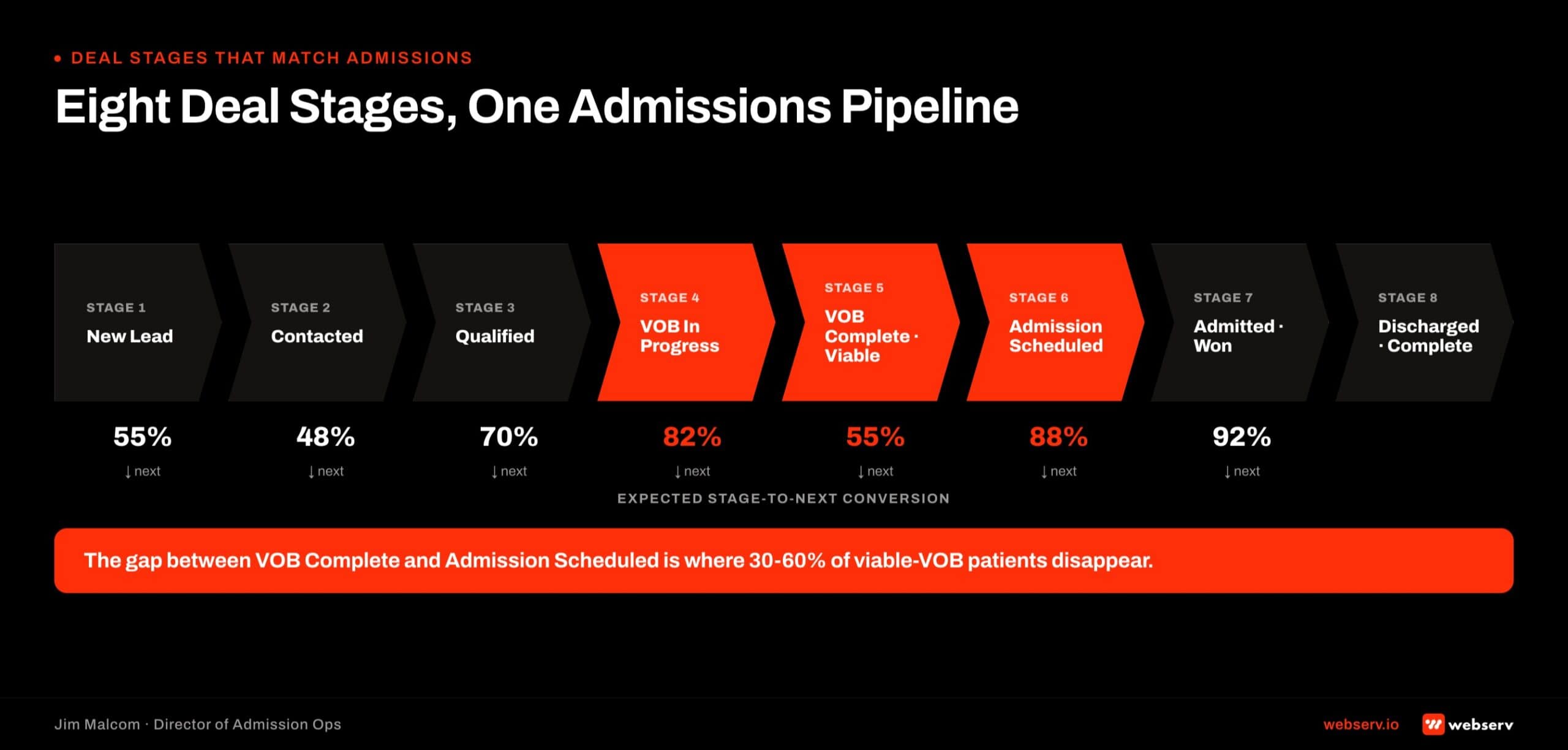
Workflows That Move Records
Six workflows every behavioral health HubSpot build needs. HubSpot’s Workflows tool is the automation layer that does the same job Salesforce Flow or Dazos automation does elsewhere.
1. New lead created. Auto-assign to coordinator based on source, round-robin, and shift schedule using HubSpot’s team rotation feature.
2. Deal stage change to VOB. Task created for the insurance coordinator with due date and payer prefilled from the Contact. Prevents the “did anyone start this VOB” ambiguity.
3. VOB coverage status set to viable. Notify admissions rep, advance the Deal to Follow-Up stage, and start the SLA timer. This is where the funnel accelerates.
4. Missed follow-up (no activity 24 hours). Escalate to admissions manager with a Slack alert via HubSpot’s Slack integration. The leak detector.
5. Prior auth required flag. Task queue clones to the utilization review team. Prior auth cases have their own workflow and shouldn’t clog the standard follow-up queue.
6. Admit stage reached. Sync patient record to EMR, close the Deal as won, and trigger LTV tracking. This closes the loop between HubSpot and the clinical system.
The build variance. Behavioral health facilities that run a full admissions engine on HubSpot typically deploy 30 to 50 workflows total across intake, VOB, follow-up, and referral partner nurture. The six above are the required core. Payer complexity and referral partner count add the rest.
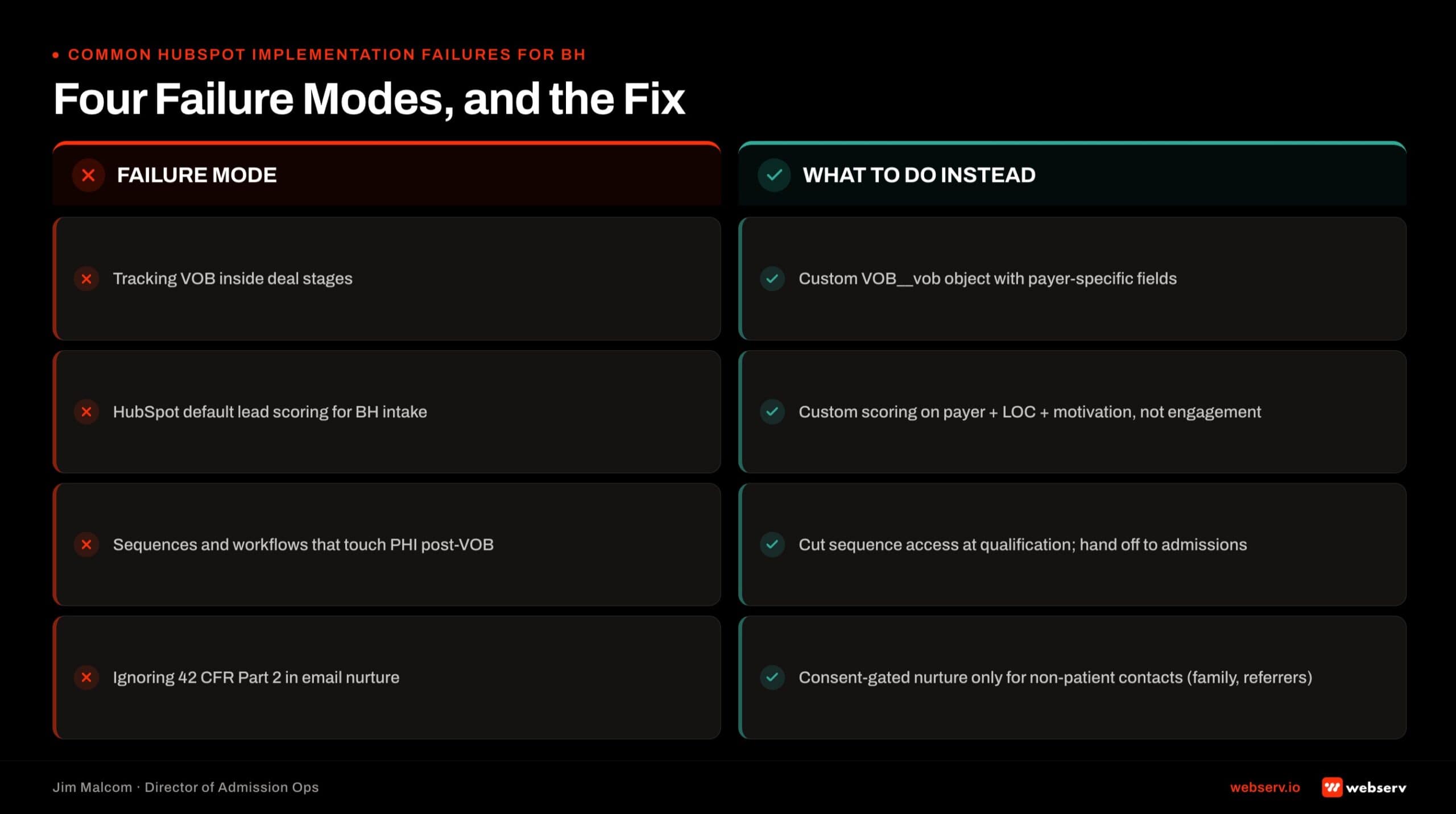
Common HubSpot Implementation Failures for BH
Five failure modes we see on audits.
HubSpot as admissions system of record without Enterprise tier. VOB tracked as fields on Contact rather than a custom object. No historical trail on re-verification. Reporting collapses at the first patient with secondary insurance.
Sales-shaped Deal pipeline instead of admissions-shaped. Default HubSpot stages (Appointment Scheduled, Qualified to Buy, Contract Sent) applied to admissions. Meaningless for the workflow the coordinators actually run.
Marketing automation running downstream of admissions. Email nurture sequences firing to patients mid-treatment because the automation was never scoped to stop when the Deal moves to Admit. Clinical exposure and family relationship damage both real.
No middleware for EMR sync. Coordinators re-entering admit data manually into Kipu because the integration was assumed and never built. Data drift within 90 days.
HIPAA BAA gaps across the stack. HubSpot’s standard tier does not sign BAAs in all configurations. Marketing automation touching PHI requires BAA coverage across HubSpot, any middleware, and any downstream tool. Facilities that treat this as a paperwork exercise carry compliance exposure that surfaces in audits.
The pattern under all five. HubSpot doing what HubSpot was not designed to do. The fix is usually to move admissions off HubSpot and keep HubSpot upstream where it is genuinely strong.
Frequently Asked Questions
Who helps treatment centers implement Dazos?
Webserv implements Dazos for behavioral health treatment centers as a formal Dazos partner. Implementation runs a 6-week Admission Ops sprint that configures pipeline stages, deploys automations across intake and VOB workflows, integrates call tracking (typically CallRail) and EMR (typically Kipu), and stands up the Dazos IQ reporting layer.
The partnership matters because Dazos is a behavioral-health-native CRM, and behavioral health admissions operations have specific field structures, coordinator ergonomics, and payer workflows that a generalist Salesforce or HubSpot consultant will rebuild from scratch. Webserv has deployed Dazos across dozens of facilities and treats the implementation as one of four core admissions-attribution decisions.
A Tennessee mental-health outpatient came to Webserv with Dazos already installed and a PPC close rate of 17 percent. Webserv rebuilt the configuration (44 automations, CallRail integration, Kipu EMR mapping) and the close rate moved to 64 percent in two months on the same platform.
Is Dazos worth it for a behavioral health facility, or is a generic CRM better?
For most small-to-mid facilities and 2-8 location portfolios, Dazos is the better pick because the field structure, VOB workflow, and coordinator ergonomics ship out-of-the-box. Generic CRMs like Salesforce or HubSpot can absolutely run a behavioral health facility, but every custom object has to be built and every workflow has to be automated from scratch. That is typically a 4-to-6-month build before the platform produces value.
Dazos is not always the right pick for enterprise portfolios of 20+ facilities with existing Salesforce admins, heavy custom development budgets, and integrated enterprise data lakes. In those environments, Salesforce Health Cloud or a heavily-customized HubSpot instance can be the defensible pick.
Webserv is a Dazos partner and discloses that openly. The partnership is why the pattern is visible. It is also why the honest answer in the enterprise-portfolio case is that a different CRM is sometimes the right pick.
What does a Dazos implementation actually cover at a treatment center?
A real Dazos implementation covers pipeline configuration, automation deployment, VOB workflow, call tracking integration, EMR mapping, coordinator training, and a reporting layer built on Dazos IQ. Installation is a first day of week one. The rest of the six-week sprint is where the numbers actually move.
Webserv’s 6-week sprint runs onboard and audit (week 1), lead tracking configuration (week 2), CRM pipeline build (week 3), VOB workflow (week 4), and training and launch (weeks 5-6). The Tennessee engagement deployed 44 automations across intake, VOB, and referral workflows.
Facilities that skip the configuration phase and treat “install” as “implementation” produce the failure mode most operators recognize: the platform exists, nobody uses the fields, and admissions runs the way it did before. Configuration is the work.
What are the most common Dazos implementation failures?
The three most common failure modes are mistaking install for configuration, no automation deployment, and no reporting layer. All three show up on facilities that assumed the platform itself would move the numbers and skipped the workflow build underneath.
Install-only deployments look active on the surface. Leads land, records exist, coordinators log in. But the fields nobody configured stay empty, and the workflow nobody automated stays manual. The CRM becomes a contact database with a behavioral health skin.
Reporting is the failure mode leadership notices last. Dazos IQ ships with default dashboards, but a facility that never customizes them is making admissions decisions on gut instead of on data the CRM already holds.
How does Dazos compare to Salesforce or HubSpot for behavioral health admissions?
Dazos ships with a behavioral-health-native object model. VOB, alpha prefix, payer product type, level of care, coordinator scorecards, and referral partner routing all exist out-of-the-box. Salesforce and HubSpot require every one of those objects to be built as a custom object with a custom workflow. The full CRM buyer’s guide compares the shortlist side by side.
Time-to-value is the sharpest difference. Dazos is production-ready in 6-8 weeks with proper configuration. Salesforce Health Cloud or a heavily-customized HubSpot instance is a 4-6 month build followed by ongoing admin overhead. Total cost of ownership over three years favors Dazos for most small-to-mid facilities.
Dashboard flexibility and enterprise data-lake integration are the areas where Salesforce genuinely wins. For a 20+ facility portfolio with a dedicated Salesforce admin, that flexibility can outweigh the behavioral-health-native starting point Dazos offers.
What does a Webserv Dazos implementation cost?
The one-time setup fee for a Webserv Admission Ops engagement, which includes Dazos configuration, is $7,500 to $15,000 depending on center size, CRM complexity, and integration scope. Ongoing retainer runs $3,500 to $5,000 per month for 1-2 locations, $5,000 to $8,000 per month for 3-5 locations, and $8,000 to $15,000 per month for 6+ locations.
Facilities that want to see the diagnostic before committing to a full engagement can run Webserv’s Fast-Track Diagnostic for $3,000. If the facility moves forward with a full Admission Ops engagement, that $3,000 is credited 100 percent toward the first month.
The pricing scope covers CRM implementation, call tracking configuration, VOB workflow, training, and the ongoing performance reporting cadence that keeps the admissions engine running past week 6.
Closing Note From the CEO
Dazos is not a fix. It is a platform with more behavioral-health-native capability than any other CRM in the category. Like every platform, it produces the results the configuration underneath it deserves.
The Tennessee engagement is the case that made that clearest to me. Same platform, same team, same marketing spend, and the numbers moved because the configuration finally matched how the admissions team actually worked.
If you are evaluating Dazos, running Dazos and not seeing the numbers, or weighing Dazos against a generic CRM, book an intro meeting with the Webserv admission ops team.
We will tell you honestly whether Dazos is the right pick for your facility. If it is, we implement it. If it isn’t, we say so.
Preston Powell is the CEO of Webserv. Webserv is a Dazos implementation partner and serves 200+ behavioral health treatment centers through its Admission Ops, Paid Media, and SEO practices.