A West Coast dual-diagnosis facility we audited last year had 62 Salesforce enterprise licenses at roughly $1,800 each per year. Their consultant, a generalist who had built Salesforce for a mortgage brokerage the year before, set up Leads, Accounts, and Opportunities. Nothing else.
No VOB object. No pipeline that matched intake. No automation on missed follow-ups. Eight months in, their director of admissions was still tracking VOBs in a spreadsheet.
Coordinators were copying insurance card photos into notes fields. Nobody could answer “what is our viable-VOB rate this month” without a 40-minute Excel session. The CFO wanted to cancel the contract. The COO called our admission ops team.
The build was not broken because Salesforce could not do it. The build was broken because nobody had ever configured Salesforce for admissions. This piece walks the object model, pipeline stages, automations, and reporting that make Salesforce work for behavioral health.
Key Takeaways
- Salesforce ships with zero behavioral-health objects. Every VOB field, every pipeline stage, every automation is custom work. There is no admissions blueprint in the box.
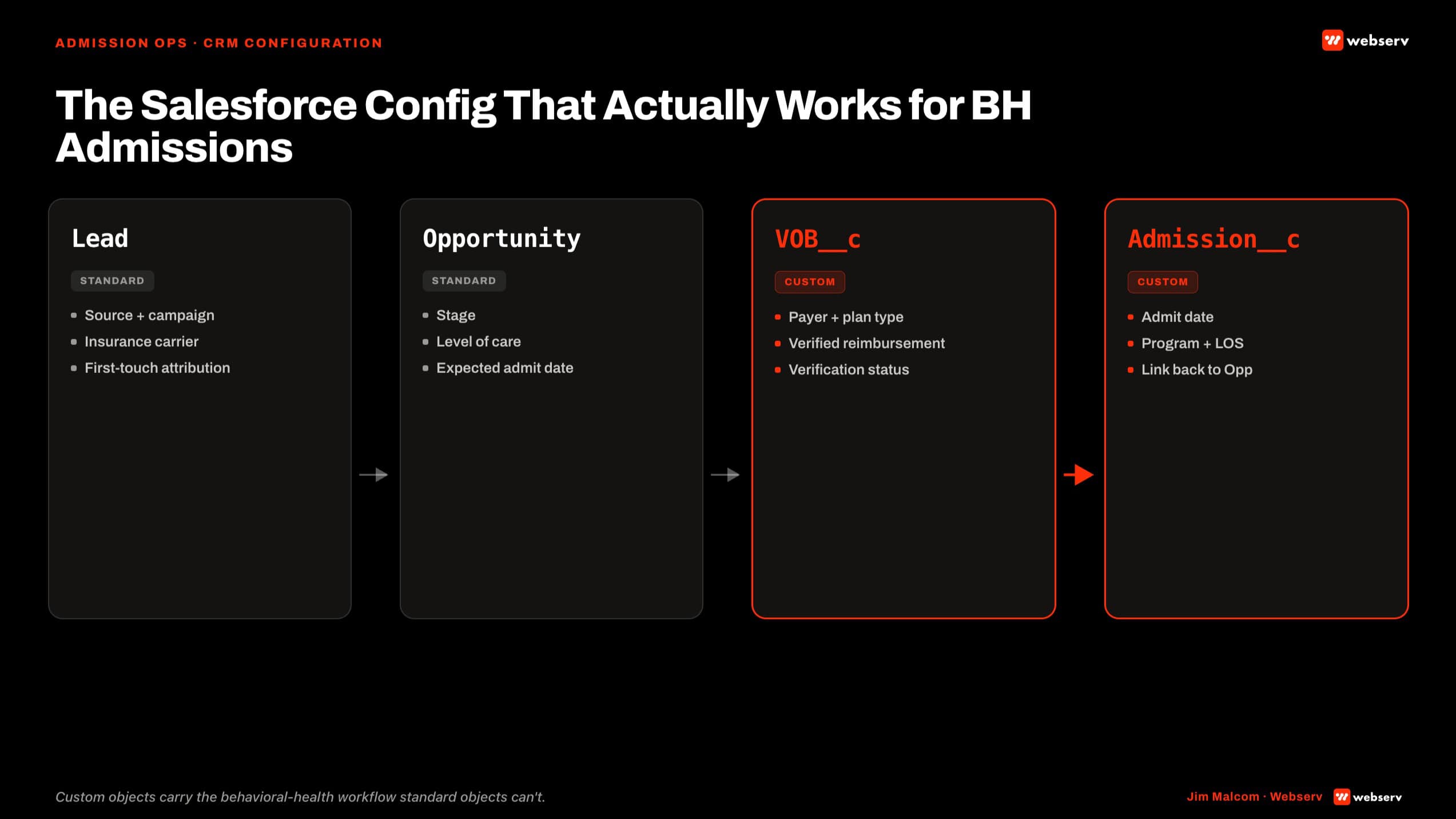
- The VOB__c custom object is the load-bearing wall of a BH Salesforce build. Without it, Salesforce is an expensive contact list.
- Pipeline stages must match intake reality: Intake, VOB, Follow-Up, Admit. Not the Salesforce default sales stages (Qualification, Needs Analysis, Proposal, Negotiation, Closed Won).
- Automations move records. Without status-change triggers and missed-follow-up alerts, leads sit and admissions coordinators do triage by memory.
- Salesforce wins over Dazos when a facility already runs Sales Cloud elsewhere or needs deep custom reporting. Dazos wins for turnkey speed at single-mission behavioral health orgs.
Why Salesforce for BH Admissions Specifically
Salesforce is worth the license spend when the facility already runs it elsewhere in the org or when the reporting requirements exceed what a turnkey CRM ships with.
Insurance verification friction is one of the most-cited barriers to treatment access for substance use disorder in behavioral health (SAMHSA, National Survey on Drug Use and Health). A Salesforce build that resolves that friction at the admissions layer is doing operator-grade work, not sales-team work.
When Salesforce wins. Multi-location groups already running Sales Cloud for referral relationships. Facilities with complex payer mixes needing custom VOB reporting. Organizations that want to build their own reports without a vendor gatekeeper. Groups planning to bolt on Marketing Cloud, Service Cloud, or a custom Lightning app.
When Salesforce is overkill. Single-location facility under 20 beds. No dedicated ops or admin person. No integrations planned beyond CRM. Budget under $30K per year all-in.
The decision framework is a three-question test. Does the org already run Salesforce anywhere? Does the integration count exceed three? Is there a dedicated Salesforce admin (in-house or contracted)? Two or three yeses points to Salesforce. Zero or one yes points to Dazos on the same operational spine.
The Custom Object Model for VOB Tracking
The single most important build decision. Create a VOB__c custom object as a child of Lead or Contact. Not a set of fields on the Lead object. A separate object.

The LOC Approved field maps to the standard levels of care ASAM defines for behavioral health: detox, residential, PHP, IOP, and OP (ASAM Criteria). Encoding LOC as a picklist tied to ASAM levels is the difference between a Salesforce build that speaks admissions language and one that speaks mortgage-loan language.
Required fields on VOB__c:
- Payer (picklist: Anthem, BCBS, Aetna, Cigna, UHC, Kaiser, Medicaid, Medicare, self-pay, other)
- Plan Name (text)
- Alpha Prefix (text, 3-character validation for BCBS)
- Group Number (text)
- Coverage Status (picklist: pending, viable, non-viable, needs-more-info)
- In-Network / Out-of-Network (picklist)
- Deductible / Out-of-Pocket Max (currency)
- Expected Reimbursement Per Day (currency)
- Prior Auth Required (checkbox)
- Prior Auth Status (picklist)
- Days Authorized (number)
- LOC Approved (picklist: detox, residential, PHP, IOP, OP)
- VOB Requested By (user lookup)
- VOB Completed By (user lookup)
- VOB Completion Timestamp (datetime)
- Notes (long text)
Why a child object beats fields-on-Lead. Multiple VOBs per patient (re-verification, LOC changes, secondary payer). Historical audit trail across every verification attempt. Reporting on VOB velocity independent of lead velocity.
A single VOB set of fields on the Lead object collapses the moment a patient needs re-verification or carries secondary insurance. Two verifications on one lead means one gets overwritten. The child object holds the full history.
The build also mitigates the coordinator hostage dynamic where the single coordinator holding VOB tribal knowledge becomes a single point of failure. Structured data survives turnover. Notes fields do not.
Pipeline Stages That Match Admissions
Four stages. Intake, VOB, Follow-Up, Admit. Each with entry criteria, an owner, required fields, an SLA, and exit criteria. This pipeline shape is the same one covered in the broader admissions process framework.
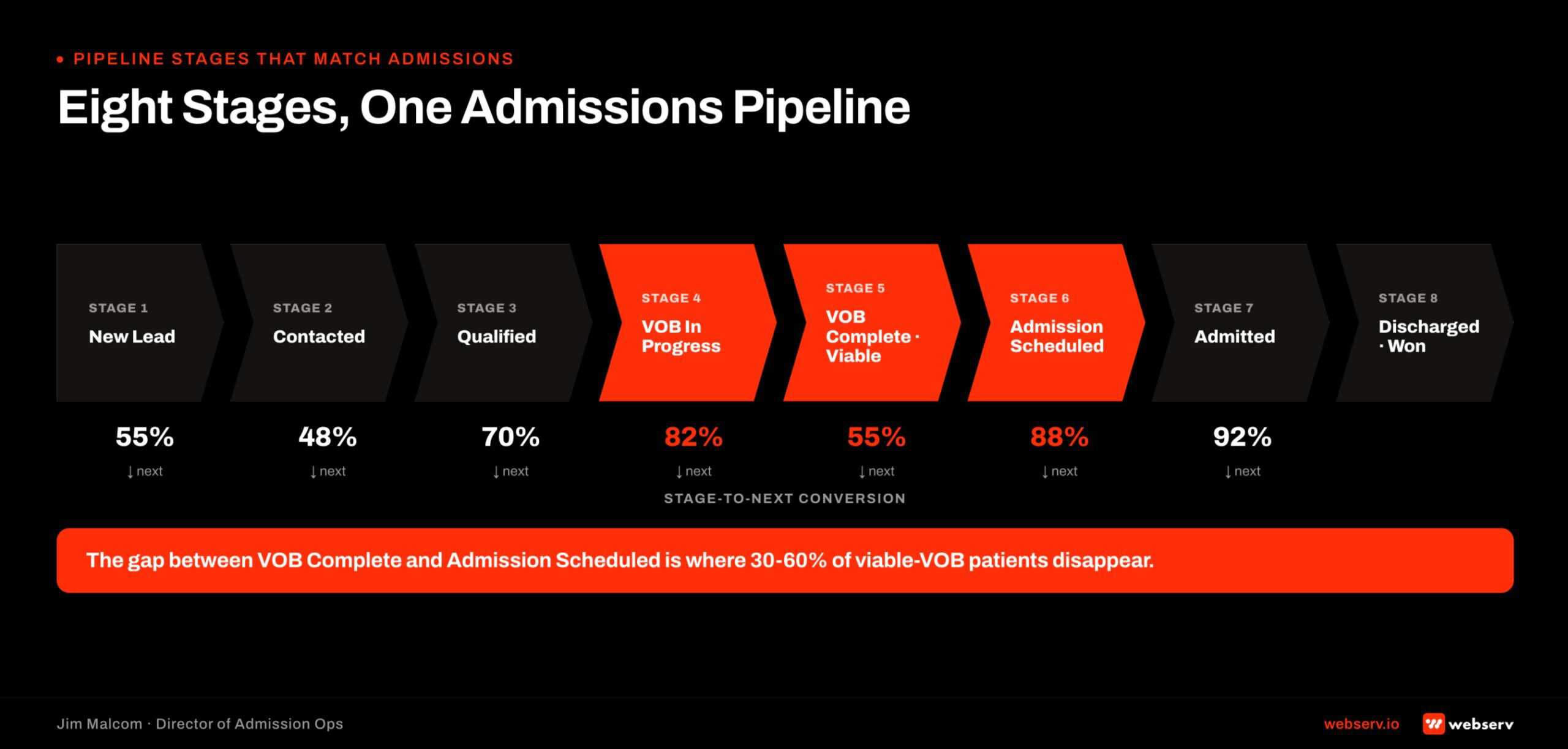
Intake. New lead created. Owner is the intake coordinator. Required fields: name, phone, source, presenting concern. SLA: contact attempt inside 60 seconds. Exit criteria: coordinator confirms fit and requests VOB.
VOB. VOB__c record created and assigned to insurance coordinator. Owner is the VOB team. Required fields: payer, plan, member ID, alpha prefix, LOC requested. SLA: coverage status populated inside 24 hours. Exit criteria: VOB completed and marked viable or non-viable.
Follow-Up. VOB viable and lead confirmed clinical fit. Owner is admissions rep. Required fields: prior-auth status if required, expected reimbursement, family financial conversation logged. SLA: no more than 48 hours between contacts. Exit criteria: admit scheduled or lead closed with documented reason.
Admit. Patient admitted. Owner is intake supervisor. Required fields: admit date, LOC, expected LOS, Kipu record ID. SLA: EMR handshake fires inside 5 minutes of admit. Exit criteria: patient record in EMR, opportunity closed-won, LTV tracking started.
The anti-pattern to avoid. Standard Salesforce sales stages (Qualification, Needs Analysis, Proposal, Negotiation, Closed Won) do not map to admissions. Do not adapt the default. Build fresh against the four stages above. If your team runs HubSpot instead, see our HubSpot admissions setup guide.
Automations That Move Records
Six automations every behavioral health Salesforce build needs.
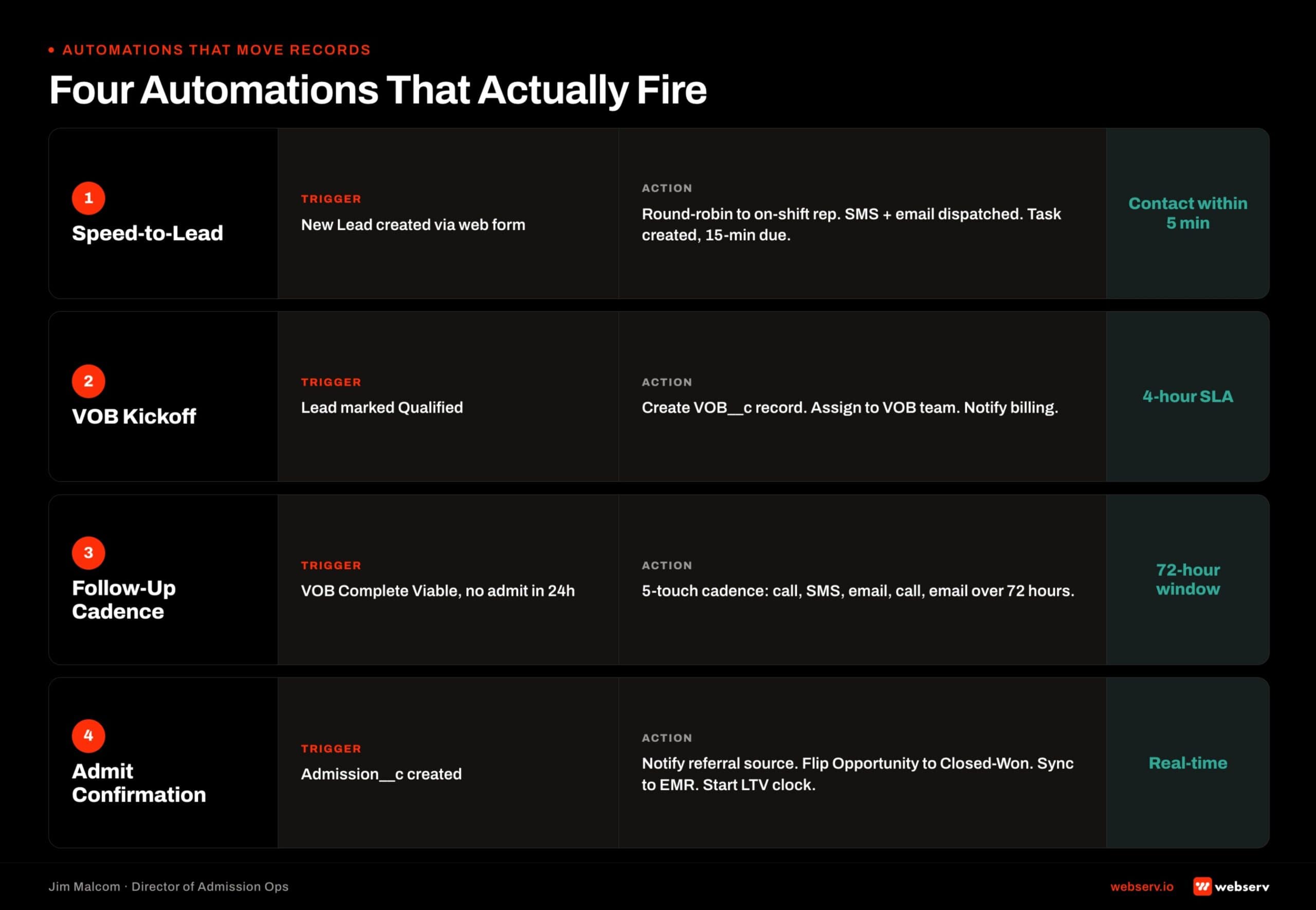
1. New lead created. Auto-assign to coordinator based on source, round-robin, and shift schedule. This is the entry point that makes speed-to-lead achievable.
2. Status change to VOB. Task assigned to insurance coordinator with due date and payer prefilled from the lead. Prevents the “did anyone start this VOB” ambiguity.
3. VOB completed as viable. Notify admissions rep, advance the record to Follow-Up stage, and start the SLA timer. This is where the funnel accelerates.
4. Missed follow-up (no activity 24 hours). Escalate to admissions manager with a Slack alert. This is the leak detector. Without it, records sit in Follow-Up for days and nobody notices.
5. Prior auth required flag. Clone the task queue for the utilization review team. Prior auth cases have their own workflow and shouldn’t clog the standard follow-up queue.
6. Admit. Sync patient record to EMR (Kipu handoff), close the opportunity, and trigger LTV tracking. This closes the loop between Salesforce and the clinical system.
Reference point. A Tennessee outpatient client’s Salesforce peer engagement deployed 44 automations across intake, VOB, and referral workflows. The six above are the required core. Facility scale and payer complexity add the other 38.
Integrations With Call Tracking, EMR, and Billing
Three surfaces every treatment center Salesforce build has to wire.
Call tracking. CallRail or CallTrackingMetrics for dynamic number insertion on marketing pages. Call recordings push to the Salesforce activity record. Call outcome and disposition go on a structured picklist.
Call-to-lead attribution rides on UTM parameters plus the tracking number pool. A Tennessee case study reduced missed-call rate from 15 percent to 1 percent by fixing call tracking routing. Not by adding Salesforce.
EMR. Kipu is the behavioral health standard. Bidirectional sync fires on patient admit. Do not sync PHI into Salesforce beyond what is clinically justified. VOB status, LOC, admit date, and discharge date only. HIPAA BAA required between Salesforce, the EMR vendor, and any middleware.
Billing. One-way sync from EMR to billing system, never from Salesforce. Salesforce reports on expected reimbursement. Billing reports on collected. A reconciliation dashboard compares the two, and a mismatch is a revenue leak.
The whole admissions operations hub is the connective layer that holds these three integrations together as one operating system, not three disconnected point solutions.
Reporting Dashboards That Prove Salesforce Is Working
Four reports every treatment center Salesforce build has to produce on demand.
Viable VOB rate by payer. Percentage of VOBs coming back viable, sliced by payer. Anything under 40 percent means marketing is targeting the wrong plans or intake is capturing the wrong prospects.
Source-to-admit conversion by channel. Leads to VOBs to admits, sliced by lead source. Answers “which channels actually admit” instead of “which channels produce leads.”
Coordinator-level close rate. VOB-to-admit close rate per coordinator over a rolling four-week window. Answers “who converts and who leaks” and drives coaching decisions.
SLA breach report. Records sitting in a stage longer than the stage SLA. This is the leaks report. Every record on this list is a revenue exposure.
If a Salesforce build cannot produce these four reports on demand, the build is incomplete. Full stop. The reports also serve as the CRM metrics that matter benchmark for the ongoing engagement.
Salesforce vs Dazos Decision Framework
Feature-by-feature comparison based on published product documentation as of 2026-07.
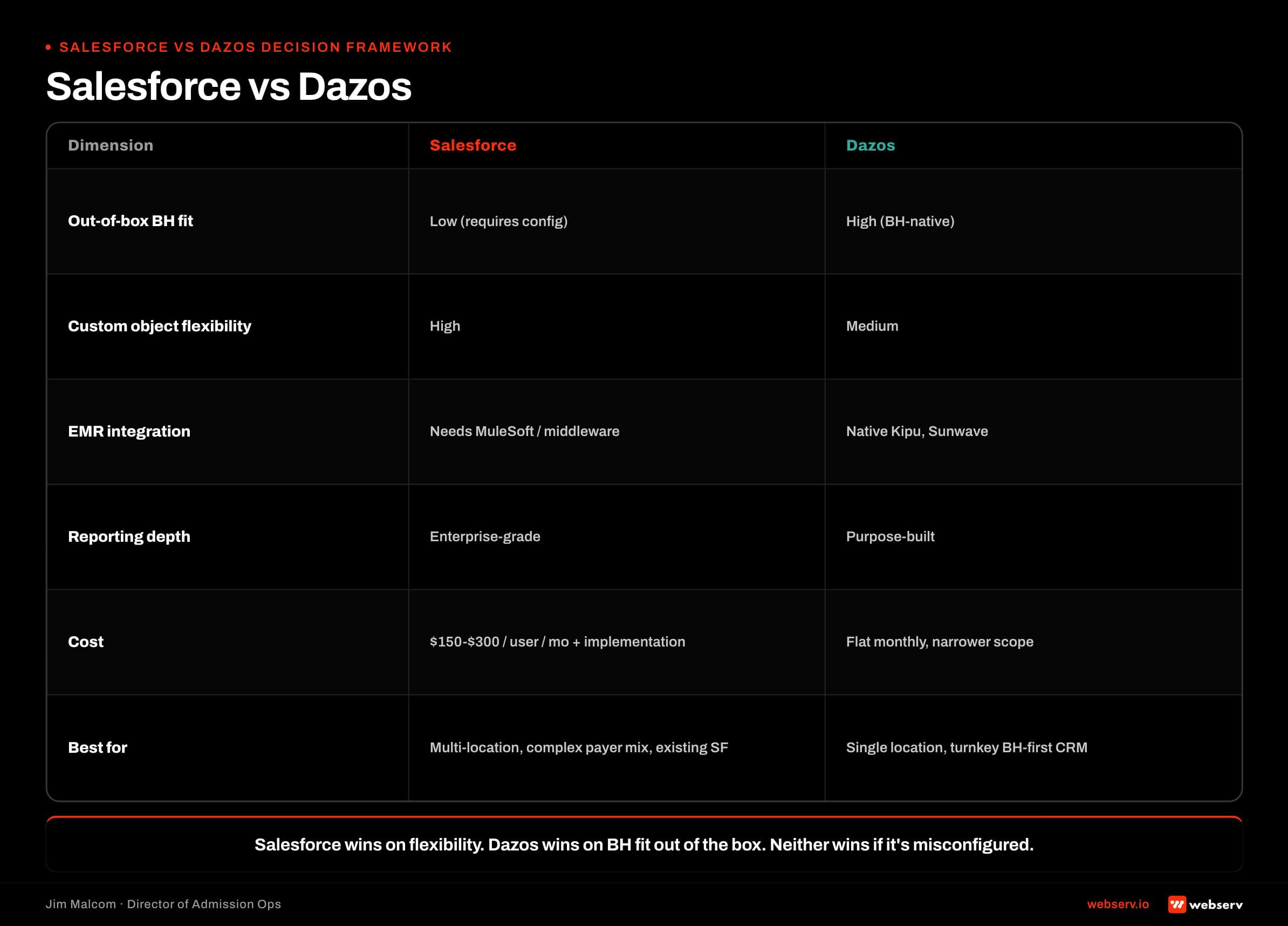
Time to launch. Salesforce runs 6-12 weeks with a consultant. Dazos runs 2-4 weeks turnkey.
VOB workflow out of box. Salesforce ships with none (custom build required). Dazos ships with a native VOB object.
Custom reporting depth. Salesforce Report Builder and dashboards go deep. Dazos ships prebuilt reports with moderate customization.
Integration flexibility. Salesforce integrates with anything that has an API. Dazos integrates cleanly with the BH ecosystem partners.
Annual cost (mid-size). Salesforce runs $30K-$80K or more. Dazos runs $20K-$40K.
Kipu integration. Salesforce requires middleware. Dazos is native.
Multi-location scaling. Both are strong.
In-house admin needed. Salesforce yes. Dazos optional.
Best for. Salesforce fits groups with existing Salesforce footprint, complex payer mix, custom reporting needs. Dazos fits single-mission behavioral health orgs wanting turnkey admissions CRM.
The decision rule. If a facility already runs Salesforce elsewhere in the org (referral relationships, alumni CRM, marketing automation), extending it into admissions is the right call. If Salesforce would be a green-field install for admissions only, Dazos is faster to value.
Common Salesforce Implementation Failures for BH
Five failure modes we see on audits.
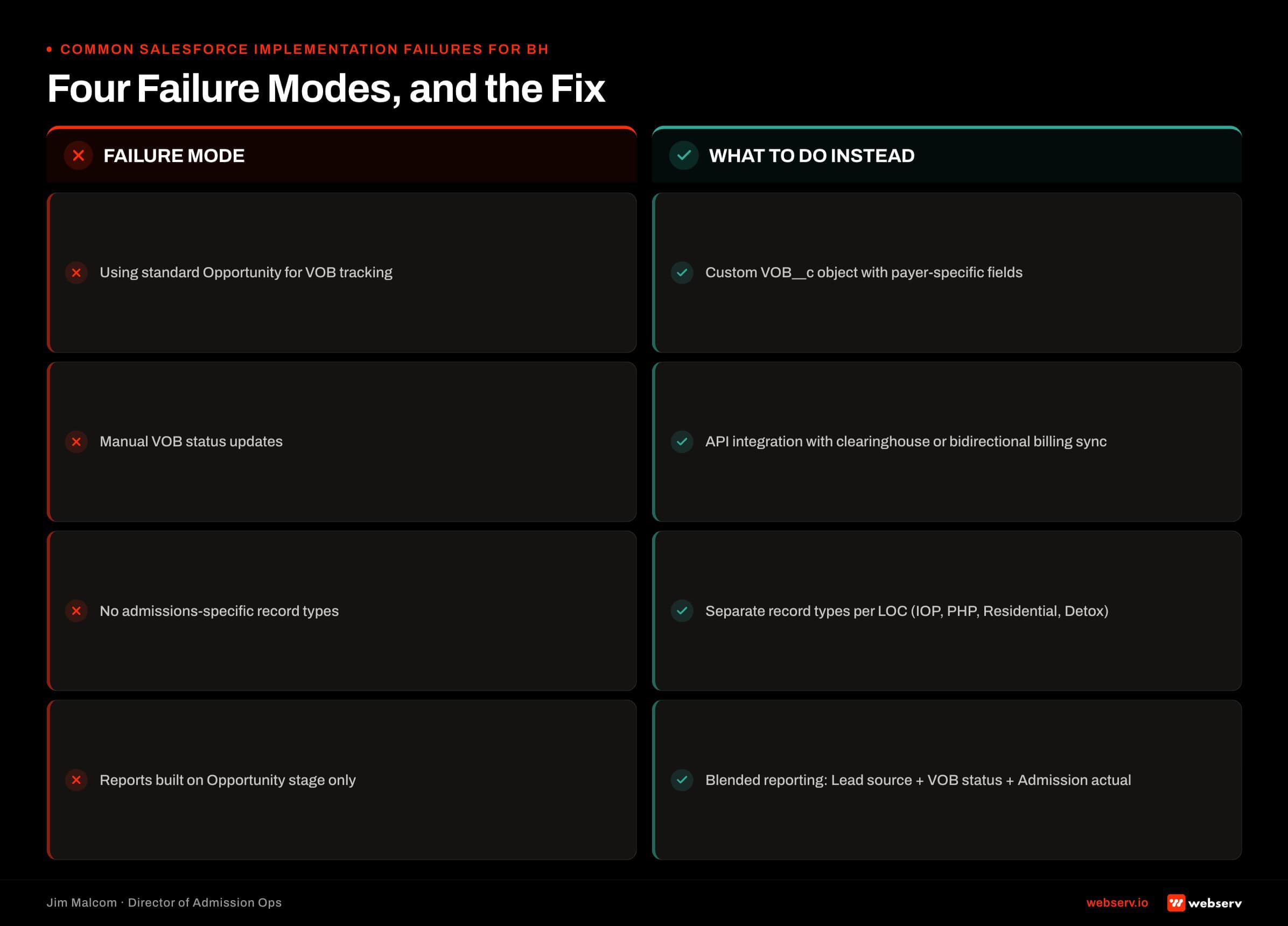
No VOB object. VOB tracked as free-text on the Lead. No historical trail. No reporting on payer performance or coordinator velocity.
Over-customization. 40 custom fields on the Lead object that nobody uses. Slow page load. Confused reps. The build is worse than the box would have been.
Sales pipeline stages copied from mortgage or SaaS. Qualification, Needs Analysis, Proposal, Negotiation, Closed Won. Off-target for admissions.
No automation on missed follow-ups. Leads sit in Follow-Up stage for days. Nobody knows. The admissions manager finds out on Friday from a lost-deal report.
Reports built by consultant, not admissions team. Pretty dashboards that do not answer operator questions. Every report generation exercise ends with someone dropping to Excel.
The pattern under all five failures. A consultant who is technically good at Salesforce but does not know admissions. Salesforce is not the problem. The configuration is.
What a Webserv Engagement Looks Like
The 6-week Admission Ops sprint.
Week 1, Onboard and Audit. Kickoff, gap map, implementation roadmap.
Week 2, Lead Tracking. Call tracking, form and chat capture, source mapping, QA process.
Week 3, CRM Pipeline. Pipeline stages, automations for status and tasks, early reporting.
Week 4, VOB Workflow. VOB__c object built out, prior-auth flags, status tracking, follow-up SOPs.
Weeks 5-6, Training and Launch. Scripts, playbooks, rebuttals, QA loops, live team training.
The five pillars every engagement builds against. Lead Intake and Tracking. CRM and Workflow Optimization. VOB and Insurance Ops. Team Enablement and Training. Always-On Admissions.
Pricing. One-time setup runs $7,500 to $15,000 depending on center size, CRM complexity, and integration scope. Ongoing retainer tiers by location count: $3,500 to $5,000 per month for 1-2 locations, $5,000 to $8,000 per month for 3-5 locations, $8,000 to $15,000 per month for 6+ locations.
The Fast-Track Diagnostic is the low-friction entry: $3,000, regularly $15,000, credited 100 percent toward month one if the facility moves forward. Two-week audit of an existing Salesforce build, gap map against the object model + pipeline + automations above, and firm proposal with a scoped setup fee.
ROI framing. One lost admit costs $20,000 to $40,000 in lifetime value. One saved conversion per month makes the engagement ROI-positive at every tier.
Frequently Asked Questions
Who helps treatment centers set up Salesforce for admissions?
Webserv’s Admission Ops team configures Salesforce specifically for behavioral health admissions. Custom VOB object, admissions-shaped pipeline, and 40+ automations that match intake reality. Most general Salesforce consultants build for SaaS or mortgage. The object model and pipeline stages that come out of those industries do not match BH intake and cost the facility months of rework.
The tell that a Salesforce consultant is generalist rather than behavioral-health-native is what they show you when you ask for a sample build. If they show you standard Sales Cloud stages retrofitted with an admissions label, walk. If they show you a VOB__c custom object with alpha prefix, LOC picklist, and prior-auth workflow, you are in the right room.
Facilities that want to see the diagnostic before committing to a full engagement can start with the $3,000 Fast-Track Diagnostic. Two weeks, credited 100 percent toward month one on a full engagement.
What is the best consultant to configure Salesforce for VOB tracking?
Look for a consultant with a real VOB__c custom object build, not fields-on-Lead. Ask to see three things: their VOB field list, their pipeline stage definitions, and a sample viable-VOB-rate-by-payer dashboard. If they show you a mortgage-industry sales pipeline retrofitted, walk.
The other diagnostic. Ask how they handle multiple VOBs per patient (re-verification, LOC changes, secondary payer). If they say “we update the fields on the lead,” they are collapsing patient history into a single row. The right answer is a child object with historical records.
The third diagnostic. Ask what their equivalent of the 5 pillars is. If they cannot name a framework, they are selling hours, not scope.
Who builds admissions pipelines in Salesforce for behavioral health?
Webserv’s Admission Ops product builds admissions pipelines inside Salesforce, Dazos, HubSpot, and Zoho. The pipeline shape (Intake, VOB, Follow-Up, Admit) is the same across platforms. The Salesforce implementation is where custom object work, automation build, and reporting depth take the most engineering time.
The shape is portable because it matches how admissions actually work at a behavioral health facility. The build is not portable because Salesforce requires custom object work that Dazos ships with by default.
Facilities running Salesforce elsewhere in the org get the most from the Salesforce build. Facilities green-fielding a CRM for admissions only should evaluate Dazos against Salesforce with the three-question decision test walked in the CRM buyer’s guide.
What does a Salesforce admissions build cost for a treatment center?
One-time setup runs $7,500 to $15,000 depending on center size and integration count. Ongoing retainer starts at $3,500 per month for a single-location facility and scales with locations and payer complexity. A Fast-Track Diagnostic runs $3,000 (regularly $15,000) and audits an existing Salesforce build against the object model, pipeline, automations, and reporting above.
The setup fee variance is driven by four inputs: CRM complexity, integration surface, number of locations, and existing technical debt. A facility with a clean Salesforce install and 2-3 integrations lands at the low end. A multi-location facility with 6+ integrations and years of accumulated tech debt lands at the high end.
Salesforce license spend is separate from the implementation fee. Enterprise licenses typically run $1,500 to $2,000 per user per year, which is why a 60-license facility carries roughly $100K per year in Salesforce spend before the build costs anything.
How long does a Salesforce implementation take for a rehab?
Six weeks in a Webserv sprint (audit, lead tracking, CRM pipeline, VOB workflow, training, launch). A generalist Salesforce consultant with no behavioral health experience typically takes 12-20 weeks and then requires rework because the object model was not built for admissions.
The reason the sprint is faster is not that the work is easier. The reason is that the object model, pipeline stages, and automation triggers are already defined for behavioral health. The team is applying a known pattern to the facility, not designing the pattern from scratch.
The 12-20 week generalist path is where most of the audits that end up on our desk started. The pattern is knowable now. There is no reason to spend a year rediscovering it.
Should a treatment center use Salesforce or Dazos?
Salesforce wins when the org already runs Sales Cloud elsewhere, has complex payer mix, or needs deep custom reporting. Dazos wins for single-mission behavioral health orgs wanting a turnkey admissions CRM. The Dazos implementation companion piece walks the same object-model and pipeline questions from the Dazos side.
The three-question test. Does the org already run Salesforce elsewhere? Does the integration count exceed three? Is there a dedicated Salesforce admin available in-house or on retainer? Two or three yeses points to Salesforce. Zero or one yes points to Dazos.
Webserv builds admissions engines on both. The recommendation depends on the facility’s operating profile, not on which platform we are more comfortable configuring.
Closing Note From the Admission Ops Floor
Salesforce works for behavioral health admissions when it is built against the actual object model, pipeline, and automations behavioral health needs. It fails when a generalist consultant applies the Sales Cloud default to a workflow that does not fit.
The West Coast facility we started this piece with went through a rebuild. VOB__c object with 16 fields. Admissions-shaped pipeline. Six required automations plus 38 more specific to their payer mix. Reporting that answered the “what is our viable-VOB rate” question in a click, not a 40-minute Excel session.
If you are running Salesforce for admissions and cannot pull the four reports above on demand, the build is incomplete. Start with the $3,000 Fast-Track Diagnostic. Book an intro meeting with the Webserv admission ops team.
Jim Malcom is Director of Admission Ops at Webserv. He has spent his career inside behavioral health admissions operations (call floors, VOBs, CRMs, and the reporting stack that ties them together) and now leads the Webserv admission ops practice for treatment center operators nationwide.