A treatment center we audited had two website navigation menus. The desktop menu was a sprawling mega-menu with every service, modality, location, and resource the center offered. The mobile menu was something else entirely.
This is the same pattern that causes most treatment center website rebuilds to lose rankings: the mobile rendering shifts even when desktop looks identical, and the ranking drop shows up within days of the migration.
The center’s web team had updated the desktop navigation continuously as new pages launched. They had never gone back to update the mobile equivalent.
The mobile menu was full of broken links, redirects to defunct URLs, drafts of pages that had since been published under different slugs, and glaring omissions of entire service lines.
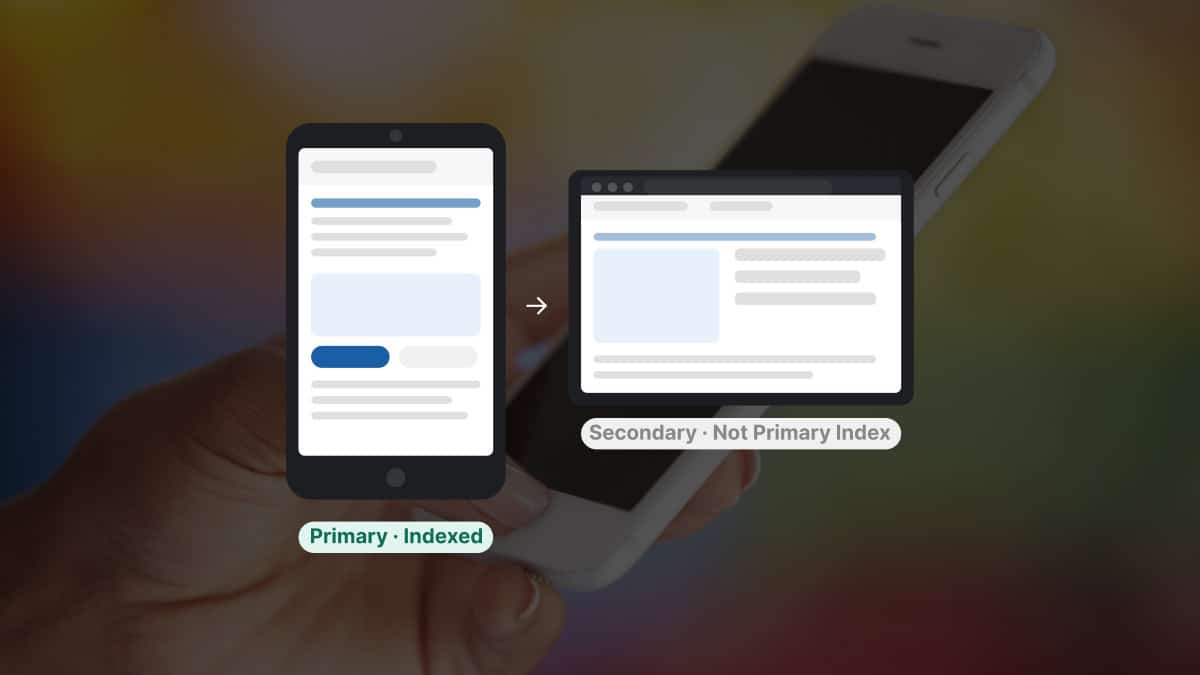
Google only crawls the mobile version of a site. Every new page the marketing team had built was effectively invisible to the crawler because the mobile menu did not link to it. It is the same dynamic that shows up across our SEO work for treatment centers — the mobile foundation either holds the rest of the program up or quietly collapses it.
The center had spent twelve months wondering why their traffic was not growing. The pages they had been investing in could not be found by the only crawler that mattered.
This is the 2026 reality of mobile-first indexing, and most treatment center operators have not internalized what it means. Google’s own mobile-first indexing documentation covers how it works. Google began rolling it out in 2018 and moved the last remaining sites to Googlebot Smartphone after July 5, 2024.
Core updates keep moving rankings, and because Google indexes the mobile version of each page, the mobile version is what every update evaluates.
The bigger story is what stacks on top of mobile-first now. AI crawlers from OpenAI, Anthropic, Perplexity, and others crawl the same mobile-rendered version of the site that Googlebot does.
On some sites they already out-request Googlebot. In a sponsored analysis of 69 websites on its platform, Alli AI found OpenAI’s ChatGPT-User fetcher made 3.6 times as many requests as Googlebot.
Mobile-first indexing has stopped being a Google story. It now serves as the foundation that determines whether AI search engines can even read your site.
Trevor Gage, Director of Marketing, Webserv
Key Takeaways
- Google moved the last sites to its smartphone crawler in July 2024, so the mobile version of each page is the version Google indexes and ranks, including in core updates like March 2026’s.
- AI crawlers (GPTBot, ClaudeBot, Claude-SearchBot, PerplexityBot) now stack on top of Googlebot Smartphone and crawl the same mobile-rendered output. In one 69-site analysis, OpenAI’s ChatGPT-User fetcher made 3.6 times as many requests as Googlebot.
- AI crawlers have stricter rendering tolerances than Googlebot — they do not run a second JS-execution wave. JS-heavy heroes, load-more buttons, accordions, popups, and SPA architectures routinely render invisible to GPTBot and ClaudeBot even when Googlebot eventually picks them up.
- The single biggest invisible failure is mobile-menu drift: pages added to the desktop mega-menu that never made it into the mobile menu. AI crawlers discover pages through the same links, so a missing mobile link can hide a page from both layers at once.
- Six checks separate a 2026-ready mobile site from a 2018-style mobile site: mobile menu parity, render-blocking JS audit, View Source content visibility, semantic HTML, schema validation, and a curl simulation of an AI crawler User-Agent.
This guide explains what mobile-first indexing means in 2026, how AI crawlers stack on top of it, the specific website design choices that make a mobile site invisible to AI search, and the practical audit that treatment centers should run on their own sites this quarter.
Mobile-first indexing in 2026 is not what it was in 2018
When Google introduced mobile-first indexing in 2018, the framing was: “the mobile version of your site will be the primary source for indexing.” Most operators interpreted that as “make sure the site is responsive.”
That interpretation was acceptable in 2018. It is dangerously incomplete in 2026.
Three things changed between then and now.
Google completed the rollout in July 2024. Googlebot Smartphone is now the crawler that indexes your content; Google may still send its desktop crawler occasionally, but the mobile version is what gets indexed and ranked. If the mobile version of a page is broken, missing content, or hidden behind JavaScript that the mobile crawler cannot execute, the page is functionally not indexed.
Core updates keep raising the stakes. Google’s March 2026 core update rolled out from March 27 to April 8. Google called it a regular update to surface relevant, satisfying content and didn’t announce mobile-specific changes. Because Google indexes the mobile version, mobile gaps carry into every update. Several fixes in the technical SEO fix list trace back to mobile-experience issues.
Treatment center sites that were “technically responsive” but slow, content-light on mobile, or built with desktop-first assumptions lost rankings during the update.
AI crawlers became the second crawler layer. OpenAI’s GPTBot, Anthropic’s ClaudeBot, Perplexity’s PerplexityBot, and the retrieval bots from each of these systems now crawl the public web at scale.
They use mobile-rendering paths similar to Googlebot Smartphone. They have stricter rendering tolerances than Googlebot, which means content that Googlebot eventually finds may still be invisible to AI search.
The 2026 question is not “is my site mobile-friendly.” The 2026 question is “can the mobile version of my site be read by every crawler that matters.”
The AI crawler layer stacks on top of Googlebot
Googlebot is no longer the only crawler treatment center operators need to think about. The crawler population has fundamentally shifted in the last 18 months.
GPTBot (OpenAI) was the most active AI crawler in a 30-day server log study of 12 sites by Digital Applied, at a median of roughly 4,200 hits per site per day. It crawled breadth-first, preferred blog, documentation, and about pages, and revisited high-traffic pages about every 2.4 days. GPTBot respects robots.txt.
Anthropic’s crawlers split the work across three bots. Anthropic’s crawler documentation names ClaudeBot for model training, Claude-User for pages a user asks Claude to fetch, and Claude-SearchBot for search. Anthropic says all three respect robots.txt, and that blocking the last two may reduce a site’s visibility in Claude’s search results. In the Digital Applied study, ClaudeBot averaged about 1,800 hits per site per day and revisited pages about every 6.8 days.
PerplexityBot ran at a median of roughly 980 hits per site per day in the same study, in bursts. It fetched sites mainly when a user query referenced them, peaking at 240 requests per minute on one publisher site during a viral query.
ChatGPT-User and other retrieval bots crawl when a user prompts the AI system with a request that requires real-time information. Their robots.txt handling varies by platform. Search Engine Journal noted that OpenAI and Perplexity say their user-initiated fetchers may not follow robots.txt, while Anthropic makes no such exception for Claude-User.
In that same 69-site sample, AI crawlers together made 3.6 times as many requests as traditional search crawlers. Treatment centers that optimize for Googlebot Smartphone but not for the AI crawlers are optimizing for a shrinking share of the crawler population.
The good news: AI crawlers use the same mobile-rendered version of the site that Googlebot uses. Fix the mobile foundation correctly, and every crawler benefits at once. Get the mobile foundation wrong, and every crawler suffers at once.
How the mismatched mobile menu problem actually works
The treatment center anecdote at the top of this guide is a representative case. Webserv audits regularly turn up sites where the mobile navigation is wildly different from the desktop version, with new pages added to one menu but never reflected in the other.
The pattern repeats often enough that it deserves its own audit category.
The mechanic is straightforward. When the development team builds a desktop mega-menu, the mobile menu is usually a separate component. The two are not linked at the data layer.
A page added to the desktop mega-menu does not automatically appear in the mobile version. Someone has to manually update the mobile component, and that step routinely gets skipped.
Six months in, the desktop menu has 12 new pages. The mobile menu has none. To Googlebot Smartphone, those 12 pages do not exist in the navigation graph.
They may still be indexable through internal links elsewhere on the site, but their position in the link hierarchy collapses. They drop in rankings or never rank at all.
AI crawlers inherit the problem. They follow the same internal links, so if Googlebot cannot find the page through mobile navigation, AI crawlers are unlikely to find it either. The page is invisible to the AI search layer for as long as the mobile menu drift goes uncorrected. The same compounding shows up in the local SEO tactics that fill beds — AI discovery channels mirror what classic search already sees, or fails to see.
The fix is a single source of truth for navigation. The same menu data renders both the desktop mega-menu and the mobile menu. Adding a page to the navigation updates both versions at once. This is a one-time CMS architecture decision that prevents months of compounding invisibility.
The JavaScript trap
A client we worked with had a hero section built around an accordion of looping short videos. The visual effect was striking. The technical implementation was costly.
The hero relied on a heavy stack of custom JavaScript to orchestrate the video loops, the accordion animation, and the layered transitions. The page loaded the entire JS bundle before any content rendered. Several seconds of blank screen passed before the first headline became visible. Per Google’s Core Web Vitals guidance, a Largest Contentful Paint over 2.5 seconds falls outside the good threshold, and on mobile that’s the version Google evaluates.
Googlebot Smartphone tolerates some JavaScript rendering delay because it runs a two-wave indexing process. The first wave is HTML-only. The second wave executes JavaScript and re-indexes the rendered output. The second wave can take days or weeks to complete.
AI crawlers do not have a second wave. Vercel’s analysis of AI crawler traffic found that the major AI crawlers, including GPTBot and ClaudeBot, don’t render JavaScript. If the content cannot be reached inside their fetch window, they index whatever HTML returned before the timeout.
For a JS-heavy hero section, that means the AI crawlers were indexing an empty page shell while the actual content sat behind a several-second JS load.
The center had spent months wondering why their homepage was not being cited in AI Overviews or pulled into ChatGPT and Perplexity answers for their target queries. The answer was that the homepage, from an AI crawler’s perspective, contained no content.
The fix was structural. We rebuilt the hero to render the headline, the subhead, the primary CTA, and the first 200 words of content in plain HTML inside the initial response.
The looping videos still loaded, but they loaded as enhancement on top of an already-rendered content layer. AI crawlers now see the same content that human visitors see when the page first paints.
This pattern is common. Treatment center websites that prioritize visual sophistication over render-path discipline routinely ship pages that are functionally invisible to the crawlers their marketing teams are trying to reach. It is the same trap behind most of the failed treatment center website rebuilds that look beautiful on launch day and underperform for a year.
The styling choices that hide content from AI crawlers
Beyond mobile menu drift and JS-heavy heroes, several common front-end patterns conceal content from AI crawlers even when the page otherwise renders fine.
Load-more buttons. Content hidden behind a “load more” interaction is often not indexed at all. AI crawlers will not click the button. Googlebot will sometimes load the content, but inconsistently. Pagination with real URLs (page 2, page 3) is far safer for crawler accessibility than infinite-scroll or load-more patterns.
Complicated accordions and popups. Accordions that hide content until clicked are read by Googlebot in most cases, but read inconsistently by AI crawlers. Popups that gate content behind interaction are usually invisible to all crawlers, including Googlebot.
If the content matters for ranking or AI citation, it should be visible in the default render of the page.
Non-semantic HTML. A page built primarily with <div> and <span> elements is harder for crawlers to parse than a page built with semantic HTML5 elements (<article>, <section>, <nav>, <header>, <aside>, <main>).
AI crawlers in particular rely on semantic structure to understand which parts of a page are primary content versus navigation versus boilerplate. Generic div soup with no semantic markup forces the crawler to guess, and the guesses are often wrong.
Lazy-loaded content without proper hints. Images and content lazy-loaded with JavaScript intersection observers are routinely missed by AI crawlers. Native lazy-loading (loading=”lazy” attribute) is safer because the content reference is in the HTML even if the asset has not yet loaded.
Single-page application architectures. SPAs that render the entire page client-side from a JS bundle are the highest-risk pattern. Server-side rendering or static-site generation is the safer architecture for content that needs to be discoverable by AI crawlers.
The unifying principle: anything that requires JavaScript execution to make content visible is a risk to AI crawler discovery. Render the primary content in HTML. Use JavaScript for enhancement, not for content delivery.
The expensive truth most treatment centers learn the hard way
MOST COMMON MISUNDERSTANDING
Most operators are still working from a 2018 mental model of mobile-first indexing. “Make sure the site is responsive” was the right answer then. It is no longer enough. Agencies that check mobile responsiveness, run a PageSpeed report, and call the work done are missing the AI crawler layer entirely — mobile menu drift, JS-blocking-content patterns, non-semantic HTML, and AI crawler accessibility all fail silently on a “mobile-friendly” site. The operator sees a clean report and assumes the site is set up for 2026 search. It is set up for 2018.
Most treatment center operators are still working from a 2018 mental model of mobile-first indexing. “Make sure the site is responsive” was the right answer then. It is no longer enough.
The expensive truth is twofold.
Most agencies have not updated their playbook for the AI crawler layer. They check for mobile responsiveness, run a PageSpeed Insights report, and call the work done. They do not audit for mobile menu drift, JS-blocking-content patterns, non-semantic HTML, or AI crawler accessibility.
The operator gets a clean mobile-friendly report and assumes the site is set up for 2026 search. It is set up for 2018 search.
The cost of invisibility is increasing. AI Overviews are intercepting clicks before classic organic results render. ChatGPT, Perplexity, and Claude conversational search are gaining share of high-intent treatment center prospects who would have previously found centers through Google’s blue-link results.
Treatment centers that are invisible to AI crawlers are invisible to a growing share of the discovery layer.
The fix involves no exotic work. A deliberate audit against the 2026 standard, an honest diagnosis of which patterns are working against the site, and a structural remediation plan that prioritizes content discoverability over visual flourish.
How SoCal Sunrise generated 85 admissions and 2,297% ROI from SEO in 6 months
A ground-up SEO rebuild using the Pathfinder Parents Methodology turned an invisible online presence into a top-ranking admissions engine.
Read the case study →85 admits and 3,152 leads attributed to organic
The pattern compounds during rebuilds. A treatment center rebuild that breaks mobile rendering typically produces the kind of ranking erosion we documented in our breakdown of why rebuilds hurt treatment center rankings. The visual site launches fine, but the mobile DOM Google indexes is missing the internal linking depth the old site had.
How to audit your treatment center site against the 2026 standard
Six checks separate a 2026-ready mobile site from a 2018-style mobile site.
Check 1: Mobile menu parity. Open the desktop site in a browser. Open the mobile site (or the desktop site at 375px width) in the same browser. Compare the navigation menus side by side.
Every page in the desktop menu should also be in the mobile menu. If the mobile menu is missing pages, that is the first remediation.
Check 2: Render-blocking JavaScript audit. Run the homepage through Google PageSpeed Insights on mobile. Look at the “First Contentful Paint” and “Largest Contentful Paint” metrics.
If LCP is over 2.5 seconds, the page is failing Core Web Vitals and is likely failing AI crawler render tolerance too. The fix is to identify which JS is blocking content render and either defer it, lazy-load it, or replace it with server-rendered HTML.
Check 3: View Source check. Right-click on the homepage and select “View Source.” Scroll through the raw HTML. The primary content of the page (headline, value proposition, primary CTA) should be visible in the source code.
If the source shows mostly empty <div> shells and the content only appears after JavaScript runs, AI crawlers are seeing the empty shells.
Check 4: Semantic HTML check. In the View Source output, count the semantic HTML5 elements. A well-built page should have <header>, <nav>, <main>, <article> or <section>, and <footer> elements. If the page is built primarily with <div> and <span>, the semantic structure is missing and crawler parsing suffers.
Check 5: Schema markup audit. Run the page through Schema.org’s Schema Markup Validator. The page should have at minimum Organization schema (sitewide), Service schema (on service pages), MedicalBusiness or LocalBusiness schema (on location pages), and FAQ schema (on pages with FAQ sections).
Keep FAQ schema in perspective. Google stopped showing FAQ rich results in May 2026, and structured data isn’t required for AI features. Visible FAQ sections that answer real questions do the work; the markup is housekeeping.
Check 6: AI crawler simulation. Use a curl request with a User-Agent string set to “GPTBot” or “Claude-SearchBot” and fetch the homepage. Compare the returned HTML to what a browser sees.
If the AI-crawler response is far thinner than the browser response, the site has a render-path problem that is hiding content from AI search.
A treatment center that passes all six checks is set up for 2026 search visibility across Googlebot Smartphone and the major AI crawlers.
What success looks like at twelve weeks
A treatment center that addresses mobile-first issues correctly should see measurable change inside a quarter.
Week 1: Audit complete. Mobile menu parity confirmed or remediated. Render-blocking JS identified. Semantic HTML and schema gaps documented.
Weeks 2 to 4: Structural fixes shipped. Mobile menu rebuilt as a single source of truth shared with desktop. Render-path discipline applied to the homepage and top service pages. Schema markup added where missing.
Weeks 5 to 8: Recrawl period. Googlebot Smartphone revisits the updated pages. AI crawlers follow on their own cadences, which the platforms don’t publish. The crawlers begin indexing the now-discoverable content.
Weeks 9 to 12: Visibility lift becomes measurable. Pages that were previously invisible to Googlebot Smartphone start ranking. AI Overview citations begin appearing for the target queries. ChatGPT, Perplexity, and Claude citations follow as each platform recrawls.
Timing varies by site and by how much content was hidden before the fixes.
The lag matters: treatment centers should expect classic Google rankings to move first, then AI search visibility to follow as the AI crawlers re-index.
What to ask your web partner this week
Three questions surface whether your web partner is operating to the 2026 mobile-first standard, the kind of standard that accounts for AI crawler accessibility and not just the responsive-design checks that defined the 2018 version of mobile-first. Ask all three.
First, ask whether your mobile navigation menu is a single source of truth with the desktop menu, or two separately maintained components. A serious partner can answer in one sentence. A weak partner does not know the difference exists.
Second, ask for the Core Web Vitals scores on mobile for every priority page. Specific numbers are the right answer. If the answer is “we run PageSpeed Insights periodically,” the partner is not treating mobile performance as a structural commitment.
Third, ask how the site is structured for AI crawler accessibility. The right answer references semantic HTML, server-side rendering of primary content, schema markup foundation, and a deliberate render-path discipline. The wrong answer is “we are responsive and that should be enough.”
Mobile-first indexing in 2026 is the foundation. AI search engines stack on top of it.
A treatment center site that is set up correctly for the mobile crawler is set up for the AI crawler too. A site that is not set up for either is invisible to a growing share of the discovery layer.
If rankings have already slipped, our guide to why a rehab website isn’t ranking on Google walks the wider diagnosis, and our guide to behavioral health marketing shows where technical SEO fits in the full program.
The fix is closeable in a quarter. The cost of skipping it compounds every month the site remains invisible to the crawlers driving the next generation of high-intent search. Book an intro call and we will run the six-check audit on your site as part of the diligence.
Frequently asked questions about mobile-first indexing for treatment center websites
Is our site still vulnerable if it was built mobile-first from the start?
Sometimes. Mobile-first design does not automatically mean mobile-first indexing safety. The risks come from how mobile content is rendered, what gets hidden in collapsed menus, how JavaScript loads content on mobile, and how the site interacts with AI crawlers. Sites built mobile-first 5 years ago using JavaScript-heavy frameworks often have new issues that the original build did not contemplate.
The clearest test is whether your mobile-rendered HTML contains the same critical content as your desktop-rendered HTML. Use Search Console’s URL Inspection tool or a Lighthouse mobile audit to compare. If meaningful content differs between mobile and desktop renders, the site has mobile-first indexing exposure regardless of when or how it was built.
Most treatment center sites we audit (including some that were technically mobile-first when built) have at least one mobile-only content gap that affects rankings. The gap is usually fixable, but it requires explicit audit rather than assumption.
How do we test what Googlebot mobile actually sees?
The most direct test is Google Search Console’s URL Inspection tool, which shows the live rendered page as Googlebot mobile crawled it. Submit the URL, look at the rendered HTML, compare to what your CMS thinks should be there. The gaps surface immediately.
Two other useful tools: the Rich Results Test, which renders a URL as Googlebot Smartphone, and a Lighthouse mobile audit for performance and accessibility. Both are free and produce documentable evidence of mobile rendering issues.
We run all three on every page that ranks meaningfully or carries critical content. The audit takes 20 to 60 seconds per page once the workflow is set up. For a 50-page treatment center site, the full audit usually completes in 2 to 4 hours and produces a prioritized remediation list.
Do AI crawlers follow the same rules as Googlebot?
Not exactly. ChatGPT’s GPTBot, Anthropic’s ClaudeBot, Perplexity’s PerplexityBot, and other AI crawlers each have their own rendering capabilities and rate limits. Most AI crawlers do not execute JavaScript the way Googlebot does, which means JavaScript-heavy mobile content that Google can read may be invisible to AI engines.
The practical implication is that mobile-first indexing optimization needs to include AI crawler compatibility now. Content that depends on client-side JavaScript rendering risks being invisible to the AI engines that are increasingly important traffic and citation sources.
The defensive pattern is server-side rendering or static generation for critical content. If your most important page content is in the rendered HTML at first response (rather than loaded by JavaScript after page load), it works for both Googlebot mobile and AI crawlers. If it loads later, you are betting on each crawler’s rendering capabilities, and AI crawlers are usually the weaker case.
What is the most common mobile issue treatment centers have?
The mismatched mobile menu. Treatment center sites typically have rich desktop navigation showing all programs, locations, services, and resources. The mobile menu collapses that into a hamburger that often loses the depth of the original. When Googlebot mobile crawls the page, it sees the simplified mobile navigation, which reduces the internal link signal and topical coverage Google can attribute to the site.
The fix is to preserve the navigational depth in the mobile menu, even if visually it requires scrolling or nested levels. The links should exist in the mobile rendered HTML, not just visually on desktop. Some treatment center sites also add a footer-level navigation block as a backup, ensuring critical internal links exist in the mobile HTML regardless of the menu structure.
We have seen treatment center sites recover meaningful ranking signal simply by repairing the mobile menu depth. The fix is usually a CSS and template change rather than a content rewrite, which makes it both fast and high-return.
How often should we audit our mobile rendering?
Quarterly at minimum. Mobile rendering is affected by CMS updates, plugin updates, theme changes, third-party script additions, and Google’s evolving crawler capabilities. A site that audits clean in January can develop new mobile rendering issues by March if any of those layers change.
The quarterly cadence catches drift before it becomes a ranking problem. Sites that audit mobile rendering only once a year can carry an issue for months before anyone notices. The cost of the missed audit usually exceeds the cost of running the audits.
We bake mobile rendering audits into our standard SEO monitoring for treatment center clients. The audit takes 1 to 2 hours per quarter, and the discipline catches problems early enough to fix them before they affect organic admit volume.
The perspective in this article comes from 9 years working exclusively inside behavioral health.
We are a team built by people in recovery who understand that behind every admission is someone asking for help. If that resonates, get to know us.
Trevor Gage is the Director of Marketing at Webserv. Webserv works with behavioral health and addiction treatment centers on SEO, paid media, and full-funnel admissions strategy.