We audit a lot of treatment center websites, and we’ve stopped being surprised by the same conversation. An operator inherits an agency relationship, publishes six months of content, watches the rankings not move, and reasonably concludes the content must be the problem.
More posts. Different keywords. A refresh of what’s already there.
Almost always, the content is not what’s wrong. If rankings haven’t moved at all, our guide to why your rehab website isn’t ranking on Google walks through the full diagnosis before you get to the fixes below.
Here’s what makes behavioral health different. Addiction treatment and mental health content is evaluated under Google’s YMYL standard. That’s the highest quality bar in the evaluation framework. The same standard underpins how we approach SEO for treatment centers from the technical layer up.
Google penalizes technical signals that undercut trust more aggressively than it would on a retail site. A missing canonical tag on a blog about kitchen gadgets is a minor issue.
The same missing tag on a page about opioid addiction treatment signals that the site may not be trustworthy enough to surface for a patient making a life-affecting healthcare decision.
People assume the rankings stall because of something glamorous. A competitor’s new page. An algorithm update. Content quality. It’s almost always something quieter. A redirect chain three hops deep. A schema field still set to ‘admin.’ The sexy problems get the airtime. The boring problems are what stop the rankings. Our drug rehab SEO guide puts these fixes in context with the rest of the program.
Trevor Gage, Director of Earned & Owned Media, Webserv
Key Takeaways
- Behavioral health content is evaluated under Google’s YMYL standard, so technical signals that undercut trust (broken canonicals, schema authored by “admin,” redirect chains) penalize harder than they would on a retail site.
- The eight fixes below are the unsexy foundational issues we keep finding on inherited sites: 28 redirect chains on one, 65 broken internal links on another, hundreds of AI-generated thin posts on a third.
- None of these require new content. They require going through the site you already have and removing the things working against it, in this order, before the next content investment.
- Fixed in sequence, the on-page layer (title tags, H1s, schema author attribution) is the highest-impact starting point: a few hours of work routinely moves rankings within weeks.
Why the content team usually isn’t the problem
Treatment center websites keep getting built and maintained with retail-site diligence. Page builder defaults left in place. Schema author attribution pointing at “admin.” Redirect chains that accumulated across three site redesigns without anyone flattening them.
It isn’t intentional neglect. It’s what happens when nobody owns the technical layer and everyone assumes the content team will handle rankings.
The eight fixes below keep showing up because they are the unsexy foundational issues. The ones a consultant wouldn’t find interesting enough to write a whitepaper about.
None of them require new content. They require going through the site you already have and removing the things working against it. Do them in this order before the next content investment.
For the full technical framework, including HIPAA-compliant tracking setup, schema implementation, and Core Web Vitals, see the complete technical SEO guide.
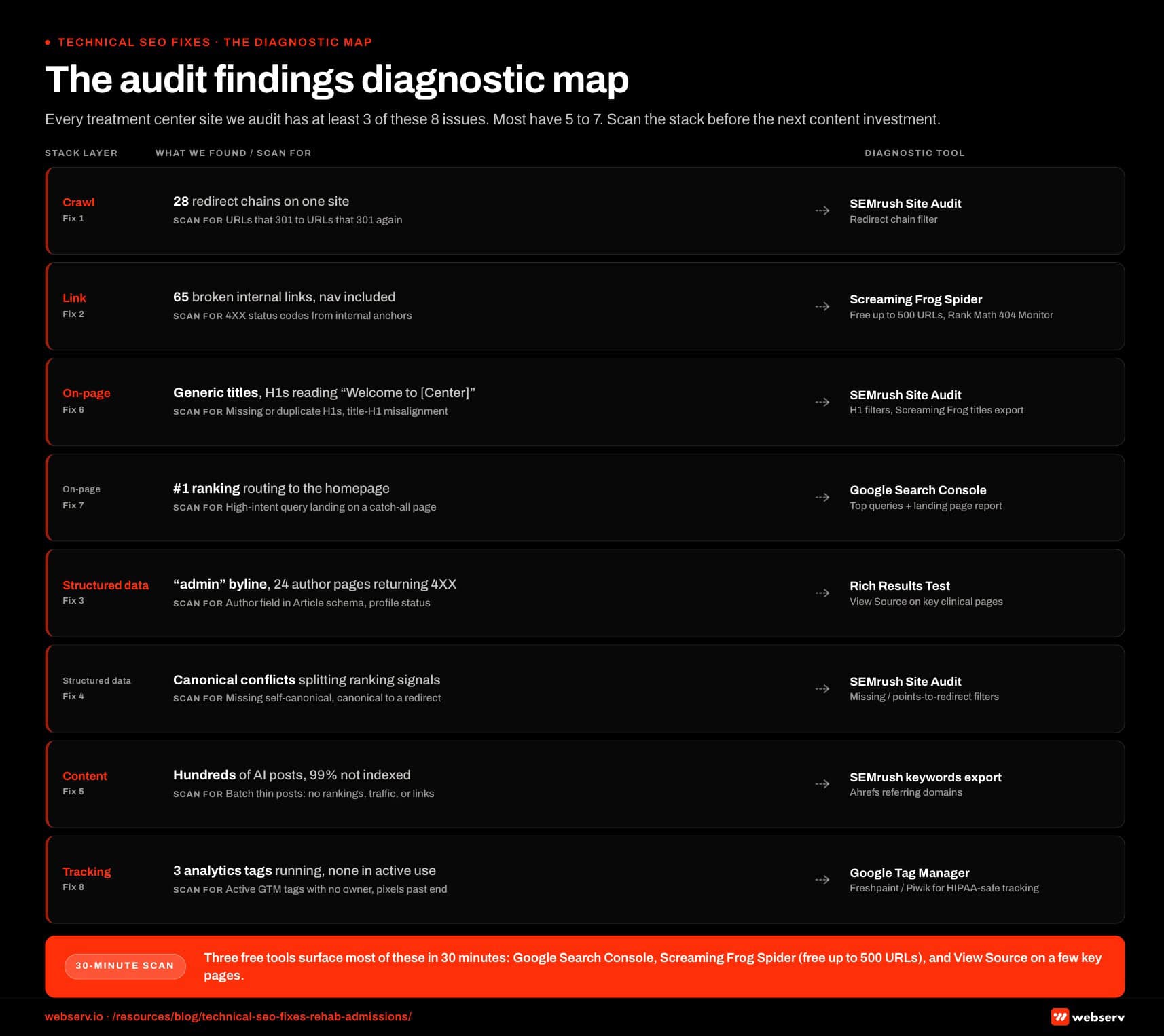
The last three audits we ran turned up 28 redirect chains on one site, 65 broken internal links on another, and hundreds of AI-generated blog posts on a third. Three different treatment centers. Three different operators. Same question at intake.
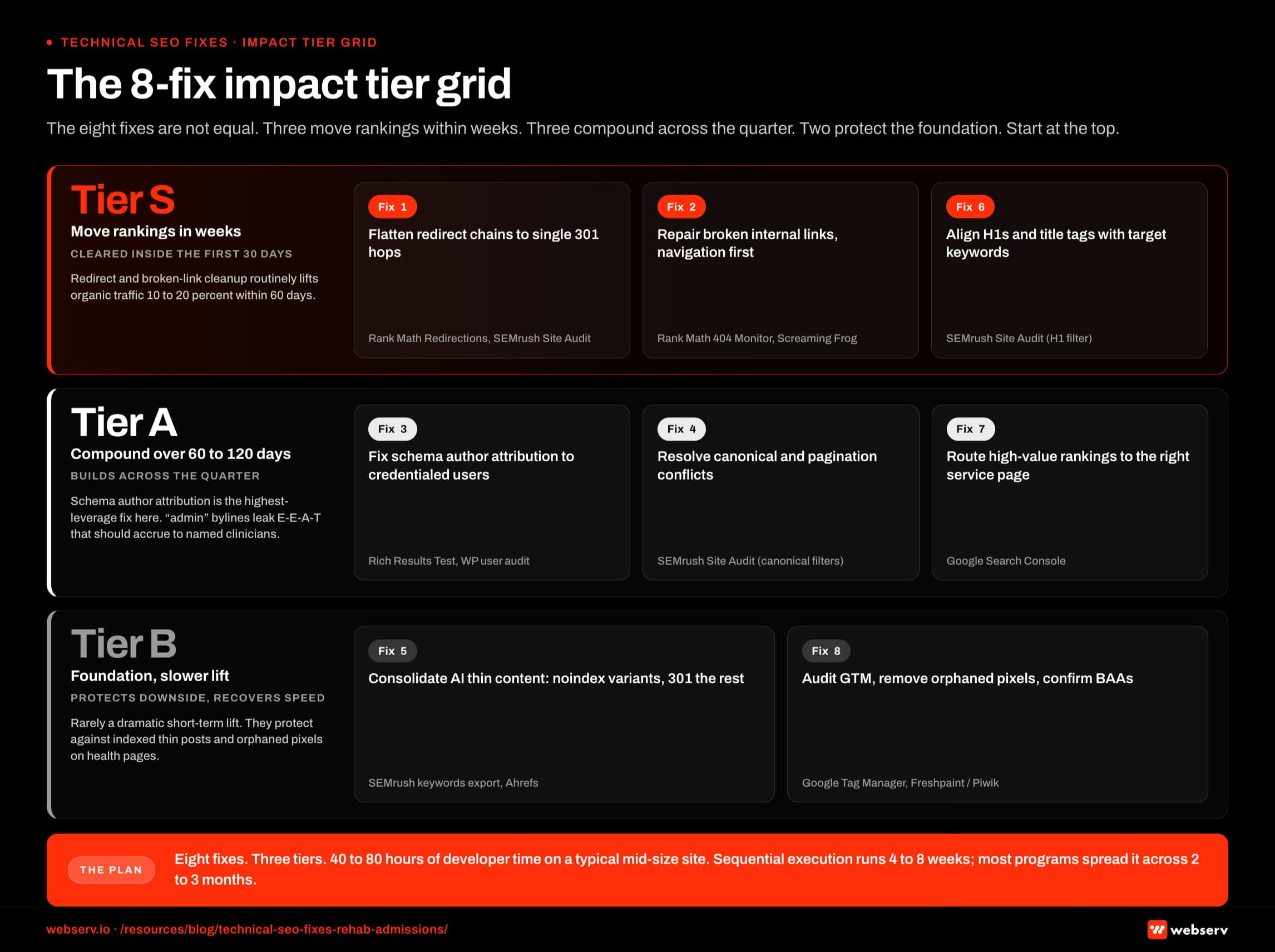 Infographic titled ‘The 8-fix impact tier grid’.
1. Flatten your redirect chains
What we found: 28 redirect chains across the site. The client’s commercial pages (outpatient rehab, IOP, addiction treatment) were already fighting against better-established local competitors for first-page rankings.
 Infographic titled ‘The audit findings diagnostic map’.
The chains meant those pages were receiving a fraction of the authority they should have been getting.
Why it matters: Every time a URL redirects to another URL that redirects to another URL, link equity bleeds out at each hop.
Authority that referring domains, internal links, or years of organic performance built up loses value before it ever reaches the destination page.
Publishing new service pages on a site with 28 redirect chains is building on a foundation that is actively leaking authority. That dynamic compounds when teams also rebuild instead of optimize. The chains multiply across redesigns.
Fix: Every flagged URL should point directly to its final destination in a single 301. Fix this before anything else on the list.
Tools: Rank Math’s Redirections module manages this on WordPress. SEMrush Site Audit identifies existing chains under the “Redirect chain” filter.
2. Fix broken internal links throughout the site
What we found: 65 broken internal links on a behavioral health practice site, including several in the primary navigation itself.
Why it matters: The real damage wasn’t the broken links themselves. It was what they did to crawl coverage.
Google’s crawler hits a dead end, stops following that path, and pages that should be receiving crawl attention don’t.
On a site where commercial service pages are already fighting for visibility, dead links in the navigation or content body mean those pages get crawled less frequently and accumulate less internal authority than they should.
Navigation links are the most-crawled element of any site, so a dead end there is effectively a dead end on every page.
Fix: Repair in priority order. Navigation first. Internal links on high-traffic pages second. Body copy across the rest of the site third.
Tools: Rank Math’s 404 Monitor catches new ones as they appear.
3. Fix your schema author attribution (WordPress defaults to “admin”)
What we found: On the multi-location mental health practice audit that turned up the 65 broken links, every blog post across the site had schema markup pointing to a clinical author whose profile page no longer existed.
24 pages were returning 4XX status codes, and many of those were the author profile pages themselves. An E-E-A-T failure at scale.
Why it matters: WordPress adds author attribution to schema markup automatically. If no named author has been assigned to a page, that attribution points to the default user.
Often that default is “admin,” a generic account name, or whatever handle was used during site setup. That information is public.
It’s in the page’s structured data, readable by Google and by anyone who inspects the source. For content on a treatment center or mental health practice website, this matters more than it would almost anywhere else.
Behavioral health content is evaluated under Google’s helpful, reliable, people-first content guidance, where verifiable author credentials feed E-E-A-T signals as a direct ranking input.
Schema that attributes clinical content to “admin” is telling Google that no identifiable licensed professional is accountable for the health information on that page.
The schema “admin” problem is invisible from the front end. That’s why it survives for years. A clinician writes the post, an editor reviews it, a designer publishes it, and the byline Google actually reads still says “admin” because nobody ever looked at the structured data.
Trevor Gage, Director of Earned & Owned Media, Webserv
Fix: In WordPress, every clinical page should be assigned to a named, credentialed user. Not “admin,” and not a generic account.
The author profile page that schema points to needs to be live, indexed, and listing verifiable credentials.
Check: Before publishing any new clinical content, verify the author attribution in the page’s structured data using the Google Rich Results Test.
4. Resolve canonical and pagination conflicts
What we found: On a Texas-based multi-location treatment center audit, canonical and pagination conflicts were the central technical issue limiting long-term organic growth.
The site had the content. It had the local presence. But ranking signals were being distributed rather than consolidated, and no individual commercial page could accumulate the authority needed to consistently hold a top-three position.
Why it matters: Clients often push back on this one because the site looks fine from the front end. Pages load, content appears, nothing seems broken.
But canonical misconfigurations and pagination conflicts are invisible to users while being very visible to Google. See Google Search Central’s canonicalization documentation for the specific signals Google reads when consolidating duplicate URLs.
What Google sees is ranking signals split across duplicate or low-value URLs, rather than concentrated on the primary service page.
Fix: Every indexable page needs a self-referencing canonical tag. Paginated series need rel=next/prev implemented correctly. Category and tag archives that generate near-duplicate content should be noindexed.
Check: Run SEMrush Site Audit and filter for “Missing canonical tag” and “Canonical points to redirect.”
While you’re in there, also confirm your robots.txt returns a 200 status code directly rather than a redirect. A robots.txt that redirects means Google is guessing at your crawl permissions instead of following explicit instructions.
How SoCal Sunrise generated 85 admissions and 2,297% ROI from SEO in 6 months
A ground-up SEO rebuild using the Pathfinder Parents Methodology turned an invisible online presence into a top-ranking admissions engine.
Read the case study →85 admits and 3,152 leads attributed to organic
5. Clean up AI-generated content before it suppresses everything else
What we found: On a Southern California treatment center audit, hundreds of near-identical posts published in batches.
Barely distinguishable from each other, clearly generated from the same template, covering demographic variations nobody was searching for.
The site had legitimate local rankings, including #1 for its core treatment terms. But it was carrying hundreds of pages actively dragging down domain trust across every legitimate service page on the same domain.
Why it matters: Google’s official stance is that it doesn’t penalize sites for using AI content tools. It evaluates content quality regardless of source. That’s true.
The problem is that most of what we find when we open a site with hundreds of AI-generated posts isn’t high-quality content. It’s churned-out, unrevised, derivative pages with no E-E-A-T.
Reproduced fluff targeting hyper-specific micro-audiences that barely differ from each other.
Here’s the part that makes this harder than it looks. If these pages were ranking, bringing traffic, or elevating the brand, the calculation would be different.
99% of them weren’t indexed, weren’t ranking, and weren’t generating a single visit.
We do our due diligence before touching anything: checking for inbound links from other sites, checking for any rankings or traffic, making sure nothing valuable gets removed.
Pages that do none of the above are a liability, and leaving them in place while building new content on top of them is fighting the wrong battle.
Fix: Consolidation, not deletion. Merge near-duplicate posts into substantive cluster pieces, noindex the thin variants, and 301-redirect any consolidated URLs to the merged destination.
Check: Export organic keywords from SEMrush and cross-reference against any pages under consideration. Check referring domains in Ahrefs.
Only touch pages with no rankings, no traffic, and no inbound links.
6. Align your H1s and page titles with your actual target keywords
What we found: A site we took over from an agency that had done solid local SEO work. Strong GBP presence, clean citations, but the on-page layer hadn’t been touched in two years.
Title tags were generic. Pages were live and indexed but not optimized for the specific keywords the center needed to rank for. Most of the gaps mapped back to the kind of issues a deliberate keyword strategy for rehab sites would have caught at template-build time.
Why it matters: This is consistently the most-neglected high-impact technical fix on treatment center sites we inherit.
A few hours of work across the site (updating title tags, meta descriptions, and H1s to reflect the right target keywords, implementing basic schema with real author attribution connected to licensed clinicians rather than a generic user) was distinct enough to trigger Google to reindex, and rankings moved within weeks.
That’s the payoff ratio when the on-page layer has been neglected: the fix is fast, the compounding is durable.
On a multi-city mental health practice audit, the practice had a dominant market in one city and was invisible in two others despite having active locations there.
Part of that invisibility came down to the location pages not being differentiated at the title and H1 level. Each one looked essentially the same to Google regardless of which city it served. See our local SEO playbook for rehab centers for the location-page differentiation pattern that fixes this.
Fix: Every page needs a unique H1 that contains the primary keyword. For location pages, include the city: “IOP Treatment Center in Austin, TX,” not “Our Programs” applied across every location.
Title tags and H1s should align. They don’t need to be identical, but they should reinforce the same keyword intent.
A title tag targeting “drug rehab Austin” on a page whose H1 reads “Welcome to [Center Name]” sends conflicting signals.
Check: Scan for missing and duplicate H1s in SEMrush Site Audit. Both are common on sites built with page builders where template defaults were never updated.
7. Make sure your highest-value rankings are routing to the right page
What we found: A treatment center in Southern California ranked #1 for their highest-value local commercial term, one of the most competitive searches in their market.
That ranking was routing to the homepage.
Why it matters: This is the most expensive mistake on the list because it wastes something that already exists: a hard-earned ranking.
The homepage serves every entry point simultaneously. It cannot close a conversion for a patient who searched a specific service and a specific city.
That person wants program-specific information, insurance acceptance details, clinical staff credibility, and a clear next step to call or verify coverage.
What they land on is a general page that makes them work to find all of that. The result: multiple #1 local rankings, a generic landing experience, and conversion loss on the exact traffic that matters most.
The ranking was doing its job. The page was not.
Fix: Create or optimize a dedicated service and location page for the query, then 301-redirect the current destination to it. Or update the internal linking structure to send authority to the correct page instead.
Check: Walk every high-intent ranking in Google Search Console. For any query with commercial intent, confirm the landing page is built for that specific query, rather than a catch-all homepage or a parent category page.
8. Audit your GTM container (it’s probably a mess)
What we found: We’ve opened GTM containers with Hotjar, Microsoft Clarity, and Crazy Egg all running simultaneously.
Three heatmapping tools, none of the data actively used, all of them adding page load time on every single page of the site.
Pixels from campaigns that ended two years ago, still firing. Tracking scripts connected to platforms with no active monitoring. In behavioral health, no Business Associate Agreement in place.
Why it matters: When we take over a treatment center site that has worked with multiple agencies over the years, the GTM container tells the whole story of the account’s history.
Beyond the speed hit, orphaned tracking tags are a HIPAA exposure waiting to be found.
A pixel from a three-year-old retargeting campaign is still collecting user data on health condition pages, still transmitting it to a platform you’re no longer managing, still doing it without a signed BAA.
Nobody is being malicious. It’s what happens when you inherit tracking infrastructure from multiple agencies without ever doing a clean inventory.
Fix: Open GTM and click through every active tag. Remove anything not connected to a currently active platform with an assigned owner. Document what stays and why.
Tools: For the full HIPAA-compliant tracking architecture (server-side GTM, Freshpaint or Piwik integration, Conversions API setup), see the complete technical SEO guide.
Fix the foundation before you invest in anything else
Treatment centers that invest in content on a technically broken site are paying twice. Once for the content, and once again when they eventually fix the technical issues and re-evaluate everything that underperformed.
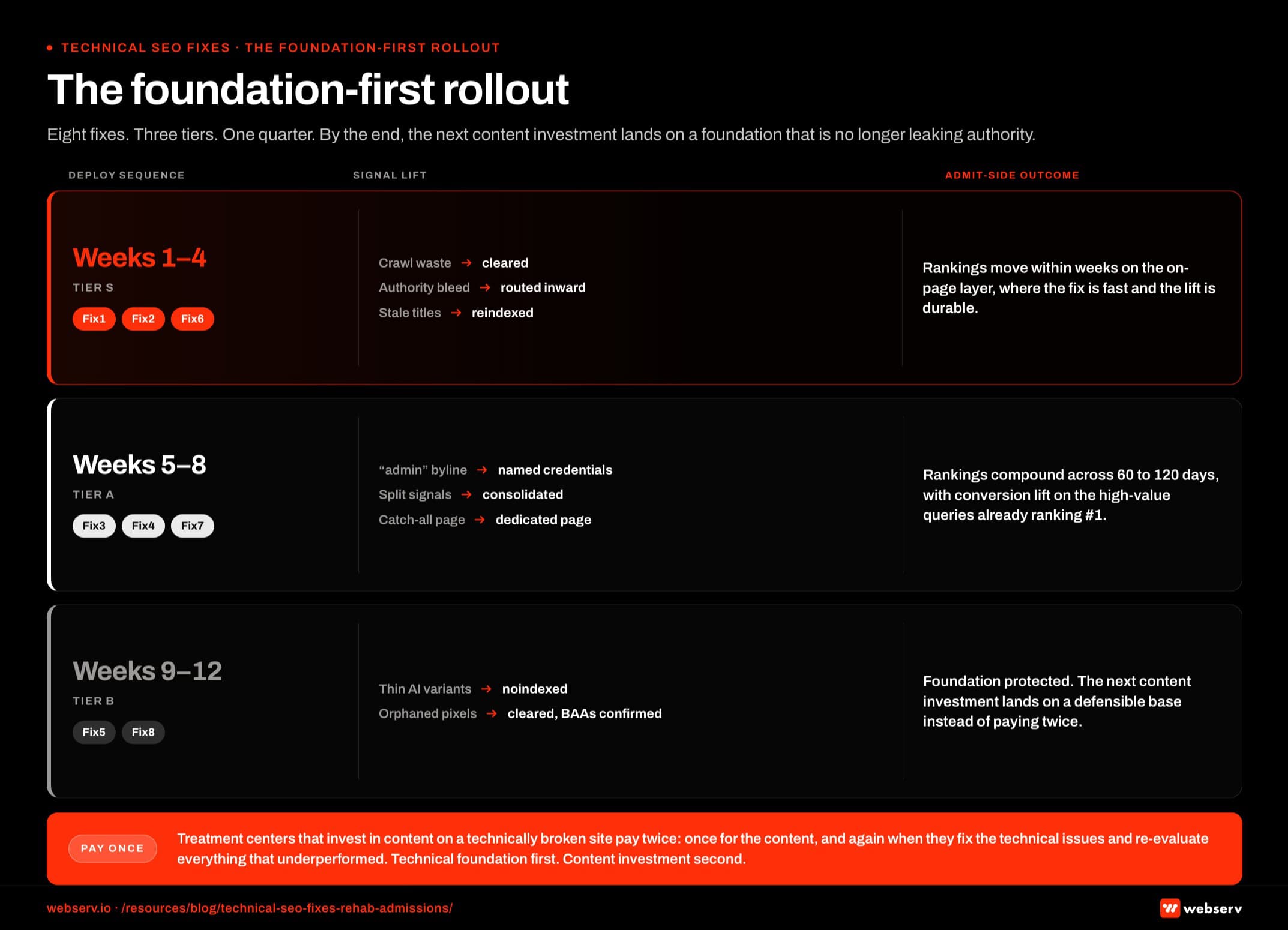 Infographic titled ‘The foundation-first rollout’.
This is why the order matters. Technical foundation first. Content investment second.
The inverse, which is what most behavioral health content programs run on, produces pages that never reach their actual ranking potential because the infrastructure underneath them is leaking authority before the content ever has a chance to compete.
Fix the redirect chains and your link equity starts reaching the pages supposed to earn it. Fix the schema author attribution and your clinical content carries verifiable credentials in front of Google quality evaluators.
That’s a direct E-E-A-T signal, and a generic “admin” byline was actively undermining it.
The GTM cleanup pulls double duty: page speed improves and HIPAA exposure shrinks at the same time. Align your H1s with target keywords and pages you’ve been staring at for six months start ranking for the queries they should have been ranking for all along.
None of this requires new content. It requires going through the site you already have and removing the things working against it.
If you want to know what’s specifically working against a given site, we run a technical audit as part of every new client engagement.
Prioritized fix list returned before any content work begins, so you know what you’re working with before you invest another dollar in new pages. Book an intro call and we’ll run yours.
This is one piece of a larger technical foundation; see behavioral health marketing guide and building topical authority for the rest.
Frequently asked questions about technical SEO for treatment center websites
Which of the 8 fixes should we prioritize first?
Redirect chain cleanup and broken internal link repair typically produce the fastest measurable lift. Both reduce crawl waste and let Google reach the pages that actually need to rank. Most treatment center sites we audit have at least 50 to 200 broken internal links and dozens of redirect chains, and clearing those alone usually produces 10 to 20 percent organic traffic improvement within 60 days.
Schema author attribution is the second-priority fix because it affects E-E-A-T signals directly. WordPress sites that default ‘admin’ as the post author leak authority that should accrue to named clinicians and experts. Fixing this is fast (a few hours of theme work) and produces compounding benefit as the site accumulates content under proper authorship.
The remaining fixes (canonical conflicts, AI content cleanup, H1 alignment, page routing, GTM hygiene) compound over months. They are essential but rarely produce the dramatic short-term lift that the first two do.
How do we know which of these issues we have without a full audit?
Three free tools surface most of the issues in 30 minutes. Google Search Console shows redirect chains, broken pages, and indexing problems. Screaming Frog Spider (free version up to 500 URLs) shows broken internal links, H1 alignment, and canonical issues. View Source on a few key pages shows schema author attribution.
The fuller audit using paid tools (Screaming Frog Pro, Ahrefs Site Audit, Semrush Site Audit) surfaces more nuanced issues like AI content patterns, page routing inefficiencies, and GTM tag bloat. For most treatment centers, the paid audit is worth running quarterly. The free quick check is worth running monthly.
The mistake is assuming that without an audit, the issues do not exist. Every treatment center site we have audited had at least 3 of the 8 issues in this guide, and most had 5 to 7. The audit work is fast enough that operating without it is just choosing to be uninformed.
Can we fix these issues without a developer?
Some, not all. Redirect chain cleanup and broken internal link fixes can usually be handled by a non-developer with CMS access. Schema author attribution, canonical conflict resolution, and GTM cleanup typically require developer or technical SEO specialist involvement.
The split usually falls along the line of CMS-configurable changes (low technical bar) versus theme or template changes (developer-required). Most treatment center marketing managers can handle the first category with a few hours of focused work. The second category requires either an in-house developer, an external technical SEO specialist, or an agency engagement.
The cost of doing nothing exceeds the cost of the developer. Most of these issues compound. A redirect chain left in place for 18 months costs more in lost ranking than the developer time would have to fix it. We typically estimate the total developer time for all 8 fixes at 40 to 80 hours, spread across the prioritization sequence.
How long does each fix take to implement?
Rough estimates per fix on a 50-page treatment center site: redirect chains 4 to 8 hours, broken internal links 8 to 16 hours, schema author attribution 2 to 4 hours, canonical and pagination 4 to 8 hours, AI content cleanup 16 to 40 hours (depends on volume), H1 and title alignment 4 to 8 hours, page routing audit 8 to 16 hours, GTM cleanup 4 to 8 hours.
Total time across all 8 fixes is 50 to 110 hours for a typical mid-size site. The work can be parallelized across team members where ownership splits cleanly (a developer on redirect and canonical work, a content team member on AI cleanup, a marketing team member on GTM hygiene). Sequential execution by one person takes 4 to 8 weeks.
Most programs spread the work across 2 to 3 months to keep it manageable alongside other operational priorities. Doing all 8 in one focused sprint is feasible but usually produces a quality dip because the team’s attention is divided across too many simultaneous projects.
Will fixing these issues bring back lost rankings?
Sometimes, depending on what caused the ranking loss. If the rankings dropped because of one of these specific technical issues (redirect chain accumulation, broken internal linking, lost author signal), fixing the issue usually recovers a meaningful portion of the lost rankings within 60 to 120 days.
If the rankings dropped for other reasons (content quality, competitor lift, algorithm update, backlink loss), fixing the technical issues alone may not produce ranking recovery. The technical fixes are necessary infrastructure but they do not substitute for content quality or authority signals.
The honest framing is that these fixes establish the foundation for rankings rather than guaranteeing them. A site with all 8 issues fixed and weak content will still rank poorly. A site with strong content and all 8 issues unfixed will rank below its potential. Both layers matter.
How do we choose between fixing these in-house and hiring an agency?
The eight fixes here are doable in-house for any treatment center with a technical SEO specialist on staff or contractor access to one. For programs that lack that capacity, hiring an agency is the cleaner path, both because the fixes compound and because most generalist agencies will introduce new versions of the same problems if they are not behavioral-health-specialist.
We publish our own evaluation of the top addiction treatment SEO agencies with the methodology disclosed. Webserv is on the list and at the top, and the methodology can be re-weighted against whatever factors matter most to your program. The list is shorter than most because we did not rank firms that failed on the six factors we evaluated against.
There is no wrong answer between in-house and agency. The wrong answer is to do neither and assume the technical foundation will fix itself.
The perspective in this article comes from 9 years working exclusively inside behavioral health.
We are a team built by people in recovery who understand that behind every admission is someone asking for help. If that resonates, get to know us.
Trevor Gage is the Director of Earned & Owned Media at Webserv. Webserv works with behavioral health and addiction treatment centers on SEO, paid media, and full-funnel admissions strategy.