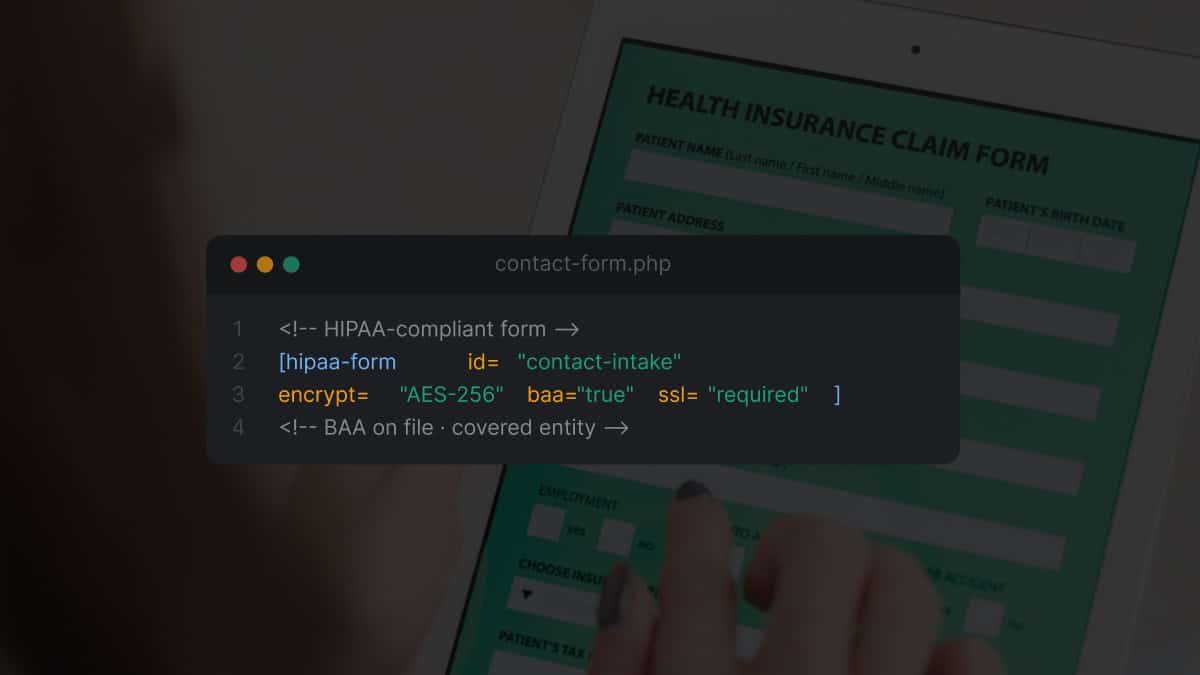
A treatment center we audited last month had a Contact Form 7 plugin on the homepage. The form collected name, phone, email, insurance carrier, and a free-text “tell us about your situation” field.
Submissions routed through the default WordPress mail() function over plain SMTP to a Gmail inbox shared by three admissions team members.
The operator had been told the site was “HIPAA compliant” by the developer who built it. The developer was wrong, and the operator did not know how wrong until the legal counsel they consulted before a Joint Commission audit walked through the form architecture and identified six separate failure points.
Each one was a potential breach event under the HIPAA Security Rule. Each one carried penalty exposure that could materially exceed the rest of the marketing budget combined.
The fix was not complicated. It was a different form plugin, a HIPAA-eligible email delivery service, a signed Business Associate Agreement with each vendor, an updated hosting configuration, and an internal access-control policy.
The total cost of the rebuild was under $4,500 in setup plus roughly $400 a month in incremental SaaS costs. The penalty exposure on the original setup was orders of magnitude higher than the fix.
This piece is the operator-facing read on what makes a WordPress contact form HIPAA-compliant in 2026, what the most common failure modes look like, and the implementation checklist treatment centers should run through before the next admissions form goes live on the site.
The piece sits inside the broader behavioral health marketing context but the compliance frame is specific to behavioral health and healthcare-adjacent operators.
One important note before the rest of the article. This is general guidance, not legal advice. HIPAA compliance is a legal and clinical-operations question, not a marketing-decision question.
Every treatment center should consult its HIPAA Privacy Officer, HIPAA Security Officer, and qualified legal counsel before relying on any specific implementation choice.
What follows is the technical and architectural frame that informs that conversation; the conversation itself is not something an article can resolve.
Key Takeaways
- Standard WordPress contact form plugins (Contact Form 7, default WPForms, Gravity Forms without HIPAA add-on) are not HIPAA-compliant by default. The plugins themselves may be functional, but the surrounding stack (email delivery, storage, transport, access controls, BAA coverage) is what determines compliance, and the default configuration on most WordPress sites fails on multiple counts.
- The single most common failure mode is the email delivery step. A form that submits over HTTPS to a HIPAA-eligible plugin storing data on an encrypted server still fails compliance if the submission email is sent through unencrypted SMTP to a personal Gmail inbox. Email delivery is where most behavioral health facilities accidentally route Protected Health Information through non-compliant channels.
- A Business Associate Agreement (BAA) is required with every vendor in the form-data stack that touches PHI. Form plugin vendor, hosting provider, email delivery service, CRM, analytics if it captures form content, and any backup service. Missing one BAA in the chain breaks compliance for the whole pipeline.
- Treatment center contact forms collect PHI almost by definition. The name and phone alone may not qualify; the combination of identifiers with health-condition references (substance use, mental health, treatment inquiry) almost always does. The right read is to treat the entire admissions inquiry pipeline as PHI-handling.
- The implementation checklist runs HIPAA-eligible form plugin, HIPAA-eligible WordPress hosting, HIPAA-eligible email delivery, signed BAAs across the stack, transport encryption (HTTPS with strong TLS), storage encryption, access controls with audit logging, and a documented data-retention and disposal policy. Missing any one creates compliance gap.
What Makes a Contact Form HIPAA-Compliant (Or Not)
The conceptual move that separates HIPAA-compliant forms from forms-that-look-compliant is understanding that the form itself is one node in a larger data pipeline, and HIPAA compliance applies to the entire pipeline, not just the form input.
A contact form submission produces a chain of events. The user fills out the form on the website. The form submission travels over the network from the user’s browser to the server.
The server receives the data and stores it. The server typically forwards a notification email to one or more admissions team members.
The admissions team accesses the data, often through the form plugin’s admin interface or through the notification email. The data may also be forwarded to a CRM, an admissions intake system, or a third-party verification of benefits tool.
Each step in this chain has its own compliance requirements. The transport (network) needs encryption. The storage needs encryption. The access points need authentication and audit logging. The email delivery needs to be over an encrypted channel and arrive in a compliant inbox.
The downstream systems need to be covered by Business Associate Agreements. The retention and disposal of the data need to be governed by a documented policy.
The single biggest mistake we see in treatment center WordPress configurations is treating compliance as a property of the form plugin alone. Operators install a plugin marketed as HIPAA-compliant, configure it according to the plugin documentation, and assume the pipeline is covered.
The plugin may in fact be HIPAA-eligible. The hosting environment, email delivery, CRM integration, and team access patterns around the plugin almost always are not.
The deeper read on what NIST SP 800-66 Revision 2 calls “implementing the HIPAA Security Rule” is the framework that organizes this thinking. NIST’s HIPAA Security Rule implementation guide walks through the Administrative, Physical, and Technical safeguards required for any system handling PHI.
A WordPress contact form pipeline has surface area in all three categories, and the guide is the authoritative reference for what each category actually requires.
The weakest link governs compliance for the whole chain. A HIPAA-eligible form plugin storing data on an encrypted server still fails compliance if the notification email lands in a personal Gmail inbox. The pipeline is the unit of analysis, not the plugin.
Preston Powell, CEO of Webserv
The PHI Definition Question: When Does a Contact Form Collect PHI?
The threshold question for any treatment center contact form is whether the form actually collects Protected Health Information. The answer is almost always yes, but the reasoning matters because it affects which fields trigger compliance requirements and which do not.
The HIPAA Privacy Rule at 45 CFR 164.501 defines PHI as individually identifiable health information transmitted or maintained in any form by a Covered Entity or Business Associate.
The two-part test is whether the data is individually identifiable (can be linked to a specific person) and whether it relates to health condition, healthcare provision, or healthcare payment.
For a treatment center contact form, three combinations typically trigger PHI classification.
Identifier plus health-condition reference. Name and phone combined with a “what condition brings you here today” field is PHI. The identifier is the name plus phone.
The health-condition reference is the form field that asks about substance use, mental health concerns, or treatment inquiry. The combination meets both prongs of the test.
Identifier plus contextual inference. Name and phone submitted to a form on a treatment center website may itself be PHI even without a health-condition field, because the context of the submission (a person contacting an addiction treatment facility) provides the health-condition inference.
This is the more conservative read, and it is the one we recommend operators default to.
Identifier plus insurance verification request. Name, phone, and insurance carrier requesting verification of benefits is unambiguously PHI. The insurance carrier and member ID are protected identifiers, and the verification request itself relates to healthcare payment.
The audience-side companion to thinking about this is the exclude-zip strategy for out-of-network family targeting, which covers how paid-traffic targeting interacts with insurance-related form data without crossing compliance lines. The same pipeline-level discipline applies to HIPAA-compliant Facebook Ads for addiction treatment, which addresses the BAA chain on the paid-social side of the funnel.
The practical implication is that treatment center contact forms should be designed and architected as if they collect PHI in every case, even when the specific form fields might not strictly require it under the most liberal reading of the rule.
The compliance cost of treating the form as PHI-handling is small. The exposure cost of getting the classification wrong is large.
The BAA Requirement: Who Needs a Business Associate Agreement
The HIPAA Security Rule at 45 CFR Part 164 Subpart C requires Covered Entities to enter into Business Associate Agreements with any vendor that creates, receives, maintains, or transmits PHI on the Covered Entity’s behalf.
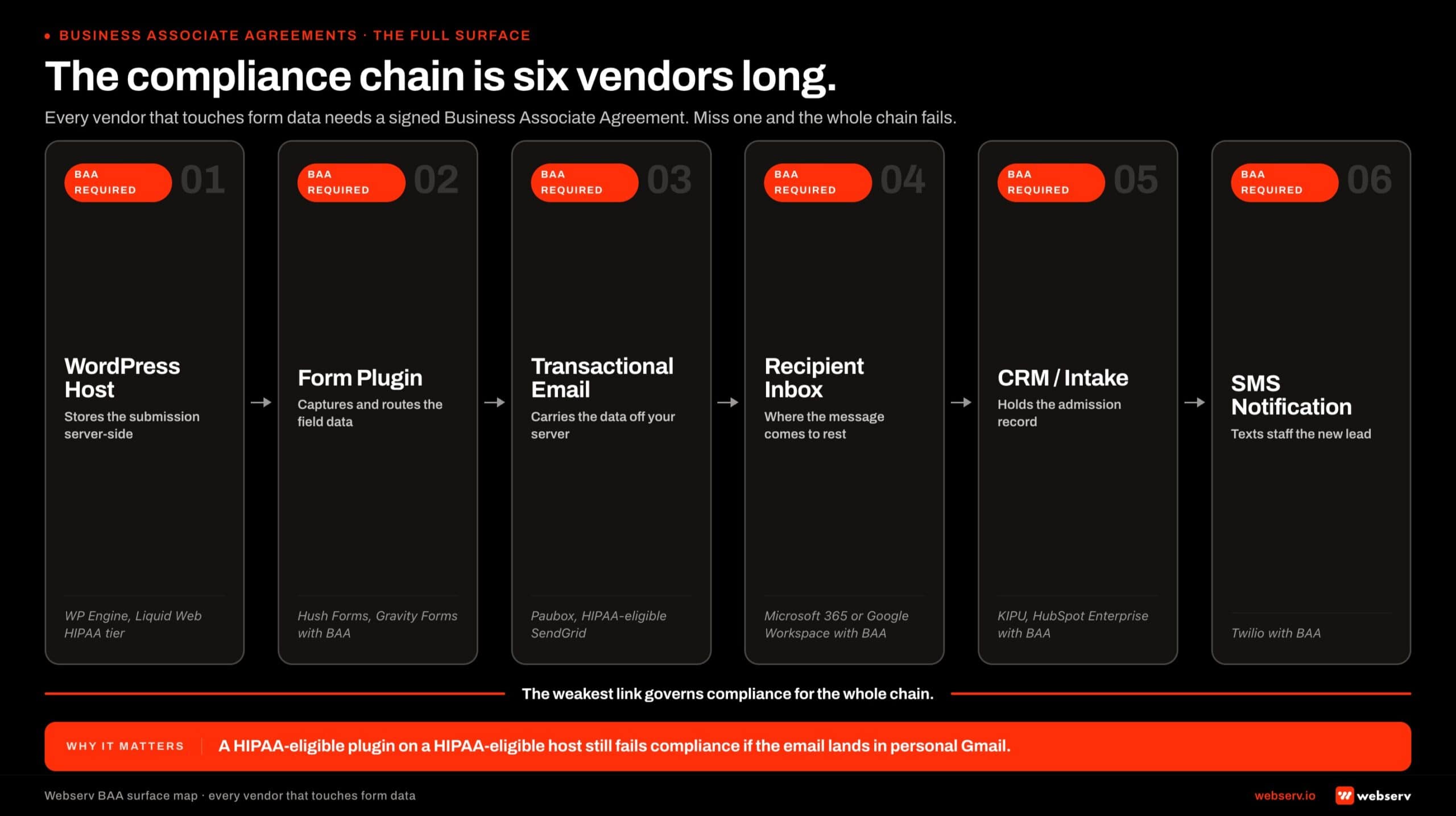 Horizontal pipeline infographic titled ‘The compliance chain is six vendors long.’
For a WordPress contact form pipeline, the BAA requirement extends to every vendor in the chain that touches the data.
The BAA chain for a treatment center contact form includes, at minimum, six vendor relationships.
WordPress hosting provider. The server that stores the WordPress site and receives form submissions. The hosting provider needs to be HIPAA-eligible and willing to sign a BAA. Most generic shared hosting providers (Bluehost, GoDaddy basic plans, DreamHost shared) are not HIPAA-eligible.
Specialized HIPAA-compliant WordPress hosts (WP Engine HIPAA-eligible tier, Pressable enterprise, Kinsta Enterprise, specialized behavioral-health-focused hosts) sign BAAs and offer the appropriate technical configuration.
Form plugin vendor. The plugin that processes the form submission and stores the data. Some plugins are HIPAA-eligible with the appropriate add-on (Gravity Forms HIPAA add-on through the Hush Forms integration, WPForms HIPAA tier through specific configurations).
Many popular form plugins (Contact Form 7 default, Ninja Forms default, Forminator) do not offer BAA coverage and are not HIPAA-eligible regardless of how the operator configures them.
Email delivery service. The service that sends notification emails when a form is submitted. Default WordPress mail through PHP’s mail() function does not provide encryption guarantees and is not HIPAA-eligible.
Sendgrid, Mailgun, Postmark, and similar services offer HIPAA-eligible tiers with BAA coverage. The form submission notification needs to flow through one of these.
Recipient email inbox. The mailbox where the notification email lands. A personal Gmail account or a free Workspace account is not HIPAA-eligible. Google Workspace business tiers offer BAA coverage when configured correctly.
Microsoft 365 enterprise tiers offer BAA coverage. The admissions team inbox needs to be on a covered tier.
CRM or downstream intake system. Any system that receives the form data after submission (Salesforce, HubSpot, KIPU, Sunwave, or facility-specific intake systems). Each needs BAA coverage and the appropriate enterprise tier configuration.
Backup and analytics services. Any backup service that captures form data and any analytics service that might inadvertently capture form content. Most generic analytics tools (Google Analytics 4 in default configuration) are not HIPAA-eligible. The configuration needs to suppress PHI collection or use a HIPAA-eligible alternative.
Missing a BAA in any link of the chain breaks compliance for the entire pipeline. The diligence pass on the vendor stack is the most underestimated piece of the implementation work and the one that produces the largest compliance gap when skipped.
Transport Encryption: HTTPS and TLS at the Submission Step
The technical safeguard most operators get right by default is transport encryption. The form is on an HTTPS site. The submission travels over TLS. The browser-to-server hop is encrypted.
The HIPAA Security Rule requirement at the transport layer is generally met by the default configuration of any modern WordPress site with a valid TLS certificate.
Three failure modes still come up in audits even when the transport layer looks correct.
TLS version and cipher suite. TLS 1.0 and 1.1 are deprecated and should not be enabled on any treatment center site. TLS 1.2 is the practical minimum; TLS 1.3 is preferred.
Cipher suites should exclude legacy weak ciphers (RC4, 3DES). The hosting provider typically controls these settings, and HIPAA-eligible hosts almost always have appropriate defaults.
Mixed-content warnings. A form page that loads over HTTPS but includes assets (images, scripts, iframes) over HTTP creates mixed-content situations that can downgrade the security context. Modern browsers block most mixed content by default, but legacy form pages occasionally surface mixed-content warnings that signal underlying configuration issues.
Certificate validity and renewal. Expired TLS certificates produce browser warnings that train users to dismiss security warnings. Automated certificate renewal (Let’s Encrypt, hosting-managed certificates, or paid commercial certificates with renewal automation) is the practical baseline.
The transport layer is usually not the source of compliance gaps in WordPress contact form pipelines. The gaps typically appear at the storage, email delivery, or downstream stack layers covered in the next sections. But the transport layer should be verified as part of the implementation checklist, not assumed.
Storage Encryption: Where the Data Sits After Submission
After the form submits, the data has to go somewhere. The storage location and the encryption applied to it are the second technical safeguard in the pipeline.
Three patterns describe where treatment center contact form data typically gets stored.
Plugin-managed database storage. The form plugin writes the submission to the WordPress database. This is the default behavior of most form plugins. The compliance requirement is that the database be encrypted at rest, which depends on the hosting provider’s configuration.
HIPAA-eligible WordPress hosts typically provide encrypted database storage as part of their HIPAA tier; generic hosting providers usually do not.
External submission service storage. Some HIPAA-eligible form plugins (Hush Forms, JotForm HIPAA tier) store submissions on the vendor’s encrypted servers rather than in the WordPress database directly.
This shifts the compliance burden to the vendor, which is acceptable as long as the vendor has BAA coverage and provides the appropriate encryption and access controls.
No on-site storage; email-only delivery. Some implementations skip database storage entirely and deliver the form submission only via email. This pattern simplifies the storage compliance question but pushes more weight onto the email delivery and inbox compliance.
It is acceptable when the rest of the stack is configured correctly; it is not a shortcut around the broader compliance requirements.
The right pattern for most treatment center sites is plugin-managed storage on a HIPAA-eligible WordPress host, with encryption at rest provided by the hosting platform, access controls on the admin interface, and audit logging on access events.
The storage layer is also where data-retention and disposal policies apply. HIPAA does not require a specific retention period for form submissions, but the Covered Entity should have a documented policy that addresses how long data is retained and how it is disposed of.
The default behavior of most form plugins is to retain submissions indefinitely, which usually does not match the operator’s documented policy and creates compliance gap over time.
Access Controls and Audit Logging
The administrative safeguards in the HIPAA Security Rule require Covered Entities to implement policies and procedures for granting access to PHI, to limit access to the minimum necessary, and to maintain audit logs of access events.
For a WordPress contact form pipeline, the access controls touch three surfaces.
WordPress admin user accounts. Every admissions team member who needs access to form submissions should have their own WordPress user account with the minimum role necessary (typically a custom role limited to form-submission access, not full admin).
Shared accounts are not HIPAA-compliant because audit logging cannot attribute access events to specific individuals.
Form plugin admin interface permissions. HIPAA-eligible form plugins typically provide their own role-based access controls layered on top of WordPress roles.
The configuration should restrict form-submission access to the specific admissions team members who need it, and exclude all other admin users including developers, agency contractors, and any non-admissions staff.
Audit logging. The WordPress site should log access events to form submissions. Date, time, user account, and the specific submission accessed. HIPAA-eligible hosts and form plugins typically provide audit logging as part of their HIPAA tier.
The logs should be retained per the facility’s policy (typically 6 years per HIPAA Security Rule guidance).
The deeper read on access control patterns lives inside the federal HHS guidance through HealthIT.gov, which covers the broader Administrative Safeguard requirements that apply to access management. The same access-control thinking informs how we approach paid CRO landing page architecture for treatment center marketing.
The access control surface is also where the admissions team’s day-to-day workflow intersects with compliance most directly. Forms that get accessed through 10 different team members’ personal email accounts produce 10 separate compliance surfaces.
Forms that get accessed through a single role-limited admin interface with audit logging produce one. The architectural choice has both compliance and operational implications.
HIPAA-Eligible WordPress Form Plugins
The form plugin landscape for HIPAA-eligible WordPress contact forms is narrower than the general WordPress form plugin landscape. The options fall into three categories.
Purpose-built HIPAA form plugins. Hush Forms is the most commonly referenced purpose-built option. It provides HIPAA-eligible form processing with BAA coverage, encrypted storage on Hush’s servers, and integration with the major HIPAA-eligible WordPress hosts.
The form fields are limited compared to general-purpose form plugins, but the constraints are deliberate to avoid edge cases that create compliance risk.
HIPAA add-ons to general-purpose form plugins. Gravity Forms offers a HIPAA configuration path through specific integrations and add-ons. WPForms similarly has HIPAA-eligible patterns when configured with appropriate add-ons.
These options are more flexible than purpose-built HIPAA plugins but require careful configuration; the default install is not HIPAA-eligible and operators frequently misconfigure them.
Custom-built form integrations. Some treatment centers build custom form processing that sends submissions directly to a HIPAA-eligible CRM or intake system, bypassing WordPress form plugins entirely. This pattern works when the operator has development capacity to maintain it, but it is overkill for most facilities.
The off-the-shelf HIPAA-eligible plugins are sufficient for almost every behavioral health facility we work with.
The plugins to avoid are the popular defaults that are not HIPAA-eligible. Contact Form 7 in its default configuration. Ninja Forms without specific HIPAA add-ons. Forminator. Default WPForms or Gravity Forms installations without the appropriate add-ons.
The broader read on landing page builders for rehab marketing campaigns covers the tooling-side considerations that interact with the form plugin choice.
Each of these is widely used on WordPress sites but does not provide BAA coverage and is not HIPAA-eligible regardless of how the rest of the stack is configured.
The plugin choice is one decision in the broader pipeline. The plugin is necessary but not sufficient for compliance. The hosting, email delivery, CRM integration, and access control surfaces all need to align with the plugin choice for the pipeline to actually be compliant.
HIPAA compliance is not a property of any one plugin or vendor. It is a property of the system the operator builds across the plugin, the host, the email service, the CRM, the SMS layer, and the access controls.
The system, not the tool, is the unit that passes or fails the audit.
Preston Powell, CEO of Webserv
Email Delivery: The Often-Overlooked Failure Mode
The single most common compliance gap we find in treatment center WordPress contact form audits is the email delivery step.
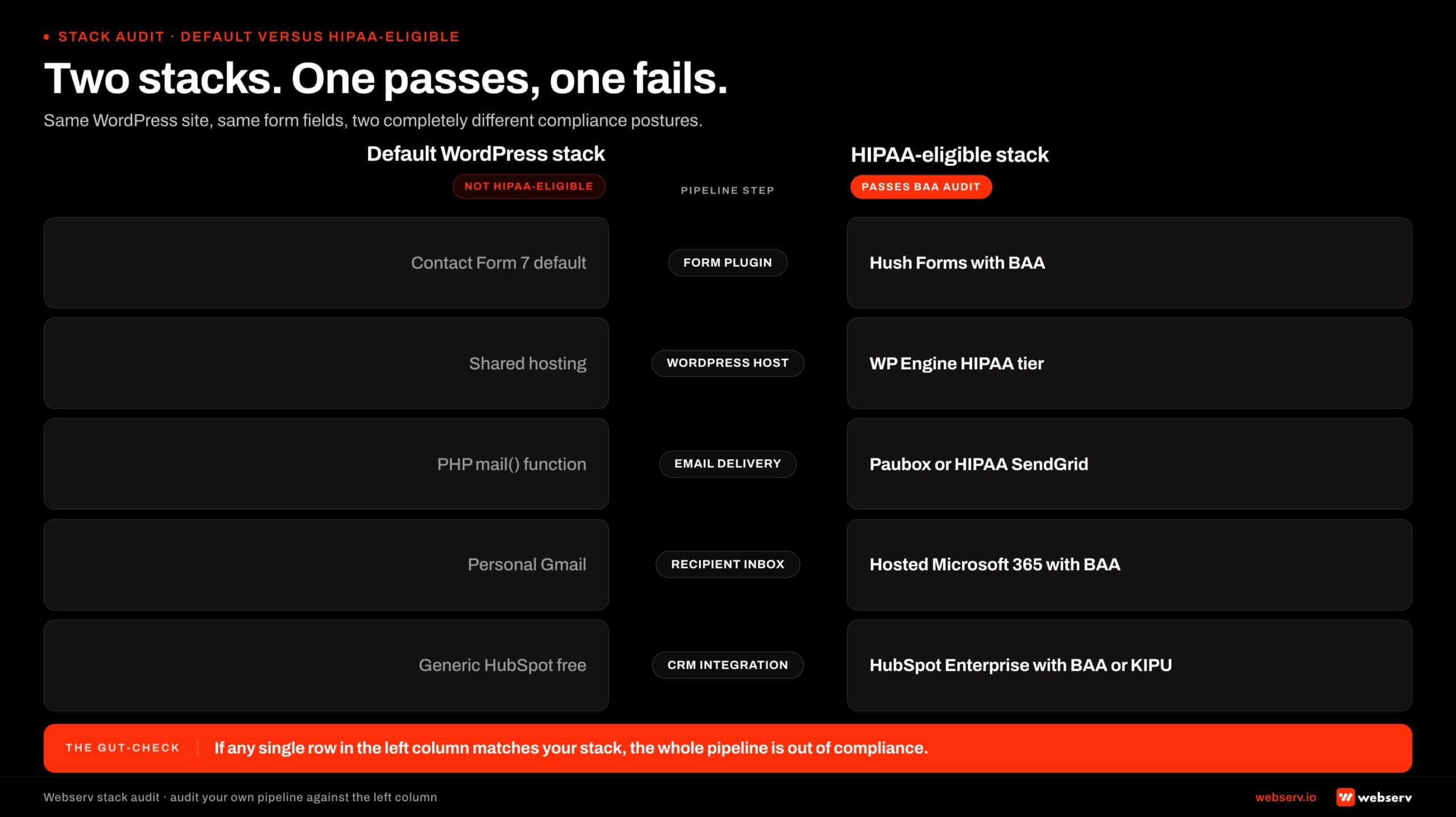 Head-to-head scorecard infographic titled ‘Two stacks, one passes, one fails.’
The form may be on a HIPAA-eligible plugin storing data on an encrypted server with proper access controls, and the submission notification still routes through default WordPress mail to an unencrypted SMTP server to a personal Gmail inbox.
Three configuration patterns produce HIPAA-eligible email delivery.
HIPAA-eligible transactional email service. Sendgrid, Mailgun, Postmark, and similar services offer HIPAA-eligible tiers with BAA coverage. The WordPress site is configured to route all outbound email through one of these services using their HIPAA tier. The transactional email vendor handles transport encryption, retention controls, and audit logging.
HIPAA-eligible Workspace integration. Google Workspace business and enterprise tiers, Microsoft 365 enterprise tiers, and similar configurations support BAA coverage. The WordPress site can route outbound email through an SMTP connection to the covered Workspace tier, which then handles delivery within the covered environment.
No email notification; in-app routing only. Some implementations skip email notifications entirely and require admissions team members to log into the WordPress admin or form plugin interface to access submissions. This pattern eliminates the email delivery compliance question but adds operational friction to the admissions workflow.
What does not work: default WordPress mail through PHP’s mail() function. Personal Gmail accounts or free Workspace tiers. Shared admissions inbox without BAA coverage. SMTP routing to consumer email providers without BAA agreements.
The email delivery configuration should be one of the first items verified in any treatment center contact form audit.
The default WordPress configuration almost always fails this check, and the fix is straightforward (configure SMTP routing through a HIPAA-eligible transactional email service, swap the destination inbox to a covered Workspace tier, sign the BAA with both vendors).
The configuration takes 60 to 90 minutes and is the highest-impact single compliance improvement in most facilities.
CRM and Downstream Stack Compliance
The form submission rarely lives in one place. After the user submits, the data typically flows to a CRM, an admissions intake system, an insurance verification of benefits tool, an SMS notification service, and possibly a Slack channel or team messaging app.
Each downstream destination is part of the compliance pipeline.
Four downstream surfaces need explicit attention.
CRM and admissions intake. Salesforce Health Cloud, HubSpot enterprise with BAA, KIPU EMR, Sunwave, and behavioral-health-specific intake systems each offer HIPAA-eligible configurations. The integration between WordPress and the CRM (typically via Zapier, native API, or a dedicated plugin) needs to use HIPAA-eligible variants.
Default Zapier does not offer BAA coverage; Zapier’s enterprise tier with BAA does.
Insurance verification of benefits tools. VOB tools that integrate with the contact form (often as a follow-up after the initial inquiry) need their own BAA coverage. The most common behavioral health VOB vendors are HIPAA-aware and offer compliant integrations.
SMS notification services. Twilio, Plivo, and similar services offer HIPAA-eligible tiers. Default SMS routing through a non-HIPAA tier is not compliant for PHI-containing messages. Admissions teams that send any patient-identifiable information via SMS need the covered tier.
Team messaging apps. Slack and Microsoft Teams both offer HIPAA-eligible enterprise tiers. The default free or standard tiers are not.
Admissions teams that route form notifications into a team Slack channel for visibility need to be on the covered tier with a signed BAA, or the routing pattern needs to change.
The CRM and downstream stack is where most ongoing compliance gaps accumulate. The initial form implementation may be clean, but the operator adds a new integration six months later (a new SMS tool, a different CRM, a Slack notification channel) without running the compliance pass on the new vendor.
Each addition is a potential compliance gap that the operator may not realize exists until an audit surfaces it.
Hosting Requirements: HIPAA-Eligible WordPress Hosts
The hosting layer underneath the WordPress site is where multiple Administrative, Physical, and Technical Safeguards come together. Generic shared hosting providers do not offer the configuration, the audit posture, or the contractual coverage that HIPAA requires. The host needs to be selected with compliance in mind, not retrofitted to it.
Four properties separate HIPAA-eligible WordPress hosts from generic hosting tiers.
Signed Business Associate Agreement. The hosting provider must sign a BAA with the treatment center, acknowledging its role as a Business Associate and committing to the appropriate safeguards.
Most shared hosting providers explicitly refuse to sign BAAs in their terms of service; HIPAA-eligible hosts have a defined process for executing one.
Encryption at rest and in transit. The hosting environment encrypts the WordPress database, the file system, and any backup storage. Transport between the hosting environment and the user (and between the hosting environment and any downstream services) uses TLS 1.2 or 1.3.
Generic hosts may offer encryption at the database level but rarely cover the full storage stack; HIPAA-eligible tiers do.
Access controls and audit logging at the infrastructure level. The hosting provider restricts which staff (its own employees and the customer’s) can access the underlying servers, and it logs those access events for audit review.
This is distinct from the WordPress-level access controls and is required for the Administrative Safeguards on the hosting side.
Backup and disaster recovery in a covered environment. Backups that contain PHI need to be stored in the same covered environment as the production data, with the same encryption, access controls, and BAA coverage.
Hosting providers that ship backups to non-covered third-party storage create compliance gaps that operators frequently miss until an audit surfaces them.
The HIPAA-eligible WordPress hosts that show up most often in our treatment center audits include WP Engine HIPAA-eligible tier, Pressable enterprise tier, Kinsta Enterprise tier, and a handful of behavioral-health-specialist hosts. Each has its own pricing model, configuration approach, and add-on requirements.
The cost differential for HIPAA-eligible WordPress hosting is typically $200 to $800 per month above the generic shared hosting tier the same operator might otherwise be on. The differential reflects the additional contractual coverage, the configuration overhead, and the audit posture the provider maintains.
For most treatment centers, the differential is small relative to the rest of the marketing budget and small relative to the exposure of operating on a non-compliant hosting tier. The right read is to budget for HIPAA-eligible hosting as a baseline cost, not as a premium add-on.
Common Implementation Mistakes
MOST COMMON MISTAKE
Plugin-only thinking. Installing a form plugin marketed as HIPAA-compliant and assuming the rest of the pipeline is covered. The plugin is one node in a chain that includes SMTP delivery, inbox, CRM, hosting, and backups. Every node needs its own BAA and its own encryption story, and the chain fails compliance the moment any single node does. The default WordPress mail() function and personal Gmail inboxes are the two nodes we flag most often in audits.
Eight implementation mistakes show up repeatedly across the treatment center contact form audits we run. The pattern is consistent enough to serve as a self-audit checklist.
1. Plugin-only thinking. Installing a plugin marketed as HIPAA-compliant and assuming the rest of the pipeline is covered. The plugin is one node in a larger chain, and the chain is the unit that passes or fails compliance.
2. Default WordPress mail() function. Routing submission notifications through PHP’s default mail() function with no transactional email service in between. The default mail function has no encryption guarantees and is not HIPAA-eligible.
3. Personal Gmail or free Workspace inboxes as the recipient. The notification email lands in a team member’s personal Gmail account, in a generic info@ address on a free Workspace tier, or in a shared admissions inbox without BAA coverage. Any of these breaks the chain.
4. Shared WordPress admin accounts. Multiple admissions team members logging into a single shared WordPress account to access form submissions. Audit logging cannot attribute access events to specific individuals, which fails the Administrative Safeguard for access control and audit logging.
5. Missing BAAs on downstream vendors. The operator signed a BAA with the form plugin vendor and the WordPress host but skipped the email delivery service, the CRM, the SMS notification service, or the team messaging app. Each missing BAA is a compliance gap.
6. Analytics capturing form content. Google Analytics 4, Hotjar, Fullstory, or similar tools that capture form-field content, query parameters, or session recordings without PHI suppression. The default configurations of these tools are not HIPAA-eligible, and they show up in audit findings frequently.
7. Indefinite retention. Form submissions retained in the WordPress database or in the CRM indefinitely without a documented retention and disposal policy.
The Covered Entity needs a documented retention period (typically aligned with the broader medical records retention policy, often 6 to 10 years depending on state law) and a documented disposal process when the retention period ends.
Our deeper read on how to build clinical content systems covers parallel documentation discipline on the content side.
8. No incident response plan. The Covered Entity has no documented Incident Response Plan that addresses the steps the team takes when a breach event is discovered.
The 60-day notification timeline starts running on the day of discovery, and operators without a documented plan typically spend the first 30 days assembling information that should have been pre-staged.
Most facilities we audit have 4 to 6 of these 8 mistakes live in their current configuration. The implementation checklist below addresses each one.
The Implementation Checklist
Twelve items to verify before a treatment center contact form should be considered HIPAA-compliant. The checklist is meant to be run end-to-end by the marketing director, the development team, the Privacy Officer, and the Security Officer together.
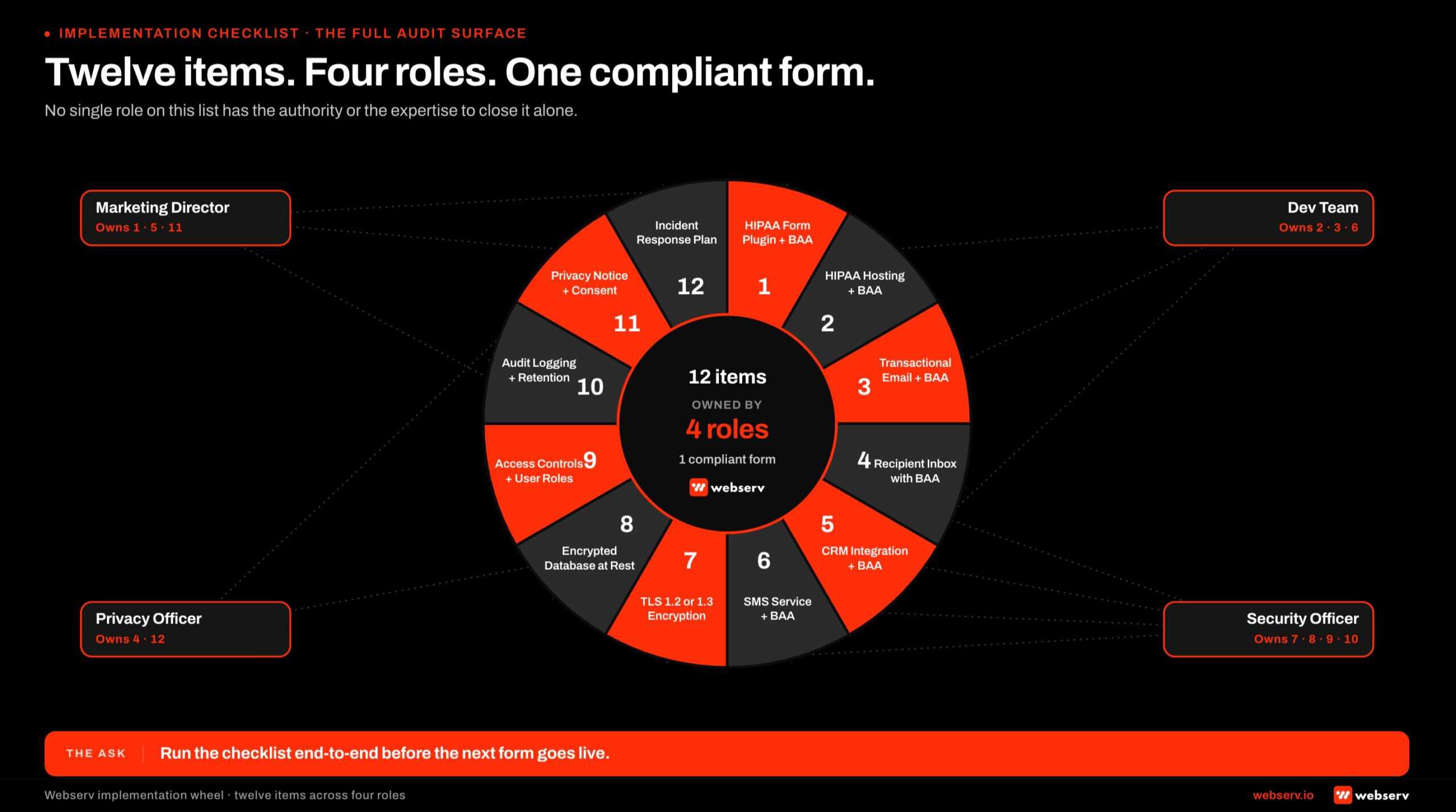 Radial 12-segment checklist wheel infographic titled ‘Twelve items. Four roles. One compliant form.’
No single role on the list has the authority or the expertise to close it alone.
1. HIPAA-eligible form plugin with signed BAA. Confirm the plugin vendor offers BAA coverage and that the BAA is signed and current. Document the BAA execution date and renewal terms.
2. HIPAA-eligible WordPress hosting with signed BAA. Confirm the host is on a HIPAA-eligible tier, that the BAA is signed, and that the encryption, access control, and backup configurations match the host’s HIPAA-tier specifications.
3. HIPAA-eligible email delivery service with signed BAA. Confirm the transactional email service (Sendgrid, Mailgun, Postmark) is on the HIPAA tier and that the BAA is signed. Configure the WordPress site to route all outbound email through the covered service.
4. HIPAA-eligible recipient inbox with signed BAA. Confirm the admissions team inbox is on a covered Workspace tier (Google Workspace business or enterprise, Microsoft 365 enterprise) and that the BAA is signed.
5. HIPAA-eligible CRM and downstream intake with signed BAA. Confirm every downstream system that receives form data has BAA coverage. CRM, VOB tool, intake system, EMR. Each vendor signs separately.
6. HIPAA-eligible SMS and messaging tools with signed BAA. Confirm Twilio, Plivo, Slack, Microsoft Teams, and any other messaging vendors used to route or discuss form data are on covered tiers with signed BAAs.
7. Transport encryption verified. TLS 1.2 minimum, TLS 1.3 preferred. Strong cipher suite configuration. Valid certificate with automated renewal. No mixed-content warnings on form pages.
8. Storage encryption verified. Database encrypted at rest on the WordPress host. Backup storage encrypted. External submission storage (if used) encrypted at the vendor level with documented protections.
9. Access controls and individual user accounts. Every admissions team member has an individual WordPress account with minimum-necessary role. No shared accounts. Form plugin permissions limit access to the specific team members who need it.
10. Audit logging configured and retained. WordPress and form plugin audit logs configured to capture access events. Logs retained per the facility’s documented policy (typically 6 years). Logs reviewed on a defined cadence as part of ongoing compliance monitoring.
11. Data retention and disposal policy documented. The Covered Entity has a written retention policy that specifies how long form submissions are retained and how they are disposed of when the retention period ends. The policy is followed in practice, not just documented.
12. Incident response plan documented and tested. The Covered Entity has a written Incident Response Plan that covers breach discovery, risk assessment, notification preparation, remediation, and HHS reporting. The plan is tested annually with a tabletop exercise so the team can execute it under real-incident pressure.
The same operational discipline pairs with the broader paid-media accountability work in our Google Ads strategy guide for behavioral health providers, where conversion-tracking discipline interacts with PHI considerations on the form side.
The checklist is not the audit. The audit is performed by the Privacy Officer, Security Officer, or qualified external consultant. The checklist is the input to the audit conversation, not the answer to it.
Operators who run through the checklist before the audit walk into the formal review with most of the gaps already closed.
Frequently Asked Questions
Is Contact Form 7 HIPAA-compliant?
No. Contact Form 7 in its default configuration is not HIPAA-eligible. The plugin does not offer Business Associate Agreement coverage, does not provide encrypted storage of submission data by default, and routes submission emails through PHP’s mail() function which has no encryption guarantees.
The plugin can be made functionally compliant when paired with appropriate add-ons, HIPAA-eligible hosting, HIPAA-eligible email delivery, and the broader stack covered in the implementation checklist. But the plugin itself does not carry the compliance, and operators who assume Contact Form 7 plus an HTTPS site equals HIPAA-compliant are running on a misunderstanding.
For most treatment centers, the simpler answer is to use a purpose-built HIPAA-eligible form plugin (Hush Forms, Gravity Forms with HIPAA add-on through Hush, WPForms with appropriate configuration) rather than retrofit Contact Form 7 into compliance.
Do we need a Business Associate Agreement with our hosting provider?
Yes, if the hosting environment stores or transmits PHI as part of the WordPress site. For most treatment center sites that means yes by default, because the WordPress database stores contact form submissions and the hosting server transmits the data to email delivery services and downstream systems.
The implication is that the hosting provider needs to be HIPAA-eligible and willing to sign a BAA. Generic shared hosting providers typically are not. Specialized HIPAA-eligible WordPress hosts (WP Engine HIPAA tier, Pressable enterprise, Kinsta Enterprise, and several BH-focused hosts) sign BAAs and offer the appropriate technical configuration.
The cost differential for HIPAA-eligible WordPress hosting is typically $200 to $800 per month above generic shared hosting tiers. The differential is small relative to the compliance exposure of operating without it.
Can we use Google Analytics 4 on a treatment center site?
Yes, with specific configuration constraints. Google Analytics 4 in default configuration is not HIPAA-eligible. The default settings can capture form-field content, query parameters, and other data that may include PHI, and Google does not sign a Business Associate Agreement for the default GA4 product.
The configuration that works for most treatment center sites is GA4 with strict PHI suppression. Form fields are excluded from event capture, query parameters that may contain identifiers are stripped before transmission, and analytics is deployed only on pages that do not collect or display PHI.
The configuration takes care to verify, and the standard GA4 install almost always needs modification before it is appropriate for a behavioral health site.
Some operators choose to skip GA4 entirely on PHI-handling pages and use server-side analytics or a HIPAA-eligible analytics alternative. The choice depends on the operator’s analytics needs and the configuration discipline they can sustain.
What happens if we have a breach event?
The HIPAA Breach Notification Rule at 45 CFR 164.404 requires Covered Entities to notify affected individuals, HHS, and in some cases media outlets within specified timeframes after a breach involving unsecured PHI. The notification timeline is 60 days from discovery for affected individuals and HHS reporting.
The breach event triggers a series of obligations: a formal risk assessment, notification preparation, documentation of remediation steps, and potential reporting to state attorneys general depending on jurisdiction. The Covered Entity should have an Incident Response Plan that documents the workflow before a breach event occurs, not after.
The practical implication for the contact form pipeline is that operators should have the documentation, access logs, and audit trail in place before a breach event so that the notification and remediation work can move quickly.
Operators who only think about breach response after the breach occurs spend the 60-day window scrambling to assemble information that should have been in place from day one.
How often should we audit our HIPAA compliance posture?
At minimum annually as a formal audit, with continuous monitoring through ongoing processes between audits. The annual audit should cover the full data pipeline: form plugin configuration, hosting environment, email delivery, CRM and downstream systems, access controls, audit logging, retention policy compliance, and BAA currency.
Continuous monitoring includes BAA renewals as vendor contracts come up, access reviews when team members join or leave, configuration verification when new integrations are added to the stack, and incident response drills to ensure the team can execute the response plan if a breach event occurs.
The audit should be performed by someone with HIPAA expertise. The internal marketing team or web development team typically does not have the depth to perform a substantive HIPAA audit; the facility’s Privacy Officer, Security Officer, or qualified external consultant should run the formal annual audit and validate the continuous monitoring program between audits.
Should we just collect less information on the contact form to reduce PHI exposure?
The instinct is reasonable, and minimizing form fields does reduce some exposure surface. But it does not eliminate the PHI question for most treatment center contact forms, because the contextual combination of identifier (name, phone) plus the implicit health-condition reference (the form lives on an addiction treatment site) generally meets the PHI definition even without explicit health-condition fields.
The right read for most facilities is to design the form for the information that admissions needs to act on the inquiry, treat the entire pipeline as PHI-handling, and implement the compliance stack appropriately. Collecting less information without addressing the broader pipeline does not produce a compliant configuration; it produces a less-useful form that is still non-compliant.
The exception is the “short form first, full intake second” pattern covered in the paid CRO landing page work: a short above-the-fold form captures name, phone, and a single insurance or service-type question, and the full clinical intake happens in a follow-up conversation rather than the initial form.
This pattern reduces exposure on the initial form while still moving the inquiry forward operationally.
Audit Your Stack Before the Next Form Goes Live
HIPAA-compliant contact forms for treatment center marketing are not a single decision. They are a pipeline of decisions: plugin choice, hosting tier, email delivery, recipient inbox, CRM integration, SMS routing, transport encryption, storage encryption, access controls, audit logging, retention policy, and incident response.
Each link in the chain has its own compliance requirement, and the weakest link governs compliance for the whole chain.
The 12-item implementation checklist above is the input to the conversation operators should be having with their HIPAA Privacy Officer, Security Officer, and legal counsel before the next admissions form goes live on the site.
Operators who run the checklist before the formal audit walk into the review with most of the gaps already identified and most of the remediation already planned. Operators who skip the checklist and trust the developer’s “HIPAA compliant” assurance discover the gaps the hard way.
We help treatment center operators audit their existing contact form stack against the 12-item checklist, identify the compliance gaps, scope the remediation work, and coordinate with the operator’s Privacy Officer and legal counsel on the implementation.
The work is one part technical configuration, one part vendor negotiation (BAAs, hosting tier upgrades, plugin licensing), and one part operational discipline (access controls, retention policy, incident response planning).
Book an intro meeting to walk through your current WordPress contact form architecture, identify the gaps against the implementation checklist, and scope the remediation work alongside your existing compliance team. The audit takes 60 to 90 minutes and produces a ranked list of fixes ordered by compliance exposure.
For the broader picture of how the contact form architecture fits inside a full treatment center marketing program, see our ultimate guide to behavioral health marketing and our capabilities overview for the cross-functional work the form pipeline depends on.
One last note before close. This is general guidance, not legal advice. HIPAA compliance is a legal and clinical-operations question that requires a Privacy Officer, a Security Officer, and qualified legal counsel to resolve for any specific facility.
Use this article as the input to that conversation, not the answer to it. Treatment center operators considering implementation choices should consult their counsel before relying on any specific configuration described here.
Trevor Gage is the Director of Marketing at Webserv. Webserv works with behavioral health and addiction treatment centers on SEO, paid media, and full-funnel admissions strategy.