The last GTM container we audited had Hotjar, Microsoft Clarity, and Crazy Egg all running simultaneously. Three competing heatmapping tools, added by three different agencies over the years, none of them talking to each other, all of them bloating page load time on every single page of the site.
Nobody had caught it. Not the previous agencies. Not the client. The site was just slow, and nobody knew why.
That’s what most treatment center websites look like under the hood. Not catastrophically broken. Just quietly carrying years of accumulated technical debt that nobody has been accountable for.
The mobile piece surprises operators most. 65% of healthcare searches happen on mobile. A site that loads in six seconds on a phone isn’t losing visitors. It’s losing admits.
But in behavioral health, these problems compound. Treatment center content is evaluated under Google’s YMYL standard. That’s the highest bar in the quality evaluation framework.
Technical errors that would be low-priority on a retail site are ranking killers here. They signal to Google that the site may not be trustworthy enough to surface to someone making a life-affecting healthcare decision. Technical work is one layer of the complete drug rehab SEO playbook.
This guide covers what we actually check and fix across our treatment center client base. The framework is drawn from doing this work, not describing it.
It covers site architecture, crawlability, HIPAA-compliant tracking setup, Core Web Vitals, schema markup, E-E-A-T signals, and the LLMs.txt standard. The E-E-A-T and clinical content layer is covered in the companion guide on clinical content that Google trusts and patients actually find.
If you’d rather have this handled than do it yourself, we offer premium SEO for treatment centers.
Key Takeaways
- Duplicate content affects the majority of healthcare websites. The most common trigger: location pages or program pages sharing boilerplate copy. This actively suppresses the pages most critical for admissions.
- Standard Google Analytics 4 and Meta Pixel implementations are not HIPAA-compliant for healthcare websites. Google refuses to sign a BAA for GA4. The solution is a server-side architecture using HIPAA-compliant middleware. Configuration settings alone are not enough. HHS guidance on online tracking technologies makes this explicit: regulated entities are responsible for ensuring tracking technologies do not impermissibly disclose PHI to third parties, regardless of how the data is collected.
- 65% of healthcare searches now happen on mobile. Sites with LCP above 2.5 seconds lose an estimated 53% of mobile visitors before the page finishes loading. That is a direct admissions cost.
- Core Web Vitals are confirmed ranking factors, not suggestions. INP (Interaction to Next Paint) replaced FID in 2024. Any technical audit still referencing FID is using an outdated model.
- Healthcare schema markup increases click-through rates from search results by an estimated 30% through rich result eligibility. MedicalOrganization, LocalBusiness, MedicalWebPage, FAQ, and Article schema are the priority implementation for treatment centers.
- LLMs.txt is an emerging standard allowing websites to communicate directly with AI crawlers. Treatment centers implementing it now have a first-mover advantage in the AI discovery systems increasingly driving patient referrals.
- Redirect chains, misconfigured canonicals, and H1 template mismatches are invisible to users. They systematically suppress rankings on the most valuable pages.
DEFINITION
Crawl Budget
The number of pages Googlebot is willing to crawl on a site within a given window. Treatment center sites with bloated parameter URLs, duplicate condition pages, or unindexed location pages routinely waste crawl budget on low-value URLs, starving the high-value pages of the crawl frequency they need. Technical SEO is the discipline of pointing the crawl budget at the right pages.
Why technical SEO has an outsized impact in behavioral health
Most industries can absorb mediocre technical SEO. Rankings slip a bit. Traffic drops some.
Behavioral health doesn’t work that way. Technical problems on a addiction treatment website produce near-zero rankings for clinical content. Not somewhat lower. Near-zero. The difference is YMYL: Google’s designation for topics where bad information carries real-world consequences for health, finances, or safety.
Google weights E-E-A-T signals more heavily for YMYL content. And it penalizes technical signals that undercut trust more aggressively. A missing canonical tag means something different on a treatment center website than it does on a home goods blog.
Most treatment center sites compete against national directories (Psychology Today, SAMHSA’s locator), major health publishers (Healthline, WebMD), and well-funded regional competitors. Those sites don’t have redirect chains. They have clean schema, fast mobile pages, and consistent NAP data.
A treatment center carrying technical debt isn’t competing on equal footing. It’s getting penalized before a single reader sees a single page.
We took over a site from a local SEO company that had done solid map pack work but hadn’t touched the on-page layer in two years. We went through and updated title tags, meta descriptions, and H1s to reflect the right keywords, then implemented basic schema with real author attribution. Actual licensed clinicians, not “admin” or a generic user.
Not earth-shattering changes. Just a little TLC.
But it was distinct enough to trigger Google to reindex the site, and rankings moved within weeks. That’s the math of technical SEO: the fix is fast, the compounding is durable.
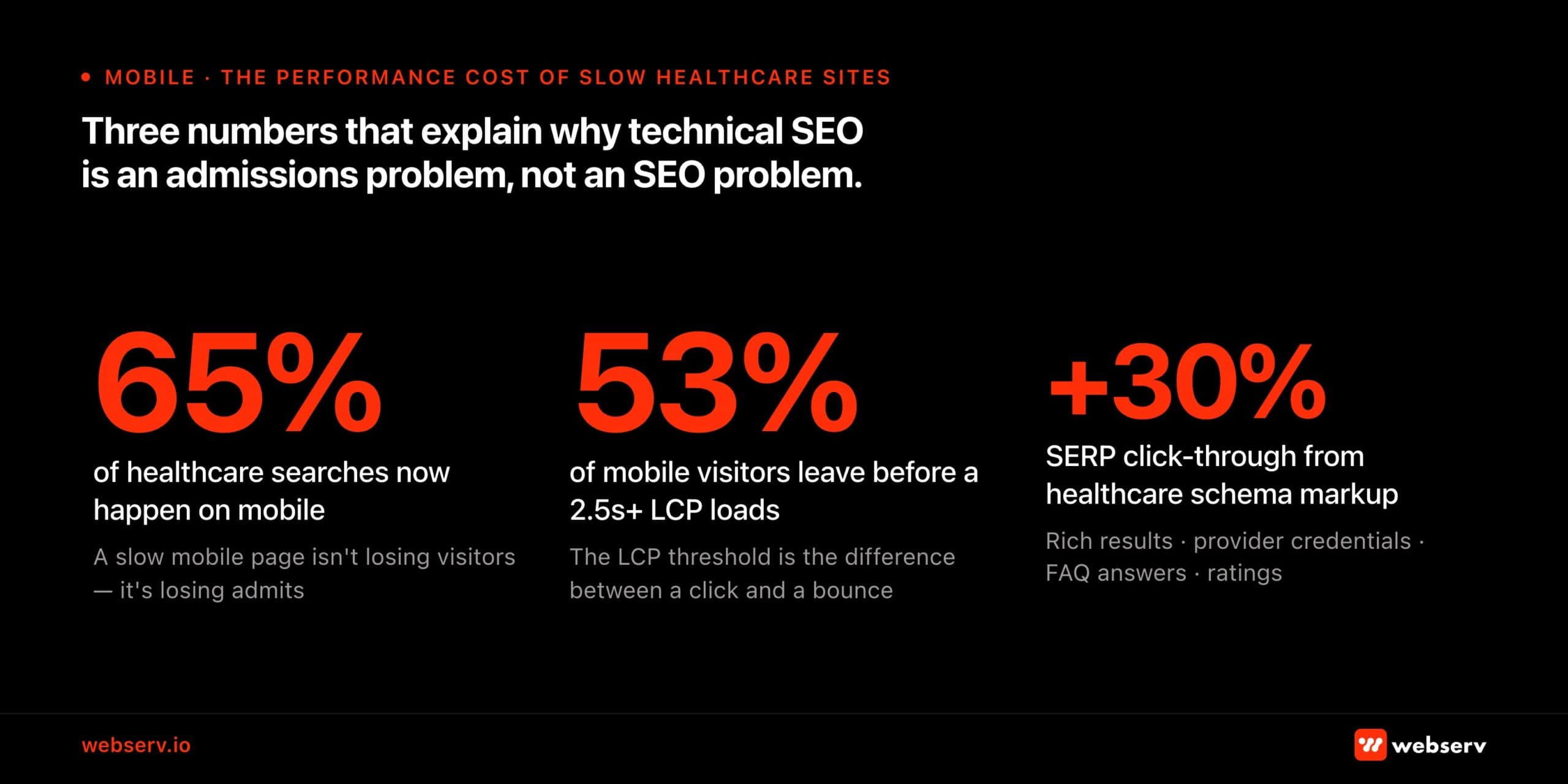 Infographic titled ‘Three numbers that explain why technical SEO is an admissions problem, not an SEO problem.’
Site architecture and URL structure
Get site architecture wrong and every other investment underperforms. For treatment centers, architecture determines whether service pages, condition pages, and location pages can rank independently. Get it wrong and they compete with each other, confuse Google, and suppress each other’s rankings.
What a standard audit won’t flag: A missing parent-child URL structure won’t trigger an error in SEMrush. Neither will a redirect that goes to the homepage instead of the updated URL. Both are real problems.
The redirect pattern in particular is one of the first things we look at on any new client site. A homepage redirect instead of a proper destination URL means every internal link pointing at that old URL is bleeding authority into a dead end, not passing it forward.
URL structure principles for behavioral health
A clean URL structure does two things: it tells Google what each page is about, and it tells Google how pages relate to each other. For treatment centers, that means following the clinical and geographic organization of the site:
| /programs/[level-of-care]/ | /programs/detox/ · /programs/residential/ · /programs/php/ · /programs/iop/ — one page per level of care |
| /what-we-treat/[condition]/ | /what-we-treat/alcohol-addiction/ · /what-we-treat/opioid-addiction/ · /what-we-treat/dual-diagnosis/ |
| /locations/[city-state]/ | /locations/austin-texas/ — one per physical facility, not one per city served |
| /insurance/[payer-name]/ | /insurance/blue-cross-blue-shield/ — individual pages per payer, high conversion intent |
| /admissions/ | The intake process hub — what to expect, insurance verification, how to call |
| /resources/blog/[slug]/ | Blog content — avoid date-stamped slugs, which create crawl budget issues over time |
The duplicate content problem: why it hits treatment centers hardest
Duplicate content is the most common and damaging technical issue on healthcare websites. It happens when location pages copy the same program descriptions across cities, when program pages duplicate content across levels of care with minor swaps, or when category and tag archives generate near-duplicate thin pages that compete with primary service pages.
Treatment center sites are especially susceptible because of how they’re typically built. A national center opens multiple locations and creates location pages by copying the residential page and swapping in the city name.
Google encounters ten near-identical pages, can’t determine which to rank, and may rank none of them well.
Often it surfaces the least relevant one.
- Each location page needs substantively unique content: local clinical staff details, that location’s specific accreditations, insurance accepted at that facility, proximity to local hospitals or detox partners.
- Each program page should be differentiated by more than the program name: clinical approach specific to that level of care, who it’s for, how it differs from the level above and below.
- Disable thin archive pages: Category, tag, date, and author archives with one or two posts are a duplicate content problem. Disable or noindex them in Rank Math until they have actual content worth indexing.
Internal linking and silo architecture
Pages in the same content cluster should link to each other. Your IOP page links to your PHP page and your detox page.
Your alcohol addiction condition page links to the detox program and residential treatment pages. Your Austin location page links to the programs available at that location.
Google learns what pages are about partly from what links to them. A program page that no other page on the site links to? Google treats it like a dead end. It ranks accordingly.
The HTML sitemap, created through Rank Math and linked in the footer, gets every page within two clicks of every other page. That handles crawlability and PageRank distribution in the same step. It’s one of those fixes that takes 20 minutes and earns its keep for years.
Crawlability, indexation, and technical configuration
XML and HTML sitemaps
Rank Math handles both XML and HTML sitemaps on WordPress. Out of the box, the settings aren’t right for treatment centers. Here’s what we adjust on every new client site:
- Exclude thin or empty pages from the XML sitemap: booking confirmation pages, empty tag archives, author archives before bio pages are built out, location pages that haven’t been populated yet. Thin pages in a sitemap tell Google the whole site is low quality. Keep the sitemap clean.
- Disable date and category archives in Rank Math sitemap settings. Most treatment center blogs accumulate archive pages that generate duplicate thin content.
- Submit the sitemap to Google Search Console immediately after configuration. Don’t wait for Google to find it on its own. Direct submission is available. Use it.
Instant indexing
Rank Math’s instant indexing connects to the Google Indexing API and pushes new and updated pages to Google on publish, rather than waiting for the standard crawl cycle.
For treatment centers actively publishing new content, this cuts the lag between publishing and ranking. In a vertical where a new fentanyl page or an updated admissions program needs to surface fast, that matters.
Canonical tags: the most systematically misconfigured element
Every indexable page should have a self-referencing canonical tag. Missing canonicals are among the most common issues in treatment center site audits, particularly on sites that have been through multiple rebuilds where canonical infrastructure wasn’t carried over.
- Every page points to itself: Run SEMrush Site Audit and filter for “Missing canonical tag” . Fix every page flagged.
- Canonical URLs are parameter-free: If a page’s canonical tag includes tracking parameters (?utm_source=…, ?gclid=…), it’s pointing to a URL Google may never index.
- Cross-domain canonicals point to production: If a staging environment is accessible to crawlers, verify that canonical tags are pointing to the production domain, not the staging URL.
Redirects: 301 vs 302, and eliminating chains
A 301 redirect tells Google the move is permanent and transfers page authority. A 302 tells Google it’s temporary. It does not pass link equity.
For virtually every redirect on a treatment center site, the correct code is 301. Every 302 that should be a 301 is silently invalidating years of accumulated link equity. Redirect chains dilute link equity at each hop. When A redirects to B which redirects to C, each hop costs authority.
Flatten all chains so every old URL redirects to its final destination in a single hop. Rank Math’s Redirections module manages this. SEMrush Site Audit identifies existing chains.
302 redirects should be updated to 301s for all permanent URL changes. Redirect chains must be flattened. Each source URL should point directly to its final destination in a single hop, with no intermediate stops.
HIPAA-compliant tracking: the most consequential technical issue on treatment center sites
Here’s the thing most clients don’t expect: genuine HIPAA compliance for a digital marketing stack is expensive. Not technically difficult. Expensive.
A HIPAA-compliant server or hosting environment costs more than shared WordPress hosting. It literally has to be under lock and key. Then you need HIPAA-compliant form handling, call tracking with a signed BAA, and instead of a free GA4 account, you’re paying a monthly fee for Freshpaint, Piwik, or Matomo.
The costs pile up fast and the conversation with a new client about why their analytics setup is a liability is rarely comfortable.
Most operators don’t realize any of this until someone explains it. The standard implementation advice they’ve been following (add the pixel, install GA4, connect CallRail) is wrong for healthcare without modification. The FTC and HHS jointly warned 130 hospital systems and telehealth providers that standard implementations of the Meta Pixel and Google Analytics may violate HIPAA.
The core problem: these tools collect user identifiers (IP addresses, device IDs) and behavioral data (pages visited, forms submitted) and transmit them to Google and Meta servers. On a healthcare website, a page URL like /what-we-treat/alcohol-addiction/ combined with an IP address is Protected Health Information. It could identify a specific individual and associate them with a health condition.
Neither Google Analytics 4 nor Google Tag Manager is inherently HIPAA-compliant. Google refuses to sign a Business Associate Agreement (BAA) for these tools.
This means that a standard GA4 or GTM implementation on a treatment center website is a potential HIPAA violation regardless of configuration settings. The fix is architectural, not a settings change.
The server-side architecture solution
The industry-standard solution for HIPAA-compliant analytics on healthcare websites is a server-side architecture that places a HIPAA-compliant intermediary layer between your website visitors and the analytics/advertising platforms you use.
How it works: instead of the browser sending data directly to Google or Meta, all tracking data flows through a server or middleware layer that you control.
That layer operates under a signed BAA. It strips PHI (IP addresses, health-related URL paths, form field content, device identifiers) before forwarding the de-identified conversion signals to GA4, Google Ads, or Meta’s Conversions API.
| Server-side GTM | Google Tag Manager can be deployed in server-side mode, routing tracking through a cloud container you control rather than directly through the browser. This gives you visibility and control over exactly what data is transmitted to each destination. Importantly, server-side GTM alone does not make GA4 HIPAA-compliant. It’s a data control layer, not a BAA solution. |
| HIPAA-compliant middleware (recommended) | Freshpaint and similar platforms act as the intermediary, strip all 18 HIPAA identifiers from data by default before forwarding to GA4, Google Ads, Meta, and other destinations, and sign a BAA with your organization. This is the approach recommended by healthcare compliance specialists for treatment centers running paid media alongside organic. |
| Meta Conversions API (CAPI) | For Meta advertising specifically: route conversions through CAPI rather than the standard browser pixel. CAPI sends event data server-to-server, giving you control over exactly what’s transmitted. Configure it to send only non-PHI conversion signals (a form submission confirmation URL with no health information) not a URL containing the patient’s condition interest. |
| Native HIPAA-compliant analytics | For organizations that want to eliminate the middleware complexity: native HIPAA-compliant analytics platforms like Piwik PRO operate under a BAA by design and don’t transmit data to third-party servers. Trade-off: less integration with Google and Meta advertising ecosystems, which matters if you’re running paid search or paid social. |
The GTM container audit
This is one of the first places we look on any new client site, and it almost always tells the story of the account’s history.
Multiple heatmapping tools running at the same time is more common than it should be. Hotjar from one agency, Clarity from another, Crazy Egg from a third.
Each does roughly the same thing. Each adds load time. None of the data is being used because nobody remembers who set it up.
Beyond the page speed hit, orphaned tracking tags are a HIPAA exposure waiting to be found. Pixels from campaigns that ended years ago, connected to platforms with no BAA, still collecting user data on health-related pages. Audit the container. Remove anything that isn’t actively managed and documented.
Webserv implementation note: We install CallRail’s Dynamic Number Insertion via GTM to enable call attribution without polluting citation NAP data.
CallRail can be configured in a HIPAA-compliant mode. If you’re recording intake calls, you’ll need a HIPAA-enabled plan with a signed BAA in place. For more on the attribution infrastructure, see the technical SEO guide for behavioral health.
Conversion tracking without PHI
Even within a HIPAA-compliant analytics architecture, the conversion events you track matter. The goal is to measure actions that indicate admissions intent without capturing the content that makes those actions PHI:
- Form submission: Fire the conversion event on the thank-you page URL after form completion. Not on the form page itself. The thank-you page URL contains no health information. The form page URL (/admissions/alcohol-detox-inquiry/) might.
- Phone call clicks: Track tel: link clicks as events. For calls generated from CallRail tracking numbers, import call data into GA4 via the CallRail–GA4 integration as offline conversion events , specifically calls exceeding a minimum duration threshold (60–90 seconds for admissions calls).
- Insurance verification: If you have a VOB widget, fire a conversion event on completion. This is typically the highest-quality lead signal on the site . A patient who completes insurance verification is further down the decision funnel than a form submitter.
- Chat and text initiation: Track the initiation action as an event. Not the chat content. The initiation only. The content of chat interactions is PHI if it contains health information.
Core Web Vitals: performance benchmarks that directly affect admissions
Core Web Vitals are now confirmed ranking factors. Healthcare sites scoring poorly on these metrics are being penalized. 65% of healthcare searches happen on mobile. Poor mobile performance is a ranking and conversion problem simultaneously. Sites with LCP above the 2.5-second threshold lose an estimated 53% of mobile visitors before the page finishes loading.
The 2026 Core Web Vitals metrics
| Metric | Description |
| LCP — Largest Contentful Paint | How long until the main content is visible. Target: under 2.5 seconds. Most treatment center sites fail this on mobile because of unoptimized hero images loaded at original resolution. A 4MB facility exterior photo is the most common LCP failure cause. |
| INP — Interaction to Next Paint | How quickly the page responds to user interaction. Target: under 200ms. INP replaced FID in March 2024 so any technical audit still referencing FID is using an outdated metric. INP failures on treatment center sites are typically caused by heavy JavaScript from page builders (Divi, Elementor, WPBakery). |
| CLS — Cumulative Layout Shift | How much the layout shifts during loading. Target: under 0.1. Common cause on treatment center sites: Google Fonts loading asynchronously causing text reflow, or CTA buttons loading after other content and pushing elements down the page. |
Diagnosing and fixing LCP failures
The hero image is the obvious culprit, but it’s not always where the problem starts. A pattern we see often: a website built by a designer who prioritized visual flexibility over performance.
Multiple Elementor add-ons, each doing one or two unique styling things, all running bloated code across every page even when that feature isn’t being used on that page. The site looks great. It loads in eight seconds on mobile.
Same goes for tracking scripts. The Facebook pixel, LinkedIn ads, Hotjar, a retargeting pixel from a campaign that ended last year. All firing on page load, none of them audited in years. A GTM audit and a CSS cleanup often do more for Core Web Vitals than image optimization alone.
Even so, the hero image is still the most common LCP failure. The fix is systematic image optimization:
- Convert to WebP format: WebP produces 30–50% smaller files than JPEG at equivalent visual quality. All hero images and content images above the fold should be converted.
- Serve appropriately-sized images: Use the srcset attribute to deliver different image sizes for different viewport widths. A 3,000px image scaled down in CSS is still downloading the full 3,000px file.
- Set fetchpriority=”high” on the LCP element: This tells the browser to prioritize the hero image in its loading queue, reducing the time to first visual render.
- Use lazy loading below the fold: Add loading=”lazy” to all images that appear below the initial viewport. Only the images the user can immediately see should load on page entry.
- Use a CDN: A Content Delivery Network serves static assets (images, CSS, JS) from servers geographically close to the user rather than from your origin server. Cloudflare and similar CDNs typically reduce LCP times by 0.5–1.5 seconds for mobile users distant from the origin server. Often the difference between a pass and a fail.
- Target server response time under 200ms: The time between the browser requesting a page and the server responding (TTFB , Time to First Byte) should be under 200ms. Most treatment center sites on shared hosting exceed this on mobile. This is a hosting and server configuration issue, not a code issue. upgrading to a dedicated server or managed WordPress hosting typically resolves it.
Fixing render-blocking resources
JavaScript and CSS loaded in the document <head> before the page renders prevent the browser from displaying anything until those files have downloaded and processed.
Treatment center sites built with Elementor, Divi, or WPBakery tend to carry heavy render-blocking overhead. Page builders load CSS and JavaScript for features you’re not even using.
- Load third-party scripts asynchronously via GTM: Chat widgets, call tracking scripts, ad pixels . Move them to GTM with a “Window Loaded” trigger so they fire after the main content has rendered, not before.
- Defer non-critical JavaScript: Any JavaScript that doesn’t affect the above-the-fold rendering experience should be loaded with the defer attribute.
- Eliminate unused CSS: Page builders generate CSS for every possible design element, most of which isn’t used on any given page. Tools like PurgeCSS or your page builder’s built-in CSS optimization can cut the CSS payload by 40-60%.
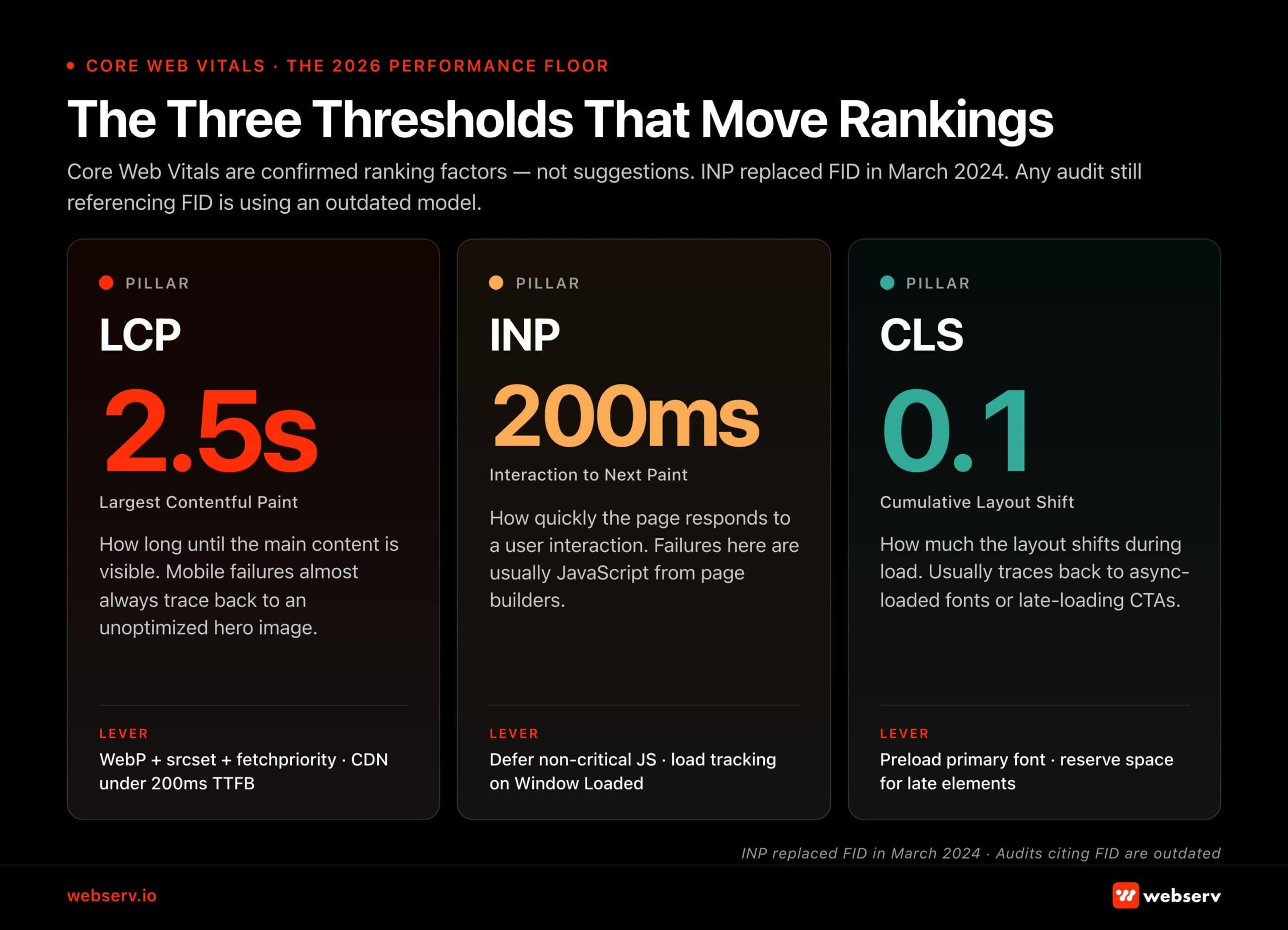 Infographic titled ‘The Three Thresholds That Move Rankings.’
Schema markup for behavioral health websites
Healthcare schema markup is estimated to increase click-through rates from search results by approximately 30% through rich result eligibility. That means ratings, provider credentials, FAQ answers, and appointment information displayed directly in SERPs before anyone clicks.
For behavioral health sites, schema also functions as a direct AEO signal, helping AI systems parse and cite content accurately.
Implement these schema types as a baseline on every WordPress treatment center site using Rank Math’s Schema Templates:
1. MedicalOrganization + Organization (homepage and About page)
This schema establishes your treatment center as a recognized entity with verifiable credentials. Required fields for behavioral health specifically:
{
“@type”: [“MedicalOrganization”, “Organization”],
“name”: “[Legal facility name, must match GBP exactly]”,
“url”: “https://yoursite.com”,
“telephone”: “[Primary admissions line]”,
“address”: {
“@type”: “PostalAddress”,
“streetAddress”: “…”, “addressLocality”: “…”,
“addressRegion”: “…”, “postalCode”: “…”
},
“medicalSpecialty”: “Addiction Medicine”,
“hasCredential”: [
{ “@type”: “EducationalOccupationalCredential”,
“name”: “Joint Commission Accreditation” },
{ “@type”: “EducationalOccupationalCredential”,
“name”: “CARF Accreditation” }
],
“sameAs”: [
“https://findtreatment.gov/[your-samhsa-listing]”,
“https://www.asam.org/membership/[your-listing]”, “https://www.qualitycheck.org/quality-report/[your-jcaho-listing]”, “[social profiles]”
]
}
The sameAs array is the external corroboration layer. It links your site’s entity to authoritative third-party listings that AI systems and quality evaluators use to verify the organization is real and credentialed.
SAMHSA findtreatment.gov is the single highest-authority sameAs target available to treatment centers.
2. LocalBusiness schema on location pages
Each location page needs its own LocalBusiness schema block with that location’s specific NAP data. This is what connects your website’s location pages to your Google Business Profile and citation profile:
{
“@type”: “LocalBusiness”,
“name”: “[Center Name] [City] Location”,
“address”: { “streetAddress”: “…”, “addressLocality”: “…”, … },
“telephone”: “[Location-specific phone]”,
“geo”: { “@type”: “GeoCoordinates”,
“latitude”: …, “longitude”: … },
“openingHoursSpecification”: [
{ “@type”: “OpeningHoursSpecification”,
“dayOfWeek”: [“Monday”,”Tuesday”,…],
“opens”: “00:00”, “closes”: “23:59” }
],
“hasMap”: “[Google Maps URL for this location]”
}
Rank Math dynamic variable tip: In Rank Math’s schema template fields, use the %url% dynamic variable for the schema’s “url” field rather than hardcoding the URL.
This keeps the schema URL aligned automatically if the page’s canonical URL changes after a redirect. a common issue during site migrations.
3. FAQ schema on service and condition pages
FAQ schema formats content as explicit Q&A pairs that Google can display as rich results in SERPs and that AI systems can directly extract for AI Overview citations.
It’s the most direct AEO implementation available and it takes approximately 30 minutes per page to implement in Rank Math.
Target 4–6 Q&A pairs per page: what this service or condition is, who it’s for, how long it takes, what insurance covers, what happens next. Write questions in patient-facing language. “Does my insurance cover detox?” not “What are the reimbursement criteria for medical detoxification services?“
4. Article + MedicalWebPage schema on clinical content
Every blog post and educational resource needs Article schema. Clinical content (condition pages, symptom articles, treatment guides) should use MedicalWebPage schema in addition. Both should include the author and clinical reviewer attribution that supports E-E-A-T evaluation:
{
“@type”: “MedicalWebPage”,
“headline”: “…”,
“datePublished”: “2026-04-01”,
“dateModified”: “2026-04-01”,
“medicalAudience”: “Patient”,
“lastReviewed”: “2026-04-01”,
“author”: {
“@type”: “Person”, “name”: “Sarah Martin, LCSW”,
“url”: “https://yoursite.com/team/sarah-martin-lcsw/”,
“sameAs”: [“https://www.linkedin.com/in/sarah-martin-lcsw”]
},
“reviewedBy”: {
“@type”: “Person”, “name”: “Dr. James Chen, MD”,
“url”: “https://yoursite.com/team/dr-james-chen-md/”
}
}
Validate all schema with the Google Rich Results Test. Schema errors suppress rich result eligibility and, for YMYL content, signal technical untrustworthiness. Rank Math’s Schema Templates allow you to create reusable reviewer templates that deploy in two clicks per page and update site-wide when reviewer information changes.
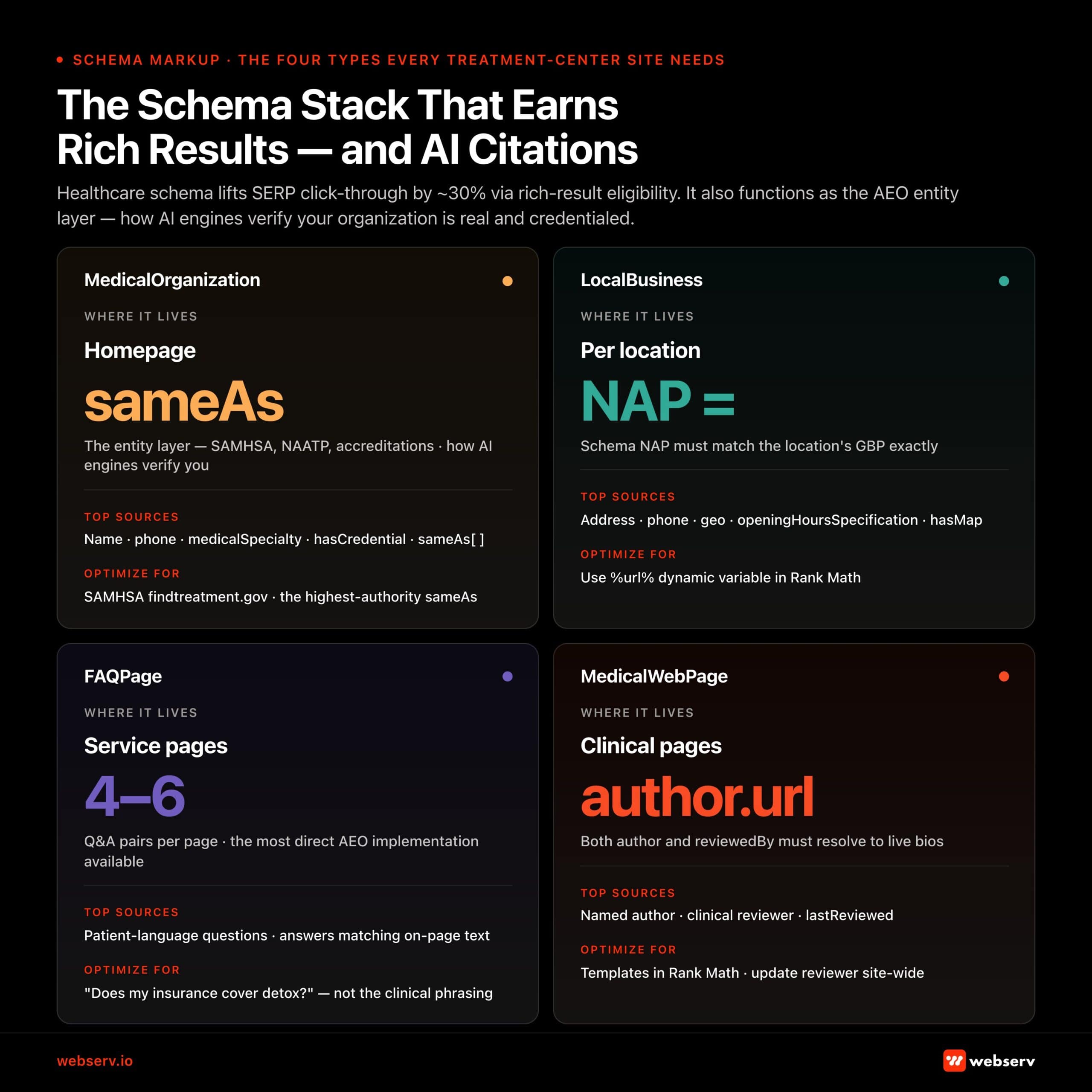 Infographic titled ‘The Schema Stack That Earns Rich Results — and AI Citations.’
E-E-A-T infrastructure: author pages, reviewer boxes, and the credential stack
E-E-A-T is not just a content quality standard. It has a technical infrastructure requirement. Author bio pages, clinical reviewer boxes, and the schema markup that makes both machine-readable are technical SEO elements, not just editorial ones.
The “faceless admin” problem
The most common E-E-A-T failure on treatment center sites: content attributed to “admin,” “staff,” or the website’s name rather than a named, credentialed individual.
This is the default WordPress configuration. It creates a directly verifiable signal to Google quality evaluators that no identifiable professional was responsible for the health content on the page.
The fix is mechanical. Create credentialed user profiles in WordPress for each clinician. Reassign authorship using bulk edit. Configure author archive pages to display full credentials and bio. Then add MedicalWebPage schema with the author’s bio page URL in the author.url field.
The complete implementation process, including clinical reviewer boxes, schema templates, and the two-role model (author + reviewer), is covered in depth in the clinical content E-E-A-T guide.
From a technical SEO standpoint, the checklist items are:
- Every clinical page has a named author with a live bio page link
- Every clinical page has a named reviewer with a live bio page link
- Every clinical page has MedicalWebPage schema with both author.url and reviewedBy.url fields populated
LLMs.txt: communicating directly with AI crawlers
LLMs.txt is an emerging web standard, proposed at llmstxt.org, that allows websites to provide AI systems with a structured, curated description of their content and purpose. Think of it as a robots.txt file oriented toward AI crawlers: instead of telling crawlers what to exclude, it tells AI systems what to prioritize and how to understand the organization.
For treatment centers, LLMs.txt addresses a specific gap. Behavioral health is among the highest-stakes topics AI systems are being asked to synthesize.
Most treatment center sites have no mechanism for communicating their clinical authority, accreditations, and content scope directly to the AI systems that are increasingly serving as the first point of contact for patients researching treatment options.
What to include in a behavioral health LLMs.txt file
- Organization description: who you are, what conditions you treat, what levels of care you offer, where you operate
- Credentialing and accreditation: JCAHO, CARF, SAMHSA certification, state licensure . These are the third-party trust signals that AI systems weight when assessing whether to cite an organization
- Content scope: description of what types of content the site contains and which sections are most authoritative for clinical queries
- Clinical team pointer: reference to your team/staff pages where clinical credentials are documented . AI systems can use this to verify that content is attributed to real licensed professionals
- External corroboration: SAMHSA findtreatment.gov listing, ASAM membership listing, accreditation body listings (Joint Commission Quality Check, CARF) . These are the same sameAs signals used in schema markup
- Implementation: Place the LLMs.txt file at yoursite.com/llms.txt (plain text, accessible via GET request returning 200 status).
The majority of treatment center websites don’t have one. Being an early implementer now is equivalent to being an early mover on XML sitemaps in 2006. You’re communicating directly with the systems driving patient discovery before your competitors have started thinking about it.
How SoCal Sunrise generated 85 admissions and 2,297% ROI from SEO in 6 months
A ground-up SEO rebuild using the Pathfinder Parents Methodology turned an invisible online presence into a top-ranking admissions engine.
Read the case study →85 admits and 3,152 leads attributed to organic
What competitor audits usually miss
Before the checklist, a word on what passes for a technical audit in this industry.
A few things come up constantly in competitive audits that are either misleading or not actionable.
Page speed screenshots. Anyone can pull a one-time PageSpeed Insights score on a slow day and make a site look broken. Core Web Vitals in Google Search Console is an average taken over time across real users. That is the number that matters. One-time snapshots are easy to cherry-pick, and most agencies are not equipped to fix systemic page speed issues anyway. They point at the problem without owning the solution.
Local citation scans. Results vary by 30 to 50 percent depending on which tool is doing the scan. Whitespark, BrightLocal, SEMrush, and Yext each check a different collection of directories. Showing a client their “poor” citation health using your tool of choice, then comparing it against a competitor scanned with a different tool, is an easy way to manufacture a problem that may not exist.
AI content scores. A growing number of agencies are running AI detection scans on client websites and presenting the results as evidence of a penalty risk. An AI writer score is not the same as low-quality content, and presenting one as evidence of the other is not an honest audit.
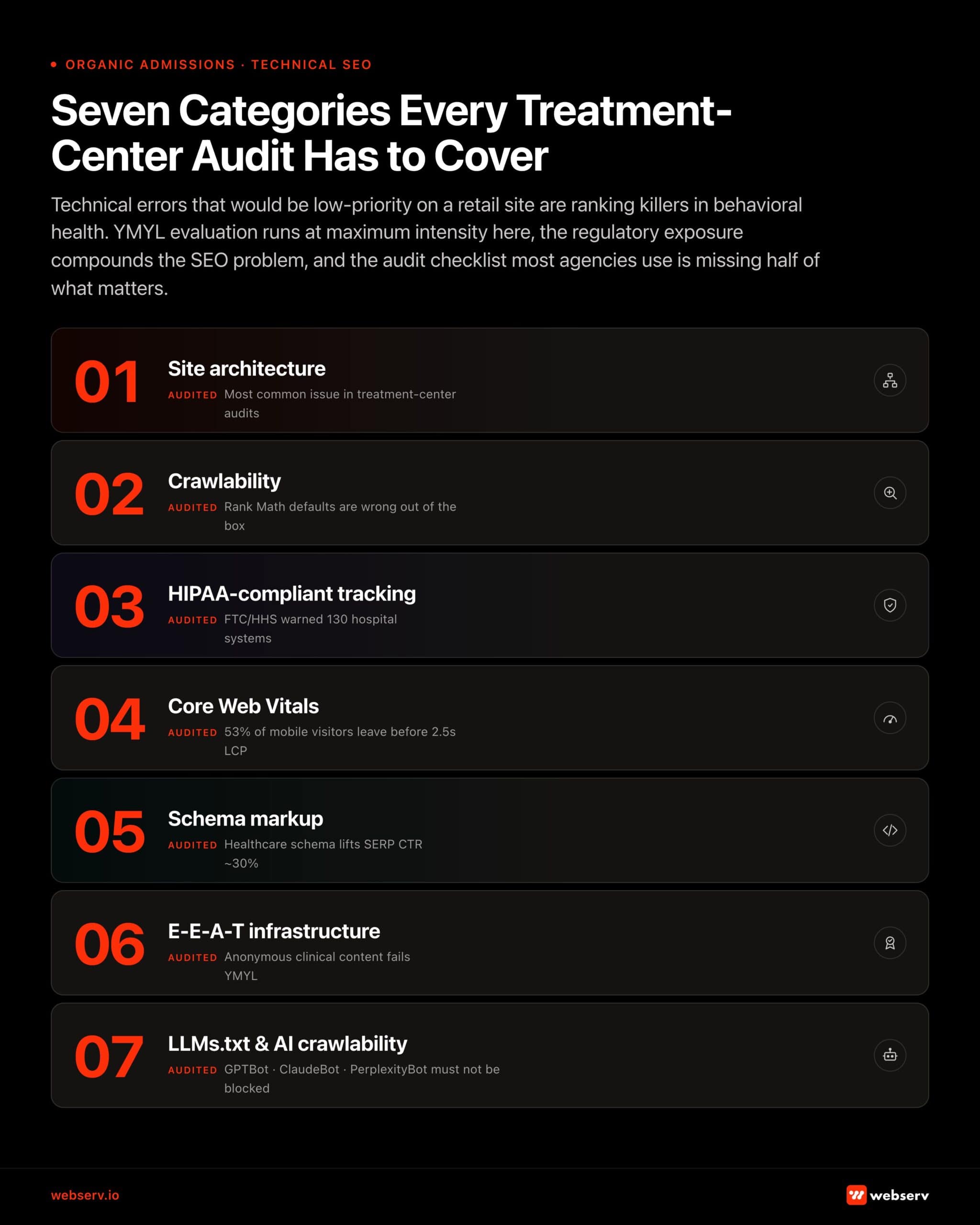 Infographic titled ‘Seven Categories Every Treatment-Center Audit Has to Cover.’
The complete technical audit checklist for behavioral health websites
This checklist reflects the Webserv technical audit process. Use it sequentially. Structural issues (architecture, crawlability) should be resolved before on-page and schema issues.
| Category | Check | Tool | What to look for |
| Site architecture & duplicate content | Every location page has substantively unique content | SEMrush Site Audit + manual review | Site architecture & duplicate content |
| Every location page has substantively unique content | SEMrush Site Audit + manual review | No copy-paste program descriptions with only city name swapped. Each page covers location-specific staff, programs, and clinical details | |
| Every program page is differentiated by clinical content | Manual audit | PHP and IOP pages should differ by more than the program name. This could be clinical approach, candidate criteria, duration, etc. | |
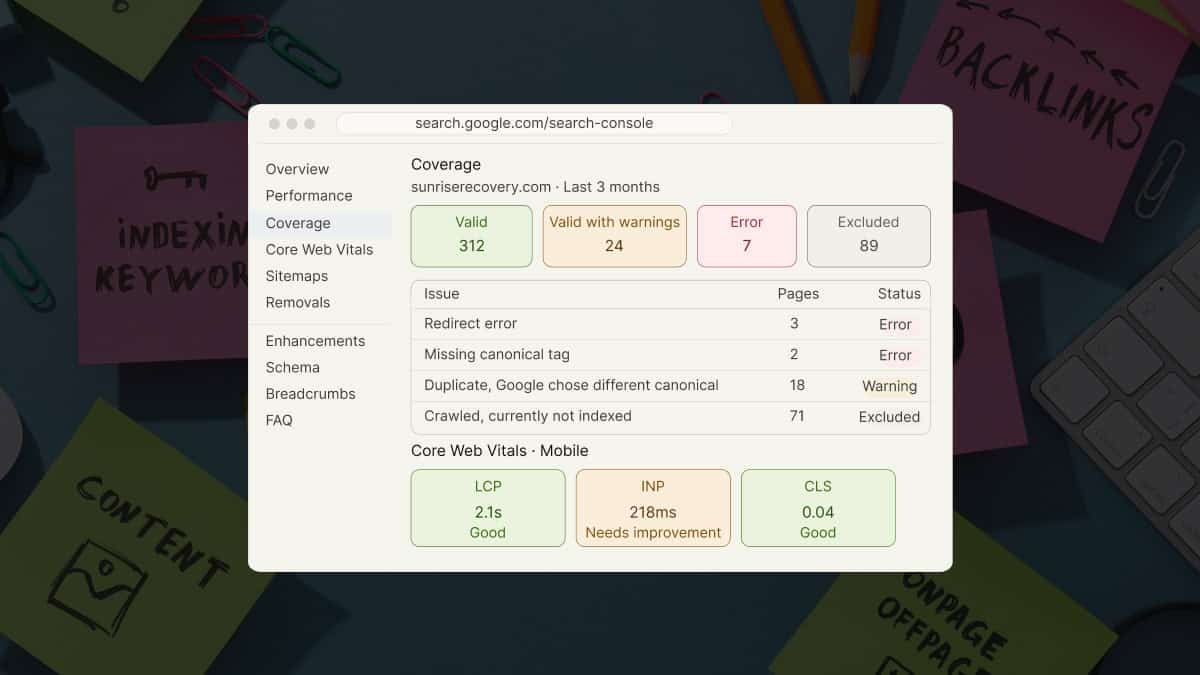
| Category/tag/date archives disabled or noindexed | Rank Math sitemap settings + GSC | Thin archive pages should not be indexed. Confirm this in GSC Coverage report. | |
| URL structure follows logical hierarchy | SEMrush crawl | /programs/[level]/ not /[level]/. Parent-child structure communicates topic relationships |
| Category | Check | Tool | What to look for |
| Crawlability & indexation | XML sitemap submitted to Google Search Console | Google Search Console | Sitemap index URL submitted and returning 200; no 4xx or 3xx URLs within sitemap |
| HTML sitemap created and linked in footer | Browser + Rank Math | Every page reachable within 2 clicks from any other page | |
| robots.txt configured correctly | Browser (yoursite.com/robots.txt) | No content-critical pages blocked; /wp-admin/ and staging subdomain disallowed | |
| Instant indexing connected to Google Indexing API | Rank Math → Instant Indexing | API key installed; test by publishing a page and checking GSC URL Inspection |
| Category | Check | Tool | What to look for |
| Canonical tags & duplicate content signals | All indexable pages have self-referencing canonical tags | SEMrush Site Audit | Filter: “Missing canonical tag” Zero pages should be flagged |
| Canonical URLs are parameter-free | SEMrush Site Audit | No ?utm_* or ?gclid=* in canonical href attributes | |
| No canonicals pointing to redirected URLs | SEMrush Site Audit | Filter: “Canonical points to redirect”. Update canonicals to final destination URLs |
| Category | Check | Tool | What to look for |
| Redirects & technical errors | All permanent redirects use 301 (not 302) | SEMrush Site Audit | Filter: “Temporary redirect (302)” and update all to 301 except genuinely temporary use cases |
| No redirect chains (max 1 hop) | SEMrush Site Audit | Filter: “Redirect chain” and flatten every chain to a single direct 301 | |
| No broken internal links (4xx) | SEMrush Site Audit / Rank Math 404 Monitor | Filter: “Canonical points to redirect”. Update canonicals to final destination URLs | |
| Custom 404 page exists with navigation and CTA | Manual browser check | 404 page should have nav, admissions phone number, and “get help” link |
| Category | Check | Tool | What to look for |
| Core Web Vitals & performance | LCP under 2.5 seconds on mobile | PageSpeed Insights (mobile) | Test homepage and top service page; LCP element identified; WebP hero images confirmed |
| INP under 200ms | PageSpeed Insights + GSC Core Web Vitals report | INP replaced FID in 2024. Verify audit tool is using the current metric | |
| CLS under 0.1 | PageSpeed Insights | Check for layout shift from async-loaded fonts, late-loading CTAs, or ad units | |
| Server response time (TTFB) under 200ms | PageSpeed Insights → “Reduce server response times” | Hosting upgrade or CDN deployment if consistently above 200ms | |
| CDN serving static assets | Browser DevTools → Network tab | Images, CSS, and JS should serve from CDN edge nodes, not origin server | |
| Third-party scripts loaded via GTM with Window Loaded trigger | GTM Container + PageSpeed | Chat widgets, tracking pixels, and call scripts should not block page render |
| Category | Check | Tool | What to look for |
| HIPAA-compliant tracking | GTM container audited. Orphaned tags removed | GTM Container → Tags | No active tags from previous agency campaigns no longer in use |
| GA4 or analytics routed through HIPAA-compliant middleware | Architecture review | Standard client-side GA4 on health pages = potential violation; Freshpaint or equivalent required | |
| Meta Pixel replaced or supplemented with CAPI server-side | Meta Events Manager + server config | Standard pixel on condition/program pages creates PHI exposure. (CAPI required) | |
| CallRail BAA in place if call recording active | CallRail account → Settings | HIPAA-enabled plan required for recorded intake calls | |
| All form submissions fire conversion events on thank-you URL (not form URL) | GA4 → Events | Form page URLs may contain health condition information but event should fire on post-submission page only |
| Category | Check | Tool | What to look for |
| Schema markup | MedicalOrganization schema on homepage/About page | Google Rich Results Test | sameAs array includes SAMHSA findtreatment.gov and accreditation listings |
| LocalBusiness schema on each location page | Google Rich Results Test | NAP matches GBP exactly; geo coordinates correct; hasMap populated | |
| FAQ schema on service and condition pages | Google Rich Results Test | Minimum 4 Q&A pairs; questions written in patient language | |
| CallRail BAA in place if call MedicalWebPage schema on all clinical content | Google Rich Results Test | author.url and reviewedBy.url both populated and returning 200 | |
| All schema passes Rich Results Test with zero errors | search.google.com/test/rich-results | Warnings acceptable but should be reviewed; errors require immediate fix |
| Category | Check | Tool | What to look for |
| E-E-A-T infrastructure | Named credentialed author on every clinical and blog page | Manual | No “admin” or “staff” bylines. Every author has a bio page with credentials and LinkedIn |
| Clinical reviewer attributed on all health-topic pages | Manual | Reviewer name, credentials, review date, and bio page link all present | |
| Author and reviewer bio pages indexed and accessible | GSC + browser | Author archive URLs return 200; bio pages appear in GSC coverage | |
| MedicalWebPage schema author.url and reviewedBy.url populated | Rich Results Test | Both URLs resolve to live, credentialed bio pages |
| Category | Check | Tool | What to look for |
| AI crawlability | LLMs.txt file created at /llms.txt | Browser check | Returns 200; includes organization description, accreditations, content scope, clinical team pointer |
| AI crawlers not blocked in robots.txt | robots.txt review | GPTBot, ClaudeBot, Claude-SearchBot, Claude-User, PerplexityBot should not be disallowed unless intentional decision | |
| AI Overview impressions tracked in GSC | Google Search Console → Search Appearance | Monitor for AI Overview impressions on key clinical queries to identify citation opportunities |
Most in-house teams hit a wall not because they lack knowledge, but because they lack bandwidth.
When you are ready to hand it off, Webserv has spent 9 years executing exactly this for treatment centers nationwide.
This is one piece of a larger technical foundation; see behavioral health marketing guide and technical SEO fixes for admissions for the rest.
Frequently asked questions
How is technical SEO for behavioral health different from general healthcare SEO?
The core technical principles are the same, but behavioral health has two compounding factors.
First, YMYL evaluation applies at maximum intensity. Addiction treatment content sits at the intersection of health, financial, and safety impact.
Second, the regulatory environment around tracking and advertising is particularly complex due to the stigma-related PHI exposure risks.
A general healthcare site faces HIPAA exposure from standard tracking tools. But a treatment center website whose URL paths reference specific substance use disorders or mental health diagnoses creates more direct PHI exposure risk than a dermatology page about eczema.
Is Google Analytics 4 HIPAA-compliant?
Not by default, and not through configuration alone.
Google refuses to sign a Business Associate Agreement for GA4 or GTM. That means any data transmitted to Google’s servers is going to a vendor without a BAA.
Treatment centers need either a HIPAA-compliant middleware layer (Freshpaint, Segment, Piwik PRO) that strips PHI before forwarding to GA4, or a native HIPAA-compliant analytics platform that doesn’t rely on Google’s infrastructure.
“Configuring GA4 settings to be more private” is not a sufficient compliance posture.
How often should a treatment center run a technical audit?
For our new clients: a full technical audit at onboarding, then quarterly thereafter.
Run a targeted technical check after any major site event: a CMS migration, a URL structure change, a new plugin installation that could affect schema or sitemaps, or a Core Web Vitals score change in Google Search Console.
Monthly monitoring of GSC’s Coverage, Core Web Vitals, and Enhancements reports catches most issues before they compound into ranking drops.
What tools does a treatment center need to run this audit themselves?
Tooling: SEMrush Site Audit for the primary crawl diagnostic. Google Search Console for real-world performance and indexation data. PageSpeed Insights for Core Web Vitals testing. Google Rich Results Test for schema validation.
Rank Math as the implementation vehicle for sitemaps, schema, redirects, and instant indexing on WordPress. The HIPAA tracking audit requires reviewing the GTM container manually and understanding what each tag transmits. This is where most treatment centers benefit from having a specialist review the implementation.
Does technical SEO work differently for multi-location treatment centers?
The principles are the same but the execution scope multiplies.
Each physical facility needs its own GBP profile, location page, LocalBusiness schema block, citation cluster, and review program. Schema and sitemaps should be structured so Google clearly understands each location as a distinct entity with its own NAP.
HIPAA tracking configuration should be audited per location if locations use different intake forms, phone systems, or CRM integrations.
The PHI exposure risk is additive across locations.
Technical SEO is the infrastructure that every other investment runs on
The content strategy, the E-E-A-T implementation, the AEO optimization, the local SEO: none of it performs at full potential if the technical foundation isn’t sound.
Google can’t rank what it can’t crawl. AI systems won’t cite content they can’t parse. Patients won’t call from a page that loads in seven seconds on mobile. And treatment centers won’t stay out of regulatory trouble if their standard analytics setup is transmitting protected health information to Google and Meta without a BAA.
The good news: technical SEO is the most durable investment in an SEO program.
We run a technical audit as part of every new client onboarding and produce a prioritized fix list before any content work begins, because the content investment only earns its full return when the technical foundation is in place.
Ready for a technical audit? Book an intro call. We’ll run your site against this checklist and return a prioritized fix list.