Google’s help center now calls click-ID-based offline conversion import a legacy feature, and recommends that advertisers starting fresh use enhanced conversions for leads instead. For most industries, that’s simple advice.
For treatment centers, it isn’t, because Google’s customer data policy says conversions related to sensitive categories, including health, can’t be used for measurement in enhanced conversions.
That leaves treatment centers with a narrower path. The older method, uploading conversions tied only to the Google click ID, is still documented and still works. It’s also the one that lets Google Ads optimize toward qualified inquiries and admits instead of every form fill.
This piece covers what offline conversion import does, Google’s 2026 changes, how health policy applies, setup, what to send, and bidding. It’s part of the measurement work in our admission ops and attribution practice. This isn’t legal advice; review any data flow to an ad platform with counsel.
Key Takeaways
- Offline conversion import lets you upload results that happen after the click, such as a qualified inquiry or an admit, tied to the Google click ID captured when the visitor arrived.
- Google now calls click-ID-only import a legacy feature and recommends enhanced conversions for leads, which uses hashed email or phone. Google’s customer data policy bars using health-related conversions for measurement in enhanced conversions.
- Google’s policy text names enhanced conversions, store sales uploads, and Google-engaged audiences, not click-ID-only imports. It doesn’t address click-ID-only uploads for health directly, so confirm your approach with counsel and Google.
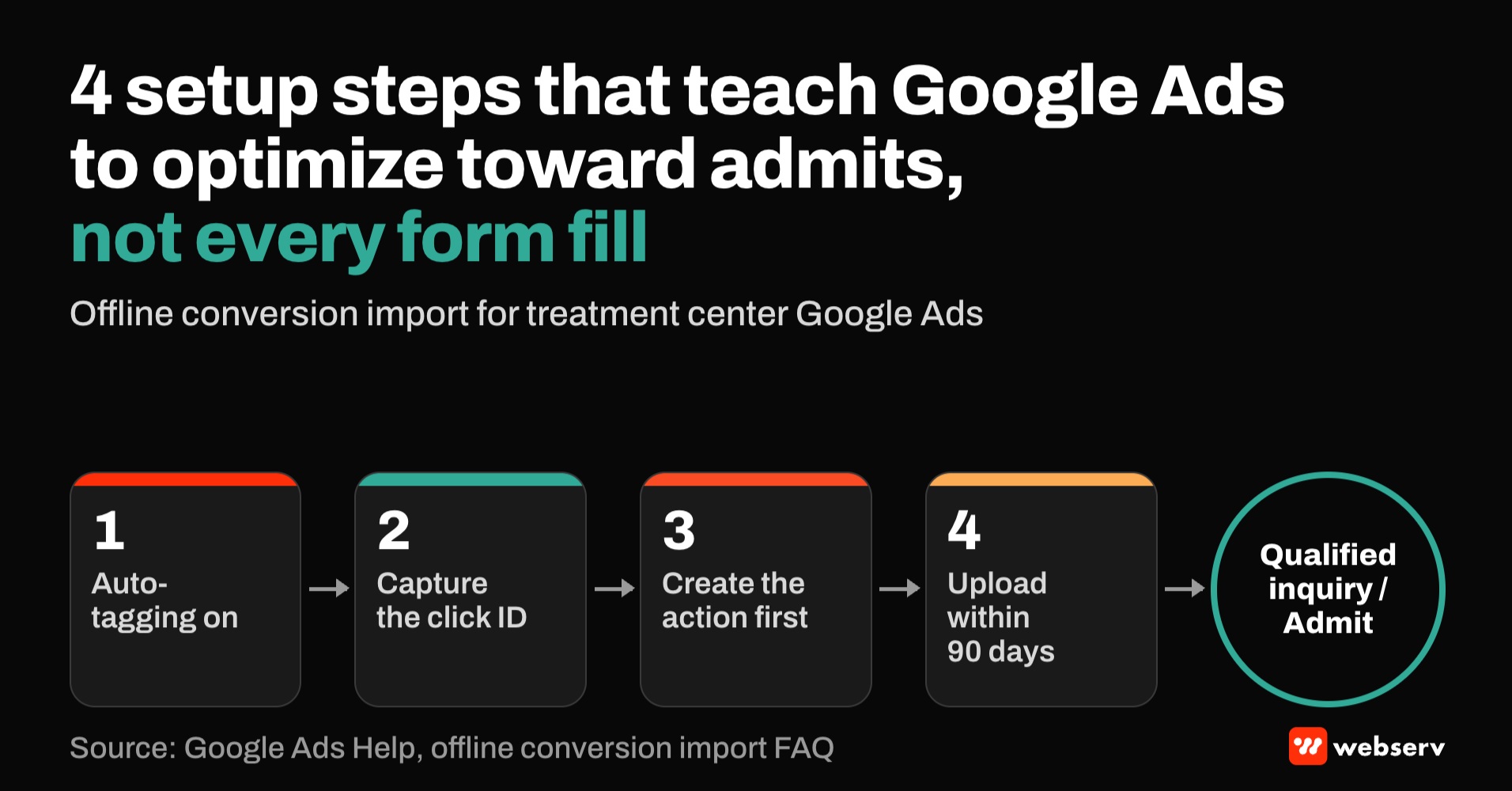
- Setup requires auto-tagging, capturing the click ID with each lead, creating the conversion action before the clicks you want to count, and uploading within 90 days of the click.
- Send neutral conversion names and values, not condition or level-of-care details. Keep the data flow inside a BAA-covered system before anything reaches Google.
- Google recommends daily uploads and at least 15 conversions in the last 30 days for target CPA bidding on qualified or converted leads.
What offline conversion import does
Without it, Google Ads optimizes toward what it can see: form submissions and calls. Many of those don’t become admits. With it, the account can learn which campaigns, keywords, and searches produce the inquiries that matter.
DEFINITION
Offline conversion import. A method of uploading conversions that happen outside the website, such as a qualified call or an admission recorded in the CRM, back into Google Ads, matched to the ad click by the Google click ID captured when the visitor arrived.
Google’s setup guide describes the process: turn on auto-tagging, capture the click ID on the landing page, store it with the lead, and upload conversions with that click ID when the outcome happens.
Where it stands after Google’s 2026 changes
Google has been moving advertisers toward enhanced conversions for leads. Its documentation describes enhanced conversions for leads as an upgraded version of offline conversion import that uses user-provided data, and recommends it for anyone not already using offline conversion import.
The click-ID-only method is still there. Google’s file upload guide, now labeled legacy, says that if you upload only click IDs, you’re using standard offline conversion import, not enhanced conversions for leads, and suggests deactivating enhanced conversions for leads if you only intend to upload click-ID-based conversions.
| Method | Data sent | Google status | Health use |
|---|---|---|---|
| Click-ID-only offline conversion import | Google click ID (GCLID, GBRAID, WBRAID), conversion name, value, and time | Labeled legacy; still documented | Not named in the customer data policy’s scope; confirm with counsel |
| Enhanced conversions for leads | Hashed email or phone, plus the click ID when available | Google’s recommended upgrade | Sensitive-category conversions, including health, can’t be used for measurement |
Uploads are also moving. Google says offline conversion and enhanced conversions for leads uploads move to the Data Manager API from June 15, 2026, and are blocked in the Google Ads API except for developer tokens with prior upload history. The Data Manager API accepts events with a click ID alone.
Google also combined enhanced conversions for web and leads into a single on/off setting in June 2026, with an opt-out at the conversion action level. Check that setting in any treatment center account.
How health policy applies
Google’s customer data policy applies to advertisers using enhanced conversions for web, enhanced conversions for leads, store sales uploads, or Google-engaged audiences. It lists health or medical information, including purchases of medical services, as a sensitive category, and says sensitive-category conversions can’t be used for measurement in enhanced conversions.
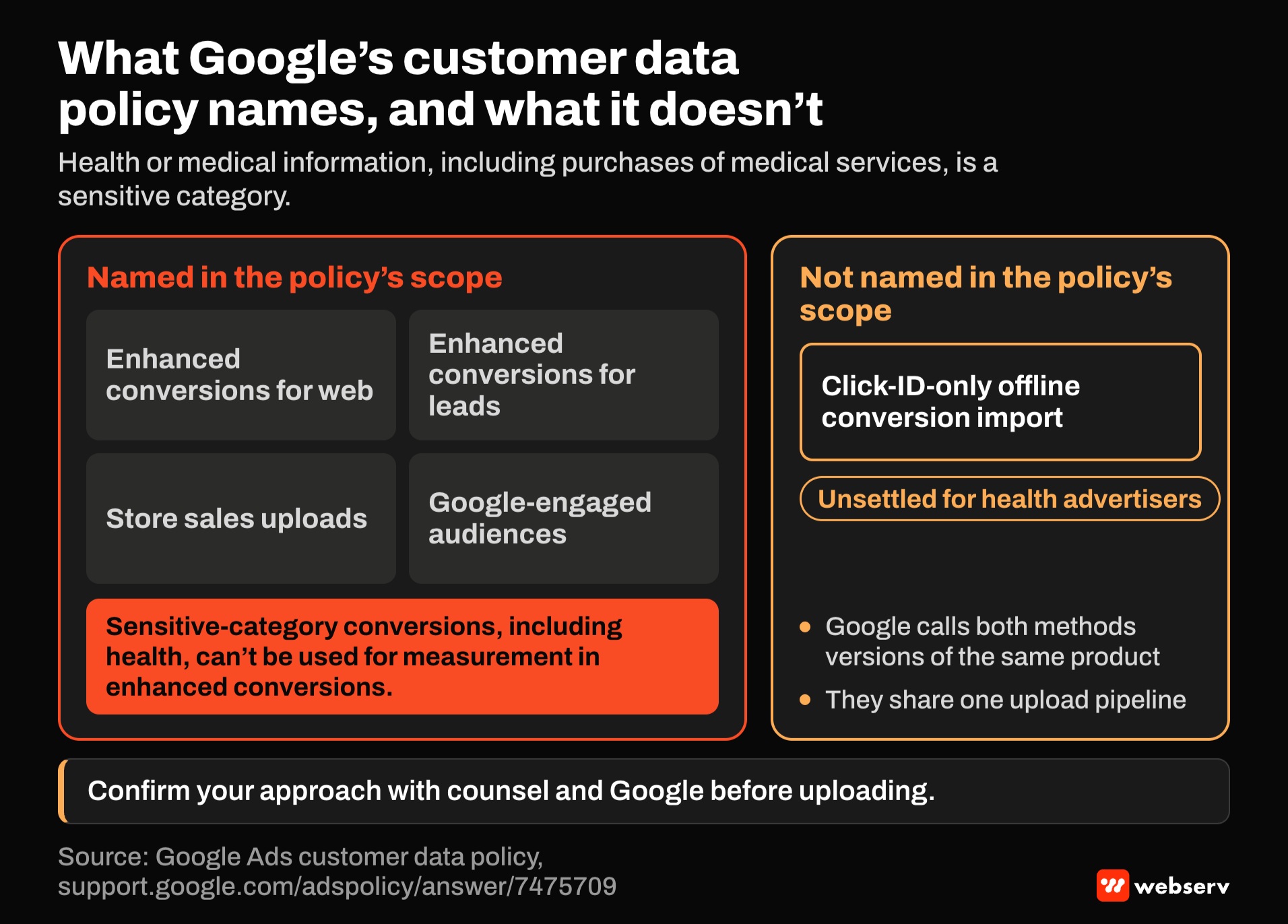
The policy’s stated scope doesn’t name click-ID-only offline conversion import, and Google’s offline import help pages don’t add a separate health restriction. But Google describes the two methods as versions of the same product, and they share one upload pipeline. The policy doesn’t settle the question cleanly for health advertisers.
COMMON MISTAKE
Treating “it’s only a click ID” as the end of the compliance review. A click ID by itself isn’t a name or phone number, but the conversion name, value, and timing travel with it. An action named “detox_admit” uploaded against a click tells Google that the person behind the click was admitted to detox.
Use neutral conversion names, such as qualified_inquiry or tier_1_conversion, avoid condition or level-of-care detail, and keep enhanced conversions off for these actions. Our HIPAA-safe conversion tracking guide covers event design, and the decision about whether and what to upload belongs with counsel.
Setting it up
Turn on auto-tagging. Google’s setup guide says auto-tagging is required for importing offline conversions.
Capture the click ID. Store the click ID from the landing page URL with each lead, in the CRM or call tracking platform. Google notes the click ID is case-sensitive. For iOS traffic, Google also passes GBRAID and WBRAID parameters that can be used for attribution.
Create the conversion action first. Google says to create the action before the clicks you want to count. Its import FAQ lists an error for clicks that happened before any conversion action existed, and recommends a separate action for each funnel stage.
Upload within 90 days. The FAQ says click-ID conversions can be uploaded up to 90 days after the click. Google’s import diagnostics say clicks less than six hours old should be retried later, and processing typically takes under 12 hours but can take up to 72.
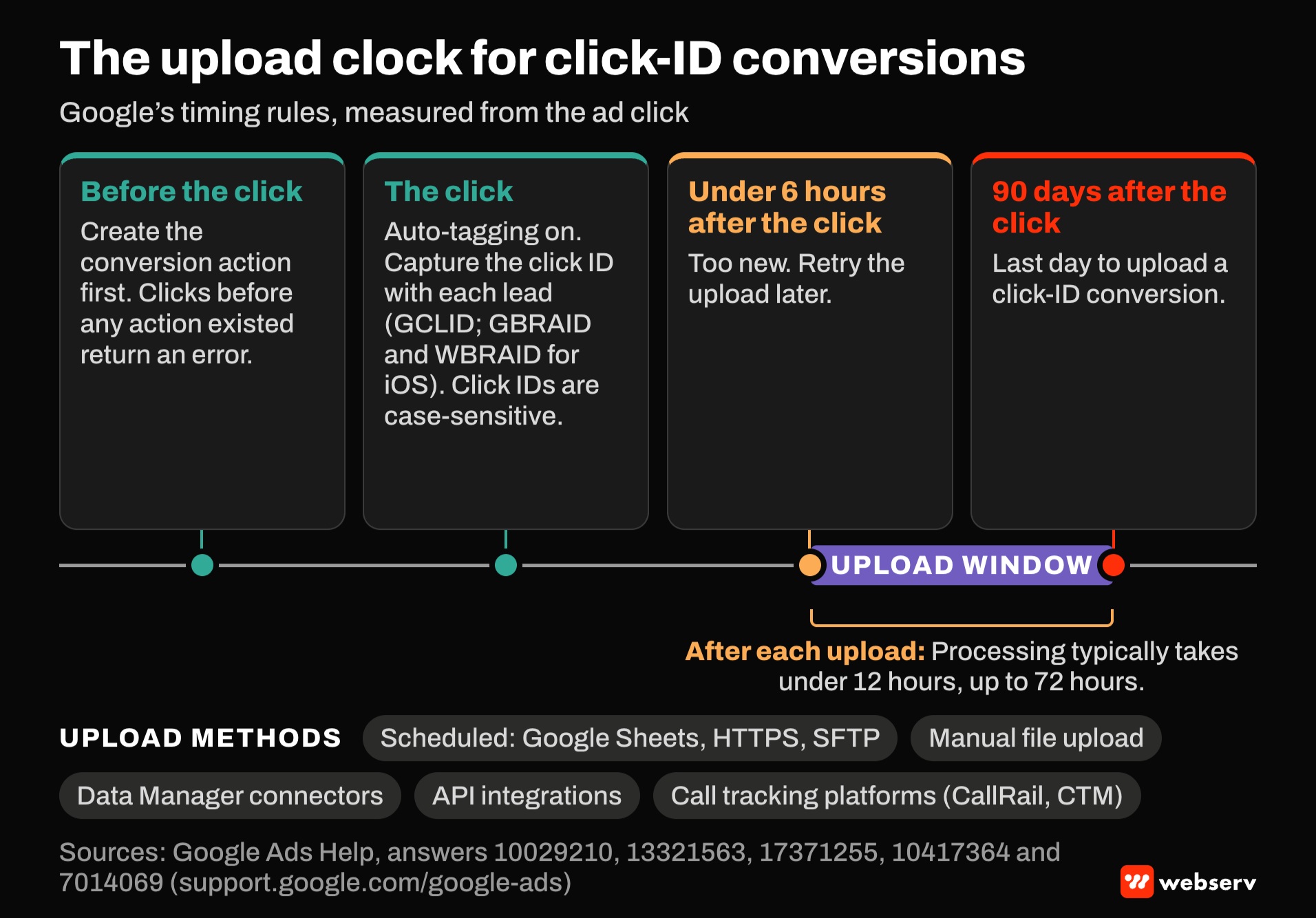
Choose the upload method. Google lists scheduled uploads from Google Sheets, HTTPS, or SFTP, manual file uploads, Data Manager connectors, and API integrations. Call tracking platforms such as CallRail and CTM can send click-ID conversions directly; our call tracking attribution guide covers the call side. For multi-location setups, see our guide to call tracking attribution at scale.
What to send
Stages. Typical stages are qualified inquiry, completed assessment or benefits check, and admission. Each gets its own conversion action.
Values. Google’s upload template accepts a value per conversion. A value can reflect a tier, such as a qualified inquiry worth less than an admit, without revealing anything clinical.
Corrections. Google allows conversion adjustments to restate a value or retract a conversion, up to 55 days after it was first recorded. Google notes the Data Manager API supports restatements but not retractions.
Timing. Google Ads reports imported conversions by click or impression time, not upload date. Use the conversion-time columns when comparing with CRM dates.
Using imported conversions in bidding
Google’s guidance on optimizing for lead quality recommends target CPA bidding on qualified or converted leads when you can’t assign distinct values, and value-based bidding when you can. It recommends uploading daily and having at least 15 conversions in the last 30 days.
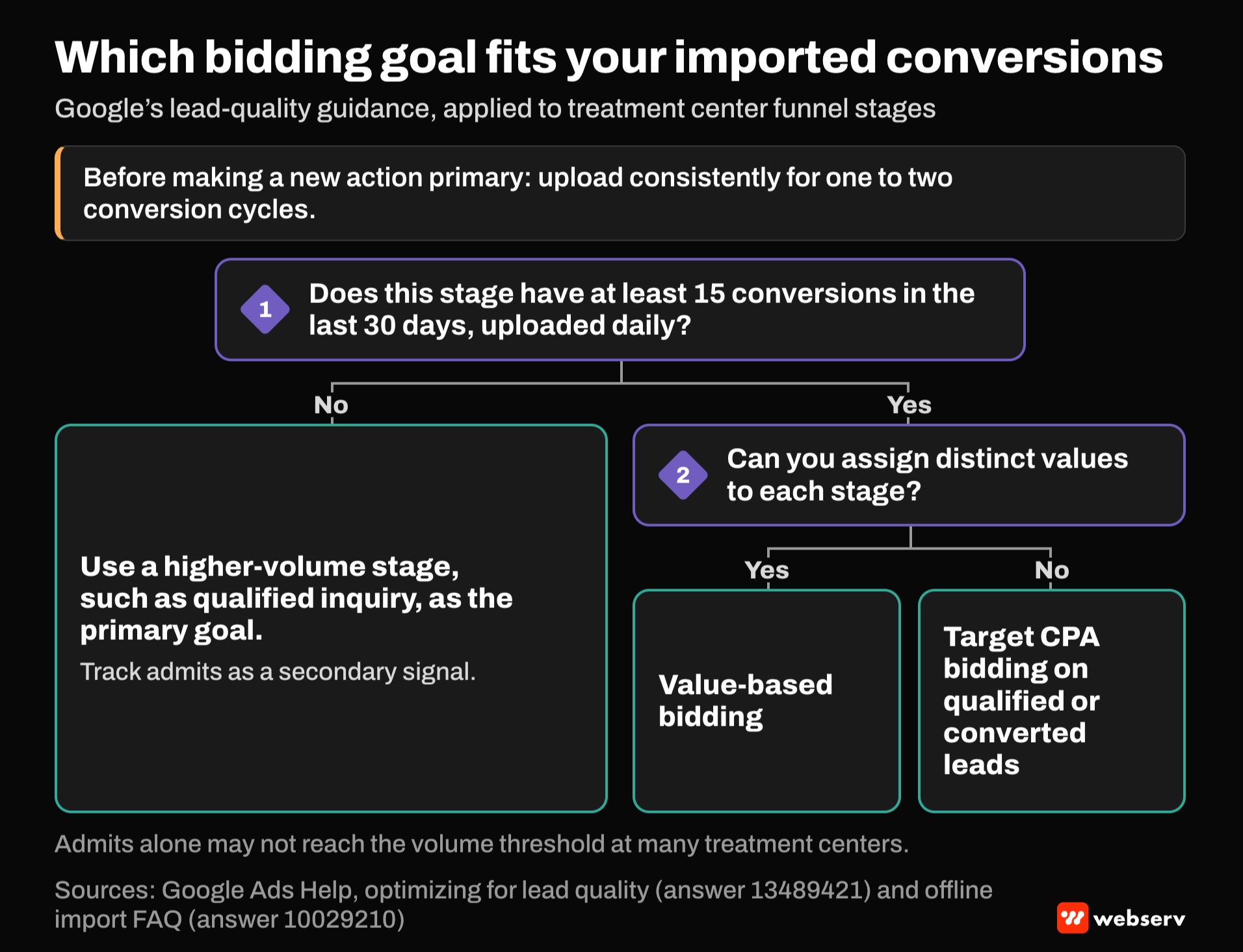
The import FAQ recommends uploading consistently for one to two conversion cycles before making a new action primary. For treatment centers, admits alone may not reach the volume threshold. A qualified-inquiry stage may, and can serve as the primary goal while admits are tracked as a secondary signal.
OPERATOR INSIGHT
Before changing bidding goals, run the imported actions as secondary for a few weeks and compare them with CRM records. If the uploaded counts don’t match what admissions recorded, the bidding change will optimize toward the error.
Our guide to reconciling CRM admits with reporting covers the reconciliation that should come first. For why the two disagree in the first place, see our piece on the attribution gap between ad platforms and the CRM.
A setup checklist
Six steps, in order.
Confirm the approach with counsel
Confirm the approach with counsel and document what will be sent and why.
Turn on auto-tagging
Turn on auto-tagging and capture click IDs, including GBRAID and WBRAID, with every lead.
Create neutral conversion actions
Create neutral conversion actions for each stage, before the clicks you want to count.
Keep enhanced conversions off
Keep enhanced conversions off for these actions.
Upload daily
Upload daily within 90 days of the click, through a BAA-covered system.
Run as secondary first
Run as secondary first, reconcile with the CRM, then promote the right stage to primary.
Where this fits
Offline conversion import connects the CRM to Google Ads. For the broader setup, see our Google Ads conversion tracking guide, the Google Ads playbook, our Google Ads strategy guide for behavioral health providers, and the complete guide to attribution.
For how paid media fits the rest of your marketing, see the complete guide to behavioral health marketing. If you want a second look at your conversion setup, book an intro meeting.
Frequently Asked Questions
Can treatment centers use offline conversion import in Google Ads?
The click-ID-only method is still documented, though Google now labels it legacy. Google’s customer data policy bars using health-related conversions in enhanced conversions, which use hashed personal data.
The policy’s stated scope doesn’t name click-ID-only imports, and it doesn’t address them for health directly.
Confirm the approach with counsel, use neutral conversion names, and keep enhanced conversions off.
What’s the difference between offline conversion import and enhanced conversions for leads?
Offline conversion import uploads conversions matched by the Google click ID. Enhanced conversions for leads also uses hashed email or phone, and Google describes it as the upgraded version.
Google’s customer data policy says sensitive-category conversions, including health, can’t be used for measurement in enhanced conversions.
For treatment centers, that makes the click-ID-only path the relevant one.
How long do we have to upload an offline conversion?
Google’s FAQ says conversions with a click ID can be uploaded up to 90 days after the click.
Clicks less than six hours old should be retried later, and processing usually takes under 12 hours.
Upload daily so bidding has current data.
What should we name imported conversions?
Neutral names that don’t describe a condition or level of care, such as qualified_inquiry or tier_1_conversion.
The conversion name travels with the click ID, so a name like “detox_admit” reveals more than intended.
Use values to reflect the stage, and document the naming decision with counsel.
How many conversions do we need for bidding on imported conversions?
Google recommends at least 15 conversions in the last 30 days for target CPA bidding on qualified or converted leads, and daily uploads.
Admits alone may not reach that, so a qualified-inquiry stage may work better as the primary goal.
Run new actions as secondary first and reconcile with the CRM before switching.
Keaton Nalle is the Director of Paid Admissions at Webserv, a digital marketing agency for treatment centers.