Most treatment centers that know about the Good Faith Estimate think of it as an intake document: a written estimate of charges handed to a self-pay family before admission. That part matters. But the federal rule has a second requirement that lives on the website, and it’s the one most often missing.
Under 45 CFR 149.610, the notice of the right to a Good Faith Estimate must be “prominently displayed (and easily searchable from a public search engine)” on the provider’s or facility’s website, in the office, and on-site where scheduling or questions about cost happen.
That makes it a website page with a search requirement attached, which puts it on the marketing team’s desk as much as billing’s.
This piece covers what the notice is, what the rule requires on the site, how to build a page that meets it, and the mistakes that leave a facility out of step. It’s part of the work inside our website design practice for treatment centers.
This is general information, not legal advice. Confirm your obligations and your notice language with counsel.
Key Takeaways
- The No Surprises Act requires providers to give uninsured and self-pay patients a Good Faith Estimate, and to post a notice of that right.
- The notice must be prominently displayed and easily searchable from a public search engine on the website, plus in the office and where scheduling happens.
- Self-pay includes insured patients who choose not to bill their insurance, a common situation in behavioral health.
- A findable notice means a real page with its own URL, plain language, and links from the pages self-pay families already visit. A PDF buried in intake paperwork doesn’t do it.
- CMS publishes a model notice providers can use. The page should also explain how to request an estimate and who to contact.
What the notice is, and who it’s for
The Good Faith Estimate requirement covers uninsured individuals and “self-pay” individuals. The regulation defines self-pay to include someone who has coverage but doesn’t want a claim submitted to their plan. In behavioral health, that’s often a family paying privately for confidentiality, or a patient whose plan won’t cover a program out of network.
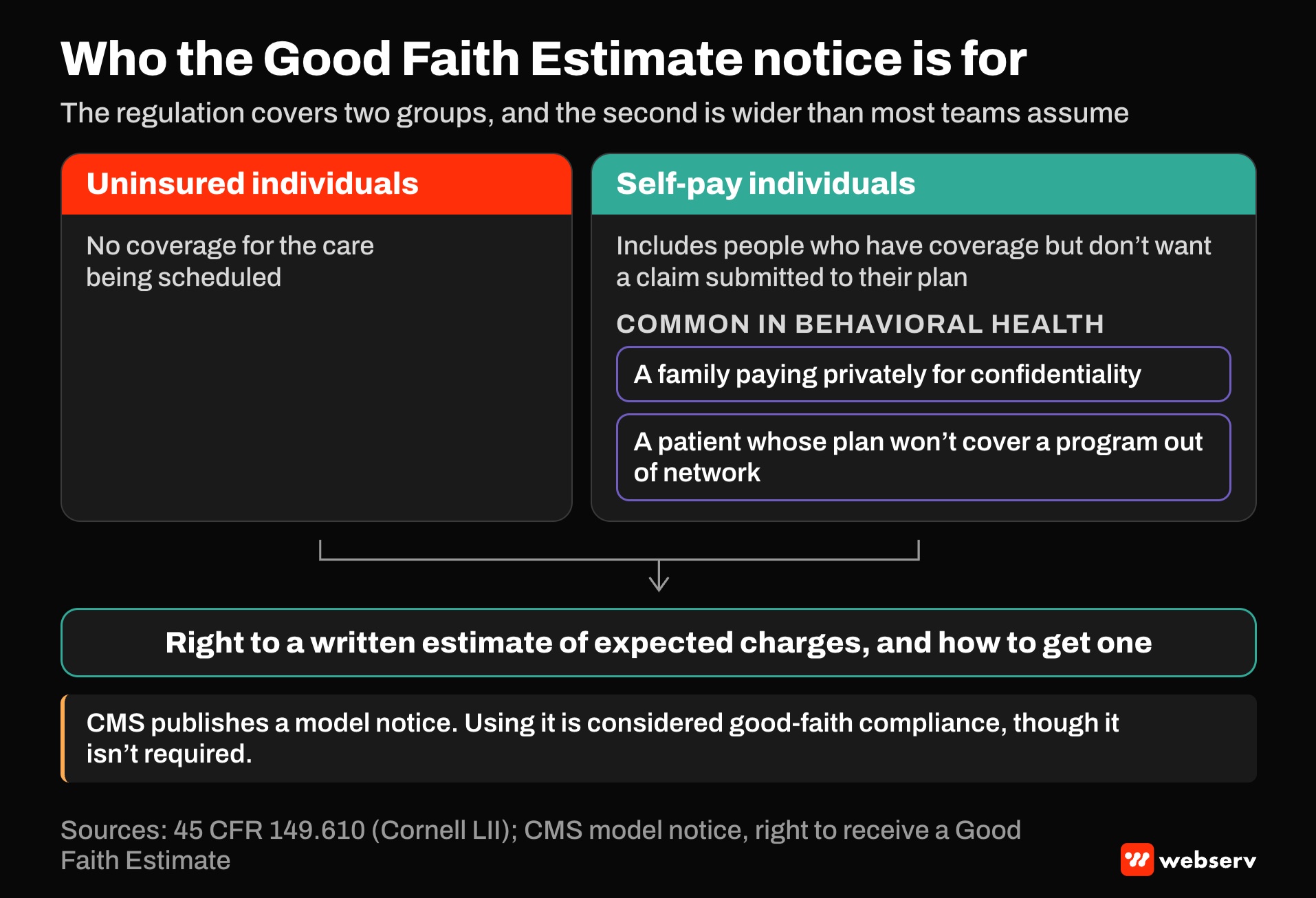
The notice tells those patients they have a right to a written estimate of expected charges, and how to get one. CMS publishes a model notice and says using it is considered good-faith compliance, though it isn’t required.
For the estimate itself, timing, contents, and the dispute process, see our Good Faith Estimate glossary entry. This piece focuses on the web side.
What the rule asks of the website
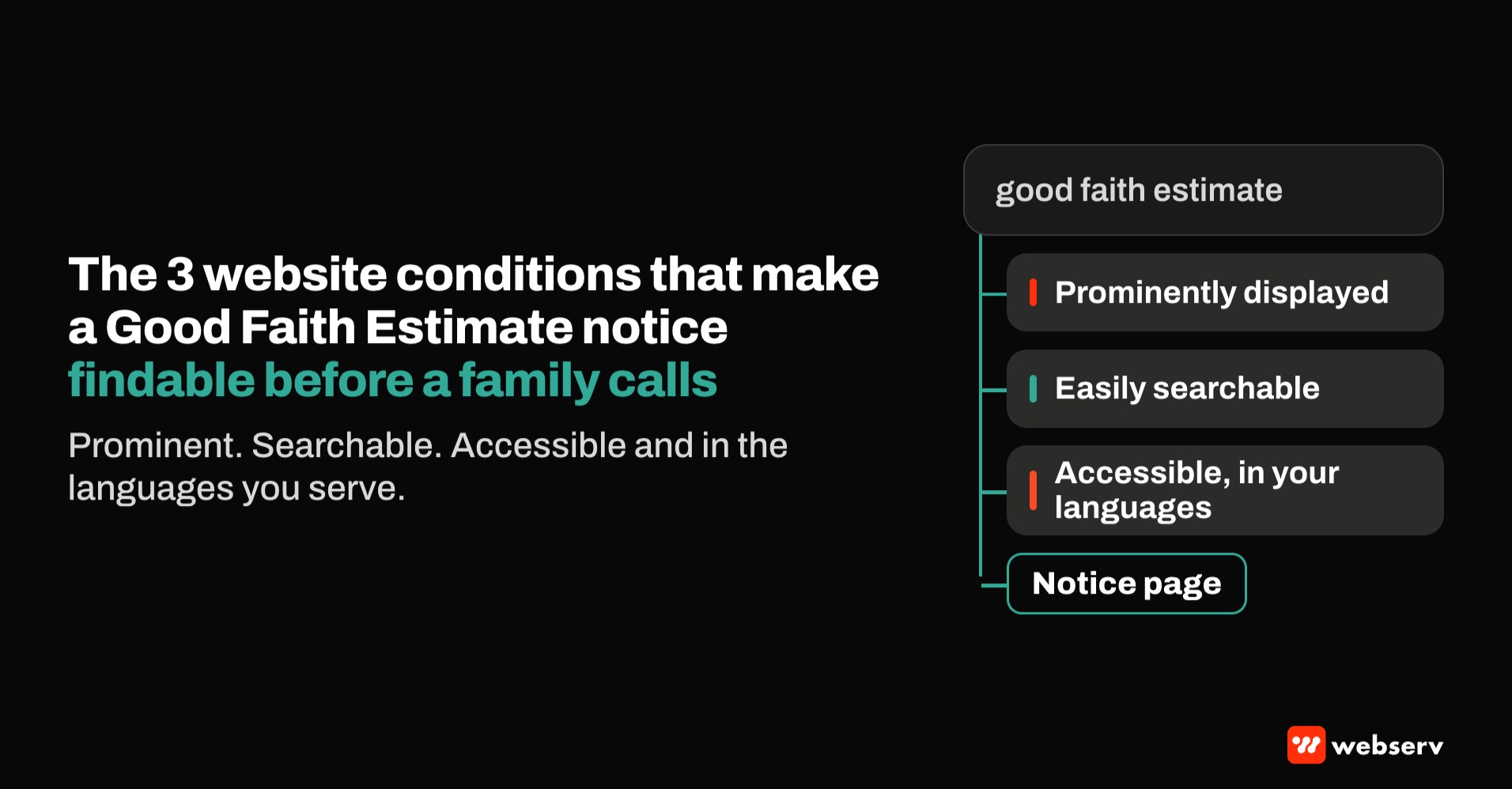
The regulation sets three conditions for the website notice:
Prominently displayed
Not hidden in a footer link labeled “legal,” not inside a downloadable PDF only, not behind a form.
Easily searchable from a public search engine
The page has to be indexable and findable when someone searches for it.
Accessible and in the languages spoken
The regulation also requires the notice to be available in accessible formats and in the language or languages spoken by the people the facility serves.
The rule also requires the notice to be given orally when scheduling, and treats any discussion or question about cost as a request for an estimate. That ties the web page to the admissions conversation: a family who reads the notice and calls should hear the same thing.
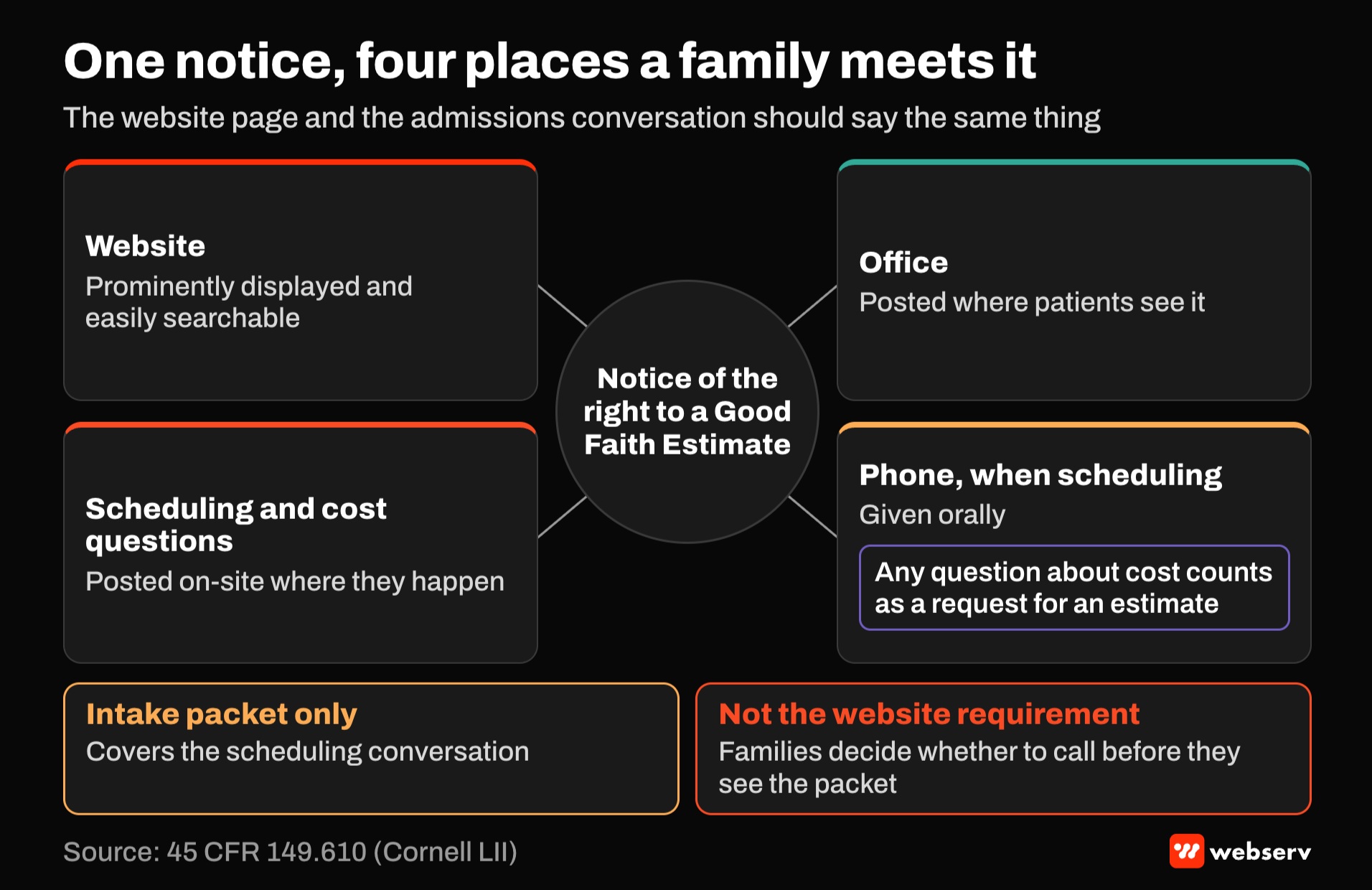
Common mistake: treating the notice as an intake form. Many facilities include the notice in the admission packet and stop there. That covers the scheduling conversation but not the website requirement.
The fix is a page anyone can find before they ever call, which is also when a self-pay family is deciding whether to call at all.
How to build the page
Give it its own URL. A dedicated page, such as /good-faith-estimate/, with a plain title like “Your Right to a Good Faith Estimate.” Keep it indexable: no noindex tag, no login, and no robots.txt block. Check that it appears when you search your facility name plus “good faith estimate.”
Publish the notice as text. Put the notice language on the page as HTML text, adapted from the CMS model notice with counsel’s review. A PDF can be offered as a download, but the page itself should carry the words.
Explain how to get an estimate. Tell families how to request one, who to contact, and what information helps. Use the same phone number and hours your admissions team uses, and avoid any claim about what the estimate will say.
Link it from the pages self-pay families visit. The insurance page, the admissions or “what to expect” page, any cost or private-pay page, the contact page, and the footer. A link from the main insurance page is the one most likely to be seen.
Match the languages you serve. If your admissions team serves Spanish-speaking families, publish the notice in Spanish too, on its own linked page or section.
Make it accessible. Real headings, readable contrast, no text inside images. The regulation’s “accessible formats” language makes this part of the notice, not a design preference.
| Element | Do | Don’t |
|---|---|---|
| Location | Dedicated, indexable page | PDF only, or a page behind a form |
| Wording | Text adapted from the CMS model notice | Paraphrase that drops the right to dispute |
| Links | Insurance, admissions, cost, contact, footer | Footer-only “legal” link |
| Languages | Every language your admissions team serves | English only when you admit Spanish speakers |
| Admissions | Same message on the phone and the page | A page that says one thing and a script that says another |
Where it fits with your other pages
The notice isn’t a sales page, but it supports the pages that are. A self-pay family comparing programs reads the insurance page, the admissions page, and anything that hints at cost. A clear notice there signals that the facility is straightforward about money, which is often the family’s biggest worry.
Keep the insurance page accurate about which plans you work with and how, as covered in our piece on insurance pages AI systems can cite. Keep the notice separate and plain.
For facilities that work out of network, the notice sits next to the rest of the self-pay conversation. Our guides to the VOB-to-admit reimbursement gap and single case agreements before admission cover the billing side.
OPERATOR INSIGHT
Search your own site the way a parent would: “good faith estimate,” “private pay,” “cost of treatment.” If the notice doesn’t come up, neither Google nor a family will find it.
Then call your own admissions line and ask what an estimate would cost. The answer should match the page.
A separate notice some facilities also need
The No Surprises Act also requires a disclosure of patient protections against surprise billing, posted on a searchable homepage, under 45 CFR 149.430. That one applies to providers that furnish services at hospitals, hospital outpatient departments, critical access hospitals, or ambulatory surgical centers.
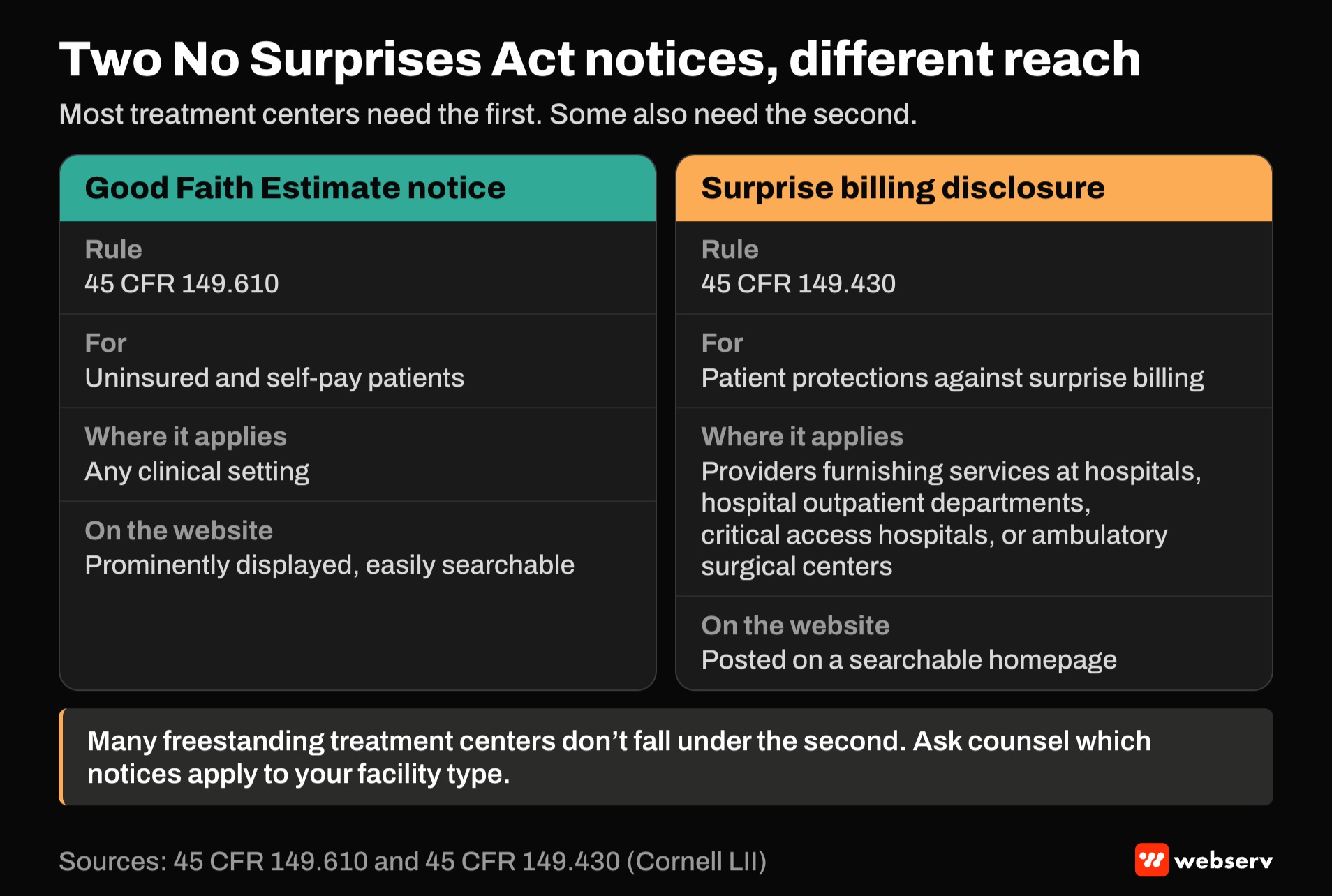
Many freestanding treatment centers don’t fall under it, but some programs do. Ask counsel which notices apply to your facility type. The Good Faith Estimate notice applies to self-pay patients in any clinical setting.
Where this fits
The notice is one of several compliance items that live on a treatment center website. For the others, see our guides to HIPAA-compliant contact forms and HIPAA-safe conversion tracking, and the No Surprises Act glossary entry. Our website compliance checklist brings them together in one review.
For how the website fits the rest of your marketing, see the complete guide to behavioral health marketing. If you want a second look at your insurance and cost pages, book an intro meeting.
Frequently Asked Questions
Does the Good Faith Estimate notice have to be on our website?
Yes. The regulation requires the notice of the right to a Good Faith Estimate to be prominently displayed and easily searchable from a public search engine on the website.
It also has to be posted in the office and where scheduling or cost questions happen.
Including it only in intake paperwork doesn’t meet the website requirement.
Can we just upload the notice as a PDF?
A PDF can be offered, but the safer approach is a dedicated page with the notice as text.
Text on an indexable page is easier for search engines to find and easier to make accessible.
Link the page from your insurance, admissions, and contact pages.
Who is the notice for?
Uninsured and self-pay patients. Self-pay includes people with insurance who choose not to have a claim submitted to their plan.
In behavioral health, that often means families paying privately for confidentiality or for an out-of-network program.
Patients in federal programs such as Medicare and Medicaid aren’t eligible for Good Faith Estimates.
Do we have to use the CMS model notice?
No. CMS publishes a model notice and considers using it good-faith compliance, but it isn’t required.
Most facilities adapt the model notice with counsel’s review.
Keep the right-to-dispute language and contact details in whatever version you use.
Does the notice need to be in Spanish?
The regulation requires the notice to be available in the language or languages spoken by the people the facility serves.
If your admissions team serves Spanish-speaking families, publish a Spanish version.
Confirm the languages that apply to your facility with counsel.
Trevor Gage is the Director of Marketing at Webserv, a digital marketing agency for treatment centers.