A multi-location residential operator called our admission ops team after an audit surfaced what everyone in the org already suspected. Their coordinators were re-entering admit data into Kipu manually every day.
The Kipu-to-CRM integration had been “set up” 18 months earlier by a generalist consultant. Nobody had touched it since. The sync fired once, on admit creation, and then stopped. Every subsequent status change, LOC update, and discharge event stayed inside Kipu and never made it back to the CRM.
The reporting suffered. Coordinators had two sources of truth to reconcile weekly. Admissions leadership could not tell you whether an admit was still in treatment without opening two systems. The integration was live. It was not working.
This piece walks the operational picture of Kipu integration at treatment center admissions. Which fields matter, where PHI boundaries live, when bidirectional sync is the right architecture, and what actually breaks on facilities running Kipu as their EMR alongside Dazos, Salesforce, or HubSpot as their admissions CRM.
Disclosure: Webserv is a Dazos implementation partner. This article evaluates Kipu integration architecture across CRM platforms on operational merits. Kipu, Dazos, Salesforce, and HubSpot are trademarks of their respective owners; use here is nominative and editorial only.
Key Takeaways
- Kipu is the dominant EMR in outpatient behavioral health. Every serious treatment center admissions CRM has to answer the “how does this integrate with Kipu” question or the integration cost gets rebuilt with every platform decision.
- The right integration architecture is bidirectional sync on a defined set of admissions-relevant fields. Not full patient-record replication. Not one-way blind fire on admit. Structured bidirectional handoff with PHI boundaries respected.
- The four fields that carry the load: admit status, LOC (level of care), admit date, and discharge date. If those four sync bidirectionally and reliably, admissions ops runs. Everything else is optional.
- PHI boundaries matter. Do not sync clinical notes, treatment plans, or medication records into the CRM. Sync only the operational metadata that admissions needs to make decisions. Anything more is a HIPAA and 42 CFR Part 2 exposure.
- Native connectors beat middleware when available. Dazos has native Kipu integration. Salesforce and HubSpot both require middleware. The middleware works but adds a maintenance layer that native connectors avoid.
- Facilities that treat Kipu integration as a set-and-forget project produce silent data drift within 90 days. The right ownership model is one person in the org accountable for the integration health, with weekly monitoring.
What Kipu Actually Does
Kipu is a behavioral-health-native EMR built for outpatient and residential treatment centers. The platform holds the clinical record: assessments, treatment plans, clinical notes, medication administration, group therapy attendance, discharge summaries.
Kipu is not an admissions CRM. It is an EMR. The distinction matters because most CRM-Kipu integration failures come from operators trying to make Kipu do CRM work or trying to make the CRM do EMR work.
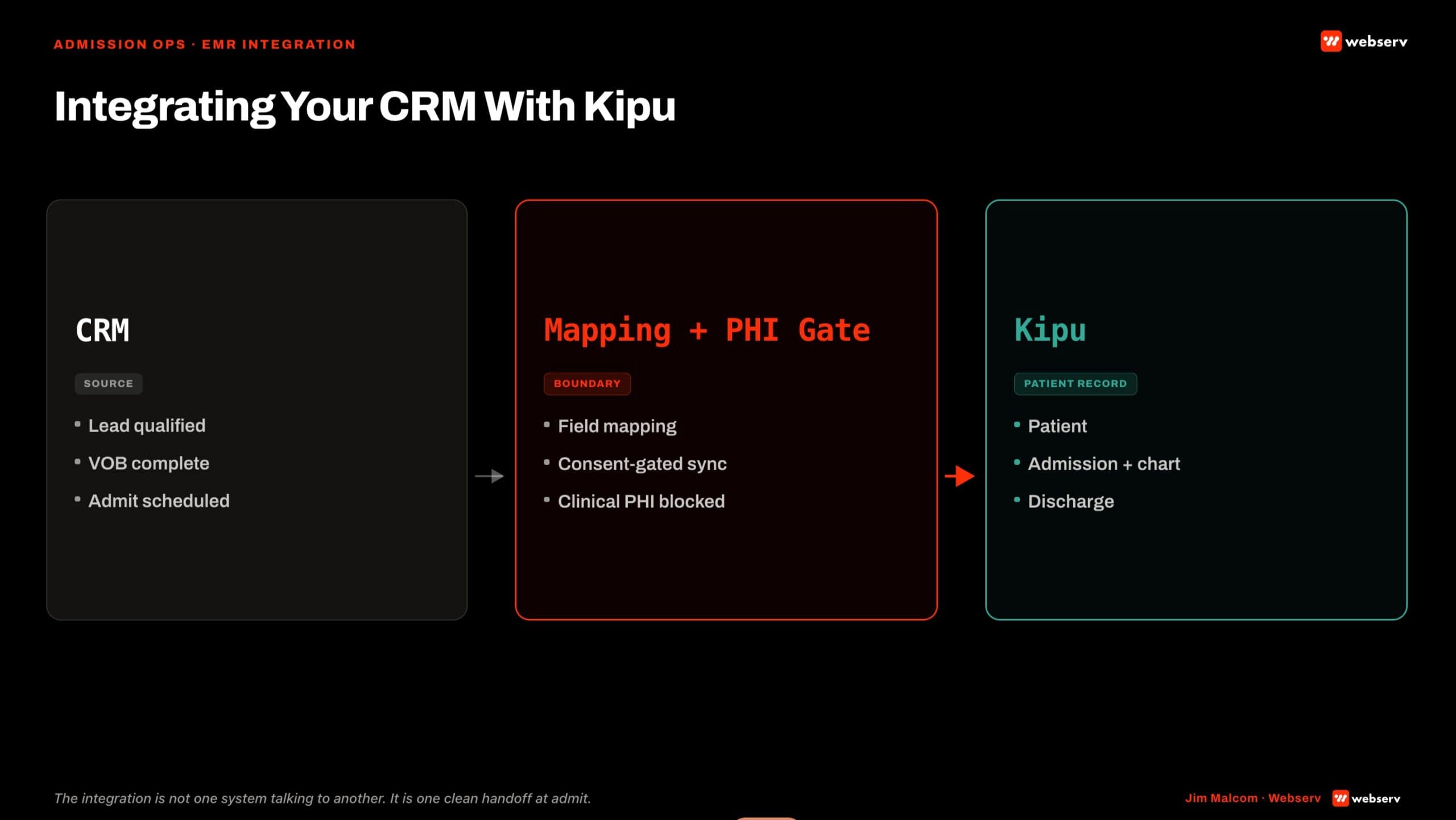
The clean architecture. Admissions CRM holds the lead-to-admit funnel: prospect intake, VOB, insurance verification, admit scheduling, close. Kipu holds the clinical record from admit forward. The integration handoff happens at admit. Everything upstream of admit is CRM territory. Everything downstream of admit is Kipu territory.
Insurance verification friction is one of the most-cited barriers to treatment access (SAMHSA, National Survey of Substance Abuse Treatment Services). A clean handoff between the admissions CRM and Kipu is what keeps that friction from compounding at the moment of admit.
Why the CRM to Kipu Integration Matters
Three operational failures happen when the CRM-Kipu integration is broken or missing.
Coordinators re-enter data manually. The lead record in the CRM says “admitted.” The Kipu record has to be created from scratch by hand. Names get misspelled. Dates get transcribed wrong. Insurance information gets re-typed. Every manual step is a data quality erosion event.
Reporting fragments. Admits by source lives in the CRM. Length of stay lives in Kipu. Discharge outcomes live in Kipu. Marketing attribution against admits requires stitching two systems together, usually in Excel, usually weekly, usually late. Leadership makes decisions on stale data.
Discharge status never routes back to marketing. The admissions team never learns which sources produced patients who completed treatment versus which sources produced patients who left AMA at day 6. Marketing spend gets calibrated against admit count, not admit quality. Cost per completed treatment stays a mystery.
The fix is a bidirectional integration that treats admit as a two-way handoff. The CRM pushes lead-to-admit metadata forward. Kipu pushes clinical status backward.
DEFINITION
CRM-to-Kipu field mapping is the specification of which patient data fields sync from your CRM into Kipu at the point of admission handoff. Getting this wrong is where coordinators end up double-entering, insurance data drops between systems, and attribution breaks between the marketing source and the admit record.
The Field Mapping That Actually Works
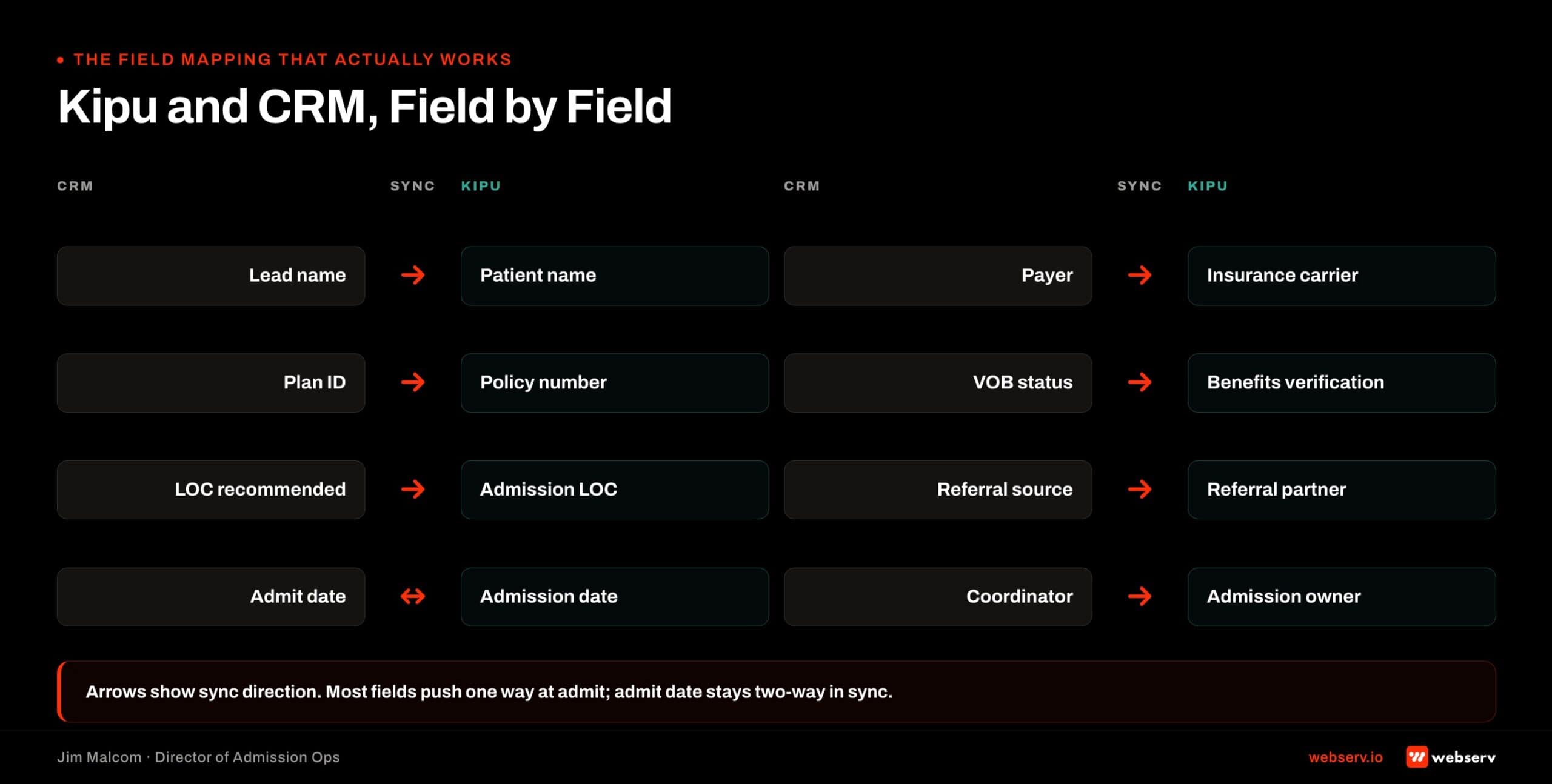
Not every field in Kipu should sync to the CRM. Not every field in the CRM should sync to Kipu. The list below is the operational minimum that most admission ops teams actually need.
CRM to Kipu (forward push at admit).
- Patient name, DOB, contact information
- Admit date and scheduled LOC
- Referral source and campaign attribution
- Insurance payer, plan, member ID, alpha prefix (for BCBS)
- Prior-auth status and days authorized
- Expected LOS based on payer approval
- Primary admissions coordinator owner
Kipu to CRM (backward push after admit).
- Admit confirmation (Yes/No)
- Current LOC (may change from scheduled during treatment)
- Days in treatment
- Discharge date
- Discharge type (completed, AMA, transferred, administrative)
That is the list. It is 12 fields total across both directions. Facilities running integrations that sync more than this are usually syncing more than admissions needs and adding compliance surface area.
The LOC field should follow ASAM’s standard levels of care so the mapping stays clinically coherent on both sides (ASAM Criteria).
Both Kipu and the major admissions CRMs support ASAM-shaped LOC picklists as configuration. Facilities running HubSpot as marketing automation upstream with Dazos or Salesforce downstream get clean LOC alignment across all three surfaces when the picklist is standardized.
Bidirectional Sync vs One-Way Sync
Two architectures show up in practice. One works. The other creates the manual re-entry problem the operator called us about at the top of this piece.
One-way sync (CRM to Kipu at admit). The admissions CRM pushes a patient record into Kipu when the admit fires. Kipu never pushes anything back to the CRM. The lead record in the CRM stays frozen at “Admitted” and never updates as treatment progresses.
This architecture is common because it is easy to build. It is also the architecture that produces the reporting fragmentation described above. Do not accept it as a finished integration.
Bidirectional sync (CRM ↔ Kipu on a scheduled cadence). The CRM pushes patient record and admit metadata forward at admit. Kipu pushes admit confirmation, LOC changes, LOS, and discharge status back to the CRM on a scheduled cadence (usually every 4-6 hours).
This is the working architecture. It keeps both systems’ records in sync without either system being the single source of truth for data the other needs.
The scheduled cadence matters. Real-time bidirectional sync sounds good but creates race conditions when a coordinator updates a field in one system while the other system is mid-sync. Every 4-6 hours is fast enough for admissions decisions and slow enough to avoid race conditions.
WATCH OUT
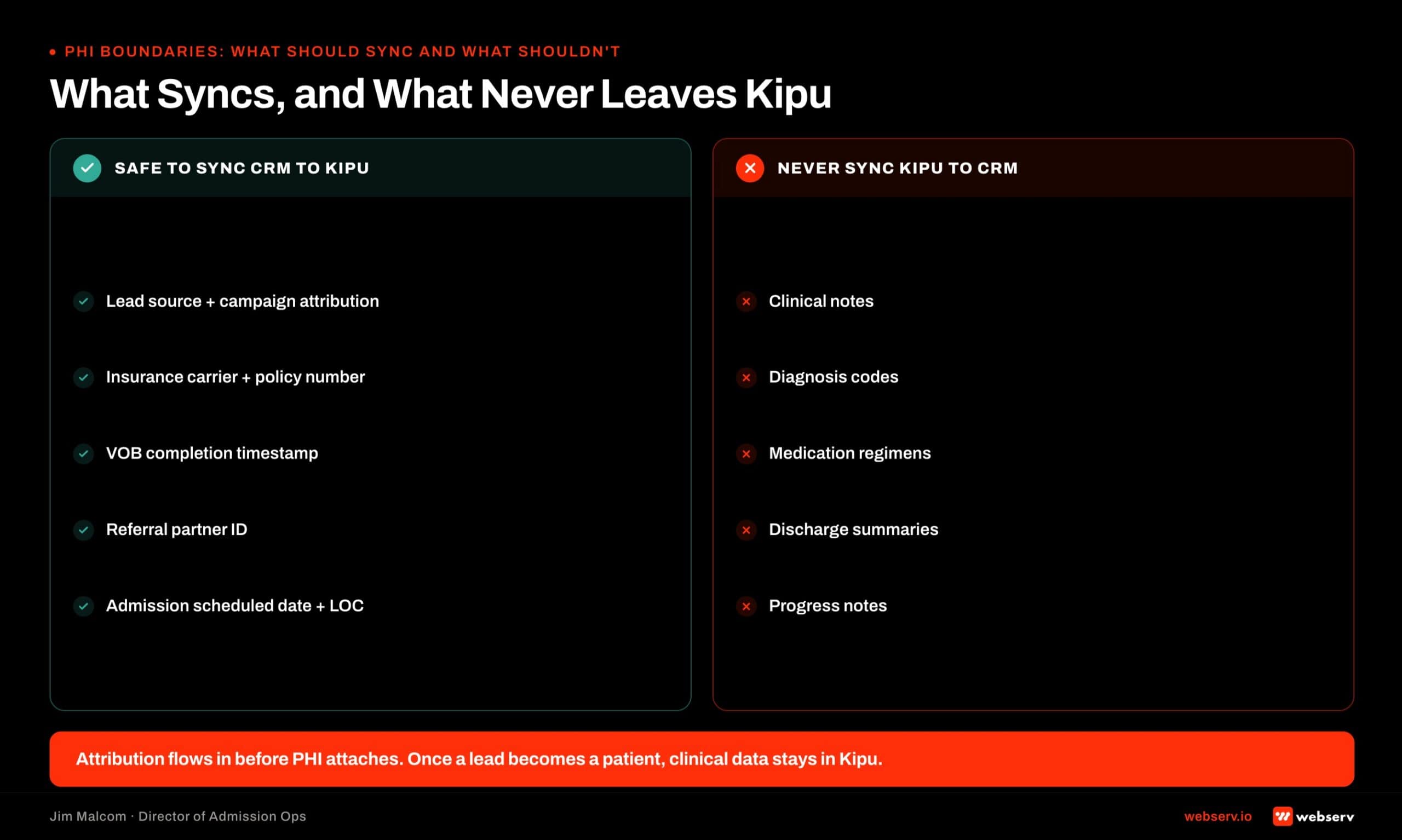
Marketing-side data (lead source, UTM parameters, first touch date) should sync into Kipu. Clinical-side data (diagnosis codes, treatment plan detail, progress notes) should NOT sync back into the CRM. Marketing team access to clinical data is a HIPAA violation regardless of intent. Field mapping is a compliance decision, not just a data model decision.
PHI Boundaries: What Should Sync and What Shouldn’t
The compliance layer that governs Kipu-CRM integration is stricter than general HIPAA. Substance use disorder patient records are also subject to 42 CFR Part 2, which imposes tighter consent and disclosure standards than HIPAA alone.
What should sync. Operational metadata that admissions needs to make decisions. Admit status, LOC, admit date, discharge date, discharge type. That is the list from the field mapping above. Every field there is defensible under Part 2 as necessary for admissions operations.
What should not sync. Clinical notes. Treatment plan details. Medication administration records. Assessment scores. Progress notes. Group therapy attendance. Any of these in the CRM is a compliance exposure and rarely produces operational value that the four load-bearing fields do not already carry.
The BAA layer has to reflect Part 2, not just HIPAA. Every tool in the integration path (CRM, EMR, middleware, and any downstream reporting tool) needs a BAA that references Part 2 confidentiality standards.
Standard HIPAA business-associate language alone is not enough. Facilities that treat this as a paperwork exercise carry compliance exposure that surfaces during audits.
Integration Architecture: Native vs Middleware
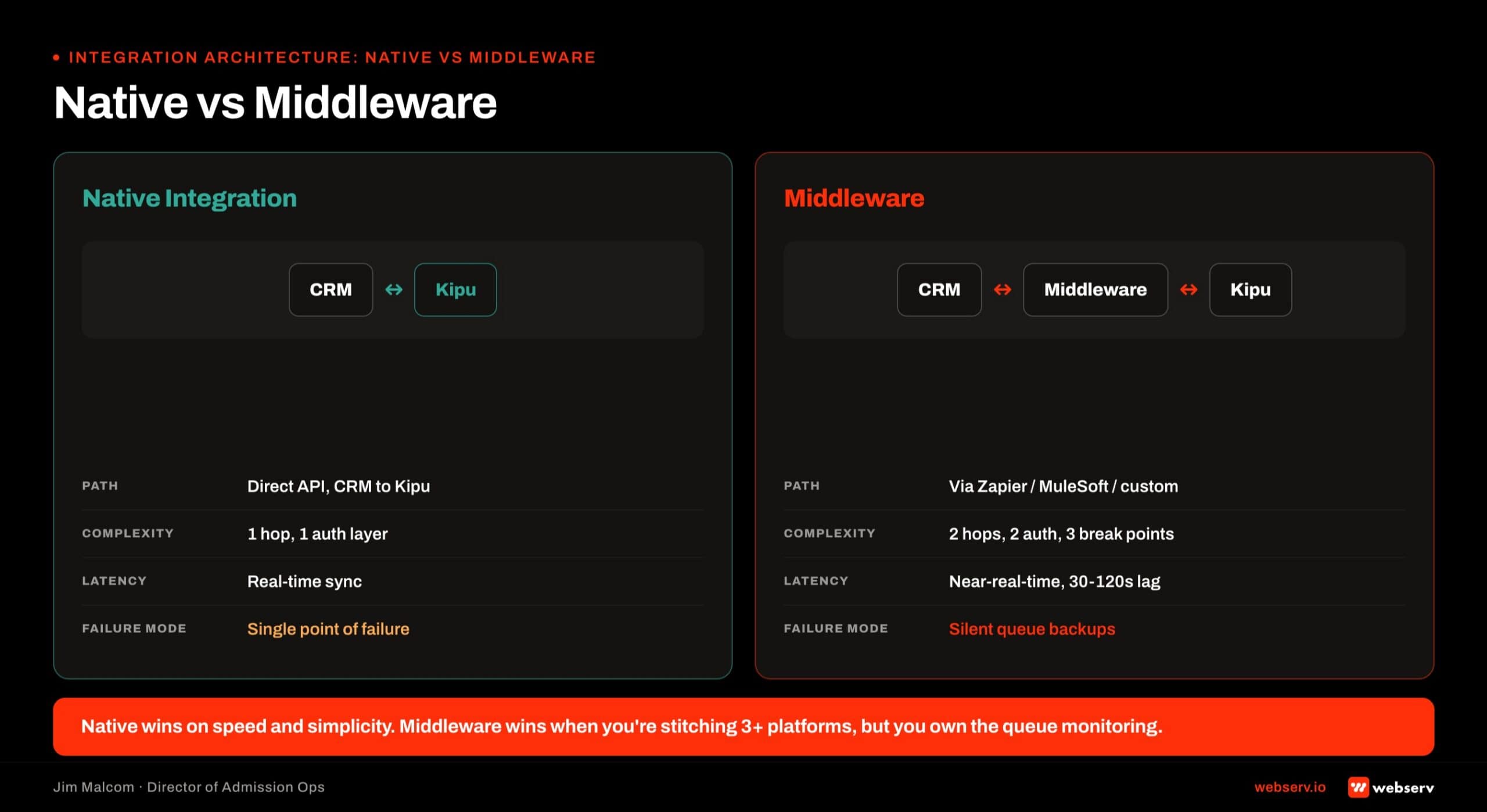
Native connectors and middleware integrations both work. They have different tradeoffs.
Native connector. The CRM vendor and Kipu maintain a direct integration. No third-party tool sits between them. Field mapping happens inside the CRM configuration. Sync frequency is set at the connector level. Maintenance burden is low because both vendors update the connector as their APIs change.
Dazos as the behavioral-health-native admissions CRM has a native Kipu connector. This is one of the operational reasons Dazos scales well at facilities where Kipu integration is load-bearing.
Middleware. A third-party integration platform (Zapier, Workato, MuleSoft, or a custom connector) sits between the CRM and Kipu. The middleware handles field mapping, sync scheduling, and error handling. This is the architecture required for Salesforce and HubSpot integrations to Kipu.
Middleware works. It also adds a maintenance layer. Every time Kipu updates its API, every time the CRM updates its API, the middleware needs verification that the sync still fires correctly.
Facilities that pick Salesforce or HubSpot as their admissions CRM and Kipu as their EMR are signing up for that middleware maintenance layer as part of the ongoing cost.
The Salesforce for BH admissions build and the HubSpot-for-admissions build both use middleware for Kipu sync. Both work. Both require ownership.
Common Integration Failure Modes
Five failure modes that show up on Kipu integration audits.
Set-and-forget. The integration was configured 18 months ago and nobody has looked at it since. The sync fires on some records and silently drops others. Data quality erodes without alerting anyone.
One-way sync accepted as finished. The CRM pushes forward at admit. Nothing pushes back. Reporting fragments. Coordinators build a manual reconciliation habit. The habit becomes tribal knowledge.
Over-syncing PHI. The integration was built to sync everything Kipu holds, on the assumption that “more data is better.” Clinical notes, medication records, and treatment plans end up in the CRM. Compliance exposure grows quietly.
Under-syncing operational metadata. The four load-bearing fields (admit status, LOC, admit date, discharge date) never sync back to the CRM. Admissions leadership cannot tell you which patients are still in treatment without opening Kipu.
No ownership. Nobody in the org owns the integration health. When something breaks, nobody notices until a report goes sideways or a coordinator raises it in a huddle. By then the drift has been running for weeks.
The pattern under all five. The integration is treated as a project instead of an ongoing operational system. The fix is one person accountable for weekly integration health monitoring.
What a Webserv Engagement Looks Like
The 6-week Admission Ops sprint includes Kipu integration configuration as part of Pillar 2 (CRM and Workflow Optimization) and Pillar 3 (VOB and Insurance Ops).
Week 1, Onboard and Audit. Current-state map of the Kipu integration (if it exists). Field mapping inventory. Sync frequency check. PHI boundary review. Ownership assessment.
Week 2, Lead Tracking. Call tracking, form and chat capture, source mapping into CRM. The layer that populates the fields that will eventually push forward into Kipu.
Week 3, CRM Pipeline. Pipeline stages built. Automations for status changes. Kipu integration configured against the 12-field mapping above. Native connector or middleware setup depending on CRM platform.
Week 4, VOB Workflow. VOB object built out. Prior-auth flags. Status tracking. The upstream layer that determines what pushes into Kipu at admit.
Weeks 5-6, Training and Launch. Coordinator training on the new sync architecture. Weekly integration health monitoring cadence installed. Ownership assigned.
Pricing. One-time setup runs $7,500 to $15,000 depending on center size, CRM complexity, and integration scope. Kipu integration configuration is included when the facility already runs Kipu.
Ongoing retainer tiers by location count: $3,500 to $5,000 per month for 1-2 locations, $5,000 to $8,000 per month for 3-5 locations, $8,000 to $15,000 per month for 6+ locations.
The Fast-Track Diagnostic is the low-friction entry: $3,000, credited 100 percent toward month one if the facility moves forward. Two-week audit of the current Kipu integration health, field mapping gaps, PHI boundary review, and firm proposal.
The perspective in this article comes from 9 years working exclusively inside behavioral health.
We are a team built by people in recovery who understand that behind every admission is someone asking for help. If that resonates, get to know us.
Frequently Asked Questions
For the fuller admissions technology stack, see behavioral health marketing guide.
How do I integrate Kipu with my admissions CRM?
The integration architecture depends on the CRM. Dazos has a native Kipu connector that syncs on a scheduled cadence with field mapping configured inside Dazos. Salesforce and HubSpot both require middleware (Zapier, Workato, or a custom connector) since neither ships a native Kipu integration.
The right integration is bidirectional. The CRM pushes patient record and admit metadata forward at admit. Kipu pushes admit confirmation, LOC changes, days in treatment, and discharge status back to the CRM on a 4-6 hour cadence.
The 12-field mapping is the operational minimum: seven fields forward (name, DOB, contact, admit date, LOC, source, payer info, prior-auth, LOS, owner) and five fields back (admit confirmation, current LOC, days in treatment, discharge date, discharge type). More than this is usually more than admissions needs.
What fields should sync between Kipu and my CRM?
Twelve fields. Seven push forward from the CRM to Kipu at admit: patient name and DOB, contact information, admit date and scheduled LOC, referral source and campaign attribution, insurance payer and plan and member ID and alpha prefix, prior-auth status and days authorized, expected LOS, and primary admissions coordinator owner.
Five push back from Kipu to the CRM on the ongoing cadence: admit confirmation, current LOC (which may change during treatment), days in treatment, discharge date, and discharge type (completed, AMA, transferred, administrative).
Do not sync clinical notes, treatment plans, medication records, assessment scores, or progress notes. Anything clinical stays in Kipu. The CRM only needs the operational metadata that admissions and marketing use to make decisions.
What PHI can I sync between Kipu and my admissions CRM?
Operational metadata that admissions needs to make decisions is defensible under HIPAA and 42 CFR Part 2. Clinical detail is not. The 12-field mapping above stays inside the operational-metadata boundary.
Clinical notes, treatment plans, medication records, and assessment scores should never leave Kipu. The CRM does not need them for admissions work, and putting them in the CRM creates compliance exposure without corresponding operational value.
Every tool in the integration path (CRM, EMR, middleware, downstream reporting) needs a BAA that references Part 2, not just HIPAA. Substance use disorder records carry stricter confidentiality standards than general PHI. Verify the BAA language before turning any sync live.
Does Dazos integrate with Kipu natively?
Yes. Dazos ships a native Kipu connector as part of its behavioral-health-native platform posture. Field mapping happens inside Dazos configuration. Sync frequency is set at the connector level. Maintenance burden is low because both Dazos and Kipu update the connector as their APIs change.
This is one of the operational reasons Dazos scales well at facilities where Kipu integration is load-bearing. The alternative is Salesforce or HubSpot with a middleware layer, which works but adds ongoing maintenance overhead.
Facilities running Dazos with Kipu get the cleanest architecture available in behavioral health admissions today. That does not automatically make Dazos the right platform for every facility, but it does simplify the Kipu integration decision when Dazos is on the shortlist.
How do I integrate Kipu with Salesforce or HubSpot?
Both require middleware. Zapier, Workato, and MuleSoft are the common options. A custom-built connector is also possible for facilities with dedicated dev resources or a Salesforce admin who can build against the Kipu API.
The middleware handles field mapping, sync scheduling, and error handling. Every time Kipu updates its API or the CRM updates its API, the middleware needs verification that the sync still fires correctly. That is the ongoing maintenance layer facilities running Salesforce or HubSpot with Kipu sign up for.
The middleware works. It is not a reason to reject Salesforce or HubSpot. It is a cost to model when comparing platforms. The CRM migration playbook walks the tradeoff in more detail for facilities weighing platform decisions with Kipu integration in scope.
What breaks most often on Kipu integrations at treatment centers?
Silent set-and-forget failure. The integration was configured once and never checked again. The sync fires on some records and silently drops others. Data quality erodes for months before anyone notices, usually when a weekly report goes sideways.
The second most common failure is one-way sync accepted as finished. The CRM pushes forward at admit. Nothing pushes back. Coordinators build a manual reconciliation habit that becomes tribal knowledge. Admissions leadership cannot tell you who is still in treatment without opening two systems.
The fix for both. One person in the org accountable for weekly integration health monitoring. A simple checklist: did every admit this week create a Kipu record, did every Kipu discharge update the CRM record, are the four load-bearing fields in sync. Fifteen minutes a week. It is not glamorous. It is the difference between an integration that works and an integration that drifts.
Closing Note From the Admission Ops Floor
Kipu integration is not a project. It is an ongoing operational system that needs weekly attention.
The facilities that get real value out of Kipu run bidirectional sync on the twelve fields that matter, respect the PHI boundary between operational metadata and clinical detail, and put one person on the hook for integration health.
Facilities that treat the integration as a set-and-forget install produce silent data drift within 90 days. The fix is architectural on day one and operational every week after.
If you are running Kipu alongside Dazos, Salesforce, or HubSpot and the sync feels wrong (coordinators re-entering data, reports pulling from two sources, discharge status missing from marketing attribution), the audit is worth running.
Start with the $3,000 Fast-Track Diagnostic. Credited 100 percent toward month one whichever way the audit points.
Jim Malcom is the Director of Admission Ops at Webserv. He has spent his career inside behavioral health admissions operations (call floors, VOBs, CRMs, and the reporting stack that ties them together) and now leads the Webserv admission ops practice for treatment center operators nationwide.