On June 3, 2026, Google turned on a set of dedicated Generative AI performance reports inside Search Console. For the first time, treatment center operators can see how often their pages appear inside AI Overviews and AI Mode. That is the good news.
The rest of the news is more complicated. The reports show impressions, pages, countries, and devices. They do not show clicks, click-through rate, or the specific queries that triggered the impression. Google staged the rollout, starting with UK properties in June, and as of August 31, 2026, the reports and the opt-out control are available to every Search Console property worldwide.
And there is a new opt-out toggle that will look tempting to any operator who has watched organic traffic drift downward over the past twelve months, but pulling that lever surrenders your entire AI citation footprint in exchange for zero measurable upside.
I spent the last week pulling the reports for every Webserv treatment center client that has them, benchmarking the numbers, and comparing them against classic Search Console impression data.
What follows is the operator’s read on what the reports actually tell you, what they refuse to tell you, and what to change in the way you think about SEO reporting for a rehab website in the second half of 2026.
Key Takeaways
- Google’s new Generative AI performance reports in Search Console show impressions inside AI Overviews and AI Mode, but no clicks, CTR, or query data yet, and the “no clicks” gap reflects how rarely AI Mode sends a click (Semrush measured 92 to 94% of AI Mode sessions as zero-click), not a reporting bug.
- The reports split into two dedicated views: one for Search (AI Overviews plus AI Mode) and one for Discover’s AI features. For a treatment center, the Search view is the one that matters.
- Impression share inside AI Mode is now the leading indicator of top-of-funnel visibility for behavioral health queries; Ahrefs found AI Mode and AI Overviews cite the same URLs only 13.7% of the time, so the two surfaces need to be read as separate SERPs.
- The opt-out toggle blocks your content from AI Overviews, AI Mode, and Discover’s AI features without affecting normal Search rankings, but for a rehab site, opting out surrenders visibility inside the exact surfaces where high-intent searchers are increasingly getting their first impressions of a facility.
- If your AI impressions are climbing while calls are flat, the gap is almost always downstream (name recognition, phone number visibility, admissions call quality) rather than a reporting error.
DEFINITION
AI performance reports in Search Console are Google’s June 2026 addition that reports how often your pages appear as citations inside AI Overviews and AI Mode responses. Impressions are visible; click data is intentionally excluded (Google’s framing: AI surfaces answer in-line, not through clicks).
What the reports actually show, in plain language
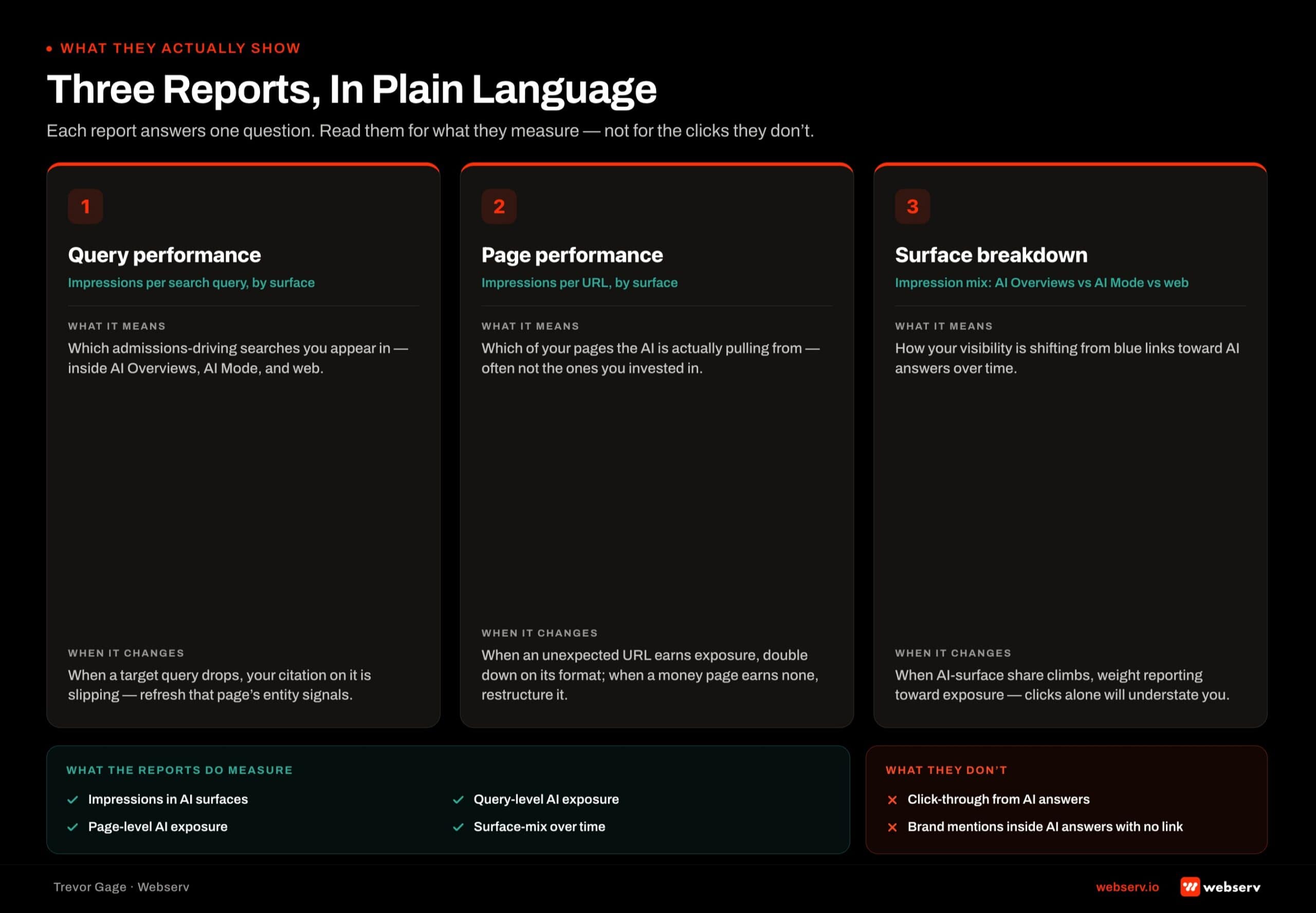
The Generative AI performance section lives inside the same Performance area of Search Console you already use. You will see two report types there.
The first is Search, which covers AI Overviews (the AI-generated summary that sits above traditional blue links on about 39% of US desktop searches as of June 2026, per Comscore data reported by Search Engine Land) and AI Mode (the standalone conversational search experience Google launched globally earlier this year).
The second is Discover, which covers AI-generated summaries surfaced inside the Discover feed on Android.
For a treatment center, Search is where the operational value lives. Discover matters for brand-side content teams but is a smaller signal for admissions-driven SEO.
Each report shows you four filterable views. Impressions is the count of times a URL from your site appeared inside a generative AI feature. Pages tells you which URLs got cited. Countries breaks the impressions out geographically.
Devices splits mobile from desktop from tablet. That is the full data set. Google has been explicit that clicks, CTR, and queries are not currently available and gave no timeline for when they might be.
Why the missing click data is not the story you think it is
The first reaction I heard from every operator who saw the report was some version of “why can’t I see clicks?” The honest answer is that clicks are not the metric that describes what is happening inside these surfaces.
Semrush’s clickstream study of US desktop sessions from May to July 2025 found 92 to 94% of AI Mode sessions ended without a visit to another site, meaning the searcher got their answer inside the AI response. The same piece cites an earlier Semrush study that put zero-click searches at about 43% when an AI Overview appeared, measured with a different method.
Reading impressions without clicks is not a workaround for a broken report. It is the accurate way to read a surface where clicks are no longer the primary outcome.
What you are measuring is citation share, the count of times Google’s AI decided your page was a source worth pointing at. For a treatment center, that citation share is what determines whether a family researching residential care ever encounters your name in the first place.
How to actually find the reports in your Search Console
Open Performance in Search Console and look for the section labeled Generative AI features. Since August 31, 2026, every property has it.
The opt-out control lives in a different place: Settings, then Search generative AI. If your team has multiple properties, check it on each one before you read the numbers, because a property that has been excluded will show no AI impressions at all.
Once you have access, the top-line view shows total impressions across generative AI features over your selected date range.
From there, you can filter to isolate AI Overviews impressions specifically, or filter down to a single URL, country, or device to see how a specific page is performing inside AI-driven surfaces.
The date range picker works the same way as the classic Search Console performance report, but the report only has data from around its launch forward, so most properties will have limited historical depth for another year.
The four questions a treatment center operator should be asking of these reports
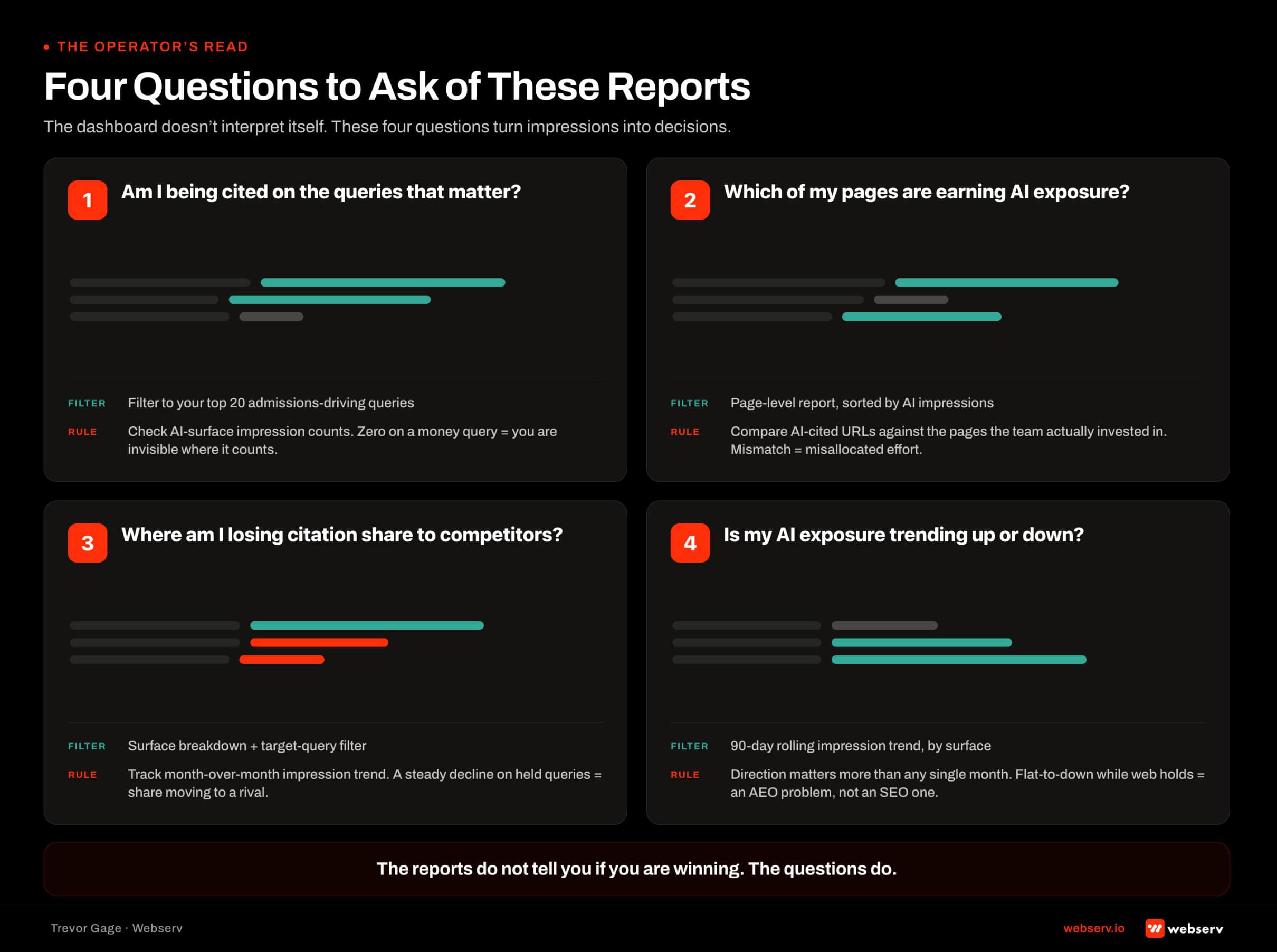
Once you have access, the reports become useful only when you ask them the right questions. I use four when I open the report for a client site.
The first is: how big is my AI impression footprint relative to my classic Search impression footprint? There is no published benchmark for that ratio yet, so track it against your own baseline month over month rather than against someone else’s number.
An AI footprint that stays tiny relative to classic impressions suggests a citation problem, either technical (schema, structured data, crawl issues) or editorial (content that does not answer the compound prompts AI Mode fans out into sub-queries).
The second is: which pages are being cited, and do those pages match the intent I want to be cited on? A common pattern I see in rehab sites is glossary and definition pages absorbing a disproportionate share of AI Overview impressions.
That is not a problem in itself, but if your service pages and location pages are not showing up at all, your citation footprint is aimed at informational intent rather than conversion intent, and that misalignment will show up in call volume before it shows up in traffic.
The third is: what is the device split on AI impressions? If your AI impressions skew noticeably more mobile than your classic Search impressions, the AI surfaces are reaching a different slice of your audience than your blue-link results, and mobile page speed and mobile FAQ visibility deserve more attention.
That has implications for how you think about mobile page speed and mobile FAQ visibility, both of which the Full AI Search Stack for Treatment Centers covers in more depth.
The fourth is: is my AI impression trend line moving in the same direction as my classic Search impression trend line? If classic impressions are up and AI impressions are flat, your pages are ranking for classic queries but losing the citation eligibility inside generative surfaces.
If AI impressions are up and classic impressions are down, you are winning citation share while losing rank, which is the modern pattern most YMYL sites are living inside now.
WATCH OUT
The opt-out toggle in Search Console removes your pages from AI Overview and AI Mode responses entirely. Some sites are considering it out of frustration with the missing click data. For behavioral health, opting out is a strategic mistake. AI Overviews alone appeared on about 39% of US desktop searches by June 2026, according to Comscore, so opting out removes you from a large share of the results page. Opting out sacrifices future traffic for present-day reporting purity.
The opt-out toggle: why no behavioral health facility should use it
Google added a control inside the new report that lets you block your content from AI Overviews, AI Mode, and Discover’s AI features. The toggle does not affect your normal Search rankings. Opting out forfeits any AI traffic and impressions entirely.
A few details from Google’s documentation for the control matter for multi-site operators. Including your site is the default. Child properties, such as a URL-prefix property for one facility’s section of the site, inherit the setting of their parent unless someone overrides it. A change generally takes a few days to fully apply. And the control does not affect AI training, which is handled separately through Google-Extended.
I want to be direct on this: for a treatment center, this toggle is a trap dressed up as a privacy control.
The impulse to opt out usually comes from watching zero-click behavior climb and reasoning that if AI features are keeping searchers from clicking through, blocking them will restore the click. That reasoning collapses on contact with the data.
A page that is not cited inside AI Mode does not send those searchers back to the classic blue links. It sends them to whichever competitor did get cited. You give up your citation footprint without gaining a single traditional click in exchange.
For a family in the first hour of researching addiction treatment, being cited by AI Mode as one of the three or four facilities the assistant recommends is worth substantially more than a click that never comes. Opting out removes you from that consideration set entirely.
The only defensible reason I can think of for a behavioral health facility to hit the opt-out toggle is if compliance counsel has flagged a specific hallucination risk on your entity, and even then, an AI Information page is a better tool than a blanket surrender.
What the reports refuse to tell you (and where to find those answers instead)
The reports are additive, not replacement. Classic Search Console still shows you clicks, queries, position, and CTR for traditional Search results. The new reports add impression visibility inside AI surfaces without touching any of the classic reporting.
What the new reports do not show is arguably as important as what they do show.
You will not see the specific queries that triggered your AI impressions, so you cannot back into what searchers are actually asking Google when the AI decides to cite you.
You will not see the position your citation appeared in inside the AI response, so you cannot tell whether you were the first citation the assistant surfaced or the fifth.
You will not see brand versus non-brand splits, and given that a substantial share of AI citations for a mid-authority behavioral health domain are triggered by branded searches, that gap matters for reporting.
For query-level insight, third-party brand monitoring tools that track your citation share inside ChatGPT, Perplexity, Claude, and Gemini are currently the best available option. That data is not perfect, but it triangulates well against the impression counts inside GSC. Our breakdown of how Google AI Overviews and ChatGPT cite rehab sites covers what drives those citations in the first place.
For position and share-of-voice inside AI Mode specifically, a monthly manual sample of ten or twenty high-intent queries (the kind of compound prompts a family member would actually ask in the first week of researching treatment) is the practical fallback until Google adds richer reporting.
How to fold AI impressions into monthly reporting for the operator or CMO
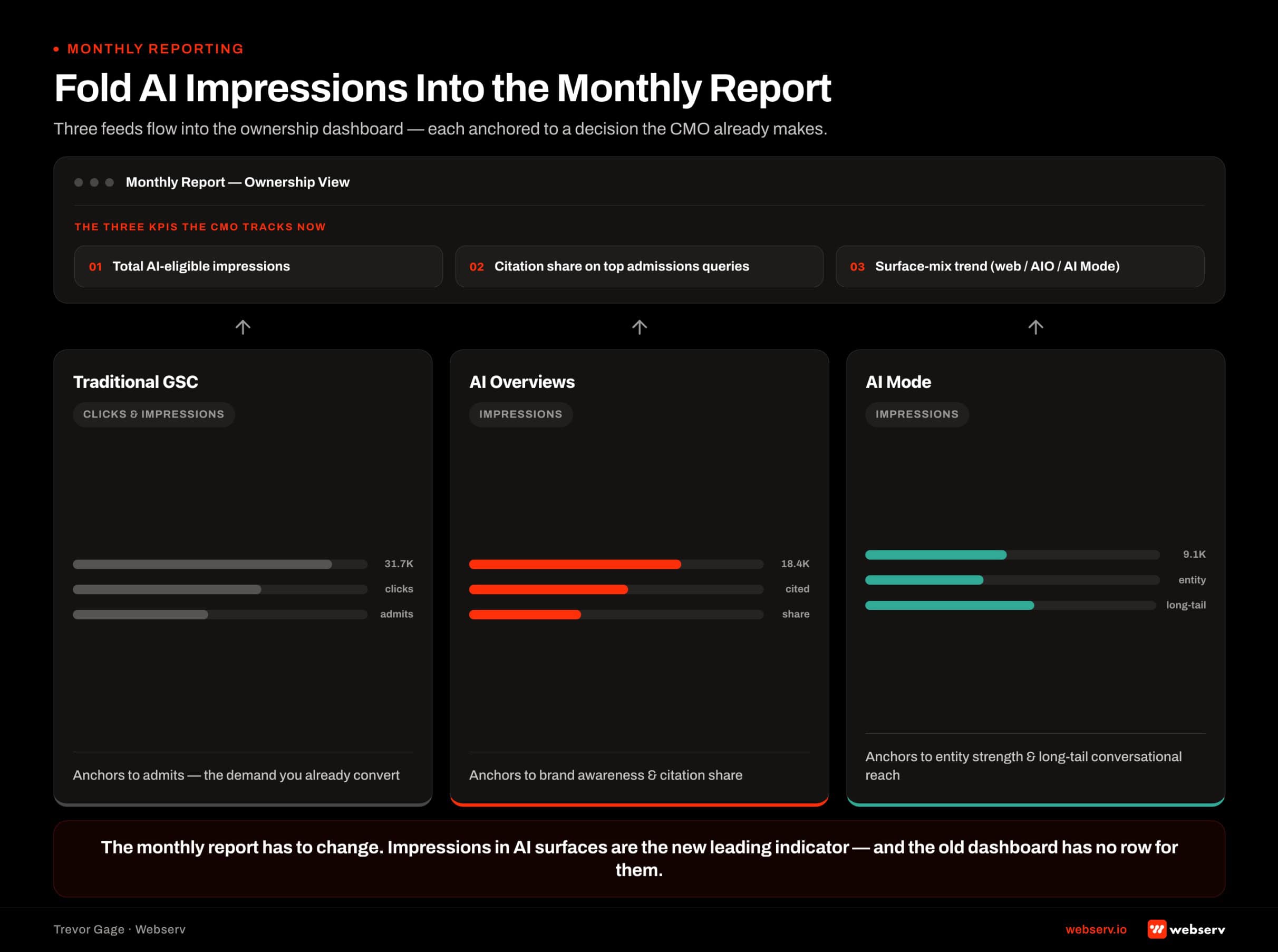
The reports will absorb some of the space in your monthly SEO report that classic Search impressions currently occupy. My recommendation is not to replace one with the other, but to run them side by side, with an explicit narrative about what each metric is actually measuring.
Classic Search impressions still tell you about traditional ranking. That number is still useful, even as CTR compresses.
AI impressions tell you about citation eligibility inside the surfaces where increasingly more high-intent searchers spend the first phase of their research. Together, they draw a fuller picture of your site’s visibility in the modern search environment.
The KPI shift I have been recommending across our client book is to add AI citation share as a first-class KPI alongside sessions, phone calls, and admits.
It does not replace admits as the north star. It becomes the new leading indicator that sits two steps before the admit, in the same slot classic organic sessions used to occupy. For how that KPI fits the rest of the plan, see our complete guide to behavioral health marketing.
What operators should change this quarter
The reports arrived at a moment when several other 2026 signals are pointing in the same direction. The May 21, 2026 core update rewarded sites with named contributor networks, peer-reviewed sourcing practices, and clear editorial review processes, and penalized templated location pages and thin YMYL content.
Ahrefs’ study of 17 million citations found AI-cited content is 25.7% fresher than the pages ranking in organic Google results, which makes freshness one of the clearest levers for AI citation eligibility.
The specific moves I would prioritize in the next 90 days based on the reports plus the surrounding 2026 signals fall into three buckets.
Audit which pages on your site are currently pulling AI Overview impressions and reinforce their citation-worthy structure (FAQ blocks, statistical density, named clinical reviewer bios).
Build an editorial refresh calendar so no cornerstone page goes more than twelve months without a substantive update.
Add an AI Information page if you have not already so that AI assistants have a canonical factual reference for your facility.
The reporting side changes too. Impressions inside AI Overviews and AI Mode become a monthly report line item. AI citation share becomes a KPI that lives alongside admits.
And your operating rhythm needs a monthly review of which pages are gaining or losing citation footprint, similar to the marketing-admissions QBR discipline that already governs demand-gen review.
Frequently Asked Questions
Why can’t I see clicks or CTR in the new AI performance reports?
Google has not released click, CTR, or query data inside the Generative AI performance reports and has not given a timeline for when they might. The absence is not a reporting bug. It reflects how AI Mode works: a Semrush clickstream study of US desktop sessions from May to July 2025 found 92 to 94% of AI Mode sessions ended without a click to another site.
For a treatment center trying to measure AI visibility, the impression number is the correct leading indicator to focus on. Clicks are a lagging metric on a surface where the primary outcome is citation, not click-through.
Should I opt out of AI Overviews and AI Mode with the new toggle?
For a behavioral health facility, no. The opt-out control removes your content from AI Overviews, AI Mode, and Discover’s AI features without restoring lost traditional clicks. Searchers who would have seen your citation inside AI Mode do not fall back to the classic blue links, they fall to whichever competitor is still eligible for citation.
The only reasonable case for opting out involves specific hallucination risks flagged by compliance counsel, and even then, publishing an AI Information page is a more precise remedy than opting out of AI surfaces entirely.
How is AI impression data different from classic Search impression data?
Classic Search impressions count how often a URL appeared in traditional blue-link results across web, image, and video search. AI impressions count how often a URL was cited inside AI-generated summaries in AI Overviews, AI Mode, or Discover’s AI features.
The two data sets do not overlap cleanly. An Ahrefs analysis of September 2025 US data found AI Mode and AI Overviews cited the same URLs only 13.7% of the time for the same query, so each AI surface, and the classic results, needs its own reporting line.
When will the reports be available to my Search Console property?
Now. Google staged the rollout, starting with a subset of UK-based properties in early June 2026, and as of August 31, 2026, the reports and the Search generative AI control are available to every Search Console property worldwide.
The reports sit under Performance as Generative AI features. The opt-out control sits separately under Settings, as Search generative AI, and every property is included by default.
If you manage several properties, such as one per facility, confirm each one is still set to include before you benchmark. Child properties inherit their parent setting, and an excluded property will show no AI impressions.
Trevor Gage is Director of Marketing at Webserv, a behavioral health marketing agency working with residential, outpatient, and telehealth treatment providers across the United States. He leads Webserv’s SEO, content, and AI search practice. If you want a walkthrough of your own AI performance data alongside a two-track citation plan, start with a Visibility Gap conversation.