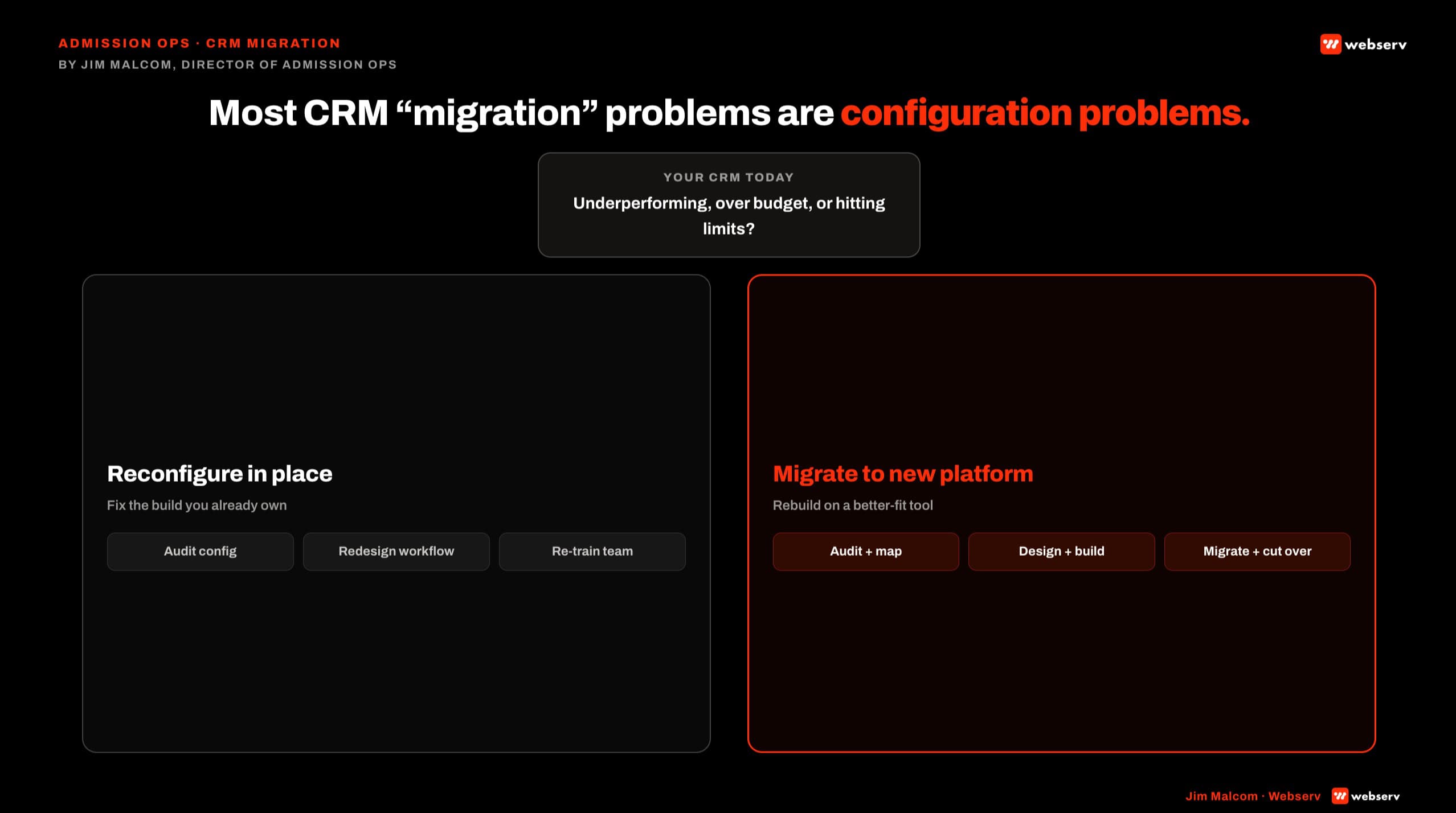
The CFO at a 4-location outpatient network was mid-signature on a $150,000 Salesforce contract when our admission ops team got the call. Migration timeline: 6 months. Reason given by the vendor sales team: “your Dazos isn’t working.”
We ran the audit. Their Dazos deployment was 40 percent built. No lead scoring. No VOB routing automation. EMR integration half-wired. Three of five pipeline stages empty.
The platform was not broken. The build was. They cancelled the Salesforce contract, spent 6 weeks with Webserv reconfiguring Dazos, and hit their admit targets the following quarter.
That is the shape of most CRM migration conversations we walk into. This piece is the honest broker: when to migrate, when to reconfigure, and how to tell which one your facility actually needs before signing a six-figure platform swap.
Disclosure: Webserv is a Dazos implementation partner. This article evaluates the platform on its operational merits. The same decision framework applies regardless of partnership. Dazos, Salesforce, and HubSpot are trademarks of their respective owners; use here is nominative and does not imply endorsement.
Key Takeaways
- Roughly 70 percent of “we need a new CRM” conversations at treatment centers end in reconfiguration, not migration. The underlying issue is almost always configuration, not platform.
- Migration is a 60-120 day project costing $50,000 to $200,000+ plus platform license fees. Reconfiguration is 6 weeks and one-tenth the cost.
- “How much of the current platform have we actually deployed?” is the correct first question. Most facilities are running 30 to 50 percent builds and calling the platform broken.
- Migration is the right call in three specific scenarios: portfolio scale past platform limits, EMR ecosystem mismatch, or data hygiene collapse beyond repair.
- A structured 5-question audit determines the call. If 3 or more answers point to configuration gaps, do not migrate.
Why Most CRM Migrations for Treatment Centers Are the Wrong Call
The platform-versus-configuration distinction is the load-bearing frame for every CRM decision at a treatment center. Most facilities do not know how much of their platform’s native functionality is actually deployed.
A Tennessee outpatient client came to Webserv already running Dazos. The team was frustrated. Leadership was talking about a switch. Webserv rebuilt the configuration: 44 automations across intake, VOB, and referral workflows, CallRail integration, Kipu EMR mapping.
PPC close rate moved from 17 percent to 64 percent in two months. Missed call rate dropped from 15 percent to 1 percent. Same coordinators. Same marketing spend. Same Dazos license. The marketing did not change. The admissions engine did.
The Broken Funnel vs Optimized Funnel benchmark shows the same pattern. A broken funnel converts 2,500 impressions into 3 admits at a 3-5 percent end-to-end close rate.
An optimized funnel converts the same 2,500 impressions into 8 admits at a 25 percent close rate. Same marketing. 3x more admits.
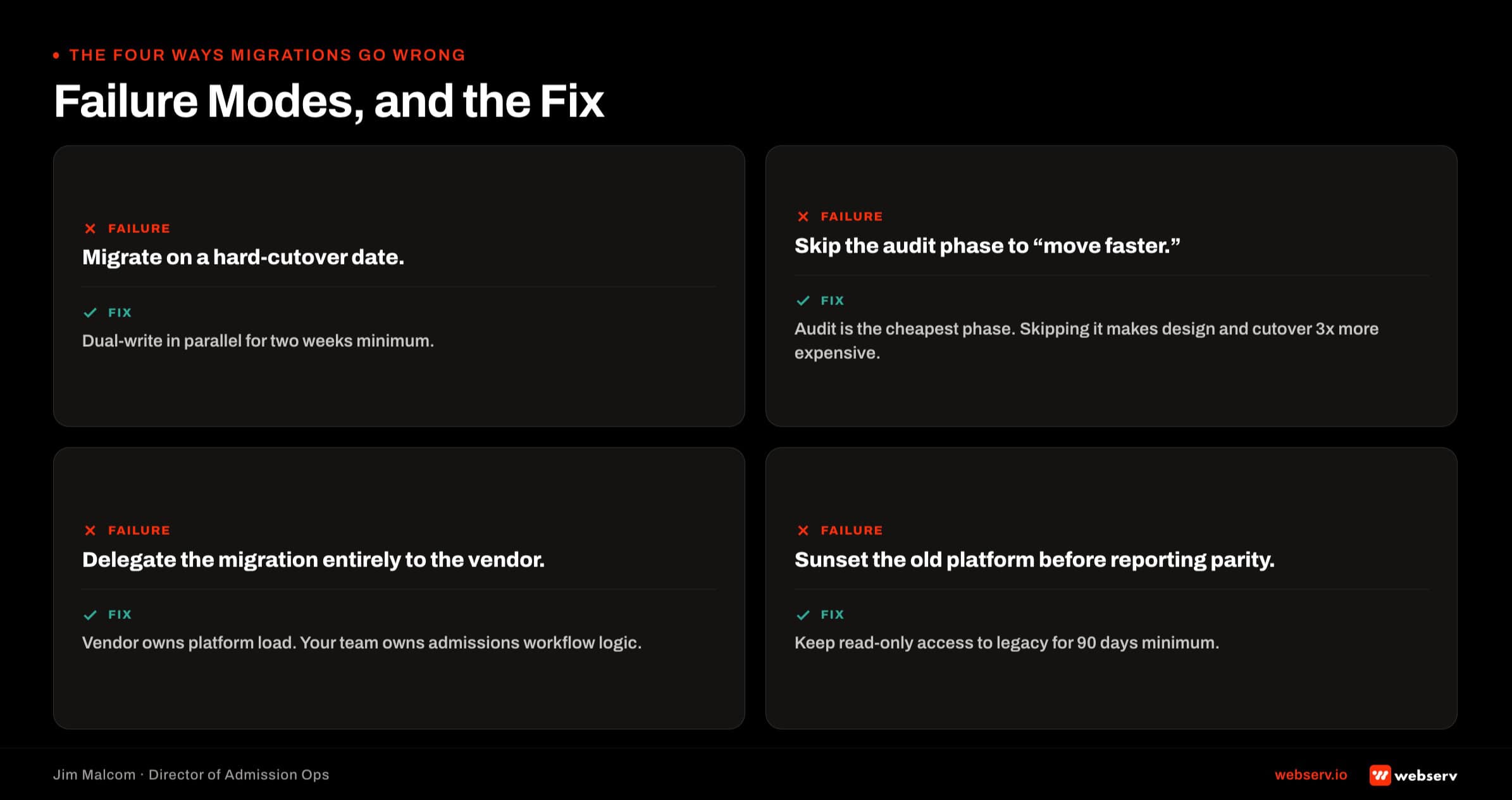
The under-current is usually the hostage dynamic that traps facilities in bad admissions workflows. One or two coordinators hold the tribal knowledge. Nobody is accountable for the platform configuration. The build never gets finished.
Leadership assumes the tool is wrong. It usually isn’t. Facilities that want to evaluate their options at the platform level before committing to reconfigure or migrate should walk against how to evaluate a behavioral health CRM at the platform level first.
The Decision Framework: Migrate vs Reconfigure (5-Question Audit)
Five questions. Score honestly. If 3 or more answers point to configuration gaps, do not migrate.
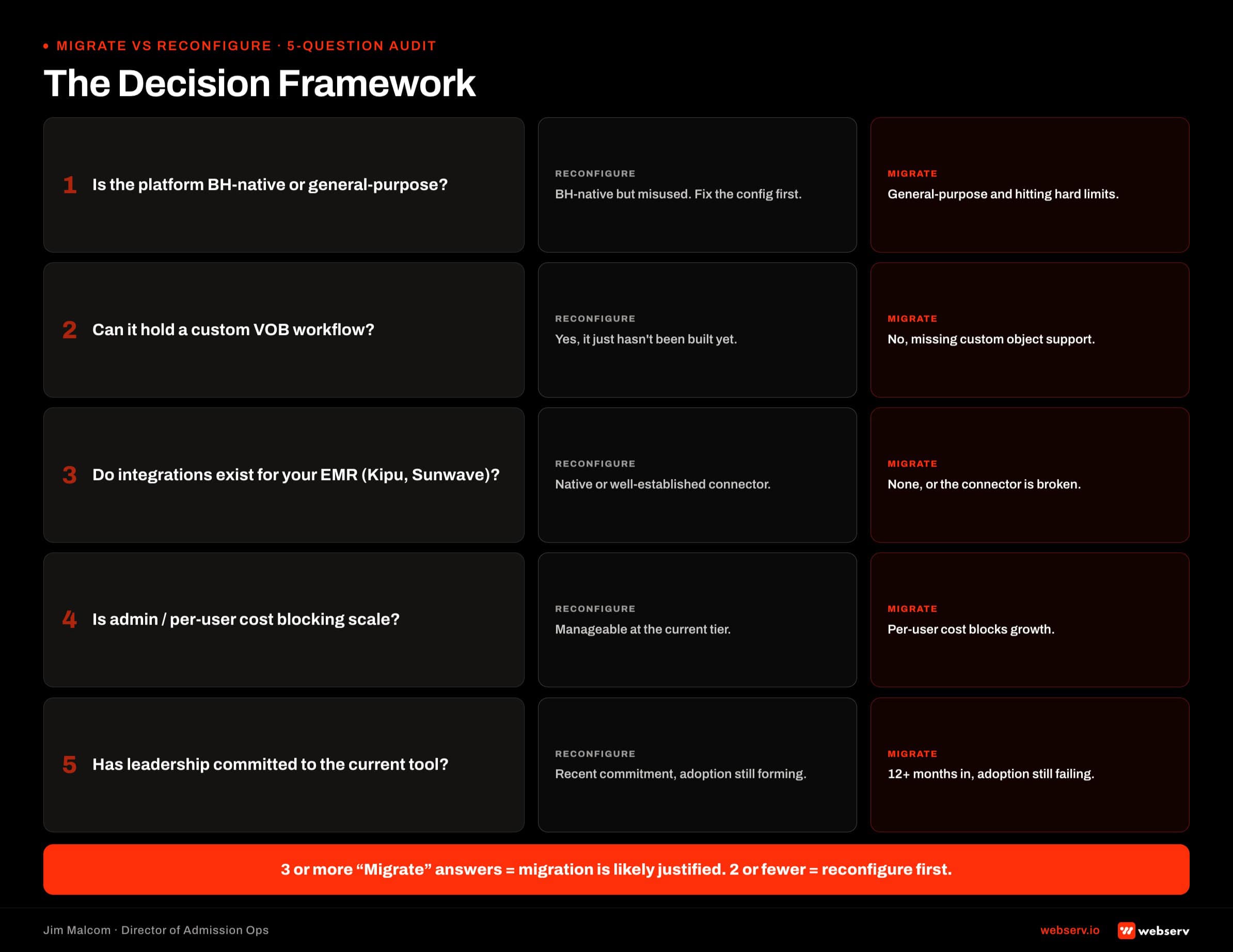
Question 1: What percentage of your current platform’s native functionality is actually deployed? Pull the platform’s feature list. Walk it against what your admissions team uses daily. If less than 60 percent is deployed, reconfigure. The build was never finished.
Question 2: Are your “breaks” structural or cosmetic? A structural break means the data model cannot hold what behavioral health admissions needs. No VOB object with alpha prefix. No LOC picklist. No referral partner attribution.
A cosmetic break means the fields are missing or the automations are not built. Cosmetic breaks reconfigure. Structural breaks migrate.
DEFINITION
Structural break. The data model cannot hold what behavioral health admissions needs: no VOB object with alpha prefix, no LOC picklist, no referral partner attribution. The platform’s ceiling stops you cold. Migrate.
Cosmetic break. The fields are missing or the automations were never built, but the platform can support them. The current CRM was implemented halfway. Reconfigure — the migration cost buys you nothing the current platform cannot deliver.
Question 3: What is the true fully-loaded migration cost? Platform license fees plus implementation plus data prep plus team retraining plus productivity dip during cutover.
Most facilities budget for the license fee only and get surprised by the other four line items. A realistic all-in number for a mid-size facility is $80,000 to $200,000+ in year one.
OPERATOR INSIGHT
Implementation, data prep, retraining, and productivity dip together typically run 3-5x the license line item. Operators who budget only for the platform fee walk into a Q3 shortfall the finance team did not see coming. Every migration model needs a productivity-dip line item — expect admissions throughput to drop 15 to 30 percent for the first 60 days on the new platform, then recover.
Question 4: Is your EMR integration currently working, and does the destination CRM have a proven connector to it? If your current CRM has a working Kipu, Sunwave, BestNotes, or Alleva integration and the destination CRM does not, rebuilding that connector is the largest migration line item most facilities discover late.
If both connectors are stable, integration is not the constraint.
Question 5: Can your admissions team articulate what they would do differently on a new platform that they cannot do on the current one? If they can, migration might be warranted.
If the answer is vague (“it will just work better”), the problem is configuration, not platform. Ask for the specific workflow they cannot build today.
Facilities that score three or more questions in favor of configuration should not migrate. Reconfigure the existing platform against the CRM metrics that actually predict admit conversion instead.
When Migration IS Warranted
Three specific scenarios where migration is the right call.
Portfolio scaling past platform limits. Typically 8+ locations, multi-brand operations, or a payer segmentation complexity that the current platform’s data model was not built for.
Dazos handles single-brand behavioral health portfolios cleanly. It can strain at very large multi-brand enterprises where Salesforce Health Cloud is a better fit. The signal is that admissions leadership is doing weekly workarounds on the current data model.
EMR ecosystem mismatch. The current CRM has no viable path to your EMR (Kipu, Sunwave, BestNotes, Alleva) and rebuilding a custom middleware integration would cost more than migrating.
This scenario has become less common as the major BH CRMs have added native connectors. Still real for facilities on legacy or generic-CRM platforms.
Data hygiene collapse beyond repair. Five or more years of duplicates, orphan records, deprecated custom fields, and abandoned automations. At some threshold, remediation cost exceeds migration cost. The threshold is usually around 40 percent bad records. Below that, remediation.
Insurance verification friction is one of the most-cited barriers to treatment access for substance use disorder, and admissions infrastructure is a documented driver of conversion outcomes (SAMHSA, National Survey on Drug Use and Health).
Every migration decision has to be evaluated against the throughput cost of not fixing the operational bottleneck.
The 4-Phase Migration Playbook: Audit, Design, Migrate, Cutover
Realistic timeline: 60 to 120 days end-to-end for a mid-size facility. Anyone quoting 30 days is quoting a template, not a scope.
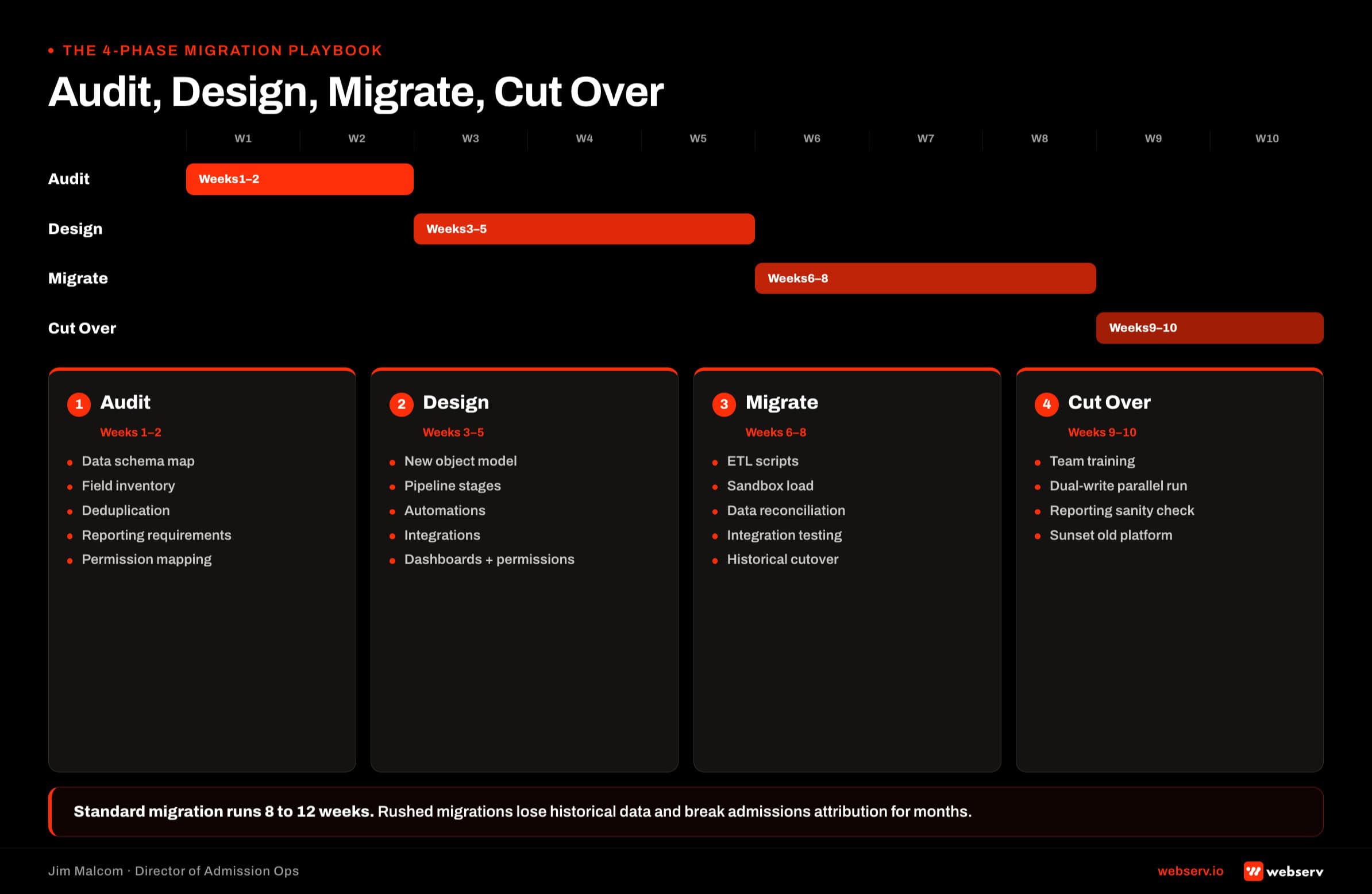
Phase 1: Audit (2-3 weeks). Current state map. Data quality baseline. Integration inventory. Automation inventory. Gap map against the destination platform. This is where the migration versus reconfiguration decision gets its final gut check.
Phase 2: Design (2-4 weeks). Object model translation. Field mapping document. Automation redesign. Integration architecture. Cutover plan with rollback triggers. Field mapping is where migrations quietly fail. Skimping here compounds every downstream week.
Phase 3: Migrate (4-8 weeks). Sandbox build on the destination platform. Historical data ETL from source. Integration rebuild. Automation port (which is really automation rebuild, since automation flows do not translate cleanly between platforms). QA cycles. This is the heaviest phase.
Phase 4: Cutover (1-2 weeks). Parallel run with the source platform still live. Team training. Go-live with a hypercare window. Rollback plan on standby for the first 72 hours.
Field-level mapping is the phase most facilities underestimate. Every treatment center CRM carries five-plus years of custom fields that were built for a specific workflow that may no longer exist.
Migrating those fields blindly imports the debt. Migrating them thoughtfully requires a coordinator with institutional memory in the room for the design phase.
Dazos to Salesforce Migration Specifics
Dazos native BH objects do not map one-to-one to Salesforce Health Cloud. Custom object work is required on the Salesforce side.
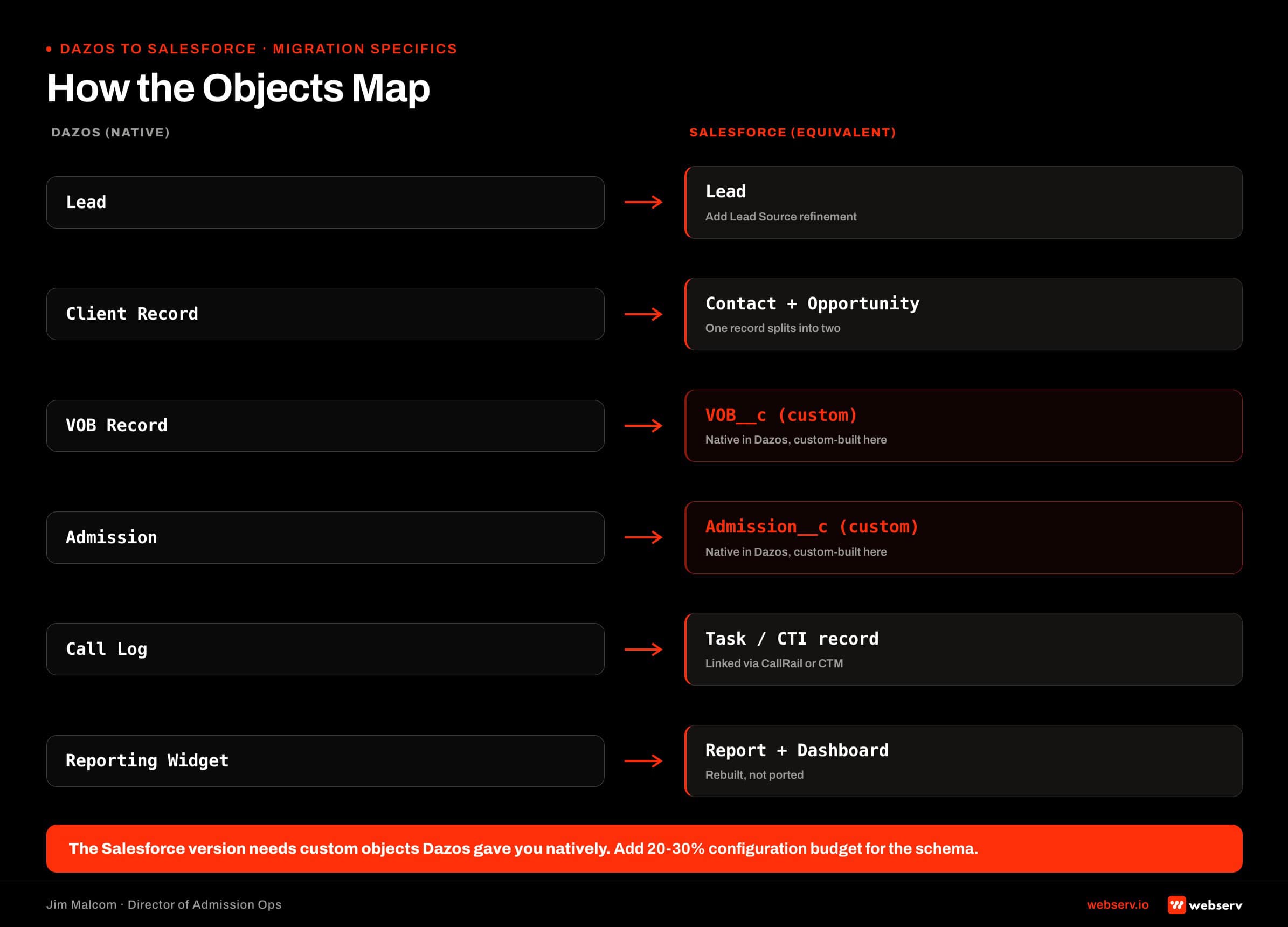
Data model translation. Dazos ships with a native VOB object with structured fields for payer, alpha prefix, coverage status, prior-auth flags, and LOC. Salesforce needs that object built from scratch as VOB__c with custom field definitions.
This is not a migration task. This is a build task inside the migration. The Salesforce build playbook walks the object model in depth.
Automation port-over. Dazos automation flows do not translate to Salesforce Flow syntax. Every automation gets rebuilt from scratch against Salesforce Flow. Six-plus weeks of automation work minimum for a mid-size facility.
The Tennessee facility that reconfigured Dazos instead of migrating deployed 44 automations. That is the scale of rebuild required on the Salesforce side of a migration.
Historical reporting continuity. The hardest problem. Dazos IQ dashboards do not port to Salesforce Reports. Two options: rebuild every dashboard in Salesforce Report Builder (labor-heavy but permanent), or archive Dazos as read-only and build fresh Salesforce reports going forward (lower cost, broken year-over-year trend analysis for the first year post-migration).
The LOC picklist should follow ASAM’s standard levels of care so the reporting stays clinically coherent regardless of platform (ASAM Criteria).
Salesforce to Dazos Migration Specifics
The reverse direction is less common but real. Usually driven by three things.
BH-native workflow needs. The Salesforce build never matched how admissions actually works. Coordinators are working around the platform instead of with it. Dazos ships with the workflow the team wanted the Salesforce build to become. Compare the workflow gap.
Salesforce customization cost exceeding Dazos out-of-box value. Facilities spending $80,000 to $150,000 a year in Salesforce license plus admin plus consulting to maintain a BH-shaped build often find Dazos plus implementation plus retainer runs materially less at similar throughput.
Admissions team velocity issues with Salesforce UI. Multi-tab Salesforce workflows slow coordinators. Dazos single-pane admissions UX moves faster. Speed-to-lead compounds against Salesforce’s more general interface.
The migration itself is a data model simplification. Salesforce custom objects flatten into Dazos native objects. Automation restart in Dazos native automation. Reporting rebuild against Dazos IQ.
HubSpot to Dazos or Salesforce
HubSpot is rarely the destination for a treatment center’s admissions system. It is usually the source.
The pattern. A marketing team ran HubSpot as a de facto CRM before admissions ops formalized the system of record. Leads accumulated in HubSpot. Coordinator work happened in a spreadsheet or a shared inbox.
When admissions ops matures, the CRM decision goes to Dazos or Salesforce, and HubSpot moves upstream as marketing automation.
The clean architecture: HubSpot for marketing automation and pre-lead nurture, feeding Dazos or Salesforce as the admissions system of record.
HubSpot as system of record for admissions itself is where the build gets thin. The BH object model, VOB workflow, and coordinator ergonomics all need heavy customization inside HubSpot to compete with what Dazos ships with by default.
Facilities using HubSpot for admissions and considering migration usually get better results moving HubSpot to marketing automation and landing on Dazos or Salesforce for admissions, rather than trying to force HubSpot into a system-of-record role it was not designed for.
Data Preservation and Historical Reporting
How to keep two-plus years of admissions history usable after migration. Three approaches, each with tradeoffs.
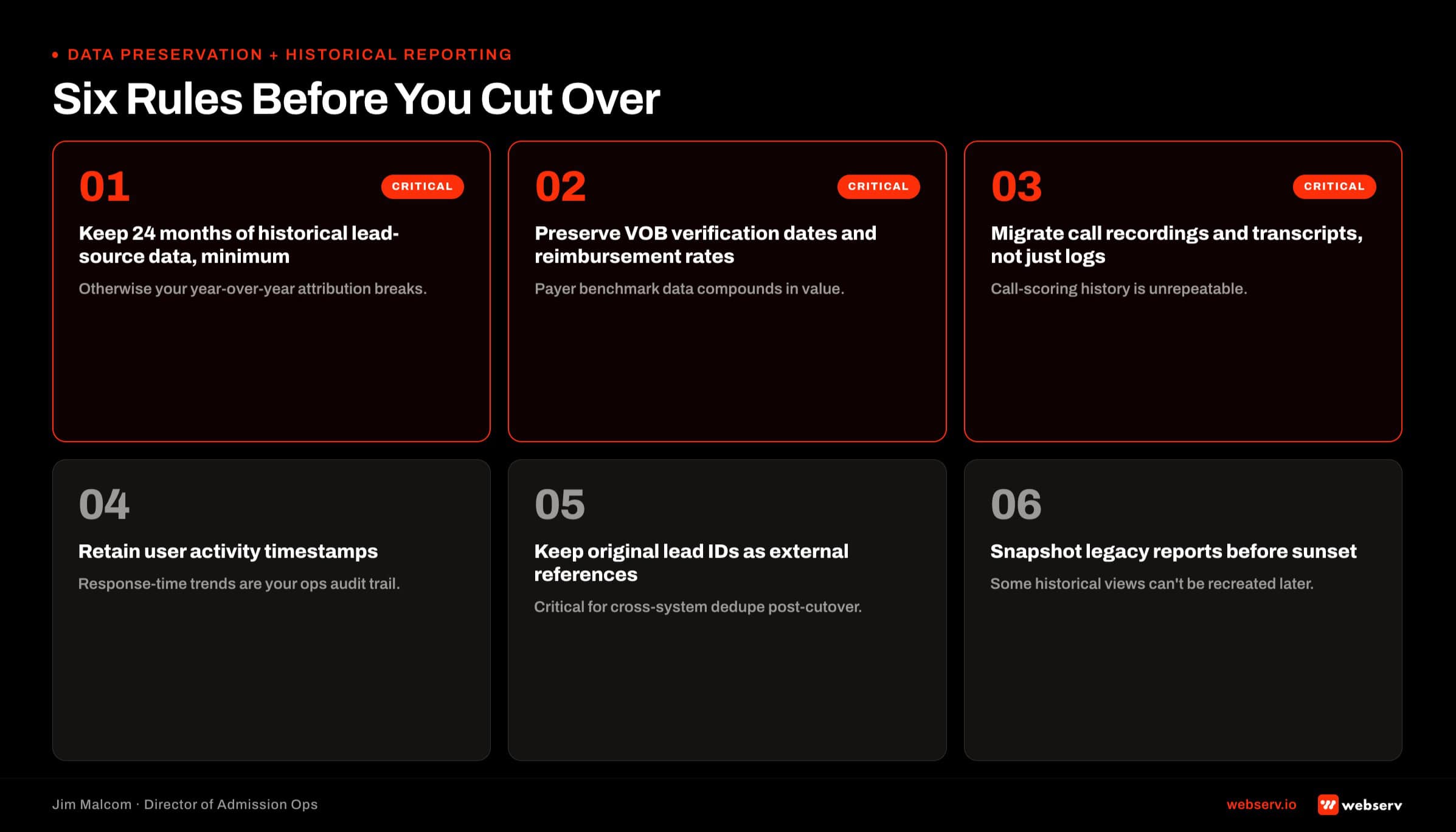
Approach 1: Full ETL into destination with reporting rebuild. Every historical record migrates into the new platform. Dashboards get rebuilt against the destination platform’s reporting layer. Highest cost. Highest fidelity year-over-year reporting. Best for facilities where historical trend analysis drives operational decisions.
Approach 2: Archive and reference (read-only historical instance). The source CRM stays live in a locked-down read-only state. New activity goes to the destination CRM. Historical queries happen against the archive. Lower migration cost. Broken year-over-year reporting until the new platform accumulates enough history.
Approach 3: BI layer above both. Warehouse historical data (Looker Studio, BigQuery, or similar) with a reporting layer that unifies the source and destination CRMs. Higher upfront BI investment. Cleanest year-over-year continuity. Best for multi-location portfolios that will accumulate more platform switches over time.
COMMON MISTAKE
Assuming the destination CRM’s import wizard will handle historical reporting. It rarely does. Legacy stage names, custom-field values from years of implementation drift, and referral-partner attribution history usually land in the new system as flat text — searchable, but not reportable. Facilities that treat historical data as a first-class migration deliverable, not an import job, keep the reporting continuity that admissions leadership actually uses at QBR.
Facilities running the full admissions operations playbook often land on Approach 3 because the BI layer serves them beyond the migration event.
What a Webserv Engagement Looks Like
Whether the answer is migrate or reconfigure, the first step is the same audit.
The Webserv Admission Ops engagement runs a 6-week sprint against the five pillars: Lead Intake and Tracking, CRM and Workflow Optimization, VOB and Insurance Ops, Team Enablement and Training, Always-On Admissions.
Fast-Track Diagnostic. $3,000, normally $15,000, credited 100 percent toward month one if the facility moves forward. Two to three weeks. Delivers the 5-question audit results, gap map, and a firm proposal with either a reconfiguration scope or a migration scope depending on what the audit reveals.
Full engagement pricing. One-time setup $7,500 to $15,000. Ongoing retainer tiered by location count: $3,500 to $5,000 per month for 1-2 locations, $5,000 to $8,000 per month for 3-5 locations, $8,000 to $15,000 per month for 6+ locations.
Migration scope adds to the setup fee based on Phase 1 audit findings.
The bias in the audit is toward reconfiguration when reconfiguration is defensible. Migrations pay Webserv more in the short term. The client relationship pays back longer when we make the honest call. That is the operating principle.
Frequently Asked Questions
How much does it cost to migrate from Dazos to Salesforce (or vice versa)?
A realistic fully-loaded migration for a mid-size treatment center runs $80,000 to $200,000 or more in year one. That includes platform license fees on the destination platform, implementation labor for the 4-phase playbook, data preparation, team retraining, and the productivity dip during cutover.
Migration-only scope (Webserv’s part of the number) runs $50,000 to $120,000 depending on integration count, data volume, and destination-platform complexity. That is separate from the license fees the facility pays directly to the destination CRM vendor.
The number most facilities budget for is just the license fee. Everything else is the surprise. Ask for a fully-loaded quote before signing anything.
How long does a CRM migration take for a treatment center?
60 to 120 days end-to-end for a mid-size facility. Audit phase is 2-3 weeks. Design phase is 2-4 weeks. Migrate phase is 4-8 weeks. Cutover phase is 1-2 weeks including hypercare.
Anyone quoting 30 days is quoting a template, not a scope. Behavioral health admissions data models, automation workflows, and EMR integrations do not compress into a month regardless of platform. The 60-day floor is a realistic minimum for a clean facility. 120 days is realistic for a multi-location or heavily-customized starting point.
Delaying migration to hit a fake 30-day timeline is where cutovers fail. The parallel-run window is the safety layer. Do not skip it.
Should I migrate my CRM if my admissions team hates the current one?
Usually not. Admissions team frustration is a symptom, not a diagnosis. The underlying cause is almost always configuration, not platform. Team hatred of a well-configured platform is rare. Team hatred of a 40-percent-built platform is universal.
Before assuming migration, run the 5-question audit. What percentage of the platform is deployed. Whether the breaks are structural or cosmetic. Whether the team can articulate what they would do differently. If the answers point at configuration, migration will move the pain to the new platform.
The Tennessee facility we opened this piece with had a frustrated admissions team on Dazos. Six weeks after reconfiguration, the same team was hitting admit targets. Same platform.
Can I keep my admissions history after switching CRMs?
Yes. Three approaches. Full ETL into the destination CRM (highest cost, cleanest year-over-year continuity). Archive-and-reference with the source CRM held read-only (lower cost, broken continuity until the new platform accumulates history). BI layer above both platforms with warehoused historical data (highest fidelity, requires ongoing BI investment).
Which approach fits depends on how much historical trend analysis drives operational decisions at your facility. Facilities that make weekly leadership decisions off of trailing 12-month data usually need the BI layer. Facilities that operate off of trailing 90-day data can often live with the archive-and-reference model.
Whatever the approach, historical reporting continuity is the phase migrations most often skimp on and the phase leadership most often regrets skipping.
What is the difference between reconfiguring and migrating?
Reconfiguring means finishing the build on your current platform: adding missing fields, deploying missing automations, rebuilding pipeline stages, wiring integrations that were never completed. Six weeks. $50,000 to $75,000 all-in for a mid-size facility.
Migrating means moving to a new platform entirely: new data model, new automations rebuilt, new integrations, historical data ETL or archive, team retraining. 60-120 days. $80,000 to $200,000 or more all-in.
Roughly 70 percent of the migration conversations Webserv gets called into resolve as reconfiguration engagements after the audit. The exception is the three scenarios where migration is warranted: portfolio scale past platform limits, EMR ecosystem mismatch, or data hygiene collapse beyond repair.
Does Webserv migrate CRMs or reconfigure them?
Both. The engagement starts with the Fast-Track Diagnostic ($3,000, credited toward month one). The audit determines whether the scope is a reconfiguration on the current platform or a migration to a new one.
Roughly 70 percent of engagements resolve as reconfiguration. Roughly 30 percent are migrations, and inside that 30 percent the direction is usually toward Dazos from a Salesforce or HubSpot build that never fit behavioral health, though the reverse is real for enterprise portfolios.
The bias in the audit is toward reconfiguration when reconfiguration is defensible. Migrations are heavier engagements and pay more in the short term. The client relationship pays back longer when we make the honest call.
Closing Note From the Admission Ops Floor
The default assumption on a CRM problem is that the platform is wrong. Roughly 70 percent of the time the platform is fine and the build is 40 percent finished.
Run the 5-question audit before signing a migration contract. If three or more answers point at configuration gaps, do not migrate. Finish the build on the platform you already own.
If you want the Webserv team to run the audit before you commit to either path, start with the $3,000 Fast-Track Diagnostic. Credited 100 percent toward the first month whichever way the audit points.
Jim Malcom is Director of Admission Ops at Webserv. He has spent his career inside behavioral health admissions operations (call floors, VOBs, CRMs, and the reporting stack that ties them together) and now leads the Webserv admission ops practice for treatment center operators nationwide.