A newer residential facility called our admission ops team six months after their launch. They had picked Alleva as their EMR specifically because their clinical team wanted mobile-first documentation. Coordinators were completing intake notes on iPads. The clinical team loved it.
The admissions ops layer was the problem. Their Dazos CRM held the marketing attribution and pipeline data. Alleva held the clinical record and the mobile-first intake notes. Neither system talked to the other reliably. Coordinators were re-typing patient information across two systems within the same hour.
This piece walks the operational picture of Alleva integration at treatment center admissions. Which fields matter, where PHI boundaries live, what changes when the EMR runs mobile-first, and how Alleva compares to Kipu, Sunwave, and BestNotes as the anchor of the admissions stack.
Disclosure: Webserv is a Dazos implementation partner. This article evaluates Alleva integration architecture across CRM platforms on operational merits. Alleva, Kipu, Sunwave, BestNotes, Dazos, Salesforce, and HubSpot are trademarks of their respective owners; use here is nominative and editorial only.
Key Takeaways
- Alleva is a mobile-first behavioral health EMR built for clinician-facing documentation on iPads and phones. The mobile workflow is Alleva’s operational differentiator against Kipu, Sunwave, and BestNotes.
- The same 12-field mapping that works for Kipu, Sunwave, and BestNotes works for Alleva. Seven fields forward at admit, five fields back on the ongoing cadence. Consistency across EMRs is deliberate.
- Alleva’s mobile-first orientation makes real-time data capture more common on the EMR side, but the 4-6 hour bidirectional sync cadence still applies. Faster sync creates race conditions without producing operational value most facilities can use.
- Middleware is the norm for Alleva-to-CRM integrations. Native connectors exist for some Dazos-Alleva configurations but are less mature than the Kipu equivalent. Salesforce and HubSpot integrations to Alleva always run through middleware.
- PHI boundaries are the same as with the other three EMRs. Sync operational metadata. Do not sync clinical documentation, individual assessment scores, or treatment plan detail. Every tool needs BAA coverage referencing 42 CFR Part 2.
- Alleva fits newer facilities, mobile-first clinician teams, and operators wanting a simpler EMR with lower training overhead. Kipu, Sunwave, and BestNotes each have their own operational fit that Alleva does not always match.
What Alleva Actually Does
Alleva is a cloud-native behavioral health EMR designed around mobile-first clinician documentation. The platform holds the clinical record: assessments, treatment plans, clinical notes, medication administration, group therapy attendance, discharge summaries.
The distinguishing feature versus Kipu, Sunwave, and BestNotes is the mobile workflow. Clinicians and coordinators document on iPads and phones as the primary interface, not desktop as a secondary. This changes how documentation happens on the clinical floor and, indirectly, how integration architecture gets scoped.
Alleva stays focused on the clinical layer without heavy admissions-adjacent functionality. That means no Sunwave-style built-in intake competing with the CRM. It also means no BestNotes-style outcomes-tracking depth to extend into marketing calibration. Alleva is a clean clinical EMR with a mobile-first workflow.
Behavioral health treatment access and workflow efficiency are documented drivers of intake outcomes (SAMHSA, National Survey of Substance Abuse Treatment Services). Alleva’s mobile workflow supports one side of that efficiency. The CRM integration is what supports the other side.
Why the CRM to Alleva Integration Matters
Same three operational failures that show up with any broken EMR-CRM integration.
Coordinators re-enter data manually. The CRM lead record moves to admitted. The Alleva patient record has to be populated from scratch. Names, DOBs, insurance information, and referral source all get re-typed.
Reporting fragments. Admits by source lives in the CRM. Clinical status lives in Alleva. Marketing attribution against admits requires stitching two systems together weekly.
Discharge status never routes back to marketing. The admissions team never learns which sources produced patients who completed treatment versus which sources produced patients who left AMA at day 6. Marketing spend gets calibrated against admit count, not admit quality. Our behavioral health marketing guide covers the attribution side.
The Alleva-specific angle. Because Alleva runs mobile-first, coordinators sometimes update patient status inside Alleva without going back to the CRM. When the integration is broken or absent, the CRM lead record freezes at admit while the Alleva record moves through treatment.
The gap between systems grows faster with Alleva than with a desktop-anchored EMR because the mobile workflow makes it easier to skip the CRM update step.
DEFINITION
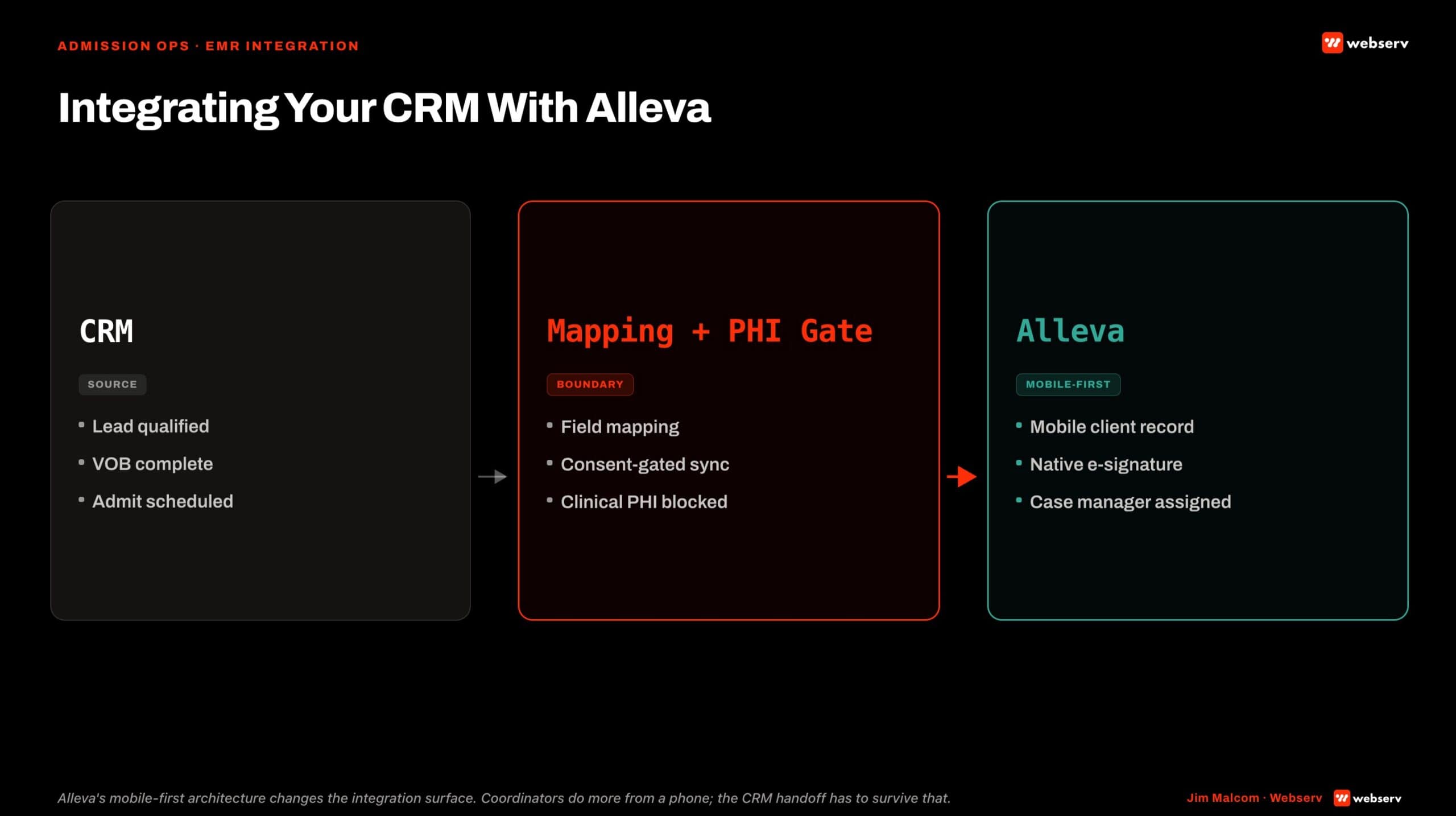
Alleva field mapping is optimized for mobile-first coordinator workflows and e-signature intake. CRM-to-Alleva sync covers the standard admissions data set with an emphasis on the e-signature timestamp as the definitive admission event.
The Field Mapping That Actually Works
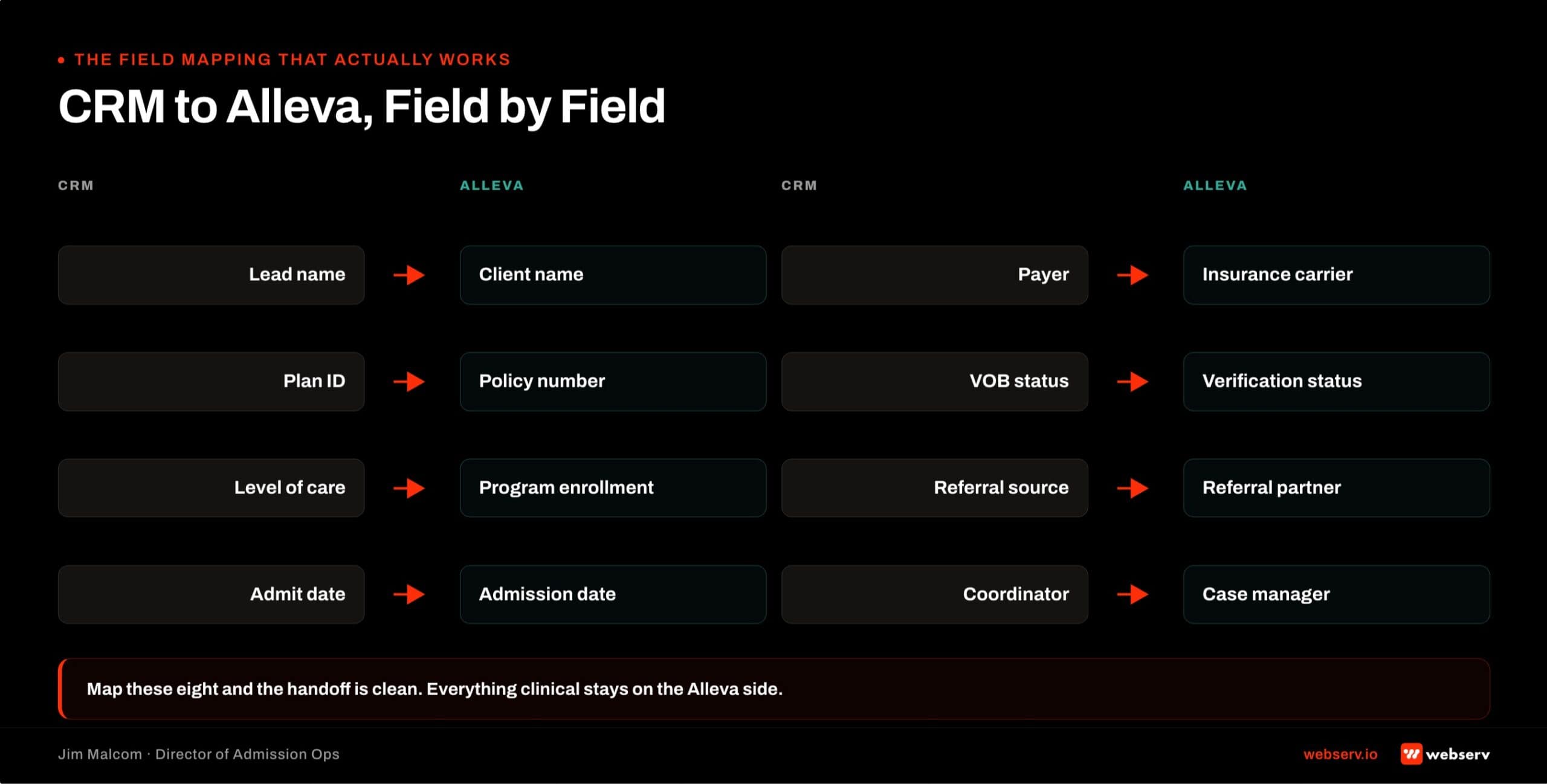
Same 12-field mapping across Kipu, Sunwave, BestNotes, and Alleva. The operational needs on the admissions side are the same regardless of which EMR anchors the clinical layer.
CRM to Alleva (forward push at admit).
- Patient name, DOB, contact information
- Admit date and scheduled LOC
- Referral source and campaign attribution
- Insurance payer, plan, member ID, alpha prefix (for BCBS)
- Prior-auth status and days authorized
- Expected LOS based on payer approval
- Primary admissions coordinator owner
Alleva to CRM (backward push after admit).
- Admit confirmation (Yes/No)
- Current LOC (may change from scheduled during treatment)
- Days in treatment
- Discharge date
- Discharge type (completed, AMA, transferred, administrative)
The LOC field should follow ASAM’s standard levels of care so the mapping stays clinically coherent on both sides (ASAM Criteria).
Alleva and the major admissions CRMs support ASAM-shaped LOC picklists. Facilities evaluating Alleva against the alternatives should walk against the Sunwave integration architecture and BestNotes integration architecture as companion pieces before deciding.
Bidirectional Sync vs One-Way Sync
Same architecture principle as the Kipu integration architecture and Sunwave and BestNotes. Bidirectional sync produces a working system. One-way sync produces reporting fragmentation.
One-way sync (CRM to Alleva at admit). The CRM pushes at admit. Alleva never pushes back. The CRM lead record freezes at Admitted. Reporting fragments.
Bidirectional sync (CRM ↔ Alleva on scheduled cadence). CRM pushes forward at admit. Alleva pushes admit confirmation, LOC changes, days in treatment, and discharge status back on a 4-6 hour cadence.
The Alleva-specific temptation. Because Alleva runs mobile-first with real-time clinician updates, some facilities push for real-time sync between Alleva and the CRM. That temptation should be resisted.
Real-time sync creates race conditions when a coordinator updates a field in one system while the other system is mid-sync. Every 4-6 hours is fast enough for admissions decisions and slow enough to avoid conflicts.
The mobile-first workflow inside Alleva is a clinical documentation feature. The sync cadence is an operational discipline that stays the same regardless of EMR speed.
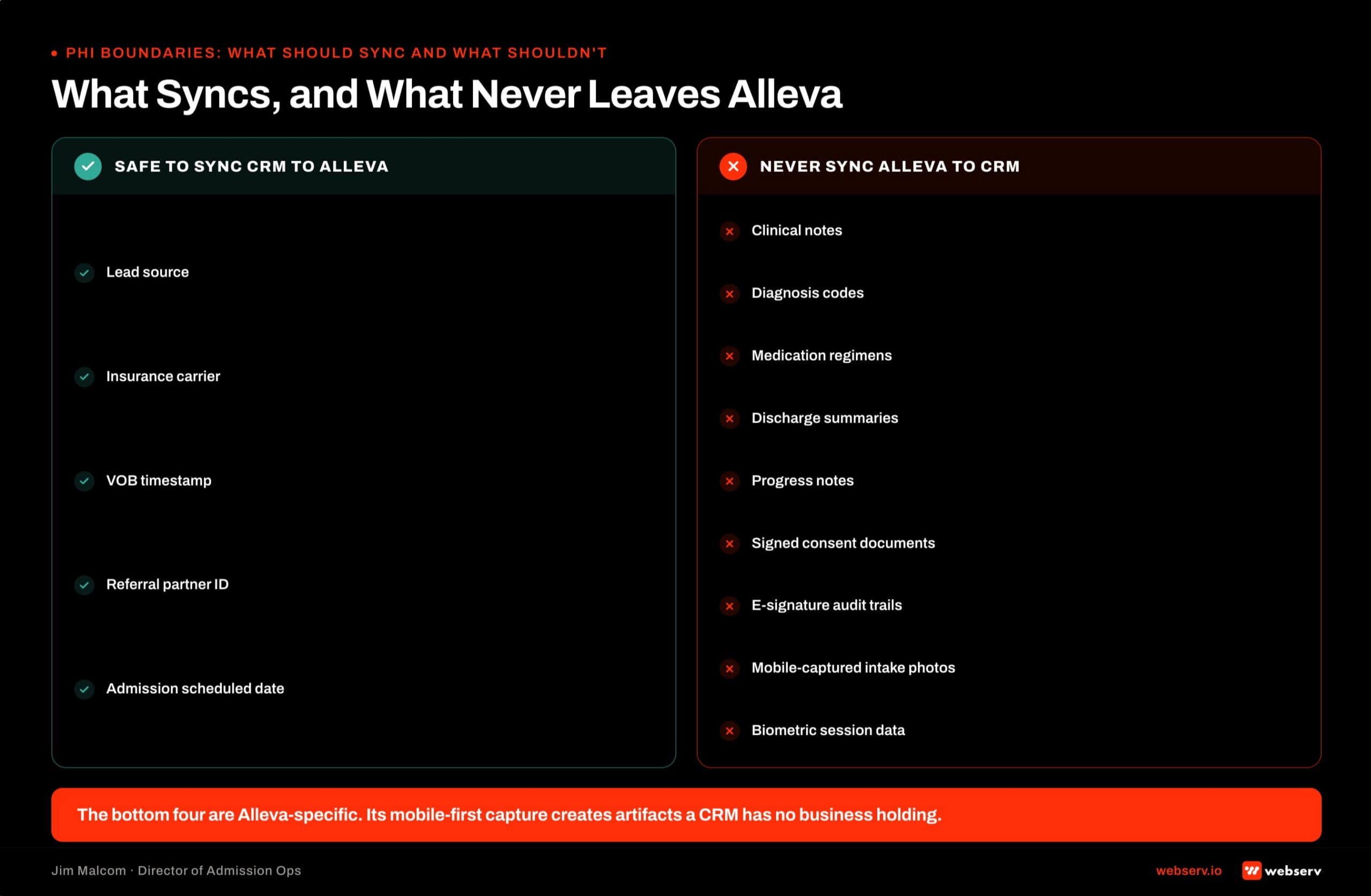
PHI Boundaries: What Should Sync and What Shouldn’t
Same compliance layer as the other three EMRs. Operational metadata syncs. Clinical detail does not.
What should sync. The 12-field mapping above. Operational metadata that admissions and marketing need to make decisions.
What should not sync. Individual clinical notes captured mobile-first by clinicians on iPads. Assessment scores. Treatment plans. Medication administration records. Progress notes. Group therapy attendance. Anything at the clinical detail level stays in Alleva.
The Alleva-specific consideration. Because clinicians document mobile-first, the volume of clinical notes produced in Alleva is often higher than at a desktop-anchored EMR. That mobile ease-of-documentation can produce more clinical content faster, which raises the stakes on PHI boundary discipline.
The temptation to pull all of that content into the CRM should be resisted for the same compliance reasons it should be resisted with the other three EMRs.
Every tool in the integration path (CRM, Alleva, middleware, downstream reporting) needs a BAA that references 42 CFR Part 2. Standard HIPAA business-associate language alone is not enough for SUD or dual-diagnosis data.
Integration Architecture: Native vs Middleware
Middleware is the norm for Alleva integrations. Same reality as BestNotes.
Native connector. Some Dazos-Alleva configurations run natively. The connector maturity is behind Dazos-Kipu integration but ahead of most Salesforce or HubSpot equivalents. Verify current native-integration status against Dazos and Alleva documentation at implementation time.
Middleware. Zapier, Workato, MuleSoft, or a custom connector sits between Alleva and the CRM. Handles field mapping, sync scheduling, error handling. This is the common architecture for Salesforce and HubSpot integrations to Alleva, and often for Dazos-Alleva integrations when the native connector is not the current default.
Dazos as the behavioral-health-native admissions CRM generally offers the smoothest Alleva integration path across the CRM options. Whether native or middleware, the maintenance layer needs an owner and a weekly monitoring cadence.
The Alleva-specific note. Alleva’s smaller market presence versus Kipu means the middleware ecosystem is less mature. Zapier templates for Alleva exist but are fewer and less battle-tested than Kipu templates. Facilities on Alleva should budget for slightly more custom integration work on the front end.
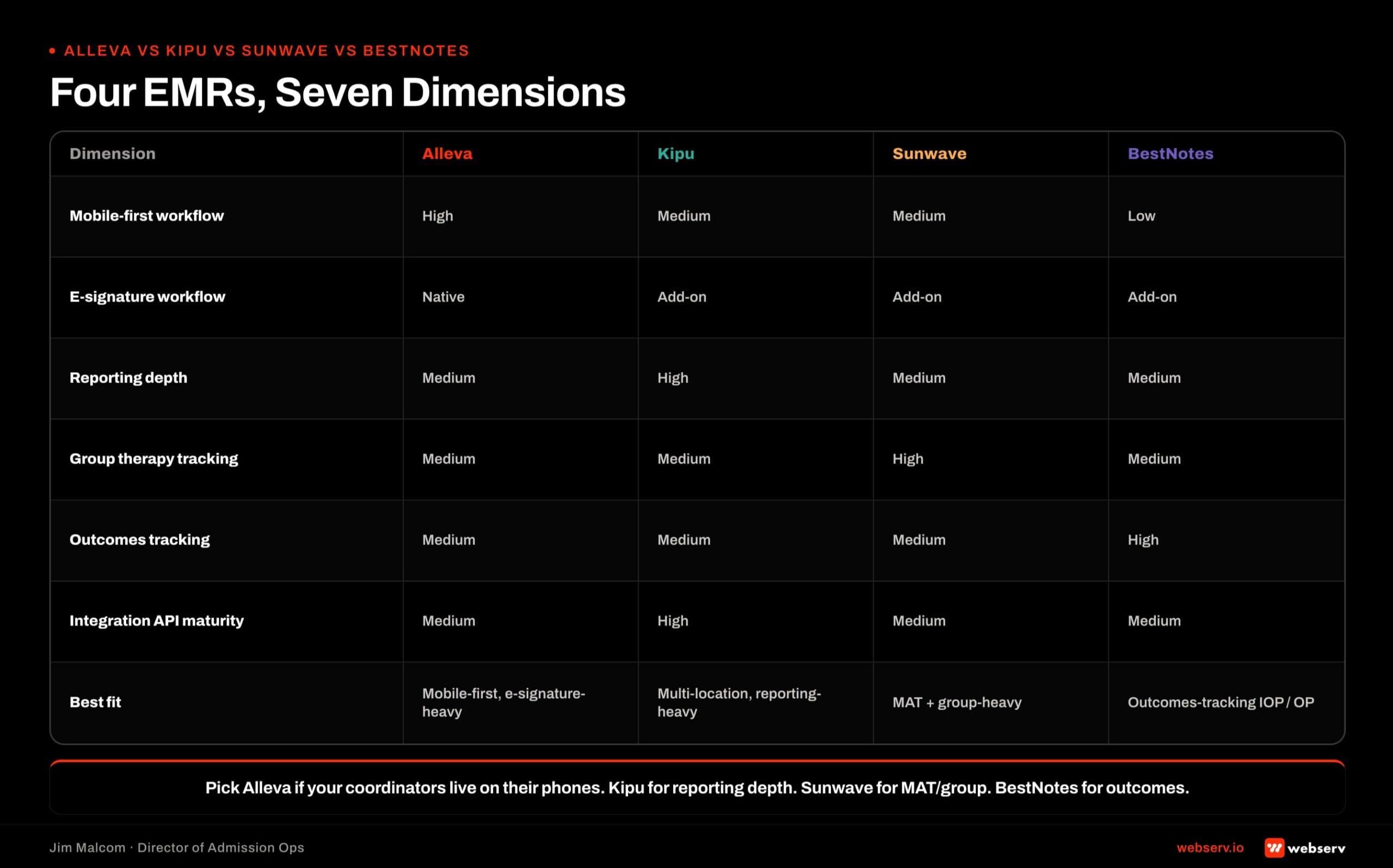
Alleva vs Kipu vs Sunwave vs BestNotes
The full four-way comparison based on published product documentation as of 2026-07.
Clinical focus. Alleva stays focused on the clinical layer with mobile-first documentation. Kipu covers the broadest range of BH facility types. Sunwave focuses on outpatient and cloud-first operators with more built-in admissions functionality. BestNotes leans mental health, dual-diagnosis, and measurement-based care with the deepest outcomes tracking.
User interface and workflow. Alleva ships the strongest mobile-first workflow. Sunwave has the cleanest desktop UI. Kipu is more function-dense and mature. BestNotes is assessment-heavy.
Admissions-adjacent functionality. Sunwave ships the most (which creates the scoping decision). Alleva, Kipu, and BestNotes all stay focused on the clinical layer without CRM-adjacent features.
Outcomes tracking depth. BestNotes has the deepest built-in outcomes measurement. Alleva, Kipu, and Sunwave all support outcomes tracking as configuration but do not lead with it.
CRM integration ecosystem. Kipu has the most mature native integrations. Sunwave has native Dazos integration. BestNotes and Alleva both lean middleware.
Adoption pattern. Kipu is broadest across BH facility types. Sunwave is growing among newer outpatient facilities. BestNotes is popular at mental-health-focused operations. Alleva is popular at newer facilities and clinician teams that prioritize mobile workflow.
Best fit. Alleva fits newer facilities, mobile-first clinician teams, and operators wanting a simpler EMR with lower training overhead. Kipu fits broad-spectrum BH facilities that want the deepest feature set. Sunwave fits cloud-first outpatient operators. BestNotes fits mental health and dual-diagnosis with outcomes measurement as a core operating metric.
No EMR in the group is objectively better than the others. The choice depends on the facility’s clinical focus, workflow preferences, and the CRM stack downstream.
COMMON MISTAKE
Assuming Alleva’s integration API matches the enterprise EMRs (Kipu, Sunwave). It does not. Alleva is newer and its API surface is still catching up. Scope specific fields you need before signing the integration contract, and confirm which fields are read-write vs read-only at the Alleva side.
Common Alleva Integration Failure Modes
Five failure modes on Alleva integration audits.
Middleware set-and-forget. The Zapier or custom connector was configured and never revisited. Alleva updated its API. The sync started dropping records silently. Nobody noticed until a report went sideways.
Mobile-first gap. Coordinators update patient status inside Alleva on their iPads without going back to the CRM. The Alleva record moves through treatment; the CRM record stays frozen at admit. The gap grows faster than with a desktop-anchored EMR because the mobile workflow makes skipping the CRM update easier.
One-way sync accepted as finished. CRM pushes forward at admit. Alleva never pushes back. Reporting fragments the same way it does with any one-way integration.
Over-syncing clinical documentation. The integration was built to sync everything Alleva holds. Clinical notes, assessment scores, and treatment plan detail end up in the CRM. Because Alleva’s mobile workflow produces higher note volume, the compliance exposure grows faster than with other EMRs.
No ownership. Same failure mode across every EMR. Nobody in the org owns the integration health. Data drift accumulates.
The pattern under all five. The integration is treated as a project instead of an ongoing operational system. The fix is architectural on day one and operational every week after.
What a Webserv Engagement Looks Like
The 6-week Admission Ops sprint includes Alleva integration configuration as part of Pillar 2 (CRM and Workflow Optimization) and Pillar 3 (VOB and Insurance Ops).
Week 1, Onboard and Audit. Current-state map of the Alleva integration if it exists. Field mapping inventory. Middleware review. Mobile-first workflow assessment. PHI boundary check.
Week 2, Lead Tracking. Call tracking, form and chat capture, source mapping. The upstream layer that populates fields pushing into Alleva.
Week 3, CRM Pipeline. Pipeline stages, automations, Alleva integration configured against the 12-field mapping. Native connector or middleware selected and configured.
Week 4, VOB Workflow. VOB object built out. Prior-auth flags. Status tracking. The upstream layer that determines what pushes into Alleva at admit.
Weeks 5-6, Training and Launch. Coordinator training on the new sync architecture with attention to the mobile-first gap. Weekly integration health monitoring cadence.
Pricing. One-time setup runs $7,500 to $15,000 depending on center size, CRM complexity, and integration scope. Alleva integration configuration is included when the facility already runs Alleva.
Ongoing retainer tiers by location count: $3,500 to $5,000 per month for 1-2 locations, $5,000 to $8,000 per month for 3-5 locations, $8,000 to $15,000 per month for 6+ locations.
The Fast-Track Diagnostic is the low-friction entry: $3,000, credited 100 percent toward month one if the facility moves forward. Two-week audit of the current Alleva integration health, mobile-workflow gap assessment, and firm proposal.
The perspective in this article comes from 9 years working exclusively inside behavioral health.
We are a team built by people in recovery who understand that behind every admission is someone asking for help. If that resonates, get to know us.
Frequently Asked Questions
How do I integrate Alleva with my admissions CRM?
Alleva integrations typically run through middleware. Zapier, Workato, or a custom connector sits between Alleva and the CRM (Dazos, Salesforce, or HubSpot). Native connectors exist for some Dazos-Alleva configurations but are less mature than the Kipu equivalent.
The right integration is bidirectional. The CRM pushes patient record and admit metadata forward at admit. Alleva pushes admit confirmation, LOC changes, days in treatment, and discharge status back on a 4-6 hour cadence.
The Alleva-specific gap to close is coordinators updating patient status inside Alleva on their iPads without going back to the CRM. That mobile-first workflow shortcut is where the biggest data drift accumulates without a working integration.
How does Alleva compare to Kipu, Sunwave, and BestNotes?
Alleva stays focused on the clinical layer with mobile-first documentation. Kipu covers the broadest range of BH facility types with the deepest feature set. Sunwave focuses on outpatient and cloud-first operators with more built-in admissions functionality. BestNotes leans mental health and dual-diagnosis with the deepest outcomes measurement.
Best fit depends on the facility’s clinical focus and workflow preferences. Newer facilities with mobile-first clinician teams often pick Alleva. Broad-spectrum BH facilities usually pick Kipu. Cloud-first outpatient operators often pick Sunwave. Mental health-focused facilities pick BestNotes.
None of the four is objectively better. The choice sits alongside the CRM stack decision (Dazos, Salesforce, or HubSpot) as the operational architecture of the admissions and clinical layer combined.
Does Dazos integrate with Alleva natively?
Sometimes yes, sometimes through middleware. Dazos supports Alleva integration but the specific configuration varies by version and by facility. Some Dazos-Alleva deployments run through a native connector. Others run through Zapier or Workato.
Verify the current native-integration status against Dazos and Alleva documentation at implementation time. If the native connector is not the current default for your version, budget for a middleware layer and the associated maintenance overhead.
Dazos generally offers the smoothest Alleva integration path across the CRM options, whether native or middleware. Salesforce and HubSpot integrations to Alleva always require middleware.
What fields should sync between Alleva and my CRM?
Twelve fields. Same mapping as Kipu, Sunwave, and BestNotes. Seven fields push forward from the CRM to Alleva at admit. Five fields push back from Alleva on the ongoing cadence.
Do not sync clinical notes, assessment scores, treatment plans, medication records, or progress notes. Anything at the clinical detail level stays in Alleva. The CRM only needs the operational metadata that admissions and marketing use to make decisions.
The consistency across EMRs is deliberate. Admissions operational needs are the same regardless of which EMR anchors the clinical layer. Facilities running multiple EMRs across a portfolio benefit from that consistency at reporting time.
Should I switch EMRs if my clinicians want a mobile-first workflow?
Only if the mobile workflow is a genuine operational constraint. Kipu, Sunwave, and BestNotes all support mobile access to varying degrees. If clinicians are frustrated with the current EMR’s mobile experience specifically, and the frustration is affecting documentation quality or clinician retention, that is a real operational reason to evaluate Alleva.
If the mobile workflow is a preference rather than a constraint, the EMR migration cost usually outweighs the benefit. Migrations run 60-120 days and cost $50,000 to $200,000 or more fully loaded. The bar for that investment should be a clear operational problem, not clinician preference alone.
The CRM migration playbook framework applies to EMR migration decisions too. Ask whether the current EMR is broken or misconfigured before assuming platform swap is the right answer.
What breaks most often on Alleva integrations?
The Alleva-specific failure mode is the mobile-first gap. Coordinators update patient status inside Alleva on iPads without going back to the CRM. The Alleva record advances through treatment while the CRM record stays frozen at admit. The gap grows faster than with a desktop-anchored EMR because the mobile shortcut makes skipping the CRM update easier.
The fix is architectural plus behavioral. Set up bidirectional sync so Alleva updates flow back to the CRM automatically. Train coordinators that the CRM is not optional even when the mobile Alleva update is fast. Monitor weekly for records where the two systems drift.
The other failure modes are the same as any EMR-CRM integration. Middleware set-and-forget drift. One-way sync accepted as finished. Over-syncing clinical detail. No ownership. All fixable with weekly integration health monitoring by one accountable person.
Is Alleva HIPAA-compliant for behavioral health?
Yes. Alleva is designed for behavioral health facilities and supports the HIPAA-covered handling of clinical records that treatment centers require. Facilities running Alleva at any layer that touches PHI need to verify BAA coverage is in place and that access controls reflect 42 CFR Part 2 for SUD data.
The compliance layer is broader than just Alleva. Every middleware (Zapier, Workato, custom connector), every downstream tool (reporting, alerts), and every mobile device policy touching Alleva data needs to be in scope. Because Alleva runs mobile-first, device policy matters more than with desktop-anchored EMRs.
Facilities running Alleva on personal devices (BYOD) or shared devices need explicit policies covering login timeouts, screen locking, and remote-wipe capability. The mobile workflow feature is also a mobile device management responsibility.
Closing Note From the Admission Ops Floor
Alleva is a strong mobile-first behavioral health EMR. The integration decision that matters most is closing the mobile-first gap where coordinators update Alleva on their iPads without going back to the CRM. That gap is the biggest source of data drift at Alleva-anchored facilities.
Configure bidirectional sync. Train coordinators that the CRM update is not optional. Put one person on the hook for integration health monitoring. Run the same 12-field mapping that works for every other EMR. Respect the PHI boundary at the clinical detail line.
If you are running Alleva alongside Dazos, Salesforce, or HubSpot and the sync feels wrong (coordinators updating Alleva but the CRM stuck at admit, reconciliation problems, discharge status missing from marketing attribution), the audit is worth running.
Start with the $3,000 Fast-Track Diagnostic. Credited 100 percent toward month one whichever way the audit points.
Jim Malcom is the Director of Admission Ops at Webserv. He has spent his career inside behavioral health admissions operations (call floors, VOBs, CRMs, and the reporting stack that ties them together) and now leads the Webserv admission ops practice for treatment center operators nationwide.