Meta’s advertising standards give an exact example of a rejected mental health ad: “Depression getting you down? Get help now.” It’s also close to how a lot of treatment center video scripts open, which is how ads end up rejected before they spend a dollar.
The problem is rarely the video. It’s the script. The first line asks a question about the viewer’s health, a clinician’s line drifts into an outcome promise, or a family testimonial goes into production without the authorization it needs.
This guide gives you eight fill-in script templates for treatment center video ads, sized to the placements they run in, with the compliance rules written into each one. It’s the working version of how our ad creative team for treatment centers drafts scripts before anything is filmed.
It builds on our ultimate guide to ad creative strategy, which sets the strategy, and our guide to video ad creative that passes compliance, which covers the formats and production. This piece is the words on the page.
Key Takeaways
- Script length follows placement. YouTube bumpers run up to 6 seconds, skippable in-stream ads can be skipped after 5 seconds, and non-skippable in-stream ads run up to 60 seconds depending on campaign subtype, per Google’s video ad format documentation.
- Meta’s personal attributes policy rules out hooks that assert or imply the viewer’s health. “Depression counseling” is allowed; “Depression getting you down?” is Meta’s own example of a violation.
- Family-directed scripts have the same limit. Speak about your family program, not about the viewer’s spouse or child being ill.
- Every template avoids outcome promises. The FTC treats a testimonial as a claim about typical results, and testimonials alone don’t substantiate health claims.
- Patient testimonials need written HIPAA authorization before production, and US addiction treatment advertisers need LegitScript certification to run on both Meta and Google Ads.
- Write every script in two versions that change only the first line, so the hook is the variable you test.
How to use these templates
Each template below has a placement, a length, a line-by-line structure, and compliance notes. Brackets mark the parts you fill in. Anything in brackets that states a fact about your program has to be true on the day the ad runs.
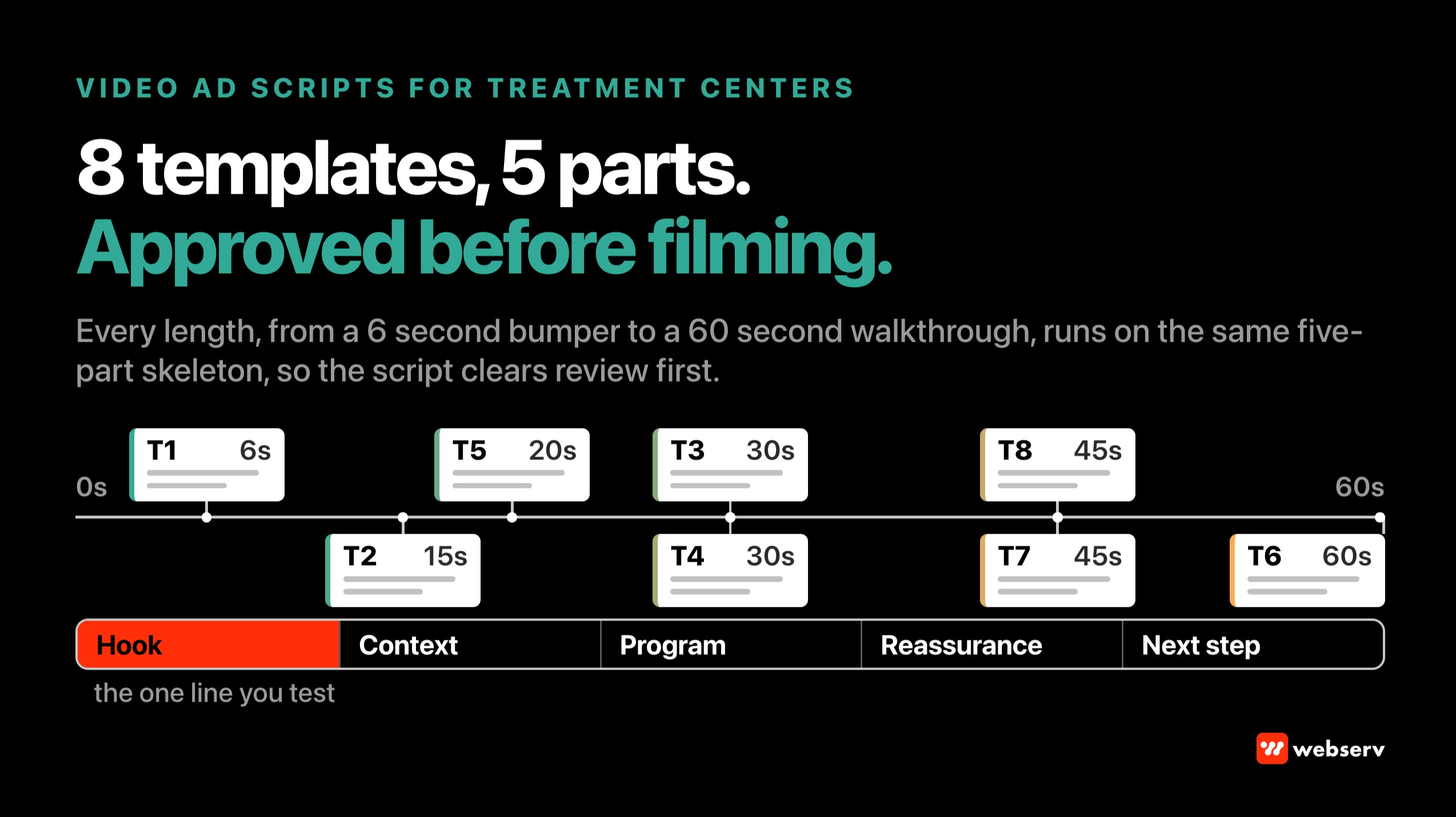
Every script follows the same five-part skeleton, compressed or expanded to fit the length: hook, context, program, reassurance, and next step. Our storyboarding framework turns that skeleton into shots; the script decides what gets said and shown as text.
DEFINITION
Script template. A fill-in structure that fixes the order, timing, and compliance boundaries of a video ad while leaving the program-specific facts open. It keeps a creative team from reinventing the approved structure on every brief, and it gives compliance review one known shape to check.
A template is not a finished ad. Every filled-in script still goes through your compliance review before production, and again before launch if anything changed on set.
The compliance rules every script has to clear
Four sets of rules shape every line in these templates. Read them once before you fill anything in.
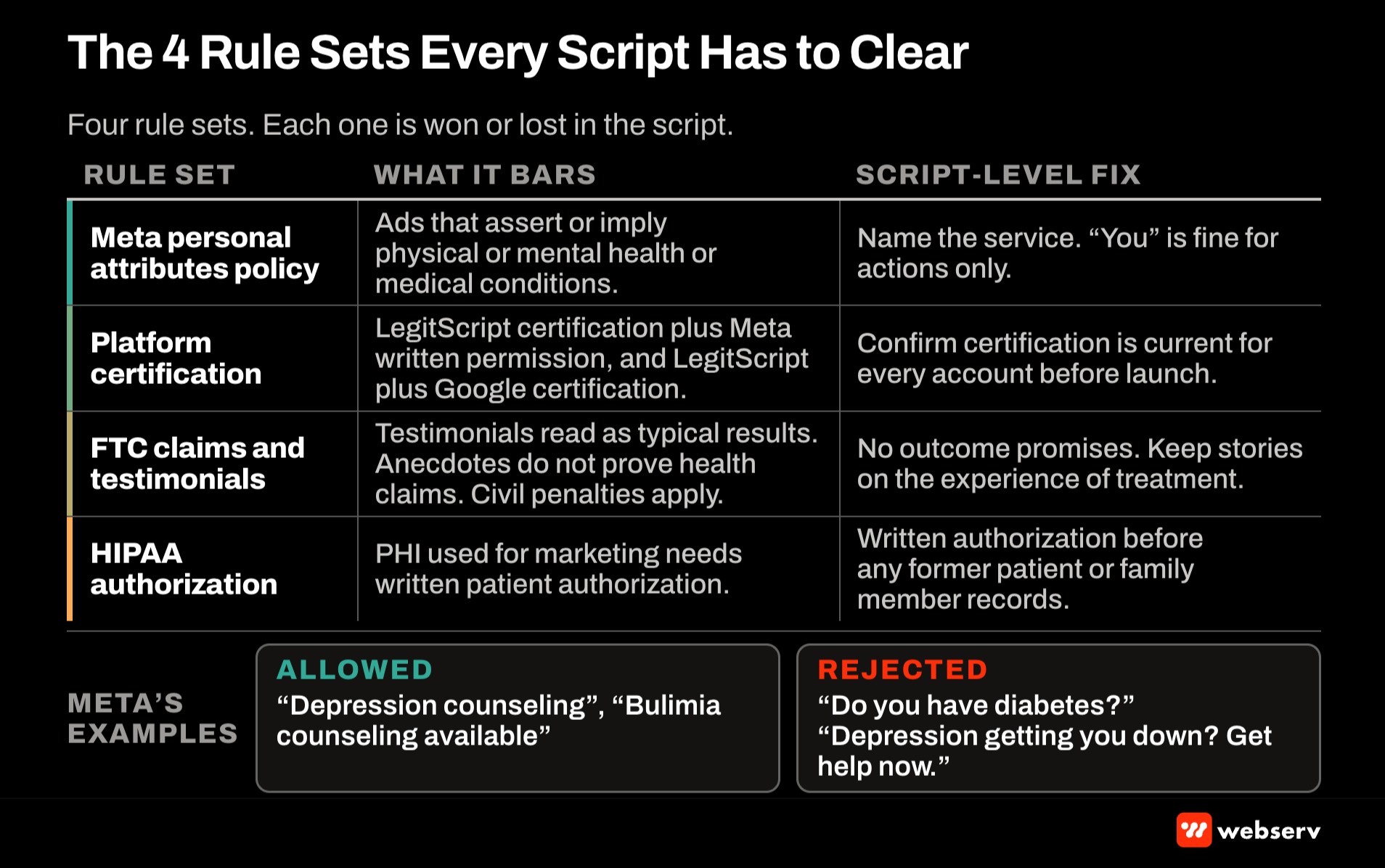
Meta’s personal attributes policy. Meta’s privacy violations and personal attributes policy bars ads that assert or imply personal attributes, including physical or mental health and medical conditions. Its own examples allow “Depression counseling” and “Bulimia counseling available” but reject “Do you have diabetes?” and “Depression getting you down? Get help now.”
The policy also allows “you/your” language as long as it doesn’t attach a personal attribute. “Your first call is answered by a clinician” is fine. “Your drinking is out of control” is not.
Platform certification. Meta requires addiction treatment advertisers targeting the United States to hold LegitScript certification and Meta’s written permission. Google’s healthcare and medicines policy requires US advertisers of recovery-oriented addiction services to be certified by LegitScript and certified with Google.
FTC rules on claims and testimonials. The FTC’s endorsement guidance treats a testimonial as a claim that the endorser’s experience is typical, and the FTC doesn’t accept anecdotes as substantiation for health claims. The Opioid Addiction Recovery Fraud Prevention Act lets the FTC seek civil penalties for deceptive practices involving substance use disorder treatment services.
HIPAA authorization. HHS guidance on marketing under the HIPAA Privacy Rule requires a patient’s written authorization before protected health information is used for marketing, with narrow exceptions. A former patient on camera, or a family member describing that patient’s treatment, falls on the authorization side.
COMMON MISTAKE
Opening on the viewer’s problem. Scripts that open with “Struggling with addiction?”, “Is your son using again?”, or “Tired of relapsing?” all imply the viewer or a family member has a health condition. Meta’s policy rejects that pattern no matter how good the rest of the video is.
Open on the service, the setting, or a fact about the program instead. “Residential treatment in [city], with family sessions every week” does the same job without the assumption.
Match script length to placement
Write to the placement before you write a word. Google’s video ad formats documentation sets the limits for YouTube:
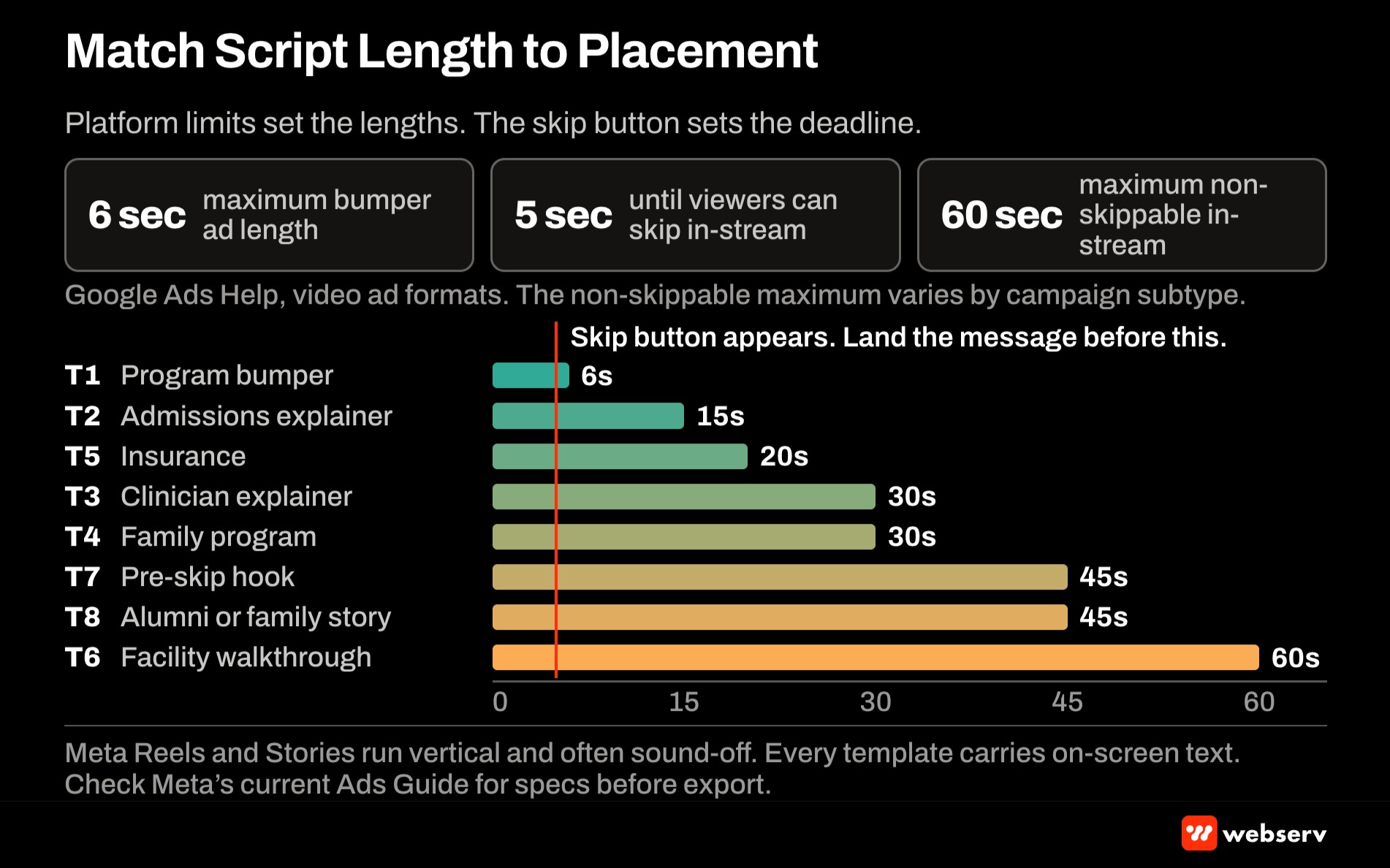
- Bumper ads: non-skippable, 6 seconds or shorter.
- Skippable in-stream ads: viewers can skip after 5 seconds, so everything that matters has to land before the skip button appears.
- Non-skippable in-stream ads: up to 60 seconds, with the allowed length depending on the campaign subtype.
- YouTube Shorts ads: Google recommends under 60 seconds, and viewers can swipe away immediately.
YouTube video ad limits (Google Ads Help)
6 sec
Maximum bumper ad length
5 sec
When viewers can skip in-stream ads
60 sec
Maximum non-skippable in-stream length, by campaign subtype
On Meta, Reels and Stories run vertically, and people often scroll feeds where they can’t play audio, so every template carries on-screen text that tells the story without sound. Check Meta’s current Ads Guide for exact dimensions and length limits before you export, because those specs change.
Our YouTube ads guide for treatment centers covers which of those campaign types fit behavioral health.
Template 1: The 6-second program bumper
Placement: YouTube bumper, Meta Reels or Stories as a short cutdown. Job: name the program and the place, nothing more.
- 0 to 2 seconds. Visual: exterior or common area of the facility. On-screen text: “[Level of care] in [city].”
- 2 to 4 seconds. Visual: a clinician or admissions staff member, natural setting. On-screen text: “[One true program fact: e.g., family sessions weekly / in-network with [payer]].”
- 4 to 6 seconds. Logo, phone number or URL. On-screen text: “[Facility name]. Call [number].”
Compliance notes. No question in the hook, no outcome claim, and only one program fact, because six seconds can’t carry qualifications. Insurance claims name specific payers only if the contract is current.
Swap-ins. Replace the program fact with accreditation (“[Accrediting body] accredited”) or availability (“Admissions open [days and hours]”) where true.
Template 2: The 15-second admissions explainer
Placement: non-skippable in-stream, Meta Reels and feed. Job: make the first call feel manageable.
- 0 to 3 seconds (hook). Visual: admissions coordinator at a desk, looking at camera. VO or on-screen: “Here’s what happens when you call [facility name].”
- 3 to 9 seconds (program). VO: “[Name/role] answers, asks a few questions, and checks your insurance with you on the call.”
- 9 to 13 seconds (reassurance). VO: “No commitment on the first call. Just answers.”
- 13 to 15 seconds (next step). On-screen: “[Phone number]. [Hours].”
Compliance notes. “When you call” uses “you” without a health attribute, which Meta’s policy allows. Only promise what admissions actually does on every call; if benefits checks take a callback, say so.
Why it works. The first call can feel like a big step, and this script answers the question of what happens next without saying anything about the caller.
Template 3: The 30-second clinician explainer
Placement: skippable in-stream, Meta feed and Reels. Job: explain one level of care in plain language.
- 0 to 5 seconds (hook, before the skip). Clinician on camera. VO: “I’m [name, credential], and I want to explain what [level of care: e.g., partial hospitalization] actually looks like day to day.”
- 5 to 15 seconds (context). VO: “[Level of care] means [plain description: hours per day, days per week, whether patients go home at night].”
- 15 to 24 seconds (program). VO: “At [facility], that includes [two true program components: e.g., individual therapy and medication management].”
- 24 to 30 seconds (next step). VO: “If you have questions about whether it fits, our admissions team can walk you through it.” On-screen: “[Phone number / URL].”
Compliance notes. The clinician’s credential must be real and current. “Whether it fits” frames suitability as a question for admissions rather than a statement about the viewer. Don’t add success rates, recovery language, or “proven” unless you can substantiate them to the FTC standard.
Why it works. Credentialed people explaining programs in plain terms carry the trust signal. The first five seconds promise a specific explanation, which gives the viewer a reason not to skip.
Template 4: The 30-second family program script
Placement: Meta feed and Reels, skippable in-stream. Job: show family members what involvement looks like, without implying anything about their loved one.
- 0 to 5 seconds (hook). Visual: family therapy room, empty or with staff. On-screen: “Family programming at [facility name].”
- 5 to 15 seconds (program). VO from family therapist: “Families join [format: weekly sessions / a weekend program / virtual groups] with our [role].”
- 15 to 24 seconds (context). VO: “The sessions cover [two true topics: e.g., how treatment works and how to plan for discharge].”
- 24 to 30 seconds (next step). VO: “Our admissions team can explain how families take part.” On-screen: “[Phone number / URL].”
Compliance notes. Meta’s policy rejects an example that tells the viewer to get a spouse treated, so family scripts can’t say or imply that the viewer’s child, spouse, or parent has a condition. Describe the program; let the viewer decide it’s relevant.
Why it works. Family members may make or influence the first call. Showing the program they’d join answers a real question without the assumption that triggers rejection.
A unified platform built for multiple locations, programs, and audiences without feeling fragmented
- Reorganized multi-service site architecture
- ADA compliant responsive design system
- Future-ready CMS with modular templates
- Optimized for SEO and lead capture
Template 5: The 20-second insurance script
Placement: Meta feed and Reels, non-skippable in-stream. Job: remove the cost question as a reason not to call.
- 0 to 4 seconds (hook). On-screen: “Does [facility name] take [payer]?” Visual: admissions desk.
- 4 to 12 seconds (answer). VO: “We’re in network with [payers, only current contracts]. For other plans, admissions can check your benefits with you.”
- 12 to 17 seconds (reassurance). VO: “You’ll know what your plan covers before you decide anything.”
- 17 to 20 seconds (next step). On-screen: “Check your benefits: [phone number / URL].”
Compliance notes. The hook asks about the facility, not the viewer, which keeps it clear of the personal attributes policy. Payer names must reflect current contracts. Promise a benefits check, never a coverage outcome.
Swap-ins. For out-of-network programs, replace the answer line with “We work with many out-of-network plans. Admissions can check your benefits and explain the costs.”
Template 6: The 60-second facility walkthrough
Placement: skippable in-stream, Meta feed. Job: show where treatment happens and who is there.
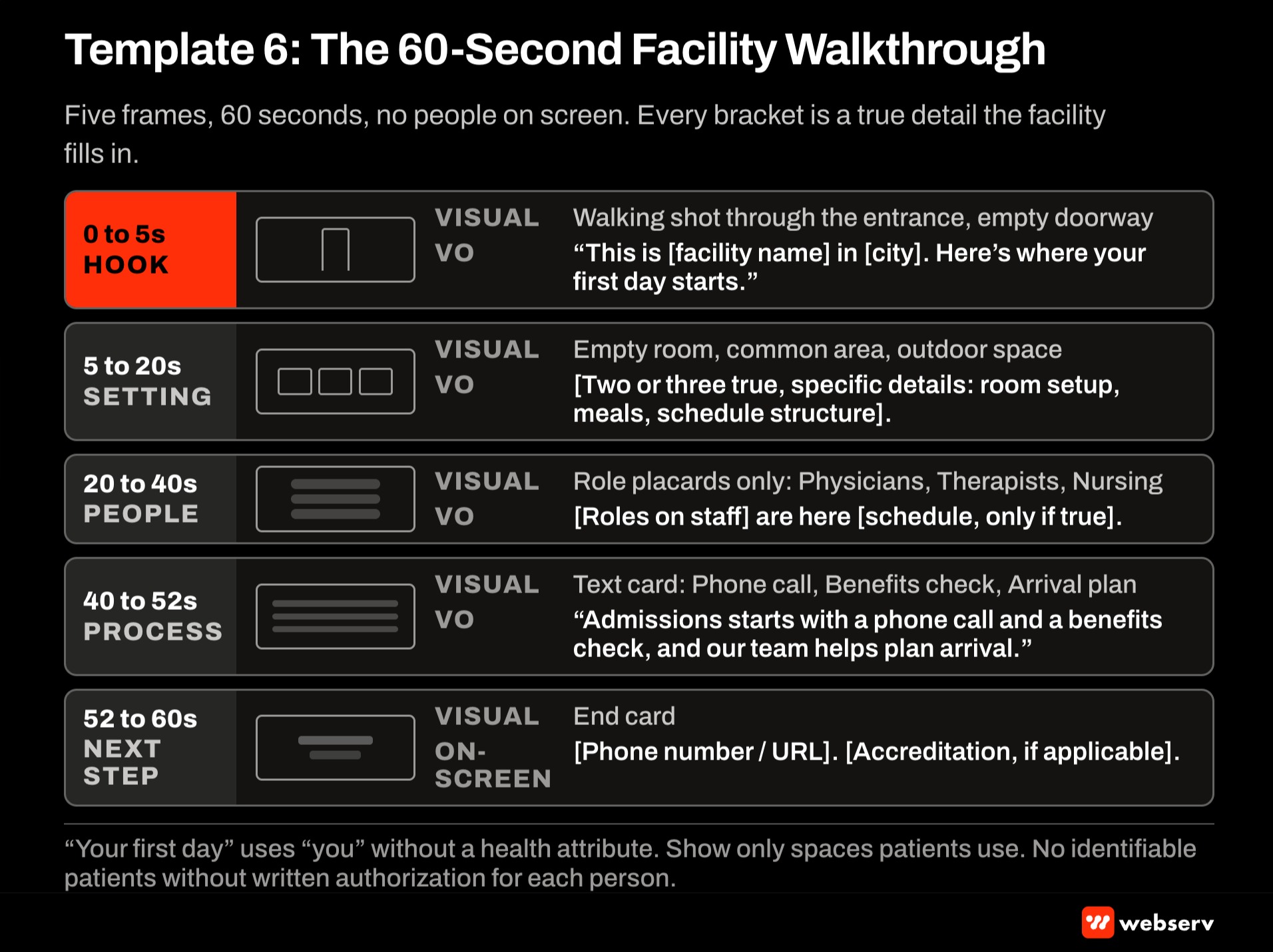
- 0 to 5 seconds (hook, before the skip). Walking shot through the entrance. VO: “This is [facility name] in [city]. Here’s where your first day starts.”
- 5 to 20 seconds (setting). Shots of rooms, common areas, outdoor space. VO: “[Two or three true, specific details: room setup, meals, schedule structure].”
- 20 to 40 seconds (people). Shots of staff by role. VO: “[Roles on staff: e.g., physicians, therapists, nursing] are here [schedule or availability, only if true].”
- 40 to 52 seconds (process). VO: “Admissions starts with a phone call and a benefits check, and our team helps plan arrival.”
- 52 to 60 seconds (next step). On-screen: “[Phone number / URL]. [Accreditation, if applicable].”
Compliance notes. “Your first day” uses “you” without a health attribute. Show only spaces patients actually use, and keep patients out of frame unless you have written authorization for each person who can be identified.
Why it works. Walkthroughs answer the practical questions (where will they sleep, who is there, what does a day look like) that a program description can’t.
Template 7: The 45-second skippable pre-skip hook script
Placement: skippable in-stream. Job: earn the view in five seconds, then deliver a full program explanation for viewers who stay.
- 0 to 5 seconds (hook). On-screen and VO: “Three things to know about [level of care] at [facility name].”
- 5 to 15 seconds (point one). VO: “[True fact about schedule or setting].”
- 15 to 25 seconds (point two). VO: “[True fact about staff or approach].”
- 25 to 35 seconds (point three). VO: “[True fact about insurance or admissions].”
- 35 to 45 seconds (next step). VO: “Questions? Our admissions team answers [hours].” On-screen: “[Phone number / URL].”
Compliance notes. Numbered structures keep the script factual and easy to review. Each “point” needs a source inside your organization (a program document, contract, or staffing plan) before the script goes to production.
Why it works. The hook tells viewers exactly what they’ll get if they don’t skip, and each point stands alone, so the ad still delivers something to viewers who leave early.
Template 8: The authorized alumni or family story
Placement: Meta feed, skippable in-stream. Job: let a real person describe their experience of the program, within the rules.
- 0 to 5 seconds (hook). Speaker on camera. On-screen: “[First name or chosen name], [relationship: alumni / family member].” VO: “I want to talk about what the first week at [facility name] was like.”
- 5 to 30 seconds (experience). VO: “[Their description of the process: admissions, the setting, the staff, the schedule].”
- 30 to 40 seconds (context). On-screen disclosure where required: “[Individual experience; results vary]” and any compensation disclosure.
- 40 to 45 seconds (next step). On-screen: “[Phone number / URL].”
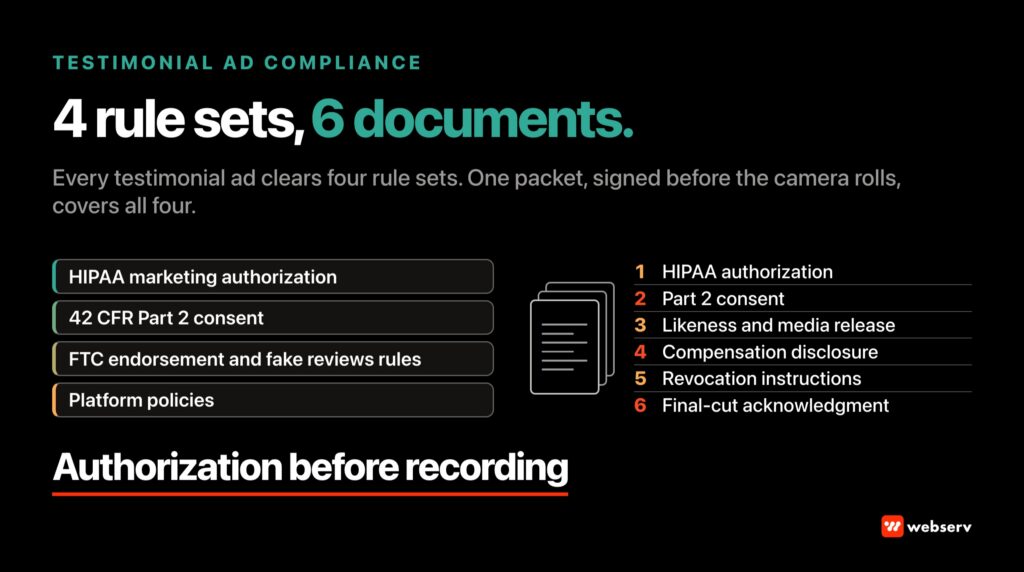
Compliance notes. Get written HIPAA authorization before recording, and have counsel confirm whether 42 CFR Part 2 consent applies to your program. Keep the story on the experience of treatment, not outcomes, because the FTC treats testimonials as typicality claims.
Disclose any payment or incentive to the speaker on screen. Our upcoming testimonial compliance playbook covers this template in depth.
Why it works. Real voices carry trust that staff can’t, and keeping the story on process rather than results keeps it defensible.
The words to use and the words to avoid
The phrases below are where scripts run into these rules. Keep this list next to the templates.
DO
- Name the service: “Residential treatment in [city].”
- Use “you” for actions: “When you call, a coordinator answers.”
- State checkable program facts: schedules, staff roles, accreditation, current payers.
- Describe the family program, not the family’s situation.
- Put the phone number and hours on screen for sound-off viewing.
DON’T
- Ask about the viewer’s health: “Struggling with addiction?”
- Imply a family member’s condition: “Is your son using again?”
- Promise outcomes: “Get sober in 30 days,” “proven results.”
- Use superlatives you can’t back up: “the best rehab in [state].”
- Show identifiable patients without written authorization.
The script review checklist
Run every filled-in script through these checks before it goes to production. Our compliance-safe creative guardrails for AI-assisted production apply the same review to AI-drafted variants.
- Personal attributes. Does any line assert or imply the viewer’s or a family member’s health, including through a question? Rewrite it around the service.
- Claims. Is every program fact true today, and is there an internal document that backs it up?
- Outcomes. Does anything promise or imply a result? Remove it or substantiate it to the FTC standard.
- People on camera. Is every identifiable patient or family member covered by written authorization? Are staff credentials accurate?
- Disclosures. Are required disclosures on screen long enough to read?
- Sound off. Does the on-screen text tell the story with the audio muted?
- Certification. Are the LegitScript certification and platform permissions current for every account the ad will run in?
How to measure which scripts work
Judge scripts by what happens after the view, not just the view. Platform retention reports show where viewers drop off, which tells you whether the hook or the middle of the script is the problem.
Tie results back to admissions through value-tier conversion events, as laid out in our HIPAA-safe conversion tracking stack, so the scripts that produce calls and admits get more budget than the scripts that only produce views.
OPERATOR INSIGHT
Write every script twice, changing only the first line. One version opens on the service, the other on the setting or a specific program fact. Everything after the hook stays identical, so the test tells you which opening holds attention rather than which whole ad happened to win.
Scripts written this way also move through compliance review faster, because reviewers see the same approved structure every time and only check the new hook and the filled-in facts.
Compare the two hook versions of each script against each other, and give each test enough spend to reach a clear result before you call a winner.
Put the templates to work
Start with Templates 2 and 5. The admissions explainer and the insurance script answer two practical questions families have before a first call (what happens when I call, and will insurance cover it), and neither needs patients on camera.
Add the clinician explainer next, then the walkthrough once you have footage. Save the alumni story for when the authorization process is in place. For how video fits the rest of your marketing program, see our behavioral health marketing guide and our creative strategy guide.
If you want a second set of eyes on your scripts before production, book an intro meeting and we’ll review them with you.
Most in-house teams hit a wall not because they lack knowledge, but because they lack bandwidth.
When you are ready to hand it off, Webserv has spent 9 years executing exactly this for treatment centers nationwide.
Frequently Asked Questions
Can a treatment center video ad ask the viewer a question?
Yes, as long as the question isn’t about the viewer’s health. “Does [facility] take [payer]?” and “What happens when you call?” ask about the facility or the process, which Meta’s personal attributes policy allows. “Struggling with addiction?” asks about the viewer’s condition, which it doesn’t.
The safest pattern is a question the facility answers about itself. It gives the hook the pull of a question without implying anything about the person watching.
Keep in mind that the rule applies to on-screen text and voiceover alike. A compliant voiceover over a caption that reads “Ready to get sober?” still gets rejected.
How long should a treatment center video ad be?
As long as the placement allows and the message needs. YouTube bumpers cap at 6 seconds, skippable in-stream ads can be skipped after 5, and non-skippable in-stream runs up to 60 seconds depending on the campaign subtype. Meta Reels and Stories reward short, vertical, captioned video.
Build a library across lengths rather than one master ad. A 6-second bumper, a 15-second explainer, and a 30- to 60-second program video each do a different job.
The trade-off is production planning. Shoot with the cutdowns in mind so one filming day produces all the lengths you need.
Can we use patient testimonials in video ads?
Only with written HIPAA authorization from each patient, and with counsel’s review of whether 42 CFR Part 2 consent applies to your program. Family members describing a patient’s treatment need the same care, because they’re disclosing that patient’s information.
Even with authorization, keep testimonials on the experience of treatment rather than outcomes. The FTC treats testimonials as claims about typical results, and it doesn’t accept anecdotes as substantiation for health claims.
Many facilities start with staff and clinician videos instead. They carry trust without the authorization process, and they’re easier to update when programs change.
Do these templates work for TikTok?
The script structure transfers, but check TikTok’s current healthcare advertising policy for your market before planning any spend. Addiction treatment advertising is restricted on many platforms, and eligibility rules change.
Where a platform allows your ads, the sound-off, vertical versions of Templates 1, 2, and 5 are the closest fit to short-form feeds.
Whatever the platform, the personal attributes discipline and the FTC rules on claims still apply to what the script says.
How often should we refresh video ad scripts?
Update a script whenever a fact in it changes: a new payer contract, a schedule change, a new level of care, or a staff credential. A script that was true at launch can become a compliance problem months later.
Beyond facts, refresh when performance data shows the audience has seen the ad enough that results are slipping. Writing hook variants in advance makes that refresh a quick swap rather than a new production.
Keep a dated record of every script version and its review sign-off. It makes the next review faster and gives you an audit trail if a platform questions an ad.
Keaton Nalle is the Director of Paid Admissions at Webserv, a digital marketing agency for treatment centers.