Treatment center website development is a distinct discipline from treatment center website design. Design decides what the site looks like, what conversion elements sit on the page, and how family and prospect audiences read the first six seconds.
Development decides whether the site actually functions, loads fast on a mobile phone at midnight, keeps PHI out of tracking pixels, survives an accessibility audit, and integrates cleanly with the CRM and EMR downstream.
Most treatment center websites get design roughly right and development roughly wrong. Beautiful hero photography with a page that takes 6 seconds to load on mobile. Clean visual hierarchy with contact forms that are technically HIPAA violations. Modern typography with schema markup that never got implemented.
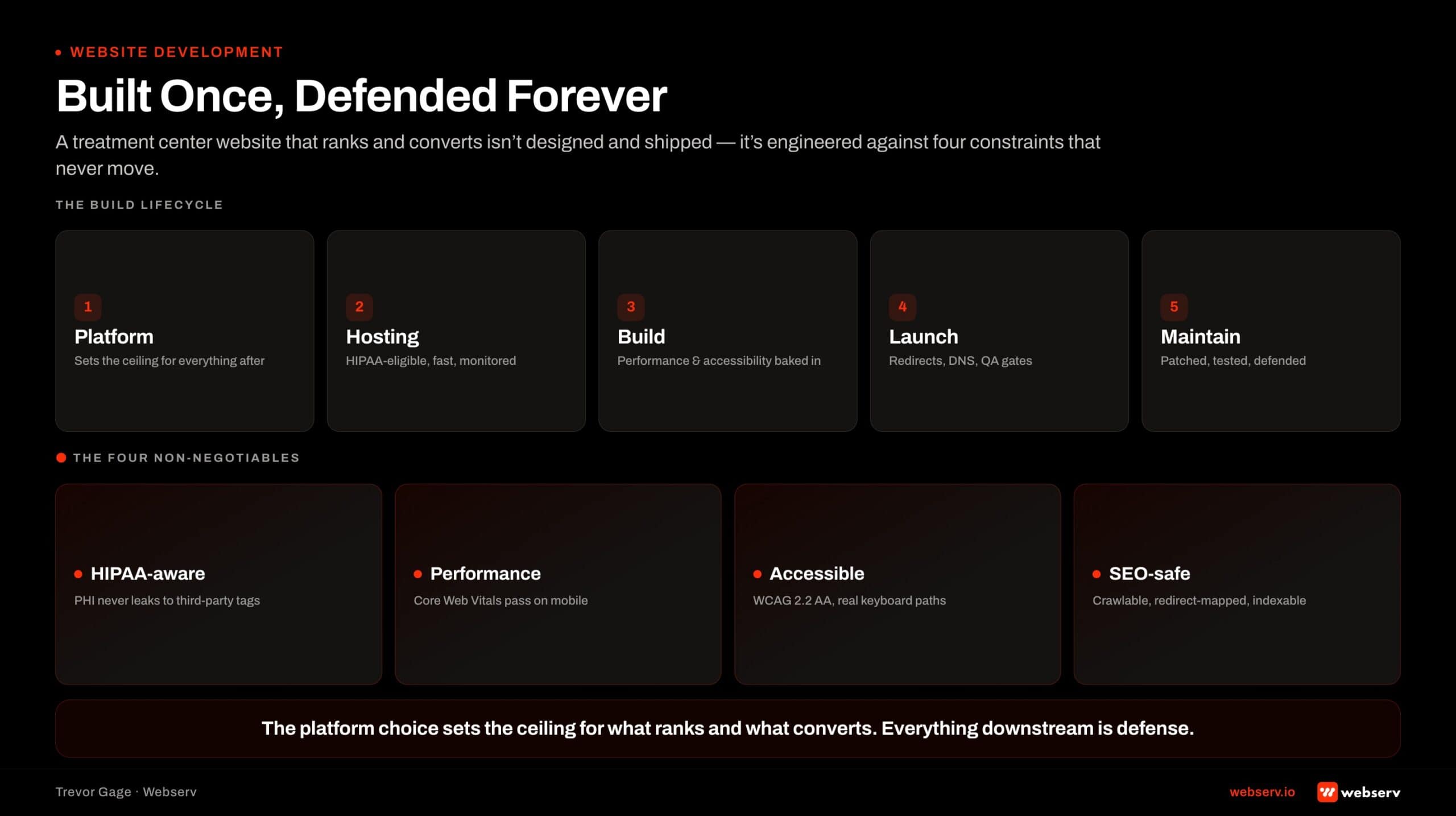
This guide walks the engineering and operations discipline for treatment center website development. Hosting and infrastructure decisions. HIPAA-aware technical implementation. Performance engineering. Accessibility in code, not just in design. SEO-safe development patterns. Integration surface with the CRM, EMR, call tracking, and chat stack. Launch QA and post-launch maintenance. Platform choice itself is the upstream decision covered in our platform buyers guide.
The audience is treatment center owners, COOs, marketing directors, and internal development teams evaluating a build, running a rebuild, or auditing a site produced by an agency without vertical-specific development discipline.
Key Takeaways
- Platform selection matters less than configuration. WordPress runs the majority of behavioral health websites and works well when configured correctly. The Best Website Development Platforms for Addiction Treatment Centers buyers guide covers the specific platform decision framework.
- HIPAA-aware development is a load-bearing constraint. Contact forms, analytics, tracking pixels, chat widgets, and any tool that touches prospect data all need HIPAA-compliant configuration. Standard installations of these tools are usually not compliant by default.
- Performance engineering is not optional. Core Web Vitals affect both search ranking and conversion. Treatment center sites that load in 4+ seconds on mobile lose 30 to 50 percent of the mobile audience before the page becomes interactive.
- Accessibility is a development discipline, not a design decoration. WCAG 2.2 requirements have to be built into the codebase from day one. Retrofitting accessibility onto a completed build is materially more expensive than building to WCAG from the start.
- The launch process is where SEO gets protected or lost. Redirect mapping, sitemap regeneration, and search console management during launch are the difference between a redesign that keeps rankings and a redesign that loses them.
- Integration architecture with CRM, EMR, call tracking, and chat is where the website connects to the admissions engine. Most facilities under-scope integration and end up with a website that looks good but does not feed data into the systems admissions actually runs.
Why Website Development at a Treatment Center Is Different
HIPAA and 42 CFR Part 2 overlay. Every layer of the site that touches prospect information (forms, analytics, tracking, chat, cookies) has to be built with HIPAA safeguards in mind. Standard installations of Google Analytics, Meta Pixel, contact form plugins, and chat widgets are usually not HIPAA-compliant by default.
The compliance work is a development discipline, not a legal afterthought. Development decisions on which tools to install, how to configure them, and what data flows through them determine whether the site is HIPAA-defensible or a compliance exposure waiting for an audit.
Integration surface with the admissions engine. Treatment center websites are entry points to the admissions engine. Call tracking (CallRail or CallTrackingMetrics). CRM (Dazos, Salesforce, HubSpot). EMR (Kipu, Sunwave, BestNotes, Alleva).
Chat and messaging. All of these need integration architecture that survives site changes, tracks conversion attribution, and hands data cleanly to the systems downstream.
Facilities that under-scope integration end up with a website that looks polished and does not produce admissions data the CRM can act on.
Accessibility and reputational stakes. Behavioral health facilities are subject to ADA Title III accessibility requirements. Treatment center websites regularly face accessibility lawsuits when they miss WCAG 2.2 standards. The legal exposure is real and the reputational drag when a lawsuit becomes public is real.
Development decisions on accessibility have compliance stakes that general marketing websites do not carry at the same intensity.
Structured intake and admissions infrastructure is a documented driver of treatment access outcomes (SAMHSA, National Survey of Substance Abuse Treatment Services). The website is the entry point to that infrastructure. Development decisions carry clinical stakes downstream.
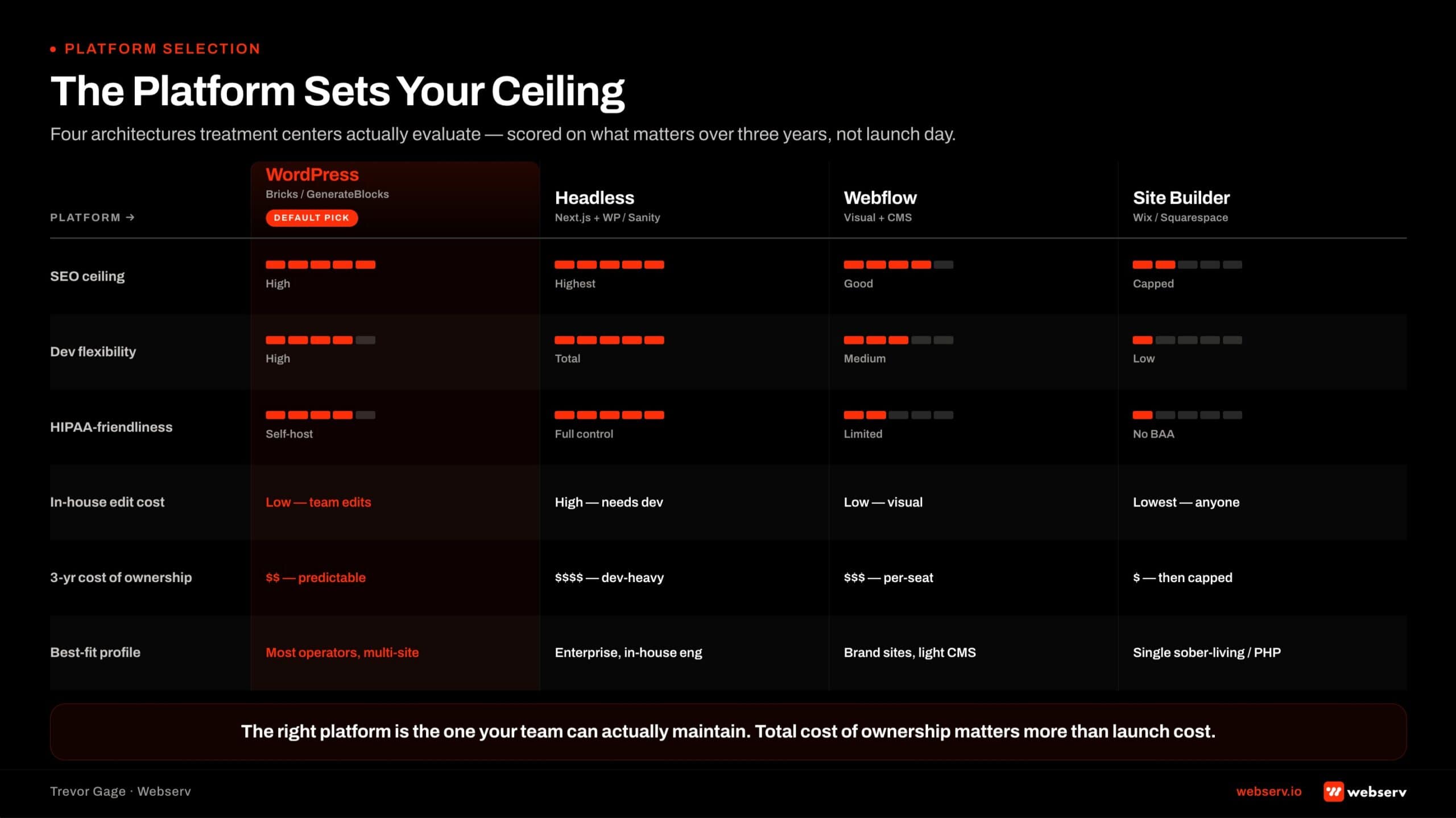
WordPress
Best for content-heavy treatment center sites with editorial workflow. Elementor or Bricks for visual editing. Strong plugin ecosystem for HIPAA-aware analytics.
Webflow
Best for design-forward sites without heavy plugin needs. Cleaner code, faster performance. Weaker for large content teams and complex integrations.
Custom (Next.js / etc)
Best for scale + strict performance requirements. Highest control, highest ongoing dev cost. Reserve for multi-facility operators with in-house dev.
Squarespace / Wix
Not recommended for treatment centers. Insufficient HIPAA-aware analytics support, thin SEO controls, poor integration surface.
Platform Selection
Platform choice is upstream of this guide. It is the first development decision and one of the two facilities most commonly regret, but the vendor-by-vendor comparison, evaluation framework, and common implementation mistakes are covered in depth in our platform buyers guide.
The short version: WordPress on a HIPAA-eligible host is the right answer for the large majority of behavioral health facilities. The ecosystem of BH-aware plugins, HIPAA-configurable hosting options, and vertical developers is deepest for WordPress, and most Webserv engagements deploy on it unless there is a specific reason not to. The buyers guide walks the ten platforms in scope, why each fits or does not fit, and the decision framework operators use to pick.
The rest of this guide assumes the platform is chosen and walks the engineering discipline that applies regardless of which platform sits underneath: hosting and infrastructure, HIPAA-aware development, performance engineering, accessibility, SEO-safe patterns, integration surfaces, launch QA, and post-launch maintenance.
Hosting and Infrastructure
Hosting choice matters more than most facilities realize. HIPAA-eligible hosting is a specific requirement, not a default.
HIPAA-eligible hosting. Treatment center websites that collect any form of PHI (insurance verification forms, contact forms discussing treatment need, chat transcripts) need HIPAA-eligible hosting with a signed Business Associate Agreement.
Most standard WordPress hosts do not sign BAAs on standard plans. Some (WP Engine Managed Hosting, Kinsta HIPAA-compliant plans) offer HIPAA-eligible tiers as an upgrade.
Facilities running contact forms on standard shared hosting are usually in a compliance exposure that surfaces during audits or subject-access requests.
Performance tier. Hosting performance directly affects Core Web Vitals scores, which affect both SEO ranking and conversion. Managed WordPress hosts (WP Engine, Kinsta, Pressable) typically outperform generic shared hosting on the performance metrics that matter.
CDN and edge caching. A content delivery network (Cloudflare, KeyCDN, or the CDN bundled with managed hosting) reduces page load times for prospects and family members researching from geographic distance. Behavioral health prospects often research from multiple states, and CDN geographic distribution materially affects load time.
SSL and security. SSL certificates are non-optional. HTTPS is a Google ranking factor and a browser trust signal. Managed hosts typically handle SSL automatically. Facilities on legacy hosting should verify SSL is deployed correctly and renewed automatically.
Backup and disaster recovery. Daily backups, offsite replication, and documented recovery procedures. HIPAA-eligible hosts typically include these. Standard hosting often does not.
WATCH OUT
Standard GA4 + Meta Pixel configurations often leak PHI in URL parameters and form field values without the marketing team knowing. Configure conversion events to strip identifiers before send. Never fire a pageview or event with a patient identifier in the URL. HIPAA fines and Meta account bans are both real risks. Our complete guide to behavioral health marketing covers the paid and organic programs the site has to support.
HIPAA-Aware Development
HIPAA-aware development touches every layer of the site that captures or transmits prospect data.
Contact forms. Every contact form that captures information about treatment need touches PHI. Forms need HIPAA-compliant form builders (Gravity Forms with HIPAA add-on, WPForms with HIPAA add-on, or custom builds). Form data has to be encrypted in transit and at rest. Storage location has to be BAA-covered.
The HIPAA-compliant contact form implementation in WordPress walks the specific tactical build for facilities on WordPress.
Analytics. Standard Google Analytics installations that capture user IDs, session details, and page interactions can create HIPAA exposure when they capture PHI. HHS Office for Civil Rights guidance on HIPAA and online tracking makes the compliance framework explicit (HHS OCR, HIPAA and Online Tracking Technologies).
The fix is HIPAA-aware analytics configuration. Anonymized IPs. No PHI in URL parameters. Session recordings and heatmap tools scoped to avoid PHI capture. Meta Pixel and third-party trackers configured with the same discipline.
Tracking pixels and marketing scripts. Meta Pixel, LinkedIn Insight Tag, Google Ads conversion tags, and any third-party marketing script that fires on the site needs HIPAA-aware scoping.
Tracking pixels that fire on pages that reveal treatment status (thank-you pages, insurance verification confirmations, treatment inquiry submissions) can transmit PHI to third-party ad platforms unless configured correctly.
Chat widgets. Live chat widgets capture transcripts that often contain PHI. Chat vendors need to sign BAAs. Transcript storage has to be BAA-covered. Automatic chatbots that log intent categories or symptom mentions have to be scoped to avoid capturing PHI in categories that could identify a specific prospect.
Cookies and consent. Cookie consent banners have to reflect the actual cookies the site sets. Marketing cookies that touch PHI have to be gated behind explicit consent. Standard consent banners that just inform without actually gating are compliance exposure.
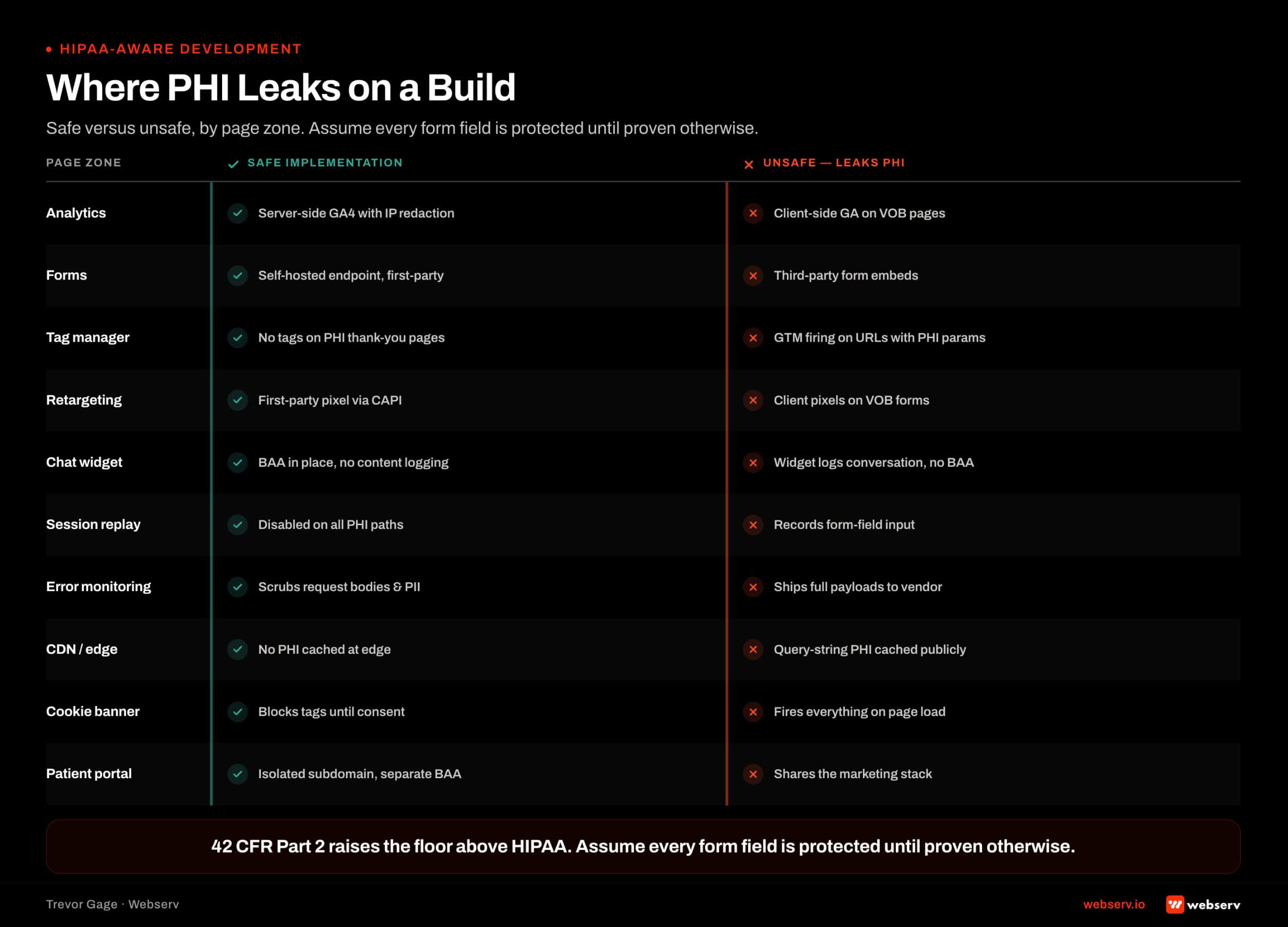 Two-column safe versus unsafe development checklist for treatment center websites showing where PHI leaks on a build across analytics, forms, tag manager, retargeting pixels, chat widgets, session replay, error monitoring.
Performance Engineering
Core Web Vitals affect both search ranking and conversion. Treatment center sites that fail Core Web Vitals lose search visibility and conversion in parallel.
Largest Contentful Paint (LCP). The main content of the page should load in under 2.5 seconds. Hero images, above-the-fold text, and primary CTAs all count toward LCP. Image compression, preload directives on critical assets, and CDN caching all affect LCP.
Interaction to Next Paint (INP). Replaced First Input Delay (FID) as of 2024. Measures how quickly the page responds to user interactions. INP below 200ms is the standard. Heavy JavaScript, third-party scripts, and unoptimized event handlers all degrade INP.
Cumulative Layout Shift (CLS). Visual stability metric. Content that jumps as the page loads produces high CLS and low user experience scores. Reserving space for images, avoiding late-loading fonts that reflow text, and stable ad placements all affect CLS.
The tactical benchmarks for treatment center sites live in the Core Web Vitals benchmarks for treatment centers. Facilities can benchmark their current site against Google’s PageSpeed Insights tool and prioritize the remediation that produces the biggest lift.
Image optimization. Hero images and gallery photography often carry the most weight on a treatment center site. Compress every image (WebP where supported, JPEG with proper quality settings otherwise). Lazy-load images below the fold. Serve appropriately-sized images based on viewport (srcset attributes).
JavaScript optimization. Defer non-critical JavaScript. Audit third-party scripts and remove any that do not directly drive conversion. Marketing tools accumulate on treatment center sites over time; regular script audits catch the drift before it degrades performance.
Font loading. Web fonts are a common CLS culprit. Use font-display: swap. Preload critical fonts. Limit the number of font weights loaded to the ones actually used on the page.
Accessibility in Code
Accessibility is a development discipline, not a design decoration. WCAG 2.2 requirements have to be built into the codebase.
Semantic HTML. Screen readers rely on semantic HTML to move through the page. Proper heading hierarchy (h1, h2, h3), landmark elements (nav, main, aside, footer), and semantic form elements all affect screen reader compatibility.
Alt text on every image. Every image needs descriptive alt text covering the image content and function. Decorative images should have empty alt attributes (alt=””). Facilities that skip alt text on hero images and staff photos fail the WCAG standard immediately.
Color contrast. Text needs 4.5:1 contrast against the background for normal text, 3:1 for large text. Design decisions on typography and color palette get validated in development through contrast checking. Facilities that design first and audit contrast later usually find contrast failures that require design rework.
Keyboard navigation. Every interactive element (buttons, form fields, links, dropdowns, modals) has to be operable with keyboard alone. Tab order has to be logical. Focus states have to be visible.
ARIA labels where needed. ARIA (Accessible Rich Internet Applications) labels supplement semantic HTML where standard elements are not enough. Custom widgets, modal dialogs, dropdowns, and interactive components often need ARIA labels to communicate correctly to screen readers.
Testing. WCAG compliance requires actual testing, not just automated tools. Automated tools (axe, WAVE, Lighthouse) catch some issues. Manual testing with a screen reader (NVDA, JAWS, VoiceOver) catches the rest. The Web Content Accessibility Guidelines (W3C, WCAG 2.2 Quick Reference) is the standard reference for the specific criteria.
SEO-Safe Development
Development decisions affect SEO rankings in ways that surface late and are hard to reverse.
URL structure. Clean, keyword-relevant URLs. Consistent hierarchy that reflects site architecture. Avoid deep nesting (more than three levels) where possible. URL changes during redesigns require redirect mapping to preserve ranking equity.
Schema markup. Structured data helps search engines understand the site’s content. Treatment centers benefit from LocalBusiness schema, MedicalBusiness schema, MedicalCondition schema on condition pages, and Article schema on blog posts. Rank Math or Yoast automate most schema deployment on WordPress; custom builds require explicit schema implementation.
Internal linking architecture. Development has to support internal linking patterns that build topical authority. Service pages linking to related service pages. Location pages linking to service pages.
Blog posts linking to service pages and other blog posts. The blog and resource architecture walks the specific patterns that work for treatment centers.
Sitemap and indexation controls. XML sitemaps generated automatically and submitted to Google Search Console. Robots.txt configured correctly. Noindex directives on pages that should not rank (paid media landing pages, thank-you pages, internal search results).
Redirect management. Site changes, page renames, and content consolidations all require redirects to preserve ranking equity. 301 redirects for permanent moves. Careful mapping during major redesigns so every old URL points to the correct new URL.
Facilities that skip redirect mapping during redesigns routinely lose 30 to 60 percent of organic traffic in the weeks following launch.
The why rebuilding your treatment center website can hurt your rankings piece walks the specific SEO protection framework for facilities running a redesign.
Integration Architecture
The website is the entry point to the admissions engine. Integration architecture determines whether data flows cleanly to the systems downstream.
Call tracking integration. CallRail or CallTrackingMetrics for dynamic number insertion, source-preserving routing, and call attribution. Integration with the CRM so calls flow into the same lead record as form submissions. Dynamic number insertion needs to be deployed to every landing page that takes calls, not just the homepage.
CRM integration. Contact forms feed the CRM. Lead source captures on form submission. UTM parameters and referring URL data flow through to the CRM record. Integration architecture varies by CRM (Dazos native connectors, Salesforce and HubSpot middleware) but the pattern is consistent.
EMR integration. Not usually a direct website integration. EMR data flows from the CRM after admit, not from the website directly. The website should not touch EMR data at any point.
Chat integration. Chat widget data flows to the CRM as lead records. Chat transcripts remain in the chat vendor with BAA coverage. Bot handoffs to live coordinators route through defined workflows.
Marketing automation. Email nurture sequences, drip campaigns, and marketing automation tools (HubSpot Marketing Hub, Mailchimp with HIPAA-eligible tier) integrate with the website through form submission or CRM webhook triggers.
Analytics stack. GA4 or the analytics platform of choice, configured with HIPAA-aware scoping. Google Tag Manager for tag deployment. Data flows to reporting dashboards without transmitting PHI to third-party analytics vendors.
Launch Process and QA
The launch process is where SEO gets protected or lost. Poor launch execution can undo months of development work.
Pre-launch checklist. Redirect map from old URLs to new URLs. XML sitemap regenerated and submitted to Search Console. Robots.txt reviewed. Meta tags and canonical URLs verified on every template.
Analytics and tracking configured on staging and verified before going live. HIPAA-compliant form builds tested end-to-end. Accessibility audit against WCAG 2.2 completed with documented pass/fail results.
The pre-launch SEO checklist for treatment center websites walks the tactical checklist. Every launch should run this before going live.
Hypercare window. The first 72 hours after launch are the hypercare window. Monitor Google Search Console for crawl errors. Monitor analytics for traffic drops or conversion anomalies. Monitor page speed benchmarks. Maintain rollback capability in case a critical issue surfaces.
Post-launch verification. First week, verify indexation of new URLs. Verify redirects fire correctly. Verify tracking events fire on key conversion actions. First month, verify ranking preservation on the top 20 organic keywords. Any ranking drops beyond expected variance need investigation.
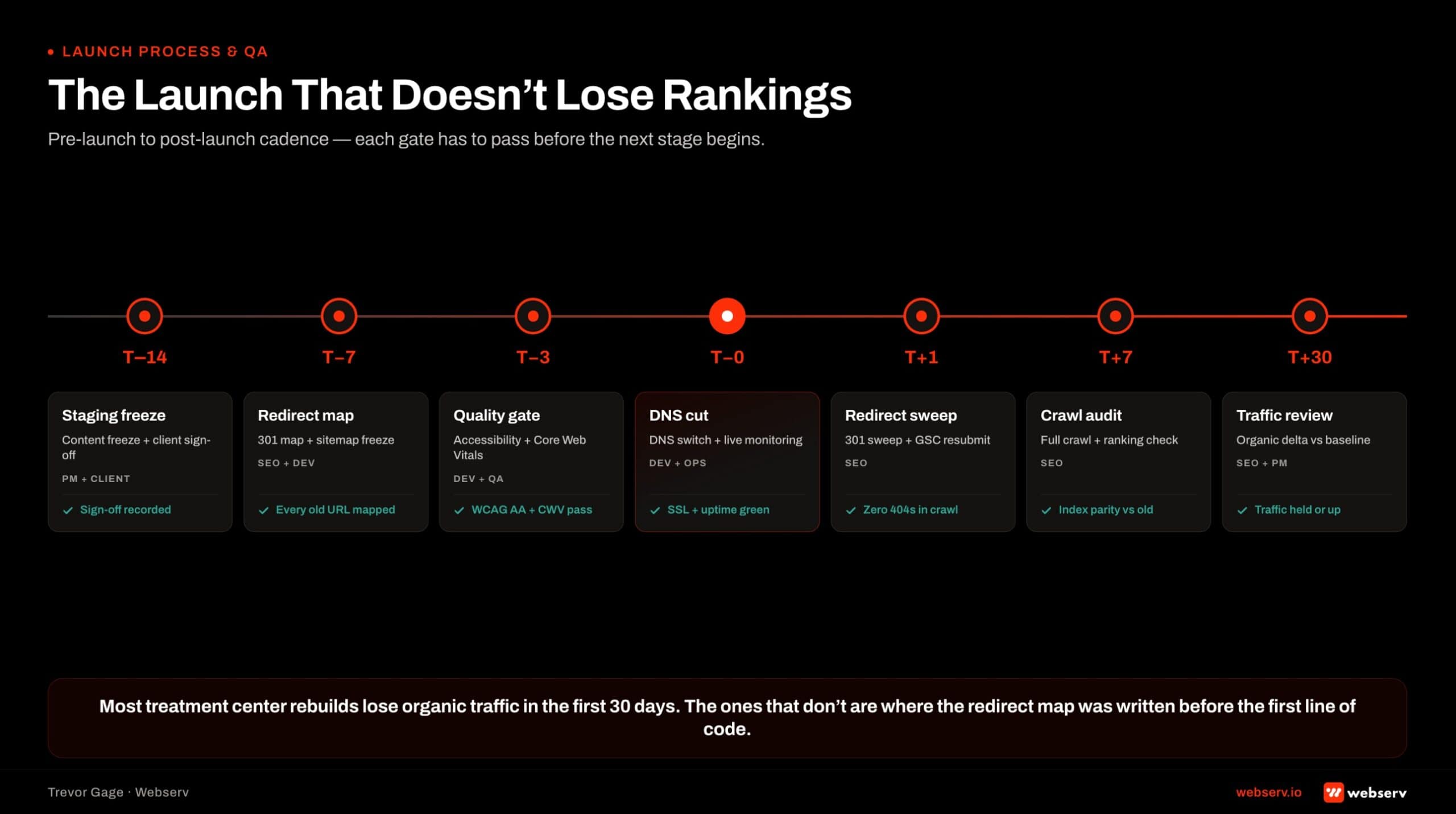 Horizontal launch and QA timeline for treatment center websites from T minus 14 days through T plus 30 days: staging freeze and client sign-off, 301 redirect map and sitemap freeze.
Post-Launch Maintenance
A treatment center website is an operational asset, not a one-time project. Maintenance discipline determines whether the site’s initial launch performance holds over time.
OPERATOR INSIGHT
The engineering discipline that separates high-performing rehab sites is treating post-launch maintenance as a program, not an afterthought. Monthly plugin/dependency updates, quarterly Core Web Vitals checks, semi-annual integration validation. Sites that stop touching the codebase after launch discover 2 years later that half their tracking is broken.
Plugin and platform updates. WordPress core, plugins, and themes need regular updates. Security patches, feature updates, and compatibility fixes. Managed hosting typically handles core updates; facility teams or agencies handle plugin updates on a monthly cadence.
Content updates. Blog posts, service page updates, staff bio changes, and accreditation refreshes. Content workflow needs a defined process that doesn’t degrade SEO through duplicate content or broken internal links.
Performance monitoring. Monthly Core Web Vitals checks. Quarterly full performance audits. Page speed drift catches accumulate over time as new plugins, new third-party scripts, and new content assets get added.
Accessibility monitoring. Content added post-launch can break accessibility. Alt text on new images. Contrast on new content blocks. Keyboard navigation on any new interactive elements. Quarterly accessibility audits catch drift.
Security monitoring. Regular security scans, malware checks, and vulnerability patching. HIPAA-eligible hosts typically include monitoring; standard hosting often does not.
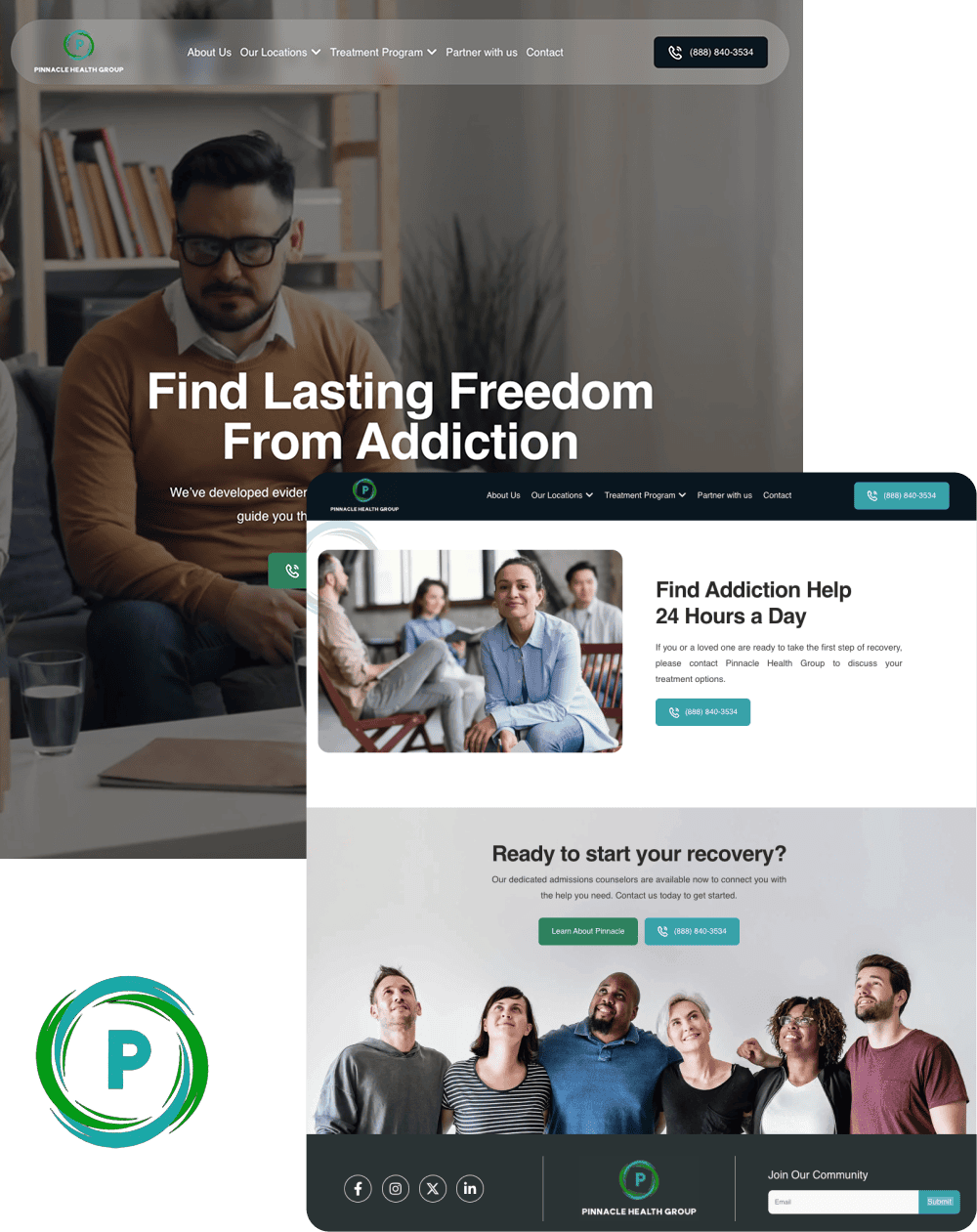
A unified platform built for multiple locations, programs, and audiences without feeling fragmented
- Reorganized multi-service site architecture
- ADA compliant responsive design system
- Future-ready CMS with modular templates
- Optimized for SEO and lead capture
What a Webserv Engagement Looks Like
Webserv’s website development work runs inside the Performance Creative capability alongside Web Design, Landing Pages, and Ad Creative. Design and development typically run as one integrated engagement rather than separate phases.
Discovery and architecture (2-3 weeks). Current-state technical audit if a site exists. Platform recommendation. Hosting recommendation. Integration surface mapping. Compliance audit against HIPAA and WCAG.
Development (4-8 weeks). Front-end build. CMS configuration. Contact form and analytics stack. Integration wiring to CRM, call tracking, chat. Performance optimization. Accessibility QA against WCAG 2.2.
Launch (2-4 weeks). Redirect mapping. Pre-launch QA. Content migration. Search Console setup. Launch and hypercare monitoring.
Post-launch retainer. Monthly platform updates. Performance monitoring. Content workflow support. Ongoing optimization based on analytics and search performance.
Pricing depends on scope. Refresh engagements (updated visual design on existing architecture) run $15,000 to $30,000. Full builds run $30,000 to $75,000. Enterprise portfolios with multi-location complexity run higher.
Facilities weighing rebuild versus refresh should read the rebuild vs optimize decision framework. The Fast-Track Diagnostic ($3,000, credited toward the first month if you engage) is the low-friction entry to scope the specific build.
Most in-house teams hit a wall not because they lack knowledge, but because they lack bandwidth.
When you are ready to hand it off, Webserv has spent 9 years executing exactly this for treatment centers nationwide.
Frequently Asked Questions
How is website development different from website design at a treatment center?
Design decides what the site looks like and what conversion elements sit on the page. Development decides whether the site actually functions, loads fast on mobile, protects PHI in forms and analytics, survives accessibility audits, and integrates cleanly with the CRM and EMR downstream.
Most treatment centers get design roughly right and development roughly wrong. Beautiful hero photography with a page that takes 6 seconds to load. Clean visual hierarchy with contact forms that are technically HIPAA violations. Modern typography with schema markup that never got implemented.
The two disciplines run together in most engagements but scope different work. Design work produces wireframes, visual systems, and template layouts. Development work produces the codebase, the integrations, the performance profile, and the compliance layer.
What platform should we build our treatment center website on?
WordPress runs the majority of behavioral health websites and works well when configured correctly. The ecosystem of HIPAA-aware plugins, hosting options, and BH-specific developers is largest for WordPress.
Webflow works for facilities that want tighter design control and are willing to trade some plugin flexibility. Squarespace works for very small facilities with minimal customization. Custom CMS builds work for enterprise portfolios with dedicated development teams but carry higher maintenance overhead than most facilities need.
The Best Website Development Platforms for Addiction Treatment Centers buyers guide walks the decision framework in more detail. For most facilities, WordPress with the right hosting and plugin stack is the answer.
How do we make our treatment center website HIPAA-compliant?
Three layers. Hosting has to be HIPAA-eligible with a signed BAA. Contact forms and any tool that captures prospect information has to be HIPAA-compliant (Gravity Forms with HIPAA add-on, WPForms with HIPAA add-on, or custom builds).
Analytics and tracking pixels have to be configured with HIPAA-aware scoping to avoid capturing PHI.
Standard installations of Google Analytics, Meta Pixel, contact form plugins, and chat widgets are usually not HIPAA-compliant by default. HHS OCR has published specific guidance on HIPAA and online tracking that treatment centers should reference when configuring the analytics stack.
Facilities running contact forms on standard shared hosting or standard analytics installations are usually in a compliance exposure that surfaces during audits or subject-access requests. The fix is architectural, not a legal afterthought.
How long does it take to build a treatment center website?
8 to 16 weeks end-to-end for a mid-size facility. Discovery and architecture 2-3 weeks. Development 4-8 weeks. Launch 2-4 weeks including hypercare.
Refresh engagements (updated visual design on existing architecture) run shorter, typically 6-10 weeks. Full builds with new architecture, new photography, new content, and new integration surface run longer.
Anyone quoting a 30-day website is quoting a template with the facility name inserted. Real development work at behavioral health requires HIPAA-aware configuration, accessibility QA, integration wiring, and performance optimization that does not compress into a month.
What does website development cost for a treatment center?
Refresh engagements (updated visual design on existing architecture) run $15,000 to $30,000. Full builds run $30,000 to $75,000. Enterprise portfolios with multi-location complexity run higher.
The cost variance is driven by number of pages, custom development versus template adaptation, integration surface (CRM, call tracking, chat), photography and content production, and accessibility remediation depth if any exists.
Facilities budgeting website development should also model ongoing maintenance costs: hosting, plugin updates, content updates, and periodic optimization. A website is an operational asset with ongoing cost, not a one-time project.
What should we do to protect our SEO during a website redesign?
Redirect mapping is the biggest lever. Every old URL needs to point to the correct new URL via 301 redirect. Skipping redirect mapping is where facilities lose 30 to 60 percent of organic traffic post-launch.
Preserve URL structure where possible. Keep title tags and meta descriptions on high-ranking pages. Maintain internal linking patterns. Regenerate and submit the XML sitemap to Google Search Console immediately after launch.
The why rebuilding your treatment center website can hurt your rankings piece walks the specific SEO protection framework. The pre-launch SEO checklist should run every time.
How do we know if our current website was built correctly?
Six checks. Run the URL through Google PageSpeed Insights and check Core Web Vitals. Open the site on mobile and check whether the phone number is visible and tap-to-call. Run the site through a WCAG accessibility auditor.
Check the SSL certificate is valid and not expiring soon. Verify the contact forms are HIPAA-compliant by asking your hosting provider whether they have a BAA. Check that analytics and tracking are configured with HIPAA-aware scoping.
If any of these checks fail, the site was probably built without vertical-specific development discipline. The remediation cost varies by which check failed and how deep the underlying issue runs. Some fixes are days of work. Others require rebuilding portions of the site.
The Fast-Track Diagnostic is the fastest way to get a written audit against these checks and a scoped remediation proposal.
Closing
Treatment center website development is a distinct discipline from general website development. HIPAA and 42 CFR Part 2 compliance overlays. Integration surface with the admissions engine. Accessibility and reputational stakes higher than most healthcare marketing categories.
Most treatment centers get design roughly right and development roughly wrong. The fixes are knowable. The engagement is scoped. The ROI shows up in search rankings, conversion rates, and compliance defensibility over the site’s operational life.
If you are scoping a build, evaluating a rebuild, or auditing a site built by an agency without vertical-specific discipline, start with the $3,000 Fast-Track Diagnostic. Credited 100 percent toward the first month if you engage.
Trevor Gage is the Director of Marketing at Webserv, where he leads content and SEO for the agency’s behavioral health and addiction treatment clients. He writes about the operator lens on rehab marketing at the Webserv blog.